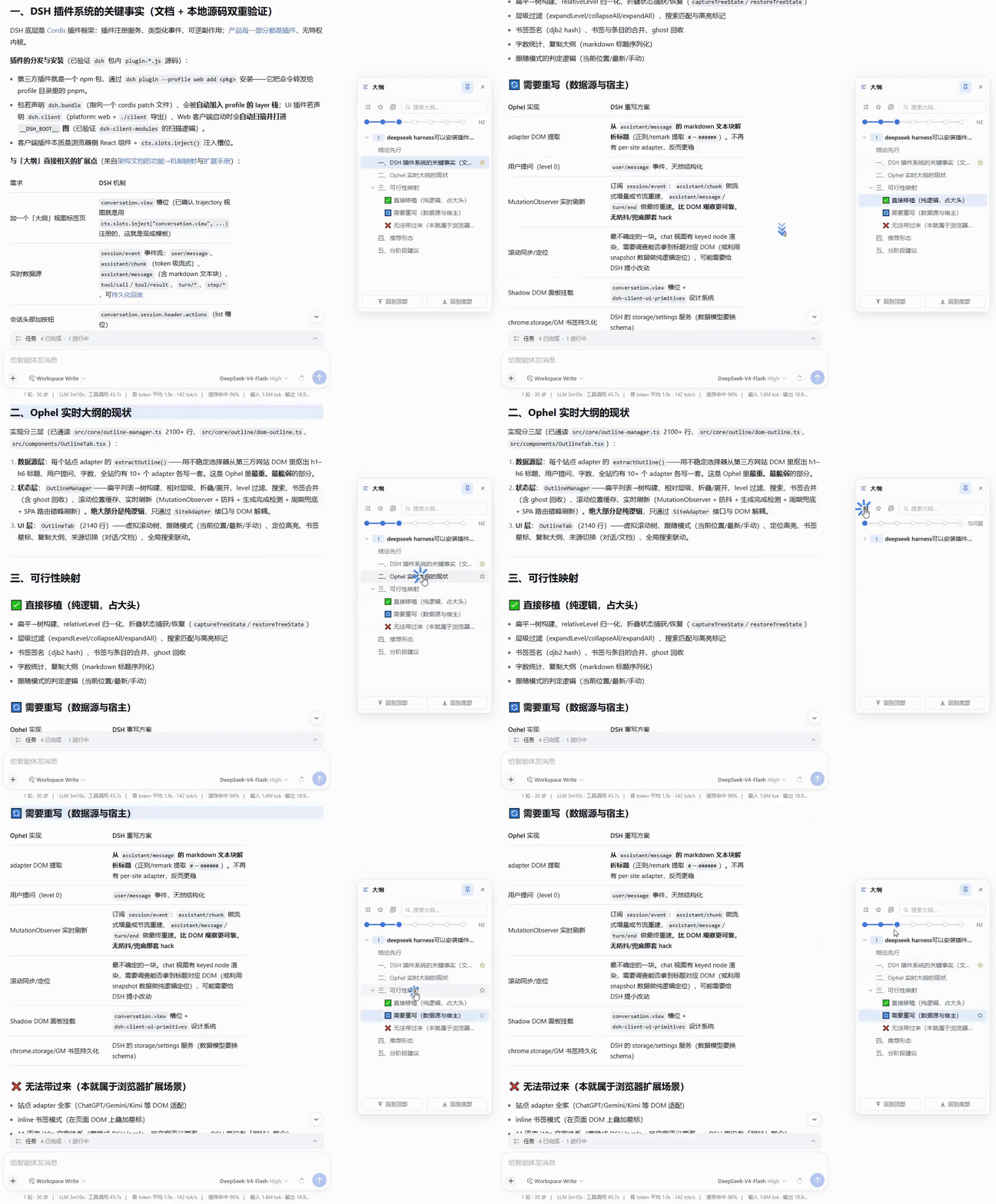
Real-time outline panel for the DSH Web session page: user questions plus a Markdown heading tree (H1–H6) that updates live during streaming, with click-to-locate highlighting, expand-depth control, search, and per-session favorites.
Install
# from npm (prebuilt)
dsh plugin --profile web add dsh-outline
# from GitHub (first run asks for allowBuilds approval — follow the hint, retry)
dsh plugin --profile web add github:urzeye/dsh-outline
GitHub-sourced plugins run build scripts on your machine at install time. Only install sources you trust, and pin a commit (github:owner/repo#sha).
README






DeepSeek Harness(DSH)Web GUI 的实时大纲插件:在会话页提供一棵"用户问题 + Markdown 标题(H1~H6)"的大纲树,流式生成时实时更新,点击节点即可定位正文并高亮当前阅读位置。
特性
实时大纲
- 大纲由会话事件流构建(用户问题为一级节点,助手回复中的 Markdown 标题挂在其下),不抓取 DOM
- 流式生成时随 token 实时更新;刷新、重连、历史分页由 DSH runtime 自动重建,无需自行处理
- 点击节点滚动定位正文,并高亮当前阅读位置
层级与视图
- 层级滑块控制展开深度(0~6 档),节点可单独展开/收起,支持一键展开/收起全部
- 关键词搜索(带匹配计数)、按会话收藏、"只看收藏"模式
- 一键复制大纲、回到顶部/底部
面板形态
- 面板为
shell.overlay浮层:右缘触发条悬停预览、可固定常驻、可拖拽移动,不挤压聊天区
主题与国际化
- 跟随 DSH 主题变量与明暗模式;界面文案中英文随 DSH 语言切换
环境要求
- DeepSeek Harness(DSH)Web GUI
- Node.js ≥ 22.13(仅本地开发与构建时需要,pnpm 11 的最低要求)
安装
以下命令均通过 dsh plugin 转发给 profile 目录内的 pnpm。安装后需重启 dsh web 生效(插件的 host 部分在 DSH 启动时加载)。
从 npm 安装(推荐)
dsh plugin --profile web add dsh-outline
从 tarball 安装
无需发布 npm,也不需要任何构建授权。可自行 pnpm pack,或从 GitHub Releases 下载:
pnpm pack                                          # 产出 dsh-outline-<version>.tgz
dsh plugin --profile web add ./dsh-outline-0.1.2.tgz
本地路径安装(开发调试)
dsh plugin --profile web add /path/to/dsh-outline # 或相对路径 ./dsh-outline
link 安装后 client 改动经 pnpm watch 重建即可 HMR 生效;host 半变更需重启 dsh web。
卸载
dsh plugin --profile web remove dsh-outline
使用
- 启动
dsh web,打开任意会话页。 - 鼠标悬停会话页右缘的大纲触发条,即可预览大纲面板。
- 点击触发条或面板右上角的固定按钮,将面板固定常驻;拖动标题栏移动面板位置(拖动即固定)。
- 面板内:点击节点跳转正文;顶部滑块调整展开层级;节点行内提供展开/收起与收藏按钮;支持关键词搜索。
开发
pnpm install       # 安装依赖(prepare 会自动构建 lib/)
pnpm build         # tsc 类型 + tsdown client bundle
pnpm test          # vitest(core 纯逻辑 + DOM 锚点)
pnpm typecheck
| 命令 | 说明 |
|---|---|
pnpm install |
安装依赖(prepare 自动构建 lib/) |
pnpm build |
构建(tsc 类型 + tsdown client bundle) |
pnpm test |
运行 vitest 测试 |
pnpm typecheck |
类型检查 |
pnpm watch |
监听构建,配合本地 link 安装 HMR 调试 |
src/
├── core/            # 纯逻辑:标题解析、大纲树、滚动计算(不依赖 DSH/DOM)
├── client/          # 适配层:会话事件流订阅、面板组件、槽位注册
│   └── panel/       # 大纲面板 React 组件
└── index.ts         # host 侧入口
tests/               # vitest 测试(core 纯逻辑 + DOM 锚点)
docs/                # 可行性分析与技术方案
架构纪律见 AGENTS.md:src/core/ 只放纯逻辑,DSH API 调用只出现在适配层与槽位注册代码里。
文档
| 文档 | 内容 |
|---|---|
| docs/feasibility.md | 可行性分析(证据、能力映射、边界) |
| docs/technical-plan.md | 技术方案与分阶段实施计划 |
贡献
欢迎通过 Issue 与 Pull Request 参与贡献。
- 改动
src/core/:运行pnpm test - 改动适配层/面板:运行
pnpm typecheck,并在本地 DSH 实例冒烟验证
社区
使用问题请提交 Issue;社区讨论可前往 LINUX DO。
致谢
- 交互形态移植自 Ophel(浏览器扩展)
- 插件形态遵循 DSH 官方打包与安装约定,参考 DSH-better-sidebar
许可证
Links
More in this category
zhu1090093659/dsh-web-ui★ 1866
Plugin and skin collection for the DSH Web UI: task board, Git graph, right-side panel, remote mobile UI, pet, live token stats, and a skin center.
ccch1mneyyy/dsh-TUI★ 869
Claude Code-style full-screen terminal UI: pixel-whale header, live status line, and streaming thought expansion.
omdsh-dev/DSH-better-sidebar★ 731
Full sidebar workbench with file rendering and editing, terminal, Git, and subagents; third-party plugins can register new tabs.
huiliyi37/dsh-tianshu-tui★ 132
A terminal UI (TUI) for DeepSeek Harness.
omdsh-dev/dsh-at-file★ 126
Codex-style `@file` mentions: search workspace files in the composer and attach their contents to prompts.
Nagi-ovo/dsh-visualize★ 82
In-conversation generative UI: the model renders interactive HTML cards into the chat stream, with streaming preview and sandboxed rendering.