Codex-style `@file` mentions: search workspace files in the composer and attach their contents to prompts.
Install
# from GitHub (first run asks for allowBuilds approval — follow the hint, retry)
dsh plugin --profile web add github:omdsh-dev/dsh-at-file
GitHub-sourced plugins run build scripts on your machine at install time. Only install sources you trust, and pin a commit (github:owner/repo#sha).
README
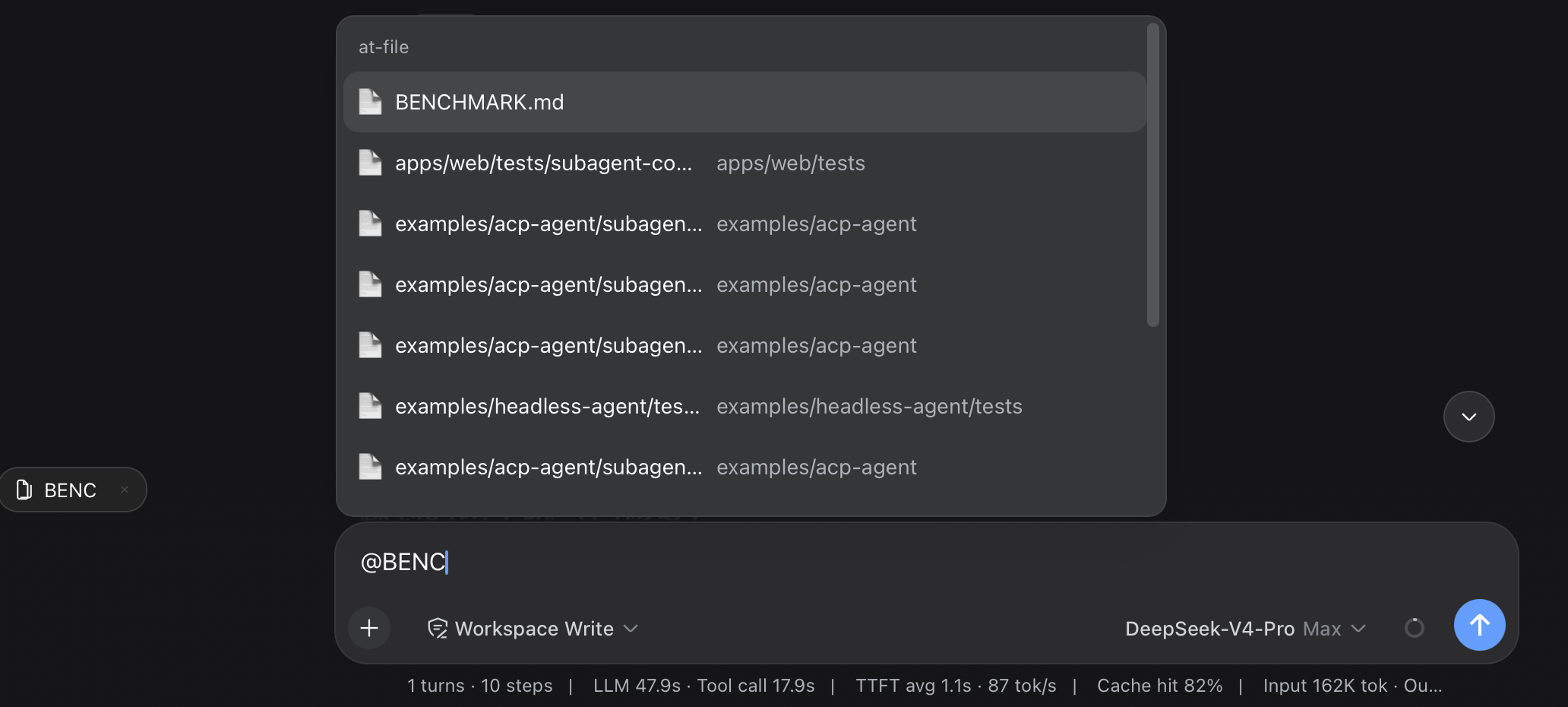
Workspace path references for the DeepSeek Harness web interface. Type @ in the composer to search the current workspace and insert a file or directory path.
Usage
Choose a result from the @ menu. The selected path remains visible in the draft and can be opened or removed from the reference bar.
Review @docs/spec.pdf
Before the agent starts a step, the plugin confirms that the path exists inside the active workspace. It then adds a short reference message:
<workspace-reference path="docs/spec.pdf" kind="file" />
The reference contains the workspace-relative path and its kind. The plugin does not open the referenced file or list the contents of a referenced directory. The agent can inspect the path with the tools available in the current session when the task requires it.
File format and file size do not change this behavior. A PDF follows the same path-reference flow as any other workspace file.
This mechanism applies to version 0.3.0 and later. Earlier releases read file content during submission and enforced file-size limits.
Path Picker
Plain queries match filenames. Exact names, prefixes, and compact matches rank ahead of looser results, without matching letters scattered across a long directory path.
A query containing / matches path segments in order. For example, src/view can find src/client/view.ts. A trailing slash such as src/ searches within that path.
When a directory is highlighted, press ArrowRight to enter it. The draft advances to @path/ without a trailing space, and the candidate menu stays open for the next selection. Enter and pointer selection keep the existing behavior and finish the directory reference.
Each result shows the filename first and its parent directory underneath. Duplicate filenames include the parent directory in the main label. Built-in SVG icons distinguish folders, source files, text, PDFs, images, data and configuration files, archives, and other files.
The default index skips common version-control directories, IDE metadata, dependency trees, caches, and build output. The list covers VS Code, Visual Studio, JetBrains IDEs, Fleet, Eclipse, Android and Gradle, Xcode, CMake, Flutter, .NET, Unity, Unreal, and common JavaScript and Python output directories. OS metadata files named desktop.ini, Thumbs.db, and .DS_Store are excluded by default.
Install or Update
dsh plugin --profile web add https://github.com/omdsh-dev/dsh-at-file/archive/refs/tags/v0.5.1.tar.gz
Use the same command to update an existing installation. Restart dsh web after installation so the Host and browser client load version 0.5.1.
File Filters
Open Settings -> File mentions to manage file-name filters.
- Global contains rules shared by every workspace.
- Workspace contains additional rules for the selected workspace path. Each workspace keeps its own list, and the panel shows the global rules it inherits.
Each rule matches one complete basename, without case sensitivity. Add and remove rules individually. Restore defaults resets the global list to the built-in file names. Clear workspace rules removes only the selected workspace's additions.
Settings are saved in the DSH web profile through the plugin's own Host connection. Existing ignoreFiles values from 0.4.1 remain in the global list after updating. A change clears the affected index cache, so the next @ search uses the saved rules.
Configuration
The available options apply to the path picker index:
maxIndexedFilessets the maximum number of indexed workspace entries.ignoreDirsreplaces the built-in list of directory names excluded from the picker. Set it to[]to index every directory.
Add the complete configuration to the selected profile's cordis.patch.yml. The usual path is ~/.dsh/profiles/web/cordis.patch.yml.
- id: dsh-at-file
  config:
    maxIndexedFiles: 10000
Omitting ignoreDirs keeps the built-in list. When you provide it, include every directory name you want excluded.
Path Handling
- The picker indexes regular files and directories in the active workspace. Configured directory names and symbolic links are skipped.
- Global and workspace file-name filters are combined during the Host index walk, before entries count toward
maxIndexedFilesor reach the browser. - The Host accepts workspace-relative paths. Absolute paths and paths that escape the workspace are ignored.
- Reference markers are created only from user-authored text.
- Clicking a referenced path uses the Harness
host.openPathendpoint. - The picker index is cached per session for 30 seconds.
- An
@pathtoken cannot contain whitespace or another@character. maxIndexedFileslimits picker results. A manually entered path can still be referenced when it exists inside the workspace.
The active agent may lack a tool for a particular file format. DSH provides read for UTF-8 text and read_image for supported images. PDF support depends on the tools available in the session.
Development
pnpm install
pnpm run check
pnpm run test
pnpm run build
The development setup expects the Harness checkout at ../dsh. Built files under lib/ are committed so profile installation does not require package build scripts.
License
MIT
Links
More in this category
zhu1090093659/dsh-web-ui★ 1766
Plugin and skin collection for the DSH Web UI: task board, Git graph, right-side panel, remote mobile UI, pet, live token stats, and a skin center.
ccch1mneyyy/dsh-TUI★ 829
Claude Code-style full-screen terminal UI: pixel-whale header, live status line, and streaming thought expansion.
omdsh-dev/DSH-better-sidebar★ 705
Full sidebar workbench with file rendering and editing, terminal, Git, and subagents; third-party plugins can register new tabs.
huiliyi37/dsh-tianshu-tui★ 131
A terminal UI (TUI) for DeepSeek Harness.
Nagi-ovo/dsh-visualize★ 79
In-conversation generative UI: the model renders interactive HTML cards into the chat stream, with streaming preview and sandboxed rendering.
omdsh-dev/dsh-genui★ 72
Interactive UI components rendered inline in replies: layout, charts, forms, quizzes, mermaid, 3D scenes, and an action event loop back to the model.