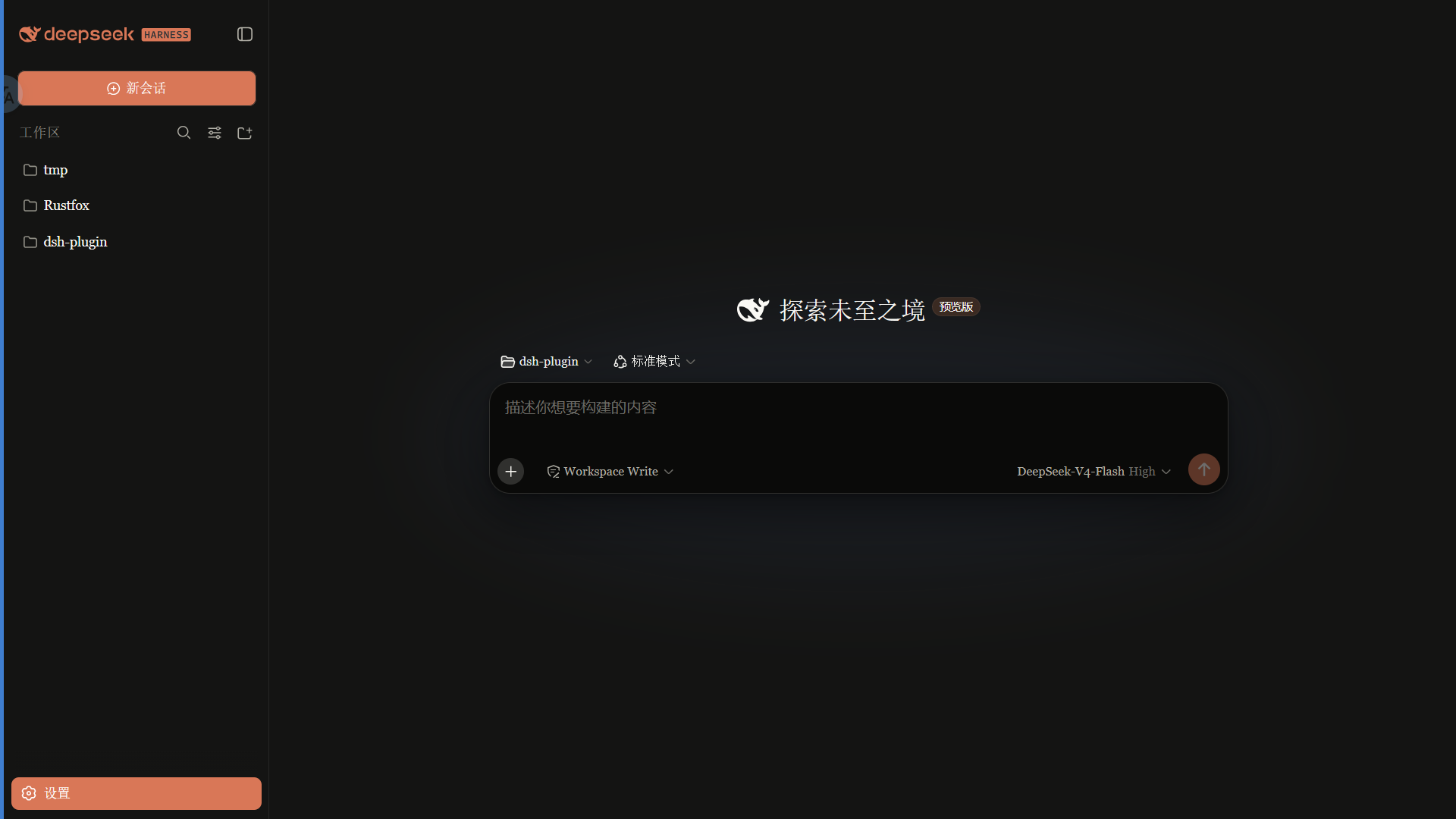
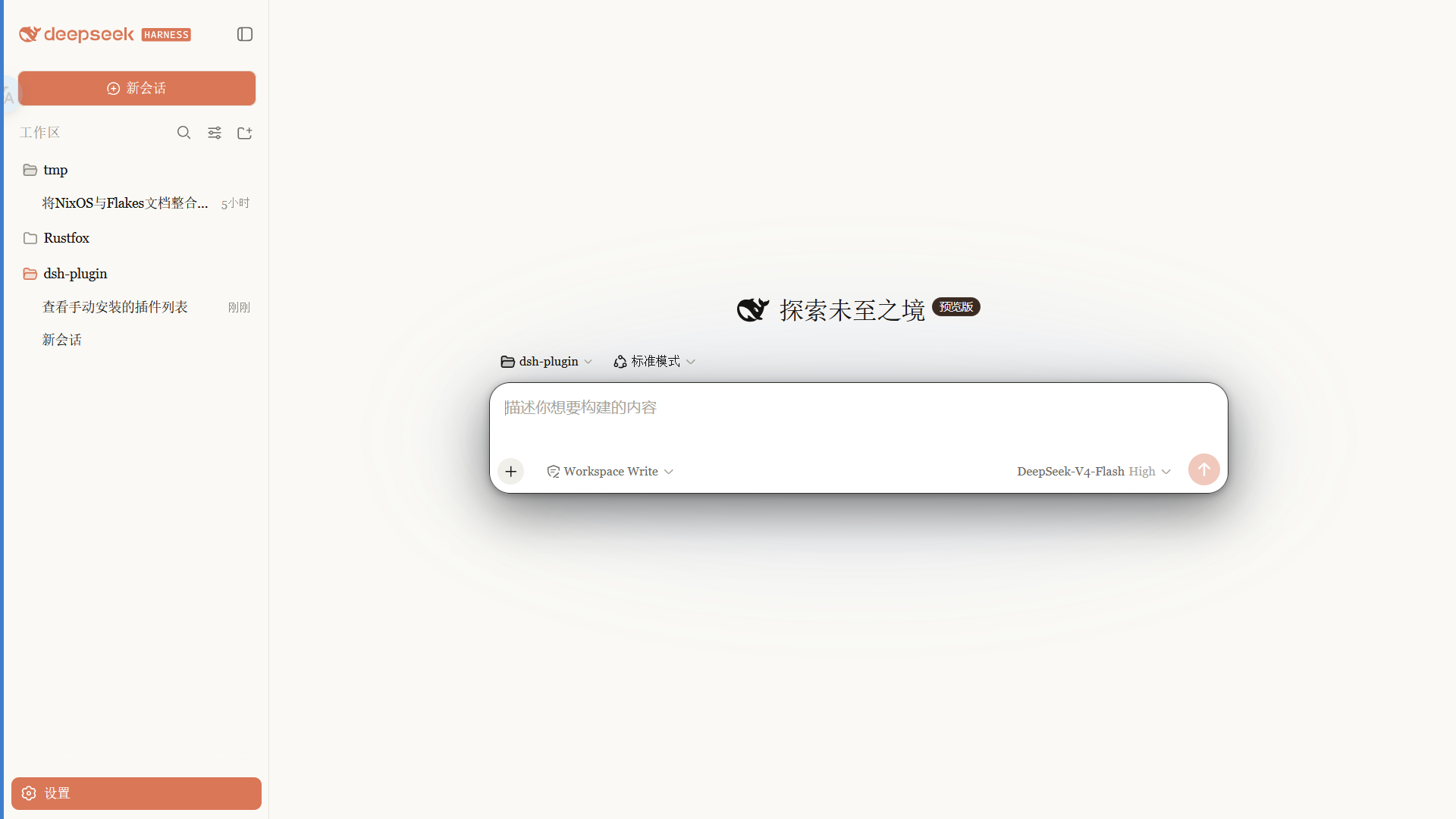
Claude-style skin with a warm-black canvas, clay accent, and serif UI that follows the native light and dark themes.
Install
# from npm (prebuilt)
dsh plugin --profile web add @pakiknowledge/dsh-client-ui-skin-claude
# from GitHub (first run asks for allowBuilds approval — follow the hint, retry)
dsh plugin --profile web add github:PAKIKNOWLEDGE/dsh-client-ui-skin-claude
Any plugin you install runs third-party code with your own permissions — it can read your files, use your credentials, and reach the network, and tool approvals don’t sandbox it. GitHub-sourced plugins also run build scripts at install time — pnpm blocks those until you allow them, so an install can stop with ERR_PNPM_GIT_DEP_PREPARE_NOT_ALLOWED or ERR_PNPM_IGNORED_BUILDS; dsh prints the exact key to add under allowBuilds in your profile’s pnpm-workspace.yaml, and the install works on the next run. Allowing a build is a trust decision: only install sources you trust, and pin a commit (github:owner/repo#sha).
README
A Claude-style skin for the DSH Web GUI: warm-black canvas, clay accent, built-in Anthropic font modes, follows the native light/dark theme.
 ·
· 
Features
- Warm-black (#141413) canvas with an Anthropic clay (#d97757) accent
- Font modes:
- Anthropic native (default): Anthropic Sans for UI, Anthropic Serif for conversation, Anthropic Mono for code
- Skin serif: keeps the original serif UI style
- System default: leaves DSH fonts untouched
- Slim scrollbars, clay selection/focus, pill badges
- Light and dark variants that follow the system theme
Fonts
Important: the npm package does not ship font files. Font files are available in the
fonts/folder of this repository; install them manually, then refresh/restart the web UI.
| Font | Used for | File |
|---|---|---|
| Anthropic Sans Web Text | UI | fonts/AnthropicSansWebText.ttf |
| Anthropic Serif Web Text | Conversation / Markdown | fonts/AnthropicSerifWebText.ttf |
| Anthropic Mono Variable | Code / code blocks | fonts/AnthropicMonoVariable.ttf |
Install: on Windows double-click each .ttf → Install; on macOS import with Font Book. Refresh the page afterwards.
The Anthropic fonts are proprietary to Anthropic and are provided for personal use only. They are not covered by the MIT license (see the font notice in LICENSE).
Install
From npm (recommended, prebuilt, no build permission needed):
dsh plugin --profile web add @pakiknowledge/dsh-client-ui-skin-claude
Or from GitHub:
dsh plugin --profile web add github:PAKIKNOWLEDGE/dsh-client-ui-skin-claude
Restart dsh web, then refresh the page.
Switching fonts
Open Settings → General → Font style:
- Anthropic native (default): Sans UI / Serif body / Mono code
- Skin serif: Georgia-style serif UI
- System default: keep DSH's default fonts
The selection applies instantly and is saved in browser localStorage.
If you previously installed
dsh-anthropic-fontsseparately, remove it first to avoid two font overrides fighting each other.
Switching skins
Only one skin is active at a time. Edit ~/.dsh/cordis.patch.yml:
# outside the dsh-skin managed section
- insert:
    - id: ui-skin-claude
      name: '@pakiknowledge/dsh-client-ui-skin-claude'
(and add disabled: true to the currently active skin's row). The config watcher hot-reloads within seconds; refresh the page.
Uninstall
- Remove the
ui-skin-claudeinsert row from~/.dsh/cordis.patch.yml. dsh plugin --profile web remove @pakiknowledge/dsh-client-ui-skin-claude- Restart
dsh web.
License
MIT
Links
More in this category
Small-tailqwq/dsh-deep-whale#maid-atelier★ 2231
Whale-girl skin series for the DSH Web UI (maid-atelier).
d-dev0101/open-sea-skin★ 379
Realtime WebGPU ocean skin with quick controls for waves, daylight, glass opacity, and an automatic day cycle.
elysia395/dsh-wallpaper-engine★ 375
Requires DeepSeek Harness 0.1.5-rc.1+ (DSH Desktop >= 2.0.7) and dsh-better-sidebar >= 0.19.0 - update both before installing or updating this plugin. Plays local Wallpaper Engine Video/Web wallpapers behind the chat, renders Scene wallpapers as extracted static frames, and adds content-rating/type filters, custom uploads and an iOS-style liquid-glass settings window.
kingOfSoySauce/dsh-liang-skin★ 221
Adaptive reasoning slider skin that maps each model's available reasoning efforts onto a 0–30 visual intensity scale, with synchronized portraits, background, and interface colors.
RevolutionLA/dsh-dream-skin★ 190
One-command skin plugin: 8 original themes, translucent wallpaper with opacity/blur, per-user accent, and shareable theme-pack import/export, favorites and surprise-me — purely native on DSH's token system.
GGBond2424648901/deep-whale-day-night-theme★ 116
Non-commercial day/night whale-girl skin for official Harness rc.7: current no-viewport-frame layout, paired crystal-workshop and moon-tide scenes, chibi companions, translucent ornaments, and lightweight ambience.
Community comments
Comments are public GitHub Discussions. Loading them connects to GitHub and Giscus; a GitHub account is required to post.