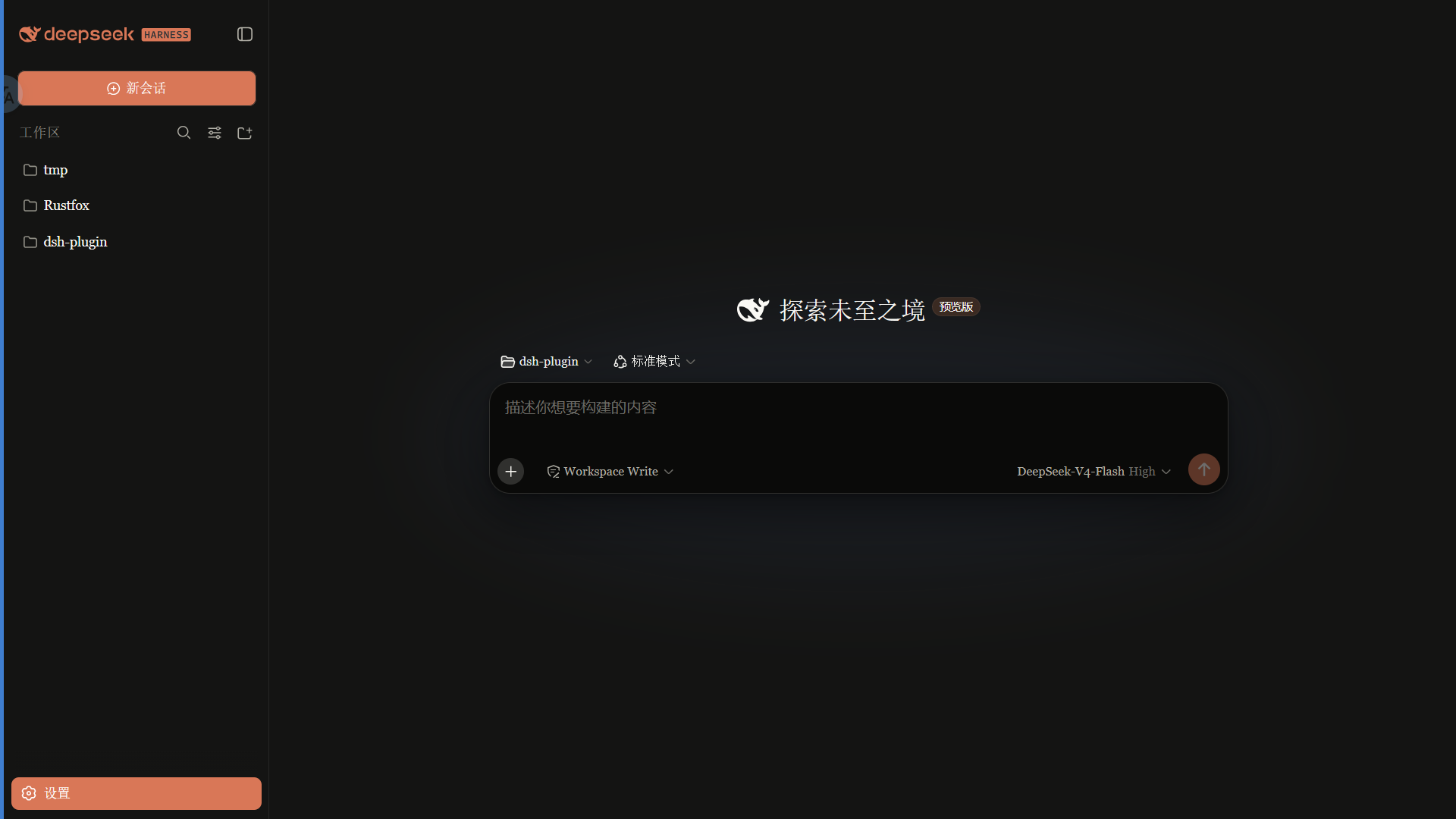
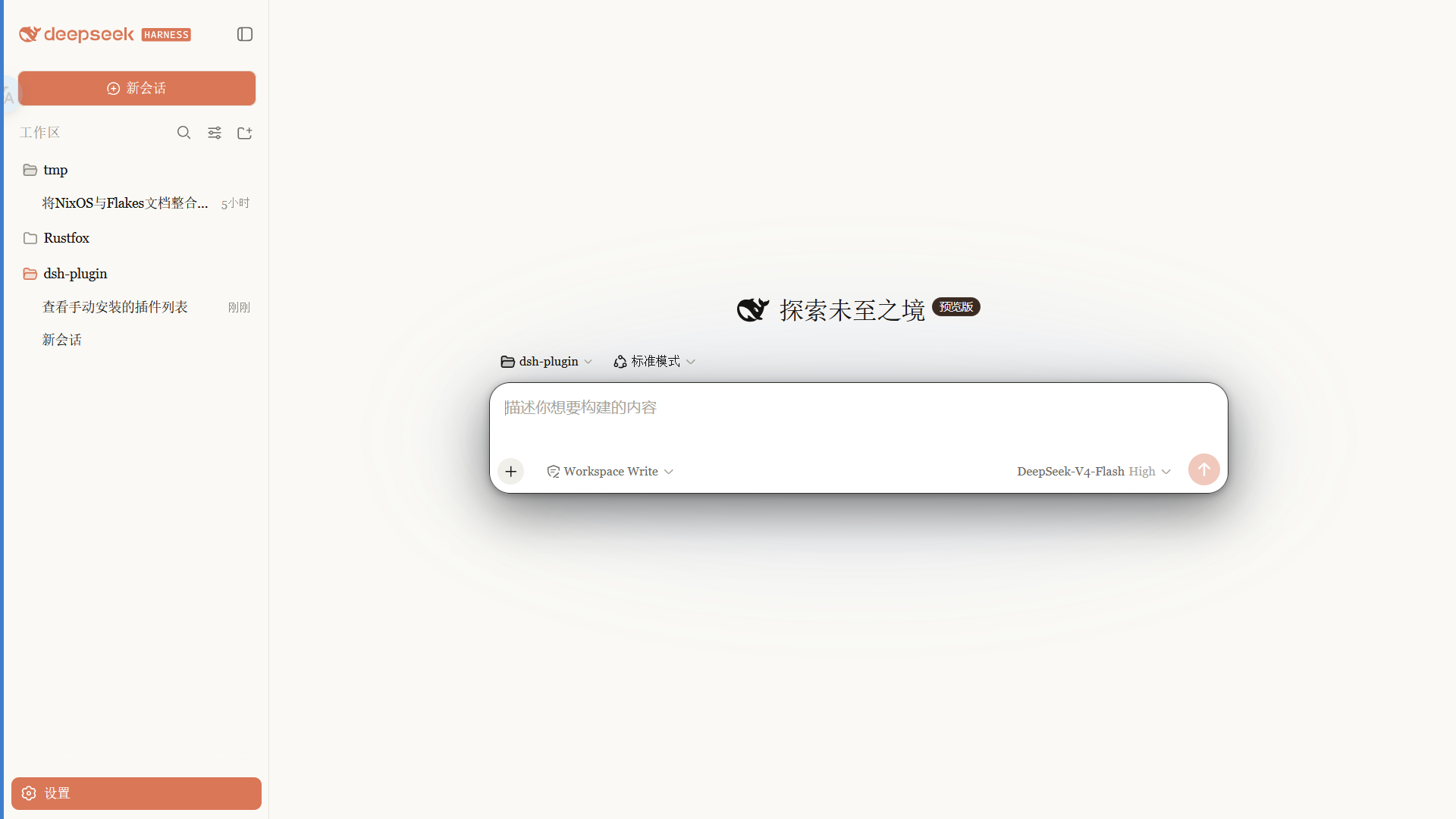
Claude 风格皮肤:暖黑画布、陶橙点缀、衬线 UI,跟随原生亮/暗主题。
安装
# npm 包(预构建)
dsh plugin --profile web add @pakiknowledge/dsh-client-ui-skin-claude
# GitHub 源码(首次需按提示配置 allowBuilds 构建授权后重试)
dsh plugin --profile web add github:PAKIKNOWLEDGE/dsh-client-ui-skin-claude
装任何插件都等于在你的机器上跑第三方代码,权限和你本人一样大——能读你的文件、用你的凭据、访问网络,工具审批管不到它。GitHub 来源的插件还会在安装时执行构建脚本——pnpm 默认拦截,所以安装可能停在 ERR_PNPM_GIT_DEP_PREPARE_NOT_ALLOWED 或 ERR_PNPM_IGNORED_BUILDS;dsh 会打印出需要添加的确切键名,把它加进该 profile 的 pnpm-workspace.yaml 的 allowBuilds 下,重跑一次即可装上。放行构建本身就是一次信任判断:请只安装可信来源,并尽量锁定 commit(github:owner/repo#sha)。
README
English | 中文
Claude 风格的 DSH Web 界面皮肤:暖黑画布、陶橙点缀,内置 Anthropic 字体切换,跟随原生亮/暗主题。
 ·
· 
特性
- 暖黑(#141413)画布 + Anthropic 陶橙(#d97757)点缀
- 字体模式:
- Anthropic 原生(默认):UI 用 Anthropic Sans,对话正文用 Anthropic Serif,代码用 Anthropic Mono
- 皮肤衬线:保留原来的衬线 UI 风格
- 系统默认:不覆盖 DSH 字体
- 细滚动条、陶橙选中 / 焦点、胶囊徽章
- 亮 / 暗双主题,跟随系统切换
字体
重要:npm 包不随包分发字体文件。 字体文件放在仓库
fonts/供下载;安装后刷新 / 重启 web 才会生效。
| 字体 | 用途 | 文件 |
|---|---|---|
| Anthropic Sans Web Text | 界面 / UI | fonts/AnthropicSansWebText.ttf |
| Anthropic Serif Web Text | 对话正文 / Markdown | fonts/AnthropicSerifWebText.ttf |
| Anthropic Mono Variable | 代码 / 代码块 | fonts/AnthropicMonoVariable.ttf |
安装:Windows 双击 .ttf → 「安装」;macOS 用「字体册」导入。安装后刷新页面生效。
字体版权归 Anthropic 所有,仅供个人使用,不适用 MIT 许可(详见 LICENSE 字体声明)。
安装
从 npm 安装(推荐,预构建免授权):
dsh plugin --profile web add @pakiknowledge/dsh-client-ui-skin-claude
或从 GitHub 安装:
dsh plugin --profile web add github:PAKIKNOWLEDGE/dsh-client-ui-skin-claude
装完重启 dsh web,刷新页面。
切换字体
打开 设置 → 常规 → 字体风格:
- Anthropic 原生(默认):Sans UI / Serif 正文 / Mono 代码
- 皮肤衬线:Georgia 等衬线 UI
- 系统默认:保持 DSH 默认字体
选择立即生效,并保存在浏览器 localStorage。
如果之前单独安装过
dsh-anthropic-fonts,建议先卸载,避免两套字体变量互相覆盖。
切换皮肤
同一时刻只启用一个皮肤。编辑 ~/.dsh/cordis.patch.yml:
# dsh-skin managed 段之外
- insert:
    - id: ui-skin-claude
      name: '@pakiknowledge/dsh-client-ui-skin-claude'
(并把当前启用皮肤的 disabled: true 加上。)配置 watcher 几秒内热加载,刷新页面生效。
卸载
- 删除
~/.dsh/cordis.patch.yml里的ui-skin-claudeinsert 行 dsh plugin --profile web remove @pakiknowledge/dsh-client-ui-skin-claude- 重启
dsh web
许可
MIT
链接
同类插件
Small-tailqwq/dsh-deep-whale#maid-atelier★ 2231
DSH Web 鲸鱼娘皮肤系列(深海女仆工坊 maid-atelier)。
d-dev0101/open-sea-skin★ 379
实时 WebGPU 海洋皮肤,可快捷调节波浪、日光、玻璃不透明度与自动昼夜循环。
elysia395/dsh-wallpaper-engine★ 375
前置要求:DeepSeek Harness 0.1.5-rc.1+(DSH Desktop ≥ 2.0.7)且 dsh-better-sidebar ≥ 0.19.0,安装或更新本插件前请先更新两者。把本机 Wallpaper Engine 的 Video/Web 壁纸实时播放到聊天界面后方,Scene 壁纸由内置渲染器输出完整场景帧,支持内容分级/类型过滤、自定义壁纸上传与 iOS 液态玻璃设置窗口。
kingOfSoySauce/dsh-liang-skin★ 221
自适应推理等级滑块皮肤,将当前模型可用档位映射到 0–30 视觉强度,并同步人物、背景和界面配色。
RevolutionLA/dsh-dream-skin★ 190
一键换肤插件:8 套原创主题、背景壁纸(透明度/模糊)、强调色、主题包导入/导出+分享链接、收藏与随机,纯原生 token 系统接入。
GGBond2424648901/deep-whale-day-night-theme★ 116
面向官方 Harness rc.7 的非商业鲸鱼娘昼夜皮肤:当前无整屏边框布局、白昼水晶工坊与夜晚月潮观测室双场景、Q 版侧栏伙伴、透明花边与轻量氛围。
社区评论
评论公开保存在 GitHub Discussions。加载评论会连接 GitHub 和 Giscus;发表内容需要 GitHub 账号。