DSH 的本地微信 OCR 工具:`wechat_ocr_recognize` 针对本地图片路径返回识别文本和引擎的结构化结果。
安装
# GitHub 源码(首次需按提示配置 allowBuilds 构建授权后重试)
dsh plugin --profile web add github:hawkhai/wechat-ocr
装任何插件都等于在你的机器上跑第三方代码,权限和你本人一样大——能读你的文件、用你的凭据、访问网络,工具审批管不到它。GitHub 来源的插件还会在安装时执行构建脚本——pnpm 默认拦截,所以安装可能停在 ERR_PNPM_GIT_DEP_PREPARE_NOT_ALLOWED 或 ERR_PNPM_IGNORED_BUILDS;dsh 会打印出需要添加的确切键名,把它加进该 profile 的 pnpm-workspace.yaml 的 allowBuilds 下,重跑一次即可装上。放行构建本身就是一次信任判断:请只安装可信来源,并尽量锁定 commit(github:owner/repo#sha)。
README
该插件的 README 只有英文版本。
Great thanks to IEEE by his Project IEEE/QQImpl] and article.
This project is based on it and reduced the product size by using protobuf-lite instead of protobuf.
This project provided a direct Python interface for calling in sync mode as well as other languages support including but not limited with c++/java/c#.
DeepSeek Harness plugin
This repository can be installed as a DeepSeek Harness plugin:
dsh plugin add github:hawkhai/wechat-ocr
It registers wechat_ocr_recognize, a model-facing tool that accepts a local image path and returns recognized text together with WeChat OCR's structured result. OCR runs locally; the image is not sent to an external OCR service.
Configure wechatOcrPath (the WeChat 3.x WeChatOCR.exe, WeChat 4.x wxocr.dll, or Linux OCR binary) and wechatPath (the matching WeChat runtime directory) in the plugin row. You may instead set WECHAT_OCR_PATH and WECHAT_PATH. The default python must match one of the bundled Windows extension builds (CPython 3.7, 3.11, or 3.12); pythonBin and moduleDir are configurable.
Prepare for usage
To work with this project, you need to prepare the wechat OCR binary and the wechat runtime folder.
For wechat 3.x, the wechat OCR binary is wechatocr.exe, it might be:
C:\Users\yourname\AppData\Roaming\Tencent\WeChat\XPlugin\Plugins\WeChatOCR\7061\extracted\WeChatOCR.exe
and the wechat runtime folder might be:
C:\Program Files (x86)\Tencent\WeChat\[3.9.8.25]
Wechat 4.0 is now supported!
For wechat 4.0, the wechat OCR binary is wxocr.dll, it might be:
C:\Users\yourname\AppData\Roaming\Tencent\xwechat\XPlugin\plugins\WeChatOcr\8011\extracted\wxocr.dll
and the wechat runtime folder might be:
C:\Program Files\Tencent\Weixin\4.0.0.26
Warning
WeChat 4.0 OCR binary is wxocr.dll, but this project built a DLL named wcocr.dll
Their names are similar, DO NOT confuse them.
Linux is now supported
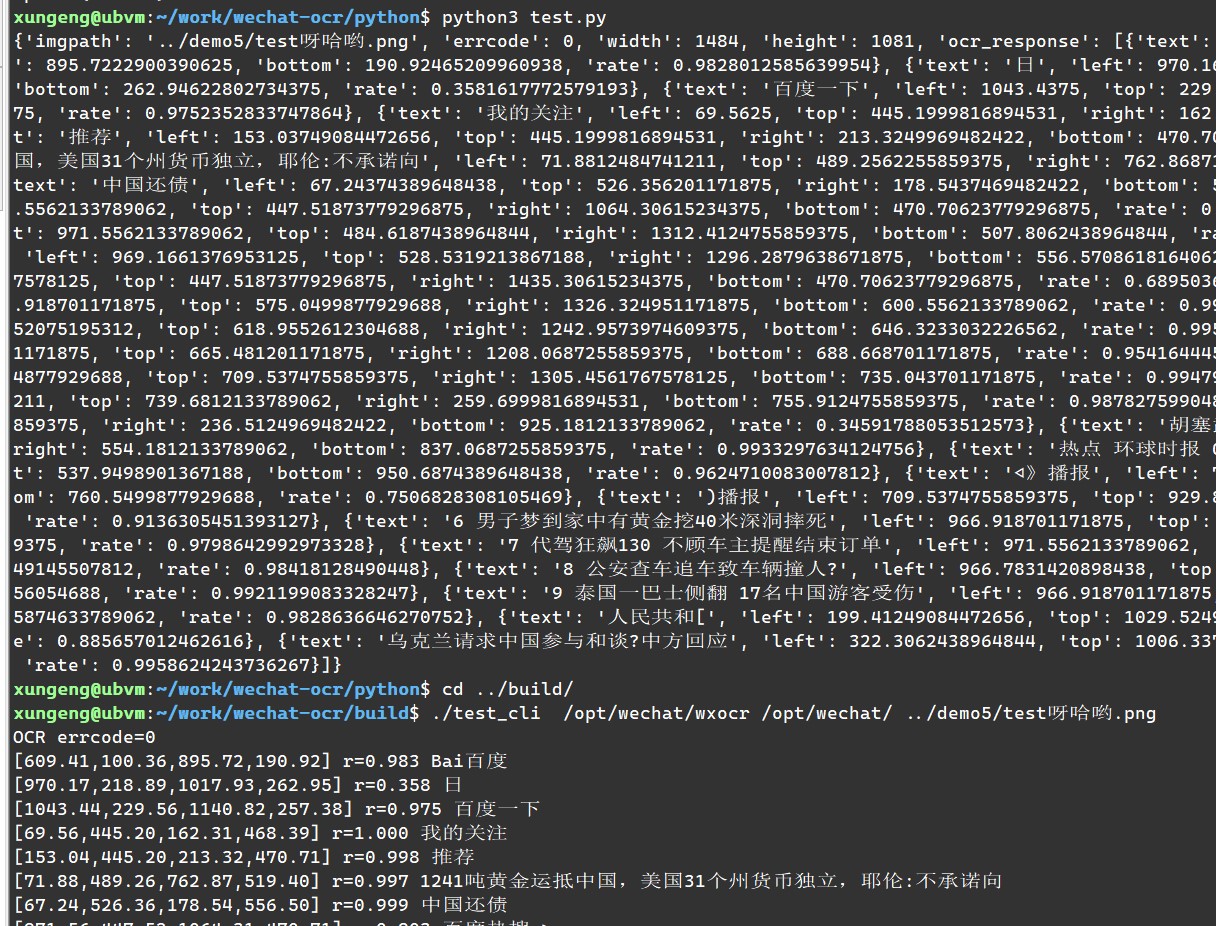
Typically, You should use /opt/wechat/wxocr as the OCR exe path and /opt/wechat/ as the WeChat folder path.
The other usages are similar to those on Windows.
C++ interface
You can use the following code to test it:
CWeChatOCR ocr(wechatocr_path, wechat_path);
if (!ocr.wait_connection(5000)) {
	// error handling
}
CWeChatOCR::result_t result;
ocr.doOCR("D:\\test.png", &result);
You can also pass nullptr to the second parameter of doOCR to call in async mode and wait the callback.
In this case, you need to subclass CWeChatOCR and implement the virtual function OnOCRResult.
Python interface
Rename the built wcocr.dll to wcocr.pyd and put it in the same directory as test.py.
You can use the following code to test it:
import wcocr
wcocr.init(wechatocr_path, wechat_path)
result = wcocr.ocr("D:\\test.png")
Currently, the python interface only supports sync mode.
Java interface
- see java/Test.java
- I'm not so familiar with java and don't know how to pass complex data structures, so I just passed a JSON string from cpp to java.
- The added DLL export function
wechat_ocrcan also be used in other scenarios.
C Sharp (C#) interface
- see
c_sharpfolder. - It's important to ensure the built dll is copied to the folder test_cs.exe in! always copy the 64bit version dll!
- It's ok to built a 32bit test_cs.exe and copy the 32bit dll, you can try.
链接
同类插件
liustack/modlens★ 4100
为纯文本模型架起视觉桥梁:粘贴图片,输出结构化 JSON 证据(OCR、版面、语义)。
ysr666/dsh-vision-router★ 1128
为纯文本 Agent 提供视觉能力:内置免 Key 视觉链 + 像素级视觉工具(看图问答、定位、裁剪、像素对比、取色、OCR、矢量化、抠图、截图);粘贴图片即可用。
Anionex/dsh-vision-toolkit★ 887
让纯文本模型处理视觉任务:粘贴图片后自动切换到 Vision Toolkit 变体,支持图片问答、多图比较、长截图 OCR、截图还原前端 UI、元素定位与像素对比。默认无需 API Key——图片经作者自建的免费服务处理,每台机器每天 100 张;也可改为指向自己的服务商。
dickpy/dsh-imagegen★ 99
面向 DSH Web GUI 的 AI 生图插件:通过可配置的 OpenAI 兼容端点(gpt-image-2 / gpt-image-1 / dall-e-3)实现文生图与图生图,提供 api_url/api_key 设置卡片与侧边栏分栏生图工作台。
fandc520/dsh-comfyui★ 94
让 DeepSeek Harness 的 Agent 直接驱动本地或远程 ComfyUI:comfyui_run / comfyui_object_info / comfyui_workflow 工具生成与编辑图像、视频,附带工作流库(图工作流提取:按分量 / 主流程 / 整体)、加载区分辨率自动匹配、实时队列、SDXL 与 Wan 2.1 模板、配套 skill 与同源媒体代理。
sunxin-ai/dsh-design-qa★ 44
给纯文本模型的设计稿保真判定:`deepseek_vision` 工具从任意 OpenAI 兼容视觉路由借来一只眼,让模型判断实现与设计稿是否一致——并附上支撑该判定的基准(4 组夹具、23 处注入缺陷、逐格原始输出)与其依赖的提问纪律。
社区评论
评论公开保存在 GitHub Discussions。加载评论会连接 GitHub 和 Giscus;发表内容需要 GitHub 账号。