Local WeChat OCR tool for DSH: `wechat_ocr_recognize` returns recognized text and the engine structured result for a local image path.
Install
# from GitHub (first run asks for allowBuilds approval — follow the hint, retry)
dsh plugin --profile web add github:hawkhai/wechat-ocr
Any plugin you install runs third-party code with your own permissions — it can read your files, use your credentials, and reach the network, and tool approvals don’t sandbox it. GitHub-sourced plugins also run build scripts at install time — pnpm blocks those until you allow them, so an install can stop with ERR_PNPM_GIT_DEP_PREPARE_NOT_ALLOWED or ERR_PNPM_IGNORED_BUILDS; dsh prints the exact key to add under allowBuilds in your profile’s pnpm-workspace.yaml, and the install works on the next run. Allowing a build is a trust decision: only install sources you trust, and pin a commit (github:owner/repo#sha).
README
Great thanks to IEEE by his Project IEEE/QQImpl] and article.
This project is based on it and reduced the product size by using protobuf-lite instead of protobuf.
This project provided a direct Python interface for calling in sync mode as well as other languages support including but not limited with c++/java/c#.
DeepSeek Harness plugin
This repository can be installed as a DeepSeek Harness plugin:
dsh plugin add github:hawkhai/wechat-ocr
It registers wechat_ocr_recognize, a model-facing tool that accepts a local image path and returns recognized text together with WeChat OCR's structured result. OCR runs locally; the image is not sent to an external OCR service.
Configure wechatOcrPath (the WeChat 3.x WeChatOCR.exe, WeChat 4.x wxocr.dll, or Linux OCR binary) and wechatPath (the matching WeChat runtime directory) in the plugin row. You may instead set WECHAT_OCR_PATH and WECHAT_PATH. The default python must match one of the bundled Windows extension builds (CPython 3.7, 3.11, or 3.12); pythonBin and moduleDir are configurable.
Prepare for usage
To work with this project, you need to prepare the wechat OCR binary and the wechat runtime folder.
For wechat 3.x, the wechat OCR binary is wechatocr.exe, it might be:
C:\Users\yourname\AppData\Roaming\Tencent\WeChat\XPlugin\Plugins\WeChatOCR\7061\extracted\WeChatOCR.exe
and the wechat runtime folder might be:
C:\Program Files (x86)\Tencent\WeChat\[3.9.8.25]
Wechat 4.0 is now supported!
For wechat 4.0, the wechat OCR binary is wxocr.dll, it might be:
C:\Users\yourname\AppData\Roaming\Tencent\xwechat\XPlugin\plugins\WeChatOcr\8011\extracted\wxocr.dll
and the wechat runtime folder might be:
C:\Program Files\Tencent\Weixin\4.0.0.26
Warning
WeChat 4.0 OCR binary is wxocr.dll, but this project built a DLL named wcocr.dll
Their names are similar, DO NOT confuse them.
Linux is now supported
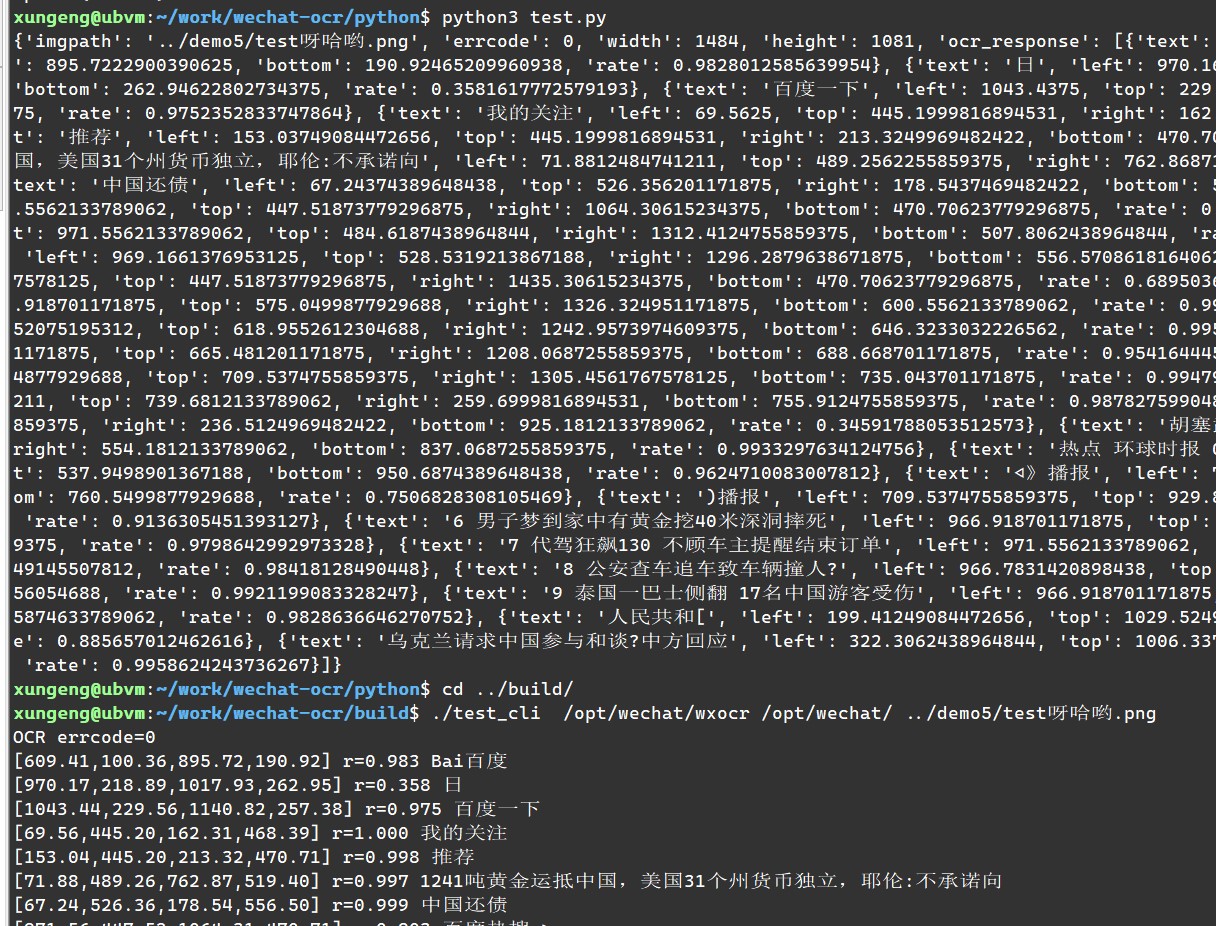
Typically, You should use /opt/wechat/wxocr as the OCR exe path and /opt/wechat/ as the WeChat folder path.
The other usages are similar to those on Windows.
C++ interface
You can use the following code to test it:
CWeChatOCR ocr(wechatocr_path, wechat_path);
if (!ocr.wait_connection(5000)) {
	// error handling
}
CWeChatOCR::result_t result;
ocr.doOCR("D:\\test.png", &result);
You can also pass nullptr to the second parameter of doOCR to call in async mode and wait the callback.
In this case, you need to subclass CWeChatOCR and implement the virtual function OnOCRResult.
Python interface
Rename the built wcocr.dll to wcocr.pyd and put it in the same directory as test.py.
You can use the following code to test it:
import wcocr
wcocr.init(wechatocr_path, wechat_path)
result = wcocr.ocr("D:\\test.png")
Currently, the python interface only supports sync mode.
Java interface
- see java/Test.java
- I'm not so familiar with java and don't know how to pass complex data structures, so I just passed a JSON string from cpp to java.
- The added DLL export function
wechat_ocrcan also be used in other scenarios.
C Sharp (C#) interface
- see
c_sharpfolder. - It's important to ensure the built dll is copied to the folder test_cs.exe in! always copy the 64bit version dll!
- It's ok to built a 32bit test_cs.exe and copy the 32bit dll, you can try.
Links
More in this category
liustack/modlens★ 4100
Vision bridge for text-only models: paste an image, get structured JSON evidence (OCR, layout, semantics).
ysr666/dsh-vision-router★ 1128
Free vision for text-only agents: built-in keyless vision chain plus pixel tools (Q&A, grounding, crop, pixel diff, colors, OCR, SVG trace, cutout, screenshots); paste an image to use it.
Anionex/dsh-vision-toolkit★ 887
Vision for text-only models: paste an image and the model switches to a Vision Toolkit variant for image Q&A, multi-image comparison, long-screenshot OCR, screenshot-to-UI reproduction, element grounding, and pixel diff. No API key by default — images are processed by the author-hosted free service, 100 per machine per day; configurable to your own provider.
dickpy/dsh-imagegen★ 99
AI image generation for the DSH Web GUI: text-to-image and image-to-image through a configurable OpenAI-compatible endpoint (gpt-image-2 / gpt-image-1 / dall-e-3), with an api_url/api_key settings card and a sidebar split-pane generation studio.
fandc520/dsh-comfyui★ 94
Drive a local or remote ComfyUI server from DeepSeek Harness: comfyui_run / comfyui_object_info / comfyui_workflow tools generate and edit images and videos, with a workflow library (graph extraction: per component / main flow / all), a load area with resolution auto-match, a live queue, SDXL and Wan 2.1 templates, a companion skill, and a same-origin media proxy.
sunxin-ai/dsh-design-qa★ 44
Design-fidelity QA for text-only models: a `deepseek_vision` tool borrows an eye from any OpenAI-compatible vision route, so the model can judge whether an implementation matches its mock — shipped with the benchmark behind that judgement (four fixtures, 23 injected defects, raw transcripts) and the questioning discipline it depends on.
Community comments
Comments are public GitHub Discussions. Loading them connects to GitHub and Giscus; a GitHub account is required to post.