基于本地 Obsidian/Codex 知识库的持久 AI 记忆:5 个 obsidian_memory_* 读写搜索工具,外加侧边栏知识库浏览器。
安装
# npm 包(预构建)
dsh plugin --profile web add dsh-client-ui-obsidian-memory
# GitHub 源码(首次需按提示配置 allowBuilds 构建授权后重试)
dsh plugin --profile web add github:detongz/dsh-client-ui-obsidian-memory
装任何插件都等于在你的机器上跑第三方代码,权限和你本人一样大——能读你的文件、用你的凭据、访问网络,工具审批管不到它。GitHub 来源的插件还会在安装时执行构建脚本——pnpm 默认拦截,所以安装可能停在 ERR_PNPM_GIT_DEP_PREPARE_NOT_ALLOWED 或 ERR_PNPM_IGNORED_BUILDS;dsh 会打印出需要添加的确切键名,把它加进该 profile 的 pnpm-workspace.yaml 的 allowBuilds 下,重跑一次即可装上。放行构建本身就是一次信任判断:请只安装可信来源,并尽量锁定 commit(github:owner/repo#sha)。
README
🧠 DeepSeek Harness 的 Obsidian Memory 插件 — 基于本地 Markdown 的持久记忆
一个 DSH 插件,让你的 AI 助手拥有持久记忆,记忆内容存储在本地 Obsidian(或普通 Markdown)知识库中。插件注册 5 个文件系统工具(obsidian_memory_*),并注册一个侧边栏面板(⚠️ 见已知问题,当前 DSH 上面板不会渲染)。
灵感来自 @Saccc_c 的 Codex 记忆技巧。
功能
- 5 个记忆工具 — AI 可以读取、列出、搜索、写入、追加本地 vault 文件
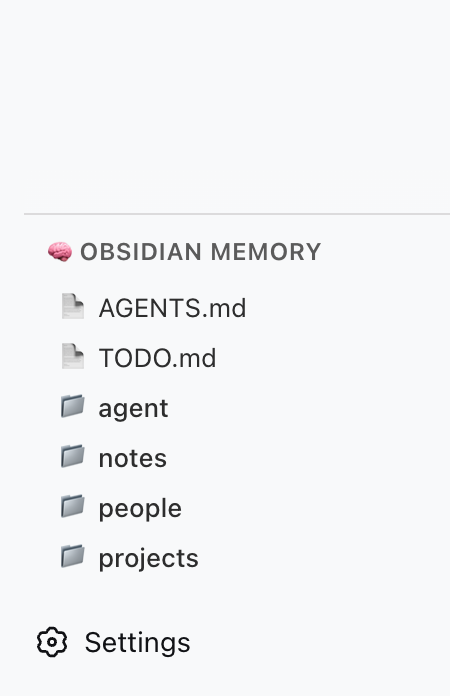
- 侧边栏面板 — vault 目录浏览器,从侧边栏面板图标打开;面板挂载在布局的
main插槽(版本注意事项见已知问题) - 无需外部服务器 — 直接通过 DSH 的 host 运行时读写文件系统
- 兼容 Codex 结构 — 支持社区推荐的
Codex/目录结构
可用工具
| 工具 | 功能 |
|---|---|
obsidian_memory_read |
读取 Markdown 或文本文件 |
obsidian_memory_list |
列出文件和目录 |
obsidian_memory_search |
全文搜索 .md 和 .txt 文件 |
obsidian_memory_write |
写入或覆盖文件 |
obsidian_memory_append |
追加内容到文件末尾 |
快速开始
1. 准备 vault
在你的机器上创建一个 Codex/ 文件夹(例如放在 Obsidian vault 里):
~/Documents/Obsidian Vault/
└── Codex/
    ├── AGENTS.md      ← AI 操作说明书
    ├── TODO.md        ← 待办事项 / 未收尾的工作
    ├── people/
    ├── projects/
    ├── notes/
    └── daily/
2. 安装插件
一条命令即可,在任意目录执行:
dsh plugin add dsh-client-ui-obsidian-memory        # npm 发布版(推荐)
# 或直接从源码安装:
dsh plugin add detongz/dsh-client-ui-obsidian-memory
插件自带
dsh.bundle清单,dsh plugin add会同时安装并激活插件 (内置的cordis.patch.yml会自动插入obsidian-memory条目), 无需手动编辑cordis.patch.yml。
3. 配置 vault 路径
让插件指向你的 Codex/ 文件夹。在 profile 的 cordis.patch.yml 中:
- id: obsidian-memory
  config:
    vaultPath: /Users/你的用户名/Documents/Obsidian Vault/Codex
将 vaultPath 替换为你的 Codex/ 文件夹的绝对路径,
也可以改用环境变量 OBSIDIAN_VAULT_PATH。
4. 重启 DSH
dsh web # 或你平时启动 DSH 的方式
重启后:
- 5 个工具 在配置了
vaultPath后可供 AI 使用 - 侧边栏面板目前不会出现 — 见已知问题
环境要求与兼容性
| 项目 | 已验证 |
|---|---|
| Node.js | ≥ 22(在 22.22.2 上验证)。DSH 自身在 Node 18 上无法启动(node:util 缺少 parseEnv),在 Node 20 上静默退出,因此不声明更低的下限。 |
| DSH | 0.1.1-rc.2、0.1.2-alpha.5、0.1.2-rc.1、0.1.5-alpha.1、0.1.5-alpha.2、0.1.5-rc.1、0.1.5-rc.2、0.1.6-alpha.1 — 全部 9/9 通过 |
| DSH Profile | web(仅验证了 web profile) |
逐版本结论写在 package.json 的 dsh.compatibility.dshReleases 中。每个
compatible 都由一次真实的一次性 DSH_HOME 安装 → 启动 → 卸载验证支撑;
0.1.3-alpha.1 与 0.1.3-alpha.2 标记为 unknown,因为它们无法被测试
(前者 npm 上无对应发布物,后者 CLI 安装失败)。完整矩阵、取证方法与复现命令见
docs/COMPATIBILITY.md。
权限与风险
插件以 DSH host 进程的权限运行,会直接访问文件系统:
- 文件访问 — 读写
vaultPath指定目录内的文件。路径已做沙盒限制: 越过 vault 的..穿越会被拒绝。 - 网络 — 无。插件不发起任何外部请求,也不内置服务器。
- 命令 / 凭据 — 无。
- 生命周期脚本 —
prepare(执行npm run build)。已显式声明,且只会在本地运行rolldown。构建产物lib/已提交,因此从 git 安装是自包含的。
能够读取 vault 意味着 AI 可以读到 vaultPath 内的任何内容。建议把它指向一个专用的
Codex/ 文件夹,而不是整个个人知识库。
已知问题
侧边栏面板现在会渲染了(自 0.4.1 起)
客户端半体在 sidebar.panellist 插槽注册一个全局面板图标
(id: "obsidian-memory"、order: 50、标签 "Obsidian Memory"),并把 vault
浏览器注册在布局的 main 插槽、使用同一个 key。点击侧边栏图标会调用
ctx.layout.selectPanel("obsidian-memory"),在中央栏打开面板。该机制在声明了
sidebar.panellist 列表插槽和 keyed main 插槽的 DSH 版本上可用
(已在 0.1.5 / 0.1.6 系列验证)。
在那些插槽尚不存在的更早 DSH 版本上,两次 ctx.slots.inject 调用只是静默失效:
插件照常加载、5 个 obsidian_memory_* 工具照常工作,只是侧边栏图标不出现。
不崩溃、不影响安装——仅面板在旧版本上不可用。
5 个 obsidian_memory_* 工具在以上所有版本上均不受影响。
构建可复现性(0.4.0 已修复)
0.4.0 之前,提交的 lib/ 依赖 checkout 的绝对路径:rolldown 的 //#region
注释内嵌了 CSS 虚拟模块 id,lightningcss 把 filename 混进了 [hash]
类名前缀,且其导出顺序不稳定。现在 npm run build 在任意目录下都产出
逐字节一致的结果,提交的产物与同一 Commit 上的重建结果一致。
配置
| 选项 | 类型 | 默认值 | 说明 |
|---|---|---|---|
vaultPath |
string |
— | Codex/ vault 目录的绝对路径 |
环境变量兜底(可选):
export OBSIDIAN_VAULT_PATH=/Users/你的用户名/Documents/Obsidian Vault/Codex
如果配置和 env var 都没有设置,插件会记录警告并跳过工具注册。
架构
┌─────────────────────────────────────────┐
│ DSH Web(浏览器端)                      │
│  ┌─────────────────────────────────┐    │
│  │ sidebar.obsidian-memory          │    │
│  │  ┌─────────────────────────┐    │    │
│  │  │ 🧠 Obsidian Memory      │    │    │
│  │  │  — 工具说明              │    │    │
│  │  │  — vault 结构            │    │    │
│  │  └─────────────────────────┘    │    │
│  └─────────────────────────────────┘    │
└─────────────────────────────────────────┘
                    │
┌───────────────────▼─────────────────────┐
│ DSH Host(Node.js)                     │
│  • 读写本地文件                         │
│  • 注册 5 个 obsidian_memory_* 工具     │
└─────────────────────────────────────────┘
                    │
┌───────────────────▼─────────────────────┐
│ 本地文件系统                            │
│  ~/Documents/Obsidian Vault/Codex/      │
└─────────────────────────────────────────┘
| 组件 | 职责 |
|---|---|
Host (lib/index.js) |
Node 端:注册工具、读写 vault 文件 |
Client (lib/client.js) |
浏览器端:侧边栏面板,显示工具说明 |
| Vault | 数据源:本地 Markdown 文件 |
故障排查
| 现象 | 原因 | 解决 |
|---|---|---|
| Settings → Plugins 里看不到插件 | dsh plugin add 装的是 0.3.2 之前的旧版(被当作普通依赖安装,从未激活) |
重装:dsh plugin add dsh-client-ui-obsidian-memory@latest |
| AI 无法使用工具 | vaultPath 未配置 |
在 cordis.patch.yml 或环境变量中设置 vaultPath |
| 侧边栏面板不显示 | 官方 DSH 未声明 sidebar.obsidian-memory 插槽 |
已知问题 — 见已知问题;工具不受影响 |
| "Path traversal detected" 报错 | AI 试图访问 vault 外文件 | 所有路径都被沙盒限制在 vaultPath 内 |
开发
git clone https://github.com/detongz/dsh-client-ui-obsidian-memory.git
cd dsh-client-ui-obsidian-memory
npm install
npm run build        # 输出 lib/index.js + lib/client.js(逐字节可复现)
npm run watch        # 开发模式自动重建
构建产物说明:
lib/index.js— host 入口(工具注册 + 文件读写)lib/client.js— browser bundle(DSH closure-factory 格式,CSS 内联)
兼容性验收脚本
scripts/verify-disposable-profile.mjs 会在一个一次性 DSH_HOME 中跑完整的
安装 → 启动(host 工具 + client bundle)→ 卸载流程,并输出 JSON 证据记录。
它不会触碰真实 profile。
node scripts/verify-disposable-profile.mjs \
  --dsh /path/to/node_modules/@deepseek-ai/dsh/lib/bin.js \
  --version 0.1.5-rc.1 \
  --out evidence-0.1.5-rc.1.json
可选参数:--source <插件目录>(默认当前目录)、--pnpm <路径>。九项检查未全部通过时
以非零码退出。用于 dsh.compatibility.dshReleases 的结论记录在
docs/COMPATIBILITY.md。
许可证
MIT
链接
同类插件
vectorize-io/hindsight#coding-agents★ 44359
Hindsight:会学习的 Agent 长期记忆系统,自动召回/保存、知识页、深度反思与按仓库隔离的记忆银行。
volcengine/OpenViking#examples/dsh-memory-plugin★ 39101
面向 DeepSeek Harness 的 OpenViking 记忆与上下文插件:pre-step 自动召回与画像注入、会话捕获、`viking://` URI 防护,以及对接 OpenViking 服务端的 recall/write 记忆工具。
agentscope-ai/ReMe#dsh★ 3545
将 DeepSeek Harness 接入 ReMe 本地优先、自进化的个人知识库:自动把已完成的主 Agent 对话沉淀为用户掌控的 Markdown 记忆,通过 reme_search 结合 BM25、可选向量检索和 wikilink 展开搜索对话与资料,并按日整理长期记忆。
zilliztech/memsearch#MemSearch★ 2691
供 DSH 与其他编程 Agent 共享的 Markdown 记忆,支持自动捕获、步骤前上下文注入、搜索召回,以及通过审阅面板实现 memory-to-skill 自进化。
vshulcz/deja-vu#extensions/dsh★ 1116
读取本机上其他三十三个编程智能体已经写下的会话文件——Claude Code、Codex、Cursor、VS Code Copilot Chat、opencode、OpenClaw、Hermes、Kimi、Cline、Zed 等,包括安装之前的历史:提供 deja_recall、deja_session、deja_blame、deja_fix、deja_how、deja_remember 六个工具与 /deja 命令,并可选地把召回结果加入运行时上下文。本地 BM25 索引,不用大模型,不用向量嵌入,不联网(dsh plugin --profile web add dsh-deja)。
adoresever/graph-memory★ 633
DeepSeek Harness 的可追溯、可检索跨会话记忆:把对话知识沉淀为带类型的图节点(任务/技能/事件)与关系边。
社区评论
评论公开保存在 GitHub Discussions。加载评论会连接 GitHub 和 Giscus;发表内容需要 GitHub 账号。