Persistent AI memory backed by a local Obsidian/Codex vault: five obsidian_memory_* read/write/search tools plus a sidebar vault browser.
Install
# from npm (prebuilt)
dsh plugin --profile web add dsh-client-ui-obsidian-memory
# from GitHub (first run asks for allowBuilds approval — follow the hint, retry)
dsh plugin --profile web add github:detongz/dsh-client-ui-obsidian-memory
Any plugin you install runs third-party code with your own permissions — it can read your files, use your credentials, and reach the network, and tool approvals don’t sandbox it. GitHub-sourced plugins also run build scripts at install time — pnpm blocks those until you allow them, so an install can stop with ERR_PNPM_GIT_DEP_PREPARE_NOT_ALLOWED or ERR_PNPM_IGNORED_BUILDS; dsh prints the exact key to add under allowBuilds in your profile’s pnpm-workspace.yaml, and the install works on the next run. Allowing a build is a trust decision: only install sources you trust, and pin a commit (github:owner/repo#sha).
README
🧠 Obsidian Memory for DeepSeek Harness — persistent memory via local Markdown vault
A DSH plugin that gives your AI agent persistent memory backed by a local Obsidian (or plain Markdown) vault. It registers 5 file-system tools (obsidian_memory_*) and renders a sidebar panel showing vault status and tool reference.
Inspired by @Saccc_c's Codex memory techniques.
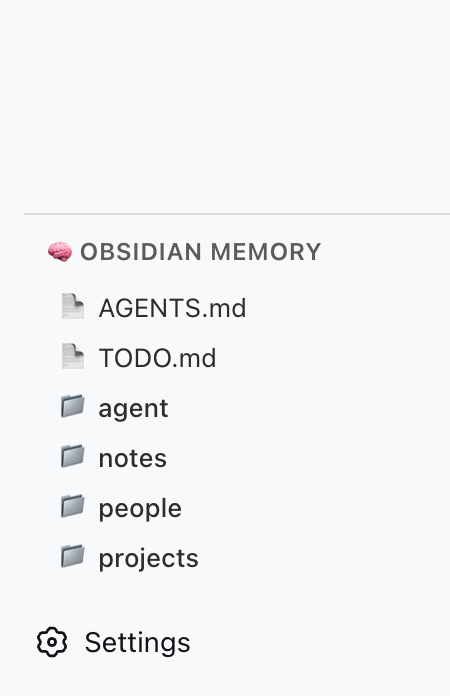
What it does
- 5 memory tools — AI can read, list, search, write, and append to your local vault
- Sidebar panel — a vault directory browser, opened from a sidebar panel icon; the panel mounts in the layout's
mainslot (see Known issues for version caveats) - No external server — talks directly to the file system via DSH's host runtime
- Codex-compatible — works with the
Codex/directory structure recommended by the community
Available Tools
| Tool | Action |
|---|---|
obsidian_memory_read |
Read a Markdown or text file |
obsidian_memory_list |
List files and directories |
obsidian_memory_search |
Full-text search across .md and .txt files |
obsidian_memory_write |
Write or overwrite a file |
obsidian_memory_append |
Append content to the end of a file |
Quick Start
1. Prepare your vault
Create a Codex/ folder anywhere on your machine (e.g. inside an Obsidian vault):
~/Documents/Obsidian Vault/
└── Codex/
    ├── AGENTS.md      ← AI operating instructions
    ├── TODO.md        ← pending tasks / open loops
    ├── people/
    ├── projects/
    ├── notes/
    └── daily/
2. Install the plugin
One command, from anywhere:
dsh plugin add dsh-client-ui-obsidian-memory        # npm release (recommended)
# or install straight from source:
dsh plugin add detongz/dsh-client-ui-obsidian-memory
The plugin ships a
dsh.bundlemanifest, sodsh plugin addboth installs the package and activates it as a profile layer (the bundledcordis.patch.ymlinserts theobsidian-memoryentry). No manualcordis.patch.ymledit is needed to load the plugin.
3. Configure your vault path
Point the plugin at your Codex/ folder. In your profile's cordis.patch.yml:
- id: obsidian-memory
  config:
    vaultPath: /Users/YOURNAME/Documents/Obsidian Vault/Codex
Replace vaultPath with the absolute path to your Codex/ folder.
Alternatively set the environment variable OBSIDIAN_VAULT_PATH.
4. Restart DSH
dsh web # or however you launch DSH
After restart:
- The 5 tools are available to the AI when
vaultPathis configured - The sidebar panel does not currently appear — see Known issues
Requirements & compatibility
| Requirement | Verified |
|---|---|
| Node.js | ≥ 22 (verified on 22.22.2). DSH itself does not start on Node 18 (node:util has no parseEnv) or Node 20 (silent exit), so no lower floor is claimed. |
| DSH | 0.1.1-rc.2, 0.1.2-alpha.5, 0.1.2-rc.1, 0.1.5-alpha.1, 0.1.5-alpha.2, 0.1.5-rc.1, 0.1.5-rc.2, 0.1.6-alpha.1 — all verified 9/9 |
| DSH profile | web (only the web profile was exercised) |
The exact per-version verdict lives in package.json under
dsh.compatibility.dshReleases. Every compatible entry is backed by a real
install → start → uninstall run in a throwaway DSH_HOME; 0.1.3-alpha.1 and
0.1.3-alpha.2 are declared unknown because they could not be tested (no
published artifact; a failing CLI install). See
docs/COMPATIBILITY.md for the full matrix, the evidence
method and the reproduction command.
Permissions and risk
The plugin runs with the DSH host process's privileges and touches the file system directly:
- File access — reads and writes inside the directory given by
vaultPath. Paths are sandboxed:..traversal outside the vault is refused. - Network — none. The plugin makes no outbound requests and bundles no server.
- Commands / credentials — none.
- Lifecycle scripts —
prepare(runsnpm run build). Declared explicitly; it only ever runsrolldownlocally. The builtlib/is committed, so a git-based install is self-contained.
Read access to a vault means the AI can read anything inside vaultPath. Point
it at a dedicated Codex/ folder rather than a whole personal vault.
Known issues
The sidebar panel now renders (since 0.4.1)
The client half registers a global panel icon in the sidebar.panellist slot
(id: "obsidian-memory", order: 50, label "Obsidian Memory") and the vault
browser in the layout's main slot under the same key. Clicking the sidebar
icon calls ctx.layout.selectPanel("obsidian-memory"), which opens the panel in
the central column. This works on DSH versions that declare the sidebar.panellist
list slot and the keyed main slot (verified on the 0.1.5 / 0.1.6 line).
On DSH versions released before those slots existed, the two ctx.slots.inject
calls are simply inert: the plugin still loads, the 5 obsidian_memory_* tools
still work, and the sidebar icon simply does not appear. No crash, no install
failure — only the panel is unavailable on those older builds.
The five obsidian_memory_* tools are unaffected on every version above.
Build reproducibility (fixed in 0.4.0)
Before 0.4.0 the committed lib/ depended on the absolute path of the checkout:
rolldown's //#region comment embedded the CSS virtual module id, lightningcss
mixed the filename into its [hash] CSS-module prefix, and its export order
was not stable. npm run build now produces byte-identical output from any
directory, so the committed bundle matches a rebuild at the same Commit.
Configuration
| Option | Type | Default | Description |
|---|---|---|---|
vaultPath |
string |
— | Absolute path to your Codex/ vault directory |
Environment variable fallback (optional):
export OBSIDIAN_VAULT_PATH=/Users/YOURNAME/Documents/Obsidian Vault/Codex
If neither vaultPath in config nor the env var is set, the plugin logs a warning and skips tool registration.
Architecture
┌─────────────────────────────────────────┐
│ DSH Web (browser)                       │
│  ┌─────────────────────────────────┐    │
│  │ sidebar.obsidian-memory          │    │
│  │  ┌─────────────────────────┐    │    │
│  │  │ 🧠 Obsidian Memory      │    │    │
│  │  │  — tool reference       │    │    │
│  │  │  — vault structure      │    │    │
│  │  └─────────────────────────┘    │    │
│  └─────────────────────────────────┘    │
└─────────────────────────────────────────┘
                    │
┌───────────────────▼─────────────────────┐
│ DSH Host (Node.js)                      │
│  • reads / writes local files           │
│  • registers 5 obsidian_memory_* tools  │
└─────────────────────────────────────────┘
                    │
┌───────────────────▼─────────────────────┐
│ Local File System                       │
│  ~/Documents/Obsidian Vault/Codex/      │
└─────────────────────────────────────────┘
| Component | Role |
|---|---|
Host (lib/index.js) |
Node side: registers tools, reads/writes vault files |
Client (lib/client.js) |
Browser side: sidebar panel with static tool reference |
| Vault | Data source: local Markdown files |
Troubleshooting
| Symptom | Cause | Fix |
|---|---|---|
| Plugin not in Settings → Plugins | dsh plugin add installed an older version (pre-0.3.2) as a plain dependency |
Reinstall: dsh plugin add dsh-client-ui-obsidian-memory@latest |
| Tools not available to AI | vaultPath not configured |
Set vaultPath in cordis.patch.yml or env var |
| Sidebar panel not visible | Official DSH does not declare the sidebar.obsidian-memory slot |
Known issue — see Known issues; the tools still work |
| "Path traversal detected" error | AI tried to access files outside vault | All paths are sandboxed to vaultPath |
Development
git clone https://github.com/detongz/dsh-client-ui-obsidian-memory.git
cd dsh-client-ui-obsidian-memory
npm install
npm run build        # outputs lib/index.js + lib/client.js (byte-reproducible)
npm run watch        # dev mode with auto-rebuild
Build artifacts:
lib/index.js— host entry (tool registration + file I/O)lib/client.js— browser bundle (DSH closure-factory format, CSS inlined)
Compatibility harness
scripts/verify-disposable-profile.mjs runs the full install → start (host tools
- client bundle) → uninstall lifecycle against a throwaway
DSH_HOMEand prints a JSON evidence record. It never touches a real profile.
node scripts/verify-disposable-profile.mjs \
  --dsh /path/to/node_modules/@deepseek-ai/dsh/lib/bin.js \
  --version 0.1.5-rc.1 \
  --out evidence-0.1.5-rc.1.json
Optional flags: --source <plugin dir> (defaults to the cwd) and
--pnpm <path>. It exits non-zero unless all nine checks pass. Results feeding
dsh.compatibility.dshReleases are recorded in
docs/COMPATIBILITY.md.
License
MIT
Links
More in this category
vectorize-io/hindsight#coding-agents★ 60916
Hindsight, agent memory that learns: long-term project memory with auto recall and retain, knowledge pages, deep reflection, and per-repo memory banks.
volcengine/OpenViking#examples/dsh-memory-plugin★ 42209
OpenViking memory and context bundle for DeepSeek Harness: pre-step auto-recall and profile injection, session capture, `viking://` URI guarding, and recall/write memory tools backed by an OpenViking server.
MemTensor/MemOS#memos-local-plugin★ 12392
Local-first memory plugin for DeepSeek Harness: layered L1/L2/L3 memory with automatic capture, manual memos_* retrieval tools, and a built-in memory viewer.
agentscope-ai/ReMe#dsh★ 3799
Connects DeepSeek Harness to ReMe's local-first, self-evolving personal knowledge base: automatically captures completed main-agent conversations as user-owned Markdown memory, searches conversations and source material through reme_search with BM25, optional embeddings, and wikilink expansion, and schedules daily memory consolidation.
zilliztech/memsearch#MemSearch★ 2873
Shared Markdown memory for DSH and other coding agents, with automatic capture, pre-step context injection, searchable recall, and memory-to-skill self-evolution through a review panel.
vshulcz/deja-vu#extensions/dsh★ 1544
Cross-session memory and context recovery across forty-five other coding agents (45+) on this machine, reading session files they already wrote before install (Claude Code, Codex, Cursor, Windsurf, Trae, Antigravity, VS Code Copilot Chat, opencode, OpenClaw, Hermes, Kimi, Qoder, Cline, Zed, Magpie and more): six tools (deja_recall, deja_session, deja_blame, deja_fix, deja_how, deja_remember), a /deja command, and optional automatic recall injected into runtime context. Local BM25 CLI/MCP index, no LLM, no embeddings, no network (dsh plugin --profile web add dsh-deja).
Community comments
Comments are public GitHub Discussions. Loading them connects to GitHub and Giscus; a GitHub account is required to post.