纯文本 dsh 模型的识图插件:粘贴图片自动由你配置的多模态模型转成文字——透明孪生路由、模型可自主调用识图工具、无内置密钥与中转。
安装
# npm 包(预构建)
dsh plugin --profile web add @iroam2375/dsh-autovision
# GitHub 源码(首次需按提示配置 allowBuilds 构建授权后重试)
dsh plugin --profile web add github:Junkrat9527/dsh-autovision
装任何插件都等于在你的机器上跑第三方代码,权限和你本人一样大——能读你的文件、用你的凭据、访问网络,工具审批管不到它。GitHub 来源的插件还会在安装时执行构建脚本——pnpm 默认拦截,所以安装可能停在 ERR_PNPM_GIT_DEP_PREPARE_NOT_ALLOWED 或 ERR_PNPM_IGNORED_BUILDS;dsh 会打印出需要添加的确切键名,把它加进该 profile 的 pnpm-workspace.yaml 的 allowBuilds 下,重跑一次即可装上。放行构建本身就是一次信任判断:请只安装可信来源,并尽量锁定 commit(github:owner/repo#sha)。
README
该插件的 README 只有英文版本。
Vision for text-only models inside DeepSeek Harness — paste an image, and a configured multimodal model transcribes it to text automatically. No model switching, no built-in keys, no relay.
dsh-autovision gives text-only models (DeepSeek, GLM, …) real image support in the DeepSeek Harness web UI. It registers a transparent twin provider for every pure-text model, routes image-bearing requests to a multimodal model you configure yourself, and feeds the transcription back as text — so the text model "sees" the image without you switching models or touching the request.
⭐ If this plugin saves you time, please star the repo — it helps other dsh users find it.
Why
DeepSeek Harness only lets a model receive images when that model declares image input (inputModalities). Pure-text models (e.g. deepseek-*, glm-*) reject image messages — pasting a screenshot into a session either fails silently or errors out.
Existing workarounds made you switch models, use a third-party relay, or hardcode a key. dsh-autovision keeps your setup: the plugin never ships a key, never proxies through a relay, and never touches your model config. It simply borrows the multimodal model you already configured in dsh settings to transcribe images to text.
Features
- Zero-friction, transparent — every pure-text model gets a
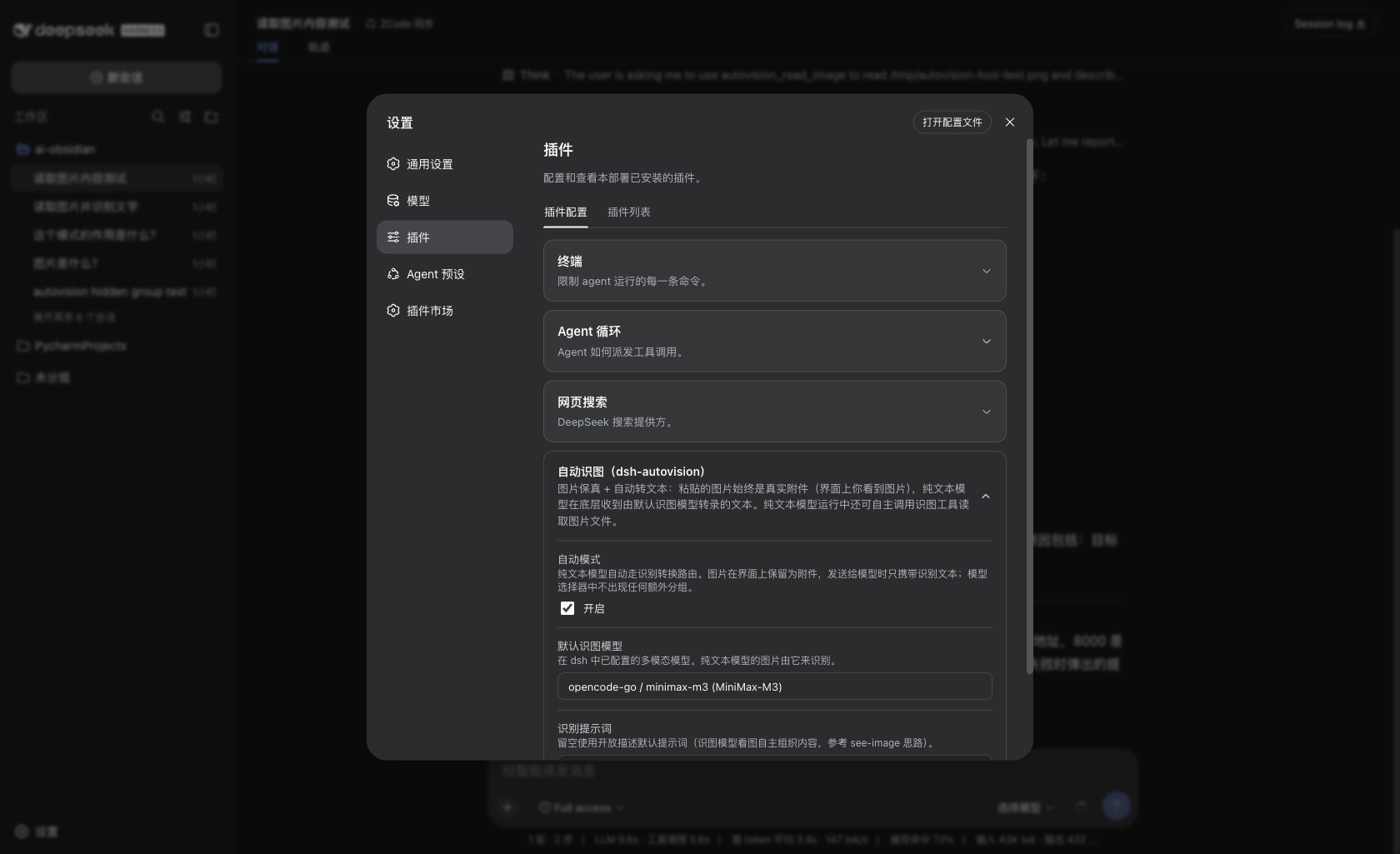
<provider>-autovisiontwin registered at runtime.agent/requestauto-redirects each request to the twin, so you never switch models and never editsettings.yaml. - Paste → text, automatically — attach an image in the composer; it is transcribed by your configured vision model and injected into the text model's context. The original image stays visible in the UI (thumbnail + message), and the durable log keeps the original.
- Clean model selector — the twin's
listModelsreturns[], so the model picker shows only your real models. No noise. - Agent-callable
autovision_read_imagetool — the model can actively read an image file during a run, with its own per-task prompt (e.g. "transcribe every word", "describe the UI state"). - No built-in credentials — the recognition engine is whatever multimodal model you configure as the default vision model in the plugin settings (e.g.
opencode-go,minimax-m3). No API key, no relay URL, nothing hardcoded. - Survives
dsh upgrade— pure plugin implementation, zero patches to dsh core, zero config rewrites.
Install
Requires dsh web ≥ 0.1.0-rc.6.
dsh plugin --profile web add @iroam2375/dsh-autovision
The npm package is published as
@iroam2375/dsh-autovision(the bare namedsh-autovisionis unavailable on npm — too similar to the existingdsh-auto-vision). The plugin itself is still addressed by its bundle iddsh-autovision.
Restart dsh web, open 设置 → 插件 (plugin settings) → Autovision, and pick a default vision model (any multimodal model available in your LLM providers, e.g. minimax-m3 / opencode-go). That model does all the transcribing; nothing else is configured.
If you develop locally, the standard bundle wiring is used: add
"dsh-autovision"todsh.profile.bundlesin your profile'spackage.json. Do not also manuallyinsertit intocordis.patch.yml— that producesduplicate loader entry id: autovisionat boot.
Usage
- Paste an image into any session and send — the text model receives a faithful text transcription instead of the raw image.
- Ask the model to read a file — the model may call
autovision_read_imagewith a file path (and its own instruction) and act on the result.
Configuration
| Setting | Meaning |
|---|---|
defaultVisionModel |
Multimodal model used for transcription (from your LLM providers). No vision model → transcription degrades to a fixed placeholder instead of crashing. |
prompt |
Optional custom instruction for the vision model. Empty → an open-ended description prompt (text, colors, shapes, UI elements, layout, state). |
targetProviders |
Optional whitelist of providers to wrap (default: all). |
How it works
- For each pure-text model, the plugin registers a twin adapter (
<provider>-autovision) that declaresinputModalities: ['text', 'image']. agent/request(prepended) redirects each request to the twin; the twin'sstream()walks every image block in the wire messages (including tool-result nesting), transcribes each via the configured vision model (LRU-cached), and forwards text upstream.read_imagetool calls pass because the twin declares image input.- A runtime wrapper on
ctx.llm.resolveModelInfolets you manually switch to any wrapped text model mid-session without rejection — the request still routes through the twin.
Known limits
- A brand-new session whose very first message already contains an image is silently skipped; send one text message first and everything after works.
- Images up to 5 MB (attachment-local default).
- Transcription latency is the vision model's latency (e.g. 6–9 s for
minimax-m3), mitigated by an LRU cache. - The settings page may show one bare provider row (
opencode-go-autovision) with no address — cosmetic only, does not affect function.
Roadmap
- npm publishing (coming).
License
链接
同类插件
liustack/modlens★ 4103
为纯文本模型架起视觉桥梁:粘贴图片,输出结构化 JSON 证据(OCR、版面、语义)。
ysr666/dsh-vision-router★ 1127
为纯文本 Agent 提供视觉能力:内置免 Key 视觉链 + 像素级视觉工具(看图问答、定位、裁剪、像素对比、取色、OCR、矢量化、抠图、截图);粘贴图片即可用。
Anionex/dsh-vision-toolkit★ 887
让纯文本模型处理视觉任务:粘贴图片后自动切换到 Vision Toolkit 变体,支持图片问答、多图比较、长截图 OCR、截图还原前端 UI、元素定位与像素对比。默认无需 API Key——图片经作者自建的免费服务处理,每台机器每天 100 张;也可改为指向自己的服务商。
dickpy/dsh-imagegen★ 99
面向 DSH Web GUI 的 AI 生图插件:通过可配置的 OpenAI 兼容端点(gpt-image-2 / gpt-image-1 / dall-e-3)实现文生图与图生图,提供 api_url/api_key 设置卡片与侧边栏分栏生图工作台。
fandc520/dsh-comfyui★ 93
让 DeepSeek Harness 的 Agent 直接驱动本地或远程 ComfyUI:comfyui_run / comfyui_object_info / comfyui_workflow 工具生成与编辑图像、视频,附带工作流库(图工作流提取:按分量 / 主流程 / 整体)、加载区分辨率自动匹配、实时队列、SDXL 与 Wan 2.1 模板、配套 skill 与同源媒体代理。
sunxin-ai/dsh-design-qa★ 44
给纯文本模型的设计稿保真判定:`deepseek_vision` 工具从任意 OpenAI 兼容视觉路由借来一只眼,让模型判断实现与设计稿是否一致——并附上支撑该判定的基准(4 组夹具、23 处注入缺陷、逐格原始输出)与其依赖的提问纪律。
社区评论
评论公开保存在 GitHub Discussions。加载评论会连接 GitHub 和 Giscus;发表内容需要 GitHub 账号。