Vision for text-only dsh models: paste an image and a configured multimodal model transcribes it to text automatically — transparent twin routing, an agent-callable read-image tool, no built-in keys or relay.
Install
# from npm (prebuilt)
dsh plugin --profile web add @iroam2375/dsh-autovision
# from GitHub (first run asks for allowBuilds approval — follow the hint, retry)
dsh plugin --profile web add github:Junkrat9527/dsh-autovision
Any plugin you install runs third-party code with your own permissions — it can read your files, use your credentials, and reach the network, and tool approvals don’t sandbox it. GitHub-sourced plugins also run build scripts at install time — pnpm blocks those until you allow them, so an install can stop with ERR_PNPM_GIT_DEP_PREPARE_NOT_ALLOWED or ERR_PNPM_IGNORED_BUILDS; dsh prints the exact key to add under allowBuilds in your profile’s pnpm-workspace.yaml, and the install works on the next run. Allowing a build is a trust decision: only install sources you trust, and pin a commit (github:owner/repo#sha).
README
Vision for text-only models inside DeepSeek Harness — paste an image, and a configured multimodal model transcribes it to text automatically. No model switching, no built-in keys, no relay.
dsh-autovision gives text-only models (DeepSeek, GLM, …) real image support in the DeepSeek Harness web UI. It registers a transparent twin provider for every pure-text model, routes image-bearing requests to a multimodal model you configure yourself, and feeds the transcription back as text — so the text model "sees" the image without you switching models or touching the request.
⭐ If this plugin saves you time, please star the repo — it helps other dsh users find it.
Why
DeepSeek Harness only lets a model receive images when that model declares image input (inputModalities). Pure-text models (e.g. deepseek-*, glm-*) reject image messages — pasting a screenshot into a session either fails silently or errors out.
Existing workarounds made you switch models, use a third-party relay, or hardcode a key. dsh-autovision keeps your setup: the plugin never ships a key, never proxies through a relay, and never touches your model config. It simply borrows the multimodal model you already configured in dsh settings to transcribe images to text.
Features
- Zero-friction, transparent — every pure-text model gets a
<provider>-autovisiontwin registered at runtime.agent/requestauto-redirects each request to the twin, so you never switch models and never editsettings.yaml. - Paste → text, automatically — attach an image in the composer; it is transcribed by your configured vision model and injected into the text model's context. The original image stays visible in the UI (thumbnail + message), and the durable log keeps the original.
- Clean model selector — the twin's
listModelsreturns[], so the model picker shows only your real models. No noise. - Agent-callable
autovision_read_imagetool — the model can actively read an image file during a run, with its own per-task prompt (e.g. "transcribe every word", "describe the UI state"). - No built-in credentials — the recognition engine is whatever multimodal model you configure as the default vision model in the plugin settings (e.g.
opencode-go,minimax-m3). No API key, no relay URL, nothing hardcoded. - Survives
dsh upgrade— pure plugin implementation, zero patches to dsh core, zero config rewrites.
Install
Requires dsh web ≥ 0.1.0-rc.6.
dsh plugin --profile web add @iroam2375/dsh-autovision
The npm package is published as
@iroam2375/dsh-autovision(the bare namedsh-autovisionis unavailable on npm — too similar to the existingdsh-auto-vision). The plugin itself is still addressed by its bundle iddsh-autovision.
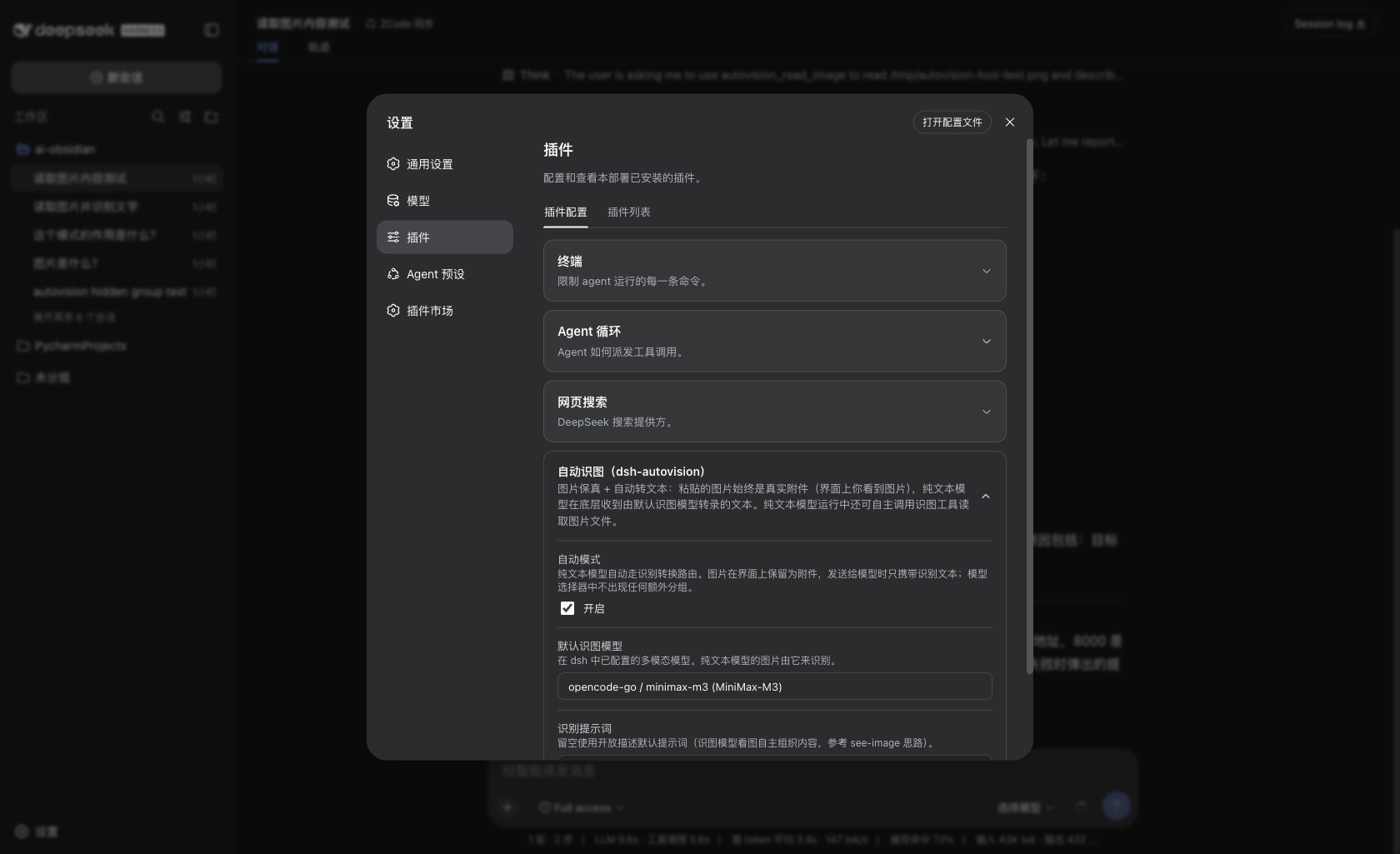
Restart dsh web, open 设置 → 插件 (plugin settings) → Autovision, and pick a default vision model (any multimodal model available in your LLM providers, e.g. minimax-m3 / opencode-go). That model does all the transcribing; nothing else is configured.
If you develop locally, the standard bundle wiring is used: add
"dsh-autovision"todsh.profile.bundlesin your profile'spackage.json. Do not also manuallyinsertit intocordis.patch.yml— that producesduplicate loader entry id: autovisionat boot.
Usage
- Paste an image into any session and send — the text model receives a faithful text transcription instead of the raw image.
- Ask the model to read a file — the model may call
autovision_read_imagewith a file path (and its own instruction) and act on the result.
Configuration
| Setting | Meaning |
|---|---|
defaultVisionModel |
Multimodal model used for transcription (from your LLM providers). No vision model → transcription degrades to a fixed placeholder instead of crashing. |
prompt |
Optional custom instruction for the vision model. Empty → an open-ended description prompt (text, colors, shapes, UI elements, layout, state). |
targetProviders |
Optional whitelist of providers to wrap (default: all). |
How it works
- For each pure-text model, the plugin registers a twin adapter (
<provider>-autovision) that declaresinputModalities: ['text', 'image']. agent/request(prepended) redirects each request to the twin; the twin'sstream()walks every image block in the wire messages (including tool-result nesting), transcribes each via the configured vision model (LRU-cached), and forwards text upstream.read_imagetool calls pass because the twin declares image input.- A runtime wrapper on
ctx.llm.resolveModelInfolets you manually switch to any wrapped text model mid-session without rejection — the request still routes through the twin.
Known limits
- A brand-new session whose very first message already contains an image is silently skipped; send one text message first and everything after works.
- Images up to 5 MB (attachment-local default).
- Transcription latency is the vision model's latency (e.g. 6–9 s for
minimax-m3), mitigated by an LRU cache. - The settings page may show one bare provider row (
opencode-go-autovision) with no address — cosmetic only, does not affect function.
Roadmap
- npm publishing (coming).
License
Links
More in this category
liustack/modlens★ 4103
Vision bridge for text-only models: paste an image, get structured JSON evidence (OCR, layout, semantics).
ysr666/dsh-vision-router★ 1127
Free vision for text-only agents: built-in keyless vision chain plus pixel tools (Q&A, grounding, crop, pixel diff, colors, OCR, SVG trace, cutout, screenshots); paste an image to use it.
Anionex/dsh-vision-toolkit★ 887
Vision for text-only models: paste an image and the model switches to a Vision Toolkit variant for image Q&A, multi-image comparison, long-screenshot OCR, screenshot-to-UI reproduction, element grounding, and pixel diff. No API key by default — images are processed by the author-hosted free service, 100 per machine per day; configurable to your own provider.
dickpy/dsh-imagegen★ 99
AI image generation for the DSH Web GUI: text-to-image and image-to-image through a configurable OpenAI-compatible endpoint (gpt-image-2 / gpt-image-1 / dall-e-3), with an api_url/api_key settings card and a sidebar split-pane generation studio.
fandc520/dsh-comfyui★ 93
Drive a local or remote ComfyUI server from DeepSeek Harness: comfyui_run / comfyui_object_info / comfyui_workflow tools generate and edit images and videos, with a workflow library (graph extraction: per component / main flow / all), a load area with resolution auto-match, a live queue, SDXL and Wan 2.1 templates, a companion skill, and a same-origin media proxy.
sunxin-ai/dsh-design-qa★ 44
Design-fidelity QA for text-only models: a `deepseek_vision` tool borrows an eye from any OpenAI-compatible vision route, so the model can judge whether an implementation matches its mock — shipped with the benchmark behind that judgement (four fixtures, 23 injected defects, raw transcripts) and the questioning discipline it depends on.
Community comments
Comments are public GitHub Discussions. Loading them connects to GitHub and Giscus; a GitHub account is required to post.