Prepares a repository README before pushing: scans repo facts, renders banner and process-diagram images (needs Pillow and the Microsoft YaHei font), lints layout and section numbering, then commits and pushes with retry.
Install
# from GitHub (first run asks for allowBuilds approval — follow the hint, retry)
dsh plugin --profile web add github:zz12hui/dsh-github-readme
Any plugin you install runs third-party code with your own permissions — it can read your files, use your credentials, and reach the network, and tool approvals don’t sandbox it. GitHub-sourced plugins also run build scripts at install time — pnpm blocks those until you allow them, so an install can stop with ERR_PNPM_GIT_DEP_PREPARE_NOT_ALLOWED or ERR_PNPM_IGNORED_BUILDS; dsh prints the exact key to add under allowBuilds in your profile’s pnpm-workspace.yaml, and the install works on the next run. Allowing a build is a trust decision: only install sources you trust, and pin a commit (github:owner/repo#sha).
README
This plugin publishes its README in Chinese only.
1. 它是什么
一个 DSH 工具插件:把「仓库要上 GitHub,README 还是一片乱」这件事变成固定流程。四个工具覆盖四步:先把仓库事实扫出来,按编号骨架重写 README,用 Pillow 出首图和过程图,推之前检查图片链接和章节标号,最后带重试地 commit + push。
用一句话说清楚它管什么:
- 管 事实:
readme_scan只读仓库,把 package.json、目录树、现有图片、环境变量、git 状态一次拿全,不靠模型记忆编数字。 - 管 结构:编号章节 1..N、参数表格化、首图当封面,和 DSH Market 上的仓库保持同一套版式。
- 管 素材:
readme_assets本地渲染 1200×600 首图和自适应高度的过程图,四种主题色,不依赖在线设计工具。 - 管 推送:
readme_publish先git status再看 diff,只提交该提交的;push 遇到网络错误自动退避重试,绝不 force。
2. 一次优化长什么样
同一份仓库信息,优化前后差在这几块:
| 位置 | 优化前 | 优化后 |
|---|---|---|
| 首屏 | 直接 # 项目名 + 一段文字 |
首图 banner + 一行居中 badges |
| 结构 | 想到哪写到哪,没有序号 | ## 1. 它是什么 … ## N. License,编号连续 |
| 参数 | 大段 bullet 罗列 | 表格:变量 / 默认值 / 作用 |
| 流程 | 一段文字描述 | 过程图 + 编号步骤,两步一一对应 |
| 推送前 | 直接 push | readme_lint + deai_audit 过了再 push |
这个仓库自己的 README 就是这么生成的:banner 和下面第 4 节的过程图,都是 readme_assets 渲染的。
3. 案例
这两个仓库是真实用这套流程重做的,点进去可以直接对照:
| B 站视频总结 | 文案去 AI 味审计 |
|---|---|
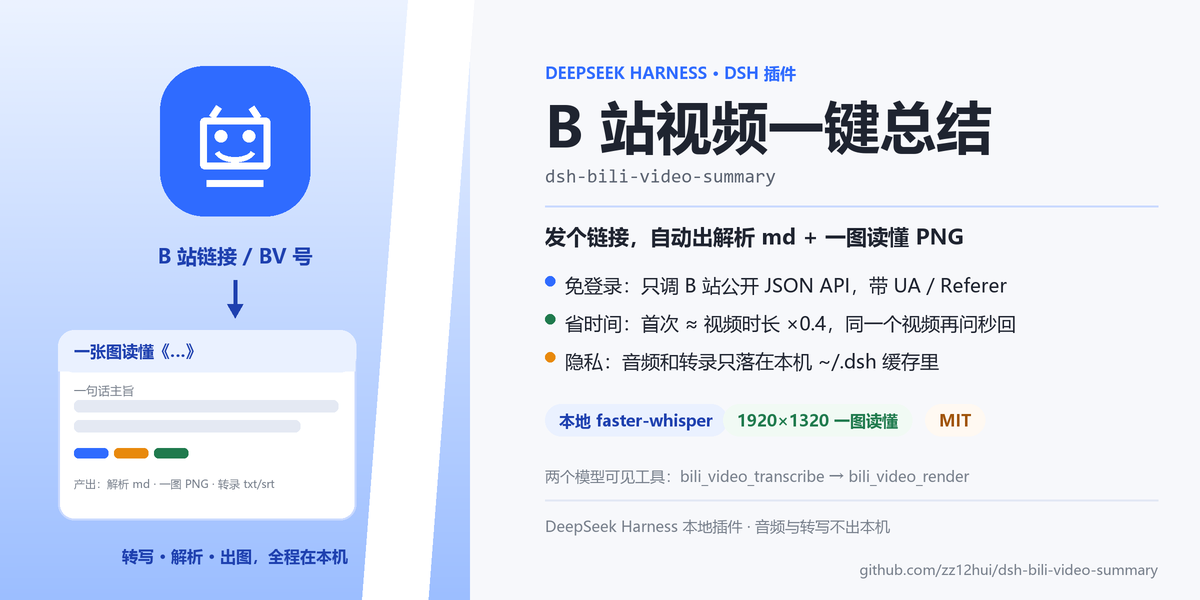 |
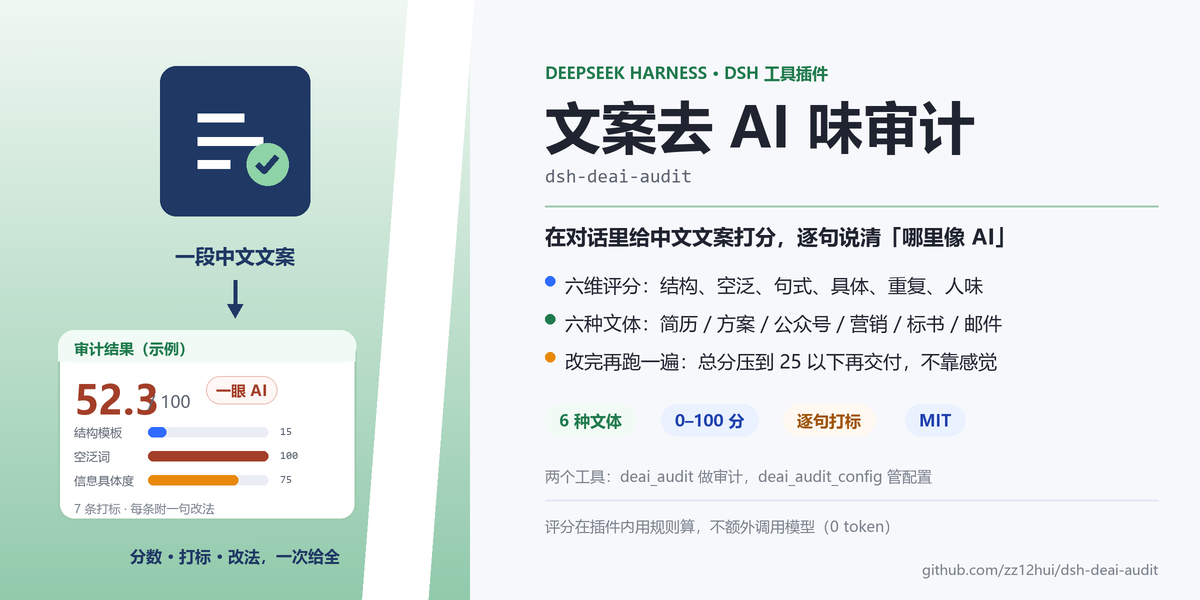 |
改了什么:
| 项目 | B 站视频总结 | 文案去 AI 味审计 |
|---|---|---|
| 优化前 | README 103 行,无首图、无过程图,章节没有编号 | README 59 行,无首图、无过程图,按功能平铺 |
| 首图 | 蓝色主题,左栏「B 站链接 → 产出小卡」 | 绿色主题,左栏「文案 → 审计结果小卡」 |
| 过程图 | 解析过程 5 步 + 产物条 + 隐私边界 | 审计过程 5 步 + 四档分数 + 设计取舍 |
| 结构 | 11 个编号章节 + 工具/配置/耗时表 | 11 个编号章节 + 六维表 + 六文体权重表 |
| 自检 | deai_audit 12.9 分(很自然) | deai_audit 20.8 分(方案汇报) |
| commit | 772d868 | 7191cdc |
两个案例走的是同一套动作:扫描 → 重写结构 → 出图 → 排版校验 → 文案自检 → 推送。
4. 优化流程
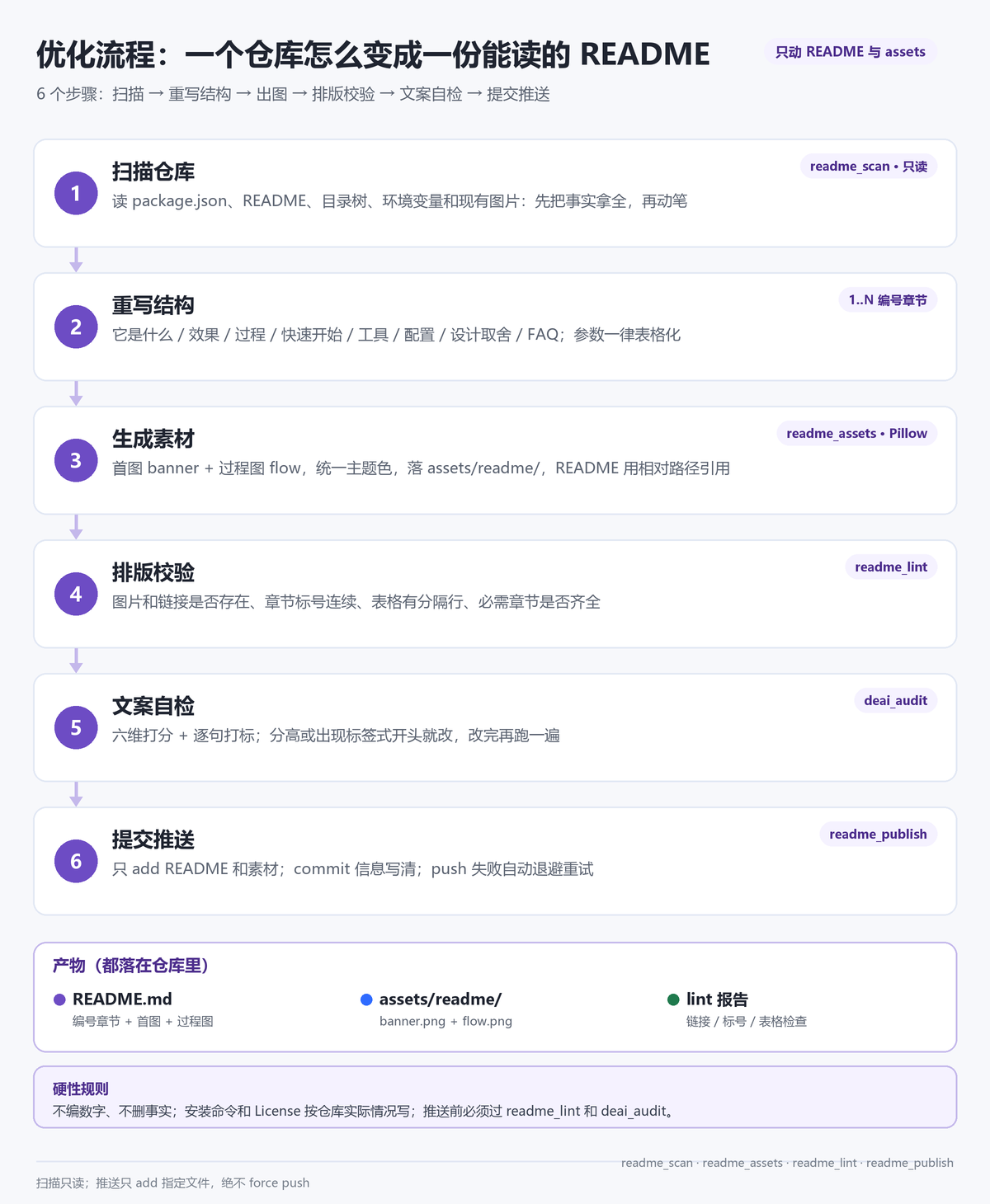
对应到工具就是固定顺序:
- 扫描仓库(
readme_scan):读 package.json、README、两层目录树、现有图片、代码里的环境变量、git remote/分支/改动。只读,不改任何文件。 - 重写结构:按
references/README-模板.md的编号骨架填内容;不适用的小节删掉,编号保持连续。 - 生成素材(
readme_assets):给一份 plan,渲染banner.png和flow.png到assets/readme/。首图有 10 种风格、每种 5–6 套配色,不指定就随机组合;图片是 2 倍超采样后缩放的,中文用微软雅黑,避免糊。 - 排版校验(
readme_lint):查图片/相对链接是否存在、## N.编号是否连续、表格有没有|---|分隔行、必需章节和首图是否齐全。 - 文案自检(
deai_audit):六维打分 + 逐句打标,先看「标签式开头 / 空泛词 / 一眼 AI」三类,改完复检到 25 分以下。 - 提交推送(
readme_publish):先dryRun看 diff stat,再正式 add → commit → push。
5. 四个工具
| 工具 | 做什么 | 关键参数 |
|---|---|---|
readme_scan |
扫描仓库事实,给写 README 用 | path(本地仓库)或 url(GitHub 地址,会浅克隆) |
readme_assets |
渲染首图 / 过程图(10 种首图风格,随机配色) | plan(必含 outDir;style、palette、seed、banner、flow 见下) |
readme_lint |
README 排版体检 | path(README.md 或仓库根);required(必需章节关键词) |
readme_publish |
commit + push(带重试) | path、message;可选 branch、files、dryRun、retries |
readme_assets 的 plan 大致长这样(完整字段见 references/素材-plan示例.json):
{
  "outDir": "<仓库根>/assets/readme",
  "style": "split",
  "palette": "violet",
  "seed": 42,
  "banner": {
    "title": "GitHub 仓库 README 优化",
    "mono": "dsh-github-readme",
    "headline": "上传 GitHub 之前,先把 README 收拾干净",
    "bullets": ["首图 + 过程图:Pillow 渲染", "编号结构 1..N", "推前自检"],
    "chips": [{ "text": "仓库扫描" }, { "text": "首图 / 过程图", "color": "blue" }],
    "leftTop": "一个本地仓库 / GitHub 链接",
    "leftCard": { "title": "README 优化后", "chips": ["banner.png", "flow.png", "lint 通过"] }
  },
  "flow": {
    "title": "优化流程:一个仓库怎么变成一份能读的 README",
    "subtitle": "6 个步骤:扫描 → 重写 → 出图 → 校验 → 自检 → 推送",
    "steps": [{ "title": "扫描仓库", "tag": "readme_scan", "desc": "读事实,不改文件" }]
  }
}
style / palette / seed 都可以省:省掉 style 就随机风格,省掉 palette 就在该风格的配色里随机,seed 用来复现同一张图。
6. 默认规则:上传 GitHub 前自动走这套
插件仓库里带了一份技能 github-readme-optimize(skill/ 目录)。装好后,DSH 在遇到「上传 GitHub / 推仓库 / 发插件 / 优化 README」这类任务时会按这套流程执行。
想让它对所有会话默认生效,把下面这段加进 ~/.dsh/AGENTS.md:
## GitHub 上传前默认优化 README

- 只要要往 GitHub 推内容(新建仓库、git push、发布插件),先按 `github-readme-optimize` 技能优化 README 再推。
- 顺序:readme_scan → 写编号 README → readme_assets 出图 → read_image 自查 → readme_lint → deai_audit → readme_publish。
- 工具没加载(旧会话):直接跑 `~/.dsh/profiles/desktop/node_modules/dsh-local-github-readme/scripts/render_readme_assets.py`。
- 例外:用户明确说「先别改 README,直接推」。
7. 快速开始
6.1 前置条件
- Windows 10 / 11:图片渲染用的是系统自带微软雅黑(
C:\Windows\Fonts\msyh.ttc),其他系统要改字体路径。 - DSH 桌面版:已实测 0.2.1-rc.2,需要支持
ctx.tools工具注册的版本。 - Python + Pillow:优先用 DSH 自带 Python 运行时(自带 Pillow);也可用
GITHUB_README_PYTHON指定解释器。 - git:
readme_publish用本机 git 和已保存的凭据推送。
6.2 安装插件
命令行走 profile 的插件管理器安装(DSH 桌面版一般用 desktop,dsh web 用 web):
dsh plugin --profile desktop add github:zz12hui/dsh-github-readme
DSH 桌面版正在运行时,命令行不会改应用的 profile:先退出桌面版再执行,或等上架后在市场里一键安装。
装完重启 DSH(关闭窗口含托盘退出 → 重开 → 恢复会话)。想让「上传 GitHub 前默认优化 README」对所有会话生效,再装技能、加 AGENTS.md 规则,见下面第 3、4 条。
git clone https://github.com/zz12hui/dsh-github-readme.git
把仓库内容复制到
%USERPROFILE%\.dsh\profiles\desktop\node_modules\dsh-local-github-readme\。目录名保持dsh-local-github-readme(和package.json的name一致)。在
%USERPROFILE%\.dsh\profiles\desktop\cordis.patch.yml末尾追加:- insert: - id: github-readme-panel name: 'dsh-local-github-readme'装技能(可选但推荐):把
skill/下的内容复制到%USERPROFILE%\.dsh\skills\github-readme-optimize\;用dsh plugin add装的,skill/在%USERPROFILE%\.dsh\profiles\desktop\node_modules\dsh-local-github-readme\skill\。在
~/.dsh/AGENTS.md末尾加上第 6 节的默认规则。重启 DSH(关闭窗口含托盘退出 → 重开 → 恢复会话)。插件和技能都在启动时加载,刷新页面不会加载它们。
6.3 验证
重启后让助手「扫一下这个仓库的 README 情况」,应该看到 readme_scan 被调用;再让它「给这个仓库出首图和过程图」,应该调用 readme_assets。
8. 素材规范
首图有 10 种风格,每种自带 5–6 套配色;调用时不指定 style / palette 就随机组合,返回里会带上实际用的 style、palette、seed,用同一个 seed 能复现同一张图。
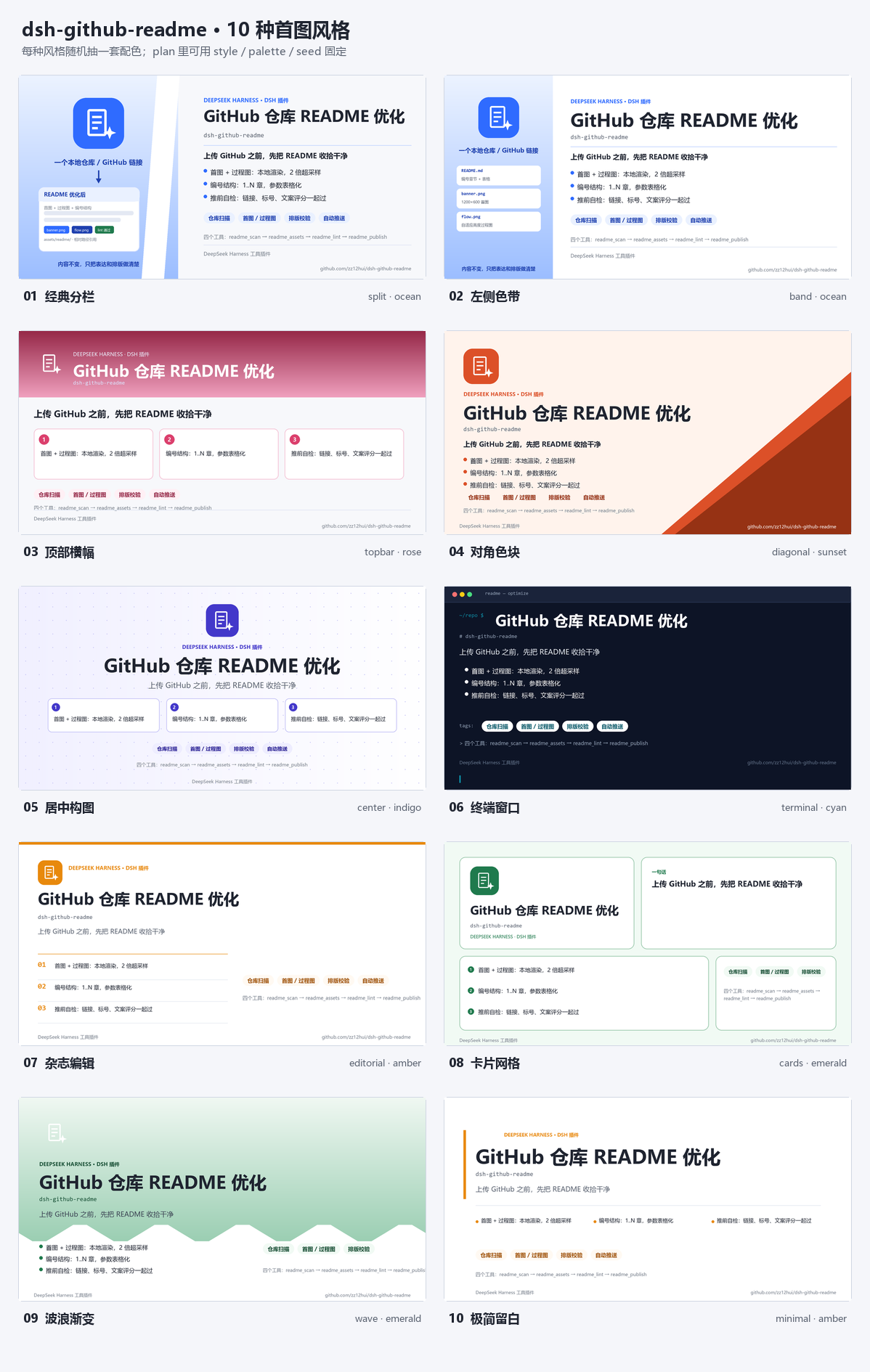
| # | 风格 id | 名称 | 适合 |
|---|---|---|---|
| 01 | split |
经典分栏 | 通用款,左栏图标 + 小卡,右栏标题与卖点 |
| 02 | band |
左侧色带 | 工具类,左栏列文件清单 |
| 03 | topbar |
顶部横幅 | 内容多,卖点拆成三张卡片 |
| 04 | diagonal |
对角色块 | 想要强视觉记忆点 |
| 05 | center |
居中构图 | 品牌型项目,图标标题居中 |
| 06 | terminal |
终端窗口 | 开发者工具 / CLI |
| 07 | editorial |
杂志编辑 | 文档型项目,大标题 + 编号条目 |
| 08 | cards |
卡片网格 | 信息多,四格各管一摊 |
| 09 | wave |
波浪渐变 | 偏产品 / 创意 |
| 10 | minimal |
极简留白 | 标题是主角,克制 |
配色 10 套:ocean 蓝 / emerald 绿 / violet 紫 / amber 琥珀 / rose 玫红 / cyan 青 / indigo 靛蓝 / slate 石板灰 / lime 青柠 / sunset 落日橙。
| 项 | 规范 |
|---|---|
| 首图 | 1200×600 PNG;10 种风格,每种 5–6 套配色;默认随机 |
| 随机规则 | 不传 style → 随机风格;不传 palette → 该风格可选配色里随机;seed 固定组合 |
| 过程图 | 宽 1200,高度随步骤数自适应(3–6 步),配色跟随同一套 palette |
| 旧字段兼容 | theme(blue/green/violet/orange)自动映射到对应配色 |
| 图标 | play / check / doc / branch / bolt / puzzle 六种内置字形 |
| 输出 | assets/readme/banner.png、flow.png,README 用相对路径引用 |
换风格后想看看全部效果,直接跑渲染器:--gallery out.png 出总览图,--list-styles 打印风格与配色清单。
9. 配置与目录
| 变量 | 默认值 | 作用 |
|---|---|---|
GITHUB_README_HOME |
~/.dsh/github-readme |
数据根目录(克隆缓存、渲染临时文件) |
GITHUB_README_PYTHON |
DSH 自带 Python | 指定渲染用的解释器 |
dsh-github-readme/
├── index.js                     # apply(ctx) 注册 4 个工具;扫描/校验/推送逻辑
├── cordis.patch.yml             # DSH 启动时的插件注册行
├── scripts/render_readme_assets.py  # 首图 / 过程图渲染器(Pillow,2x 超采样)
├── references/
│   ├── README-模板.md            # 编号章节骨架 + 推送前检查清单
│   └── 素材-plan示例.json         # readme_assets 的 plan 模板
├── skill/                       # 配套技能 github-readme-optimize
├── locale/                      # 插件清单里的中文名和描述
├── assets/readme/               # 本仓库自己的首图与过程图
├── icon.svg
└── package.json
10. 设计取舍
- 扫描只读:
readme_scan不改任何文件,克隆也落在~/.dsh/github-readme/repos,不污染工作区。模型先拿事实,再动笔。 - 图片本地渲染:不调在线设计工具,Pillow 直接画,2 倍超采样后缩小;字体用系统雅黑,中文不会变方块。
- lint 用正则而不是 Markdown 解析器:只查真正会翻车的项——图片/链接目标是否存在、编号是否连续、表格有没有分隔行、首图是否在首屏。够用,且零依赖。
- push 带退避重试:本机访问 GitHub 时好时坏,网络类错误自动重试 3–4 次;认证类错误直接报错,不做无意义重试。
- 绝不 force push:工具只做
git add/commit/push origin HEAD:branch,没有--force参数。
11. 卸载与回滚
删掉 cordis.patch.yml 末尾的 github-readme-panel 插入块和 node_modules\dsh-local-github-readme 目录;技能删掉 ~/.dsh/skills/github-readme-optimize;AGENTS.md 里的默认规则按需删除。重启 DSH 后工具消失。数据目录 ~/.dsh/github-readme 可保留(克隆缓存),也可整个删掉。
12. 常见问题
重启后工具没出现? host 插件只在 DSH 启动时注册,必须关闭窗口含托盘退出再重开,刷新页面不算。
渲染报错找不到模块? 说明用的 Python 没装 Pillow。优先让它用 DSH 自带 Python,或用 GITHUB_README_PYTHON 指向装了 Pillow 的解释器。
push 一直失败? 看 readme_publish 返回的 error:认证问题先确认本机 git 凭据(git push 能推才行);网络问题会自动重试,仍失败就手动重跑。
首图上的标题被截断? 渲染器会自动缩字号,但标题最好控制在 12 个汉字以内;长标题改成短标题 + 副标题。
想固定首图风格? plan 里传 style + palette(可选 seed),返回值会带上实际使用的组合;不传就每次随机,适合一仓一图不重样。
能新建 GitHub 仓库吗? 不能。readme_publish 只推已有的 remote;新建仓库请在 GitHub 网页或 gh 里做。
13. License
MIT © 2026 zz12hui
Links
More in this category
tt-a1i/archify#integrations/deepseek-harness★ 87151
Generate validated, self-contained interactive architecture, workflow, sequence, data-flow, and lifecycle diagrams from repositories or system descriptions.
dream-num/dsh-univer-office★ 581
Give DeepSeek Harness a real office environment. Univer Office Plugin brings spreadsheets, docs, slides, canvases, relational tables, and more into one runtime — with connected data, validation, versioned changes, and isolated worktrees for multi-agent collaboration.
ECNU/EduWork#dsh-knowledge-studio★ 214
A workspace-based Studio for source-grounded reports, slides, tables, mind maps, quizzes, flashcards, audio and video, using DSH models and shared artifact services. Office generation requires Python 3.12+ with its dependencies and DSH_OFFICE_PYTHON configured; media rendering requires Chromium, and local ASR additionally requires whisper.cpp and a model.
PerryLink/dsh-industry-research★ 211
Deterministic industry research reports for DeepSeek Harness — company and industry research flows produce structured, verifiable reports from staged evidence.
HuanLinOTO/dsh-plugin-mineru★ 48
Expose MineRU document parsing tools to the model.
PolinniZhong/dsh-knit★ 47
Puts the Markdown documents, source files, images and video that already exist anywhere in the session workspace into the DSH sidebar, ranked by relevance to the current conversation. The default lexical mode matches your recent messages against title, summary and body locally with IDF weighting (BM25) — no model calls, no network, nothing leaves the machine. The list comes from scanning the workspace rather than from a recent-files list, so restarting DSH or opening a new session does not empty it. Results are organised into a three-tier reading order (primary / supporting / related) with a verifiable reason on every row — which field matched, which document cites this one — and one click opens an in-place preview: Markdown as rendered text, relative-path images actually drawn, source code with the host's own syntax highlighting, video streamed over HTTP Range. The same Context Pack is exposed to the agent as a knit_docs tool. Later versions added read evidence and lifecycle tracking (attribution is frozen at the moment of reading), pin / exclude (exclusion applies before retrieval, and is undoable), relation evidence (references / imports / tests, with line numbers) and an incremental index reused across restarts. Since v0.23 there is also an optional hybrid mode: it is off by default and only runs once you configure an Ollama or OpenAI-compatible embedding provider yourself. When it runs, what leaves the machine is your query text plus each candidate file's title and summary — a Markdown summary is an excerpt of the body's first paragraph (at most 60 characters), a code file's summary is its workspace-relative directory, and an image or video contributes its file name; full bodies and absolute paths are not sent, and a loopback provider keeps everything on this machine. Since v0.24 it also associates uncommitted changes: a read-only git status (fixed argv, no shell, whitelisted child-process environment) combined with the same reference / import / test / mention evidence shows which files a change is likely to drag along, and it is off by default. The benefit of semantic retrieval still awaits a real-provider run, so no recall improvement is claimed.
Community comments
Comments are public GitHub Discussions. Loading them connects to GitHub and Giscus; a GitHub account is required to post.