Puts the Markdown documents, source files, images and video that already exist anywhere in the session workspace into the DSH sidebar, ranked by relevance to the current conversation. The default lexical mode matches your recent messages against title, summary and body locally with IDF weighting (BM25) — no model calls, no network, nothing leaves the machine. The list comes from scanning the workspace rather than from a recent-files list, so restarting DSH or opening a new session does not empty it. Results are organised into a three-tier reading order (primary / supporting / related) with a verifiable reason on every row — which field matched, which document cites this one — and one click opens an in-place preview: Markdown as rendered text, relative-path images actually drawn, source code with the host's own syntax highlighting, video streamed over HTTP Range. The same Context Pack is exposed to the agent as a knit_docs tool. Later versions added read evidence and lifecycle tracking (attribution is frozen at the moment of reading), pin / exclude (exclusion applies before retrieval, and is undoable), relation evidence (references / imports / tests, with line numbers) and an incremental index reused across restarts. Since v0.23 there is also an optional hybrid mode: it is off by default and only runs once you configure an Ollama or OpenAI-compatible embedding provider yourself. When it runs, what leaves the machine is your query text plus each candidate file's title and summary — a Markdown summary is an excerpt of the body's first paragraph (at most 60 characters), a code file's summary is its workspace-relative directory, and an image or video contributes its file name; full bodies and absolute paths are not sent, and a loopback provider keeps everything on this machine. Since v0.24 it also associates uncommitted changes: a read-only git status (fixed argv, no shell, whitelisted child-process environment) combined with the same reference / import / test / mention evidence shows which files a change is likely to drag along, and it is off by default. The benefit of semantic retrieval still awaits a real-provider run, so no recall improvement is claimed.
Install
# from npm (prebuilt)
dsh plugin --profile web add dsh-knit
# from GitHub (first run asks for allowBuilds approval — follow the hint, retry)
dsh plugin --profile web add github:PolinniZhong/dsh-knit
Any plugin you install runs third-party code with your own permissions — it can read your files, use your credentials, and reach the network, and tool approvals don’t sandbox it. GitHub-sourced plugins also run build scripts at install time — pnpm blocks those until you allow them, so an install can stop with ERR_PNPM_GIT_DEP_PREPARE_NOT_ALLOWED or ERR_PNPM_IGNORED_BUILDS; dsh prints the exact key to add under allowBuilds in your profile’s pnpm-workspace.yaml, and the install works on the next run. Allowing a build is a trust decision: only install sources you trust, and pin a commit (github:owner/repo#sha).
README
Task-aware workspace context retrieval and lifecycle tracking for AI coding agents.
面向 AI Coding Agent 的任务感知工作区上下文检索与生命周期追踪。
Knit is the layer between the task you are on and your whole workspace: it finds the most relevant documents, source files and media, organises them into Primary / Supporting / Related context (the Context Pack) for both the panel and the agent, and keeps tracking whether they were read, and whether they changed after being read.
Find → Organise → Track, all of it plain string work on your own machine in the default lexical mode — no model calls, no network, no latency, nothing leaves the machine. The optional hybrid mode is off by default: only if you configure a provider and switch to hybrid by hand does anything leave the machine, and what leaves is your query text plus each candidate file's title and summary (never full bodies or absolute paths) — with two easy-to-miss caveats spelled out under What hybrid mode actually sends below.
                       Current task
                            │
                    Workspace retrieval
            ┌───────────────┼───────────────┐
            ▼               ▼               ▼
         Primary        Supporting        Related
            └───────────────┼───────────────┘
                            ▼
                      Context Pack ──►  the `knit_docs` tool (for the agent)
                            ▼
                        Agent reads
                            ▼
                 Read Evidence · Context Epoch
                            ▼
                    Workspace changes
                            ▼
                   Re-read · Lifecycle
It is not a smarter recent-files list, and it is not a code browser. A recent-files list records what you happened to open and what is newest; Knit answers which things in this project are worth looking at first for the task at hand — and what happened to them after they were read.
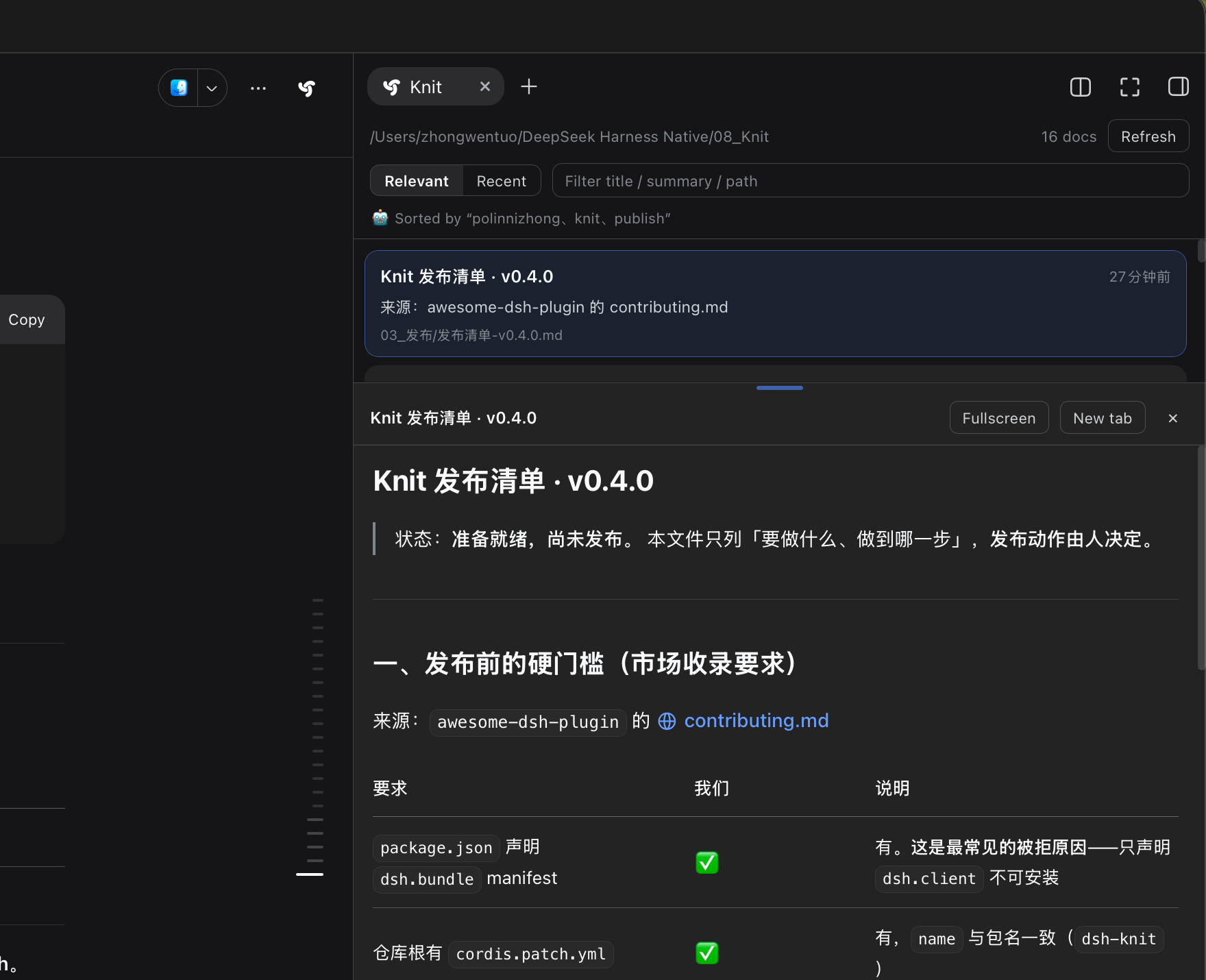
Screenshot from a real machine, not a mock-up: the same workspace, this one left on the Code tab —
since v0.19 source files are first-class citizens, just like Markdown.
The sub-row under each row says how it matched (a filename hit, a path hit, …) and which passage
of that file matched this query (命中段 24–38).
Click a row to expand the preview in place, stopped right on that passage: here
knit/src/host/passage.js, line numbers plus syntax highlighting, with the matched lines under a grey
band; the preview header holds only the path and four actions (copy / full screen / open locally / close).
The header holds only the path, one count and two toggles; whether the list runs by
relevance or by newest-first is decided by that pair of tabs on the left.
Since v0.14 the list is always one column: the rank number sits in its own column on the far left
(vertically centred on the title's first line), then Primary dot + title + relative time (time on the
right), then the summary. The path lives in the preview header only — the directory collapses to a …/ placeholder (hover the path for the full relative path); rows no longer repeat it.
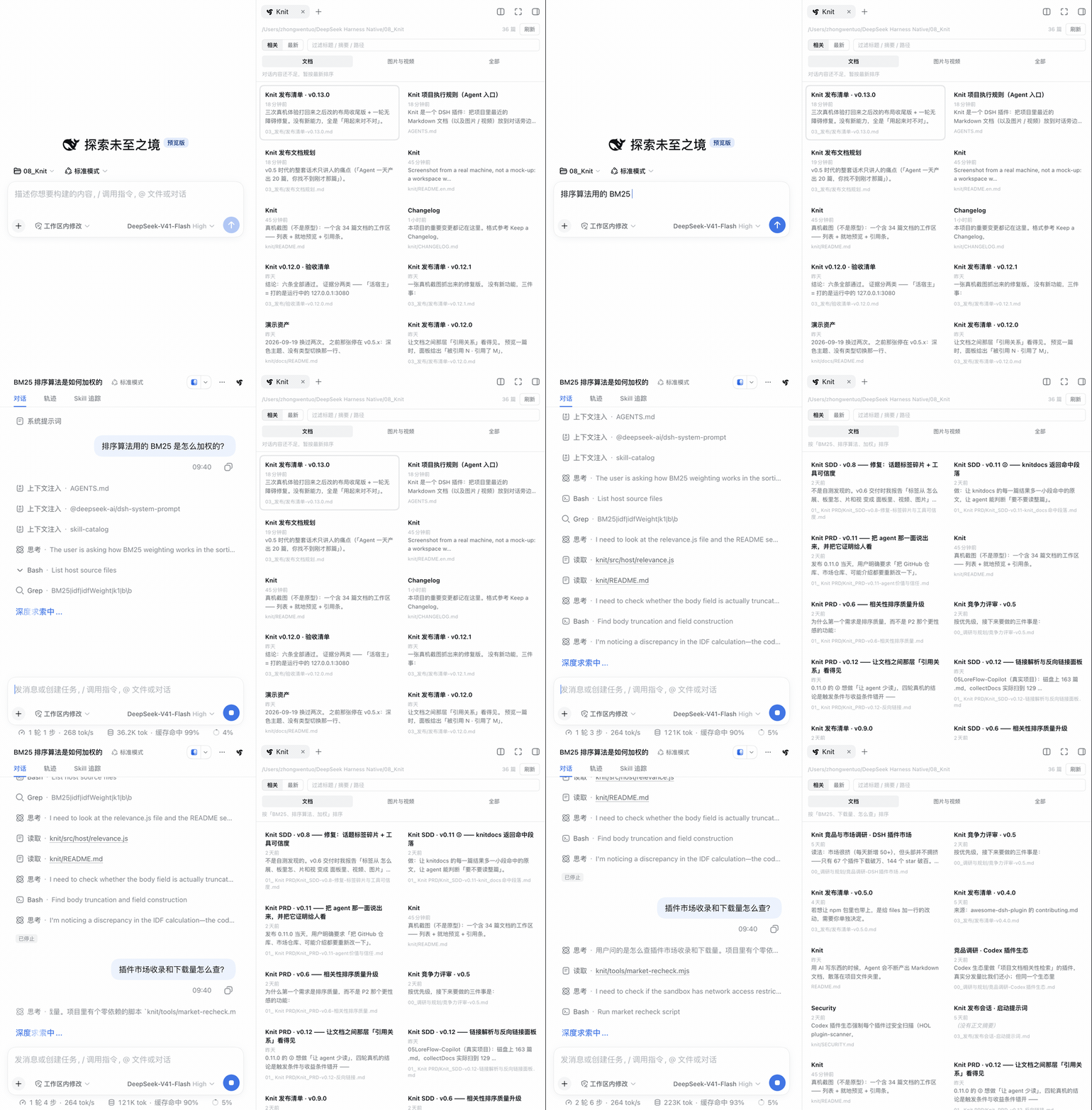
Order follows the conversation — same workspace, in a separate session: the conversation had been about a release checklist, so the top of the list was that family of documents; ask "how is BM25 weighted for the ranking?" and the list swaps over to the BM25 family, keeping the tier headings and the continuous rank numbers across all tiers, with a one-line "why" under each row (what matched, how, and which passage). ⚠️ The panel polls every 5 seconds, so the re-rank is not instantaneous: in this take the top rows only swapped once that turn had moved along (the tens of seconds in between were cut out). The GIF runs faster than real time.
Scans Markdown / images / video across the project folder · Order follows the conversation · No model calls, no network in the default lexical mode
dsh plugin --profile web add dsh-knit
Why it exists
An agent produces 20 documents a day, and you cannot find the one from a minute ago.
That is the problem it started from: output got faster than anyone can browse directories. DSH's built-in "recent files" only records what you opened; once a turn ends, the earlier ones sink out of sight.
Knit asks a different question: not "what is newest", but "what is relevant to what I am doing". It scans the whole workspace (not just what this turn produced) and ranks by what you are talking about — restart DSH, open a new session, come back the next day, and it is still there.
Then the problem grew one step further: when you actually change a feature, the first thing worth reading is usually not a document but a few lines of source. That is what v0.19 added. And after that, "ranked first" stopped being enough — of the things it ranked, did the agent actually read them? Did they change afterwards? v0.15–v0.18 filled in that layer.
Three words: Find (scan the workspace, rank by the current task) → Organise (three tiers, each with its reason) → Track (read or not, changed or not).
It is not a recent-files list, and not a code browser
Both comparisons catch one surface of Knit and miss the question it answers.
| Recent-files list | Code browser | Knit | |
|---|---|---|---|
| Scope | What you happened to open | A directory tree | The whole workspace: documents / code / images / video |
| Order | Modified time | You scroll it yourself | Relevance to the current task (BM25 + IDF, computed locally) |
| Output | One flat list | The one file you opened | Primary / Supporting / Related, each saying why it is there |
| For whom | You | You | You and the agent — the same Context Pack, through knit_docs |
| Afterwards | Nothing | Nothing | Was it read? Did it change after being read? (Read Evidence + lifecycle) |
The three differences that matter:
- Scope: a recent-files list only records the files you opened; Knit scans the whole project folder — restart DSH, open a new session, come back days later, and it is still there.
- Order: it sorts by time; Knit sorts by what you are talking about — discuss architecture and
the architecture docs rise; discuss a loader bug and
plugin-loader.tsrises. - It does not stop at finding: after finding comes organising (three tiers, each with a verifiable reason) and tracking (which were really read, and whether they changed).
No model calls, no network in the default lexical mode: all plain string work, no latency, no cost,
nothing leaves the machine. Optional hybrid mode is off by default, and a loopback provider keeps
everything on this machine. ⚠️ The benefit of semantic retrieval still awaits a real-provider run
(tracked in-repo as value-evidence: pending) — no recall improvement is claimed.
What hybrid mode actually sends
This section is written from recorded request bodies, not from design intent — for the exact
commands and per-claim assertions see
docs/evaluations/hybrid-retrieval.md (the audit script
tools/semantic-request-audit.mjs records the body of every request and then checks it claim by claim).
What leaves the machine (the request body has exactly two top-level fields, { model, input }, and
input is a list of strings):
| # | What | Exact boundary |
|---|---|---|
| ① | Your query text | On the panel path it is the latest user message with substance, truncated to 80 characters; on the knit_docs(query=…) path up to 2000. Re-sent on every refresh (document vectors are cached, the query is not) |
| ② | Each candidate file's title | Markdown: the first # heading in the body (falling back to the file name). Code: the file name with its extension. Images / video: the file name without its extension |
| ③ | Each candidate file's summary | Markdown: the first real prose paragraph, truncated to ≤ 60 characters — it comes from the body. Code: the workspace-relative directory (e.g. src/host/). Media: none |
What does not leave the machine: full bodies (the audit probed every long-enough file in the
workspace at both "first 200 chars" and "middle 200 chars" — not one hit), absolute paths (workspace
root / home directory / file:// — not one hit), conversation history, files in your workspace that
were not selected.
⚠️ Two things that are easy to assume wrongly:
① "summary" does not mean "metadata unrelated to the body" — a Markdown summary is an excerpt of the
body, so up to 60 characters of body text do leave the machine;
② image / video file names are sent too (they have no summary, so what is sent is the file name
itself, e.g. screenshot-media).
Install
dsh plugin --profile web add dsh-knit
Then restart DSH and hard-refresh the browser (Cmd + Shift + R).
How to open it:
- The Knit icon button in the session header (right next to the sidebar toggle) — one click
- Or the right sidebar's tab bar「+」→「Knit recent docs」
Optional: if dsh-better-sidebar is installed, the panel also registers
as one of its tabs. Each host is an independent optional dependency; missing one doesn't affect the other.
Upgrading: same command as installing, and the same restart + hard-refresh afterwards.
Features
| Code Context (v0.19): source files join the same retrieval pipeline as documents — classify, BM25, Context Pack, lifecycle. A dedicated classification layer decides what a file is and what it may do, so extension knowledge lives in exactly one place | ✅ |
| Sorted by relevance to the current conversation (BM25 + IDF, fully local, no model) | ✅ |
The knit_docs tool for the agent: the model can look up this project's most relevant documents itself |
✅ |
Document lifecycle (v0.17): each recommended document is shown as Unread / Read / Updated after read / Re-read after update, alongside the most recent read, how many reads fell outside the pack (expandable to which ones), and the latest context change |
✅ |
Relation evidence (v0.21): every row carries retrieval / relation / pinned; "why" expands line-level evidence (references / imports / tests / documents, with the other file and the line number — at most 3 per item in the panel, 2 through the tool). Every one of them can be grepped back to its original line: not a word of the reasoning is invented |
✅ |
| Pin / exclude (v0.21): pinning moves an item into its own section at the top (unnumbered — the three tiers keep their numbering); excluding takes effect before retrieval (the counts and the status summary move together, and it is undoable); with host storage it survives restarts, without it the panel says "this session only (not persisted)" instead of pretending | ✅ |
Retrieval status summary (v0.21.x): one honest line in the panel header — collected · excluded · candidates | BM25 lexical retrieval · relations · pinned | in pack (mid-dots inside a group, one thin rule between groups, no arrows); it follows the task, the kind tab, pins and exclusions |
✅ |
Toolbar in one row (2026-10-12): Relevance / Newest (sort) Docs / Code / Media (kind) — no rule between the two groups, spacing separates them | the filter box sits at the right (the only flexible item — 180–240px, shrinking first when the panel narrows). Retrieval mode is not in this row: it is a clickable status cell in the third row (BM25 retrieval ›); the four options are independent — switching sort / kind / retrieval mode never touches the query |
✅ |
Header count (v0.21.x): digits only (9, or 3 / 79 while filtering) — the quantifier changes with the kind, so it stays off screen; hovering still gives the full phrase (9 code files) |
✅ |
| One-click toggle between relevance / modification time (preference kept in localStorage) | ✅ |
Scans documents and code in the session workspace (recursive, depth ≤ 6, skips node_modules / .git / dist / build / out / coverage) |
✅ |
| Each row shows H1 title (or filename) + relative time + first-paragraph summary | ✅ |
| The document list is always one column (v0.14 — the multi-column layout was deleted outright, not switched off); the number sits in its own column on the far left and is vertically centred with the title line, everything else stacks to its right starting with one line: Primary dot + title + relative time (the time is pushed to the right edge), then the summary. The path is no longer shown in the list — it duplicates the clickable path in the preview header, which is the one that stays | ✅ |
| Click to preview inline, click again to collapse | ✅ |
Relative-path images actually render (./img/a.png, ../assets/b.png) |
✅ |
| One-click switch between Docs / Code / Media (v0.19 adds Code; remembered, defaults to Docs); the selected tab is an underline tab, deliberately different from the list row's grey fill. The All tab was removed from the UI in v0.23.1 | ✅ |
Images & video: square thumbnail grid — cells have a fixed 104px baseline independent of the item count, columns come from CSS repeat(auto-fill, minmax(104px, 1fr)), and as many rows as there are items are laid out (no max height, the grid never scrolls itself — scrolling belongs to the list); videos auto-grab the first frame with a play glyph and duration badge (no deps, no transcoding) |
✅ |
"Web preview" for .html (v0.19): the preview header hands the file to DSH's own document-preview tab (openResource) instead of showing source; the inline preview still shows source, so the two do not duplicate. Knit itself sends no request |
✅ |
| Click an image / video to preview inline: large image, playable & seekable video streamed over HTTP Range (no full download) | ✅ |
Preview pane is height-draggable (20%–80%, remembered), fullscreen-able, Esc to exit |
✅ |
"Open locally" opens the document in your default app; the path in the preview header is clickable and now opens the system file manager with the file selected (action:'reveal'), and its tooltip carries the full relative path |
✅ |
| Double-click opens in a new tab (the official document preview, with its PDF renderer and renderer switching) | ✅ |
| Filter box over title / summary / path | ✅ |
| Click the workspace path to open the project folder in your file manager | ✅ |
| Hover the entry button to peek: a read-only floating list of the 5 most recent docs; click to open the right sidebar (doesn't push the layout; the popover is just header + list — no extra divider or hint line) | ✅ |
Keyboard: ↑ ↓ move-and-preview, Enter toggle, Esc collapse (← → span rows in the media grid only — the document list is always one column, so they have no spatial meaning there) |
✅ |
| Auto-refresh every 5s plus a manual button; docs changed in the last 2 min get 🆕 | ✅ |
| Bilingual (zh/en), follows the DSH language live — no plugin reload needed | ✅ |
| Zero model calls / zero network egress by default: the default lexical mode is plain string work on this machine | ✅ |
Optional hybrid mode (off by default) (v0.23): needs a provider you configure (Ollama / OpenAI-compatible). With a remote provider, what leaves the machine is your query text plus each candidate file's title and summary — never full bodies or absolute paths, but note that a Markdown "summary" is a ≤ 60-character excerpt of the body and image / video files send their file name (the exact boundaries are in What hybrid mode actually sends above); vectors live in memory only and the config sits in its own DSH storage unit (knit_semantic). A loopback provider keeps everything local. ⚠️ The benefit of semantic retrieval still awaits a real-provider run (value-evidence: pending) — no recall improvement is claimed |
✅ |
Git change links (off by default) (v0.24): lists "what else to look at" from your uncommitted changes, using the evidence Knit already has (references / imports / test pairing / doc mentions) — every row names its origin, kind and line. Read-only: one git status (fsmonitor and optional index refresh disabled, child-process environment whitelisted so no GIT_* is inherited), no diff, no file bodies, no network; when it cannot read, it writes the reason in the panel instead of hiding it in a tooltip. ⚠️ This version adds a host route — restart DSH after upgrading |
✅ |
A knit_docs tool for the agent — read-only, so the model can find this project's relevant docs itself |
✅ |
Relevance is deliberately not visualised (no percentages, no bars) — the ranking itself is the answer; position is relevance.
The Media view
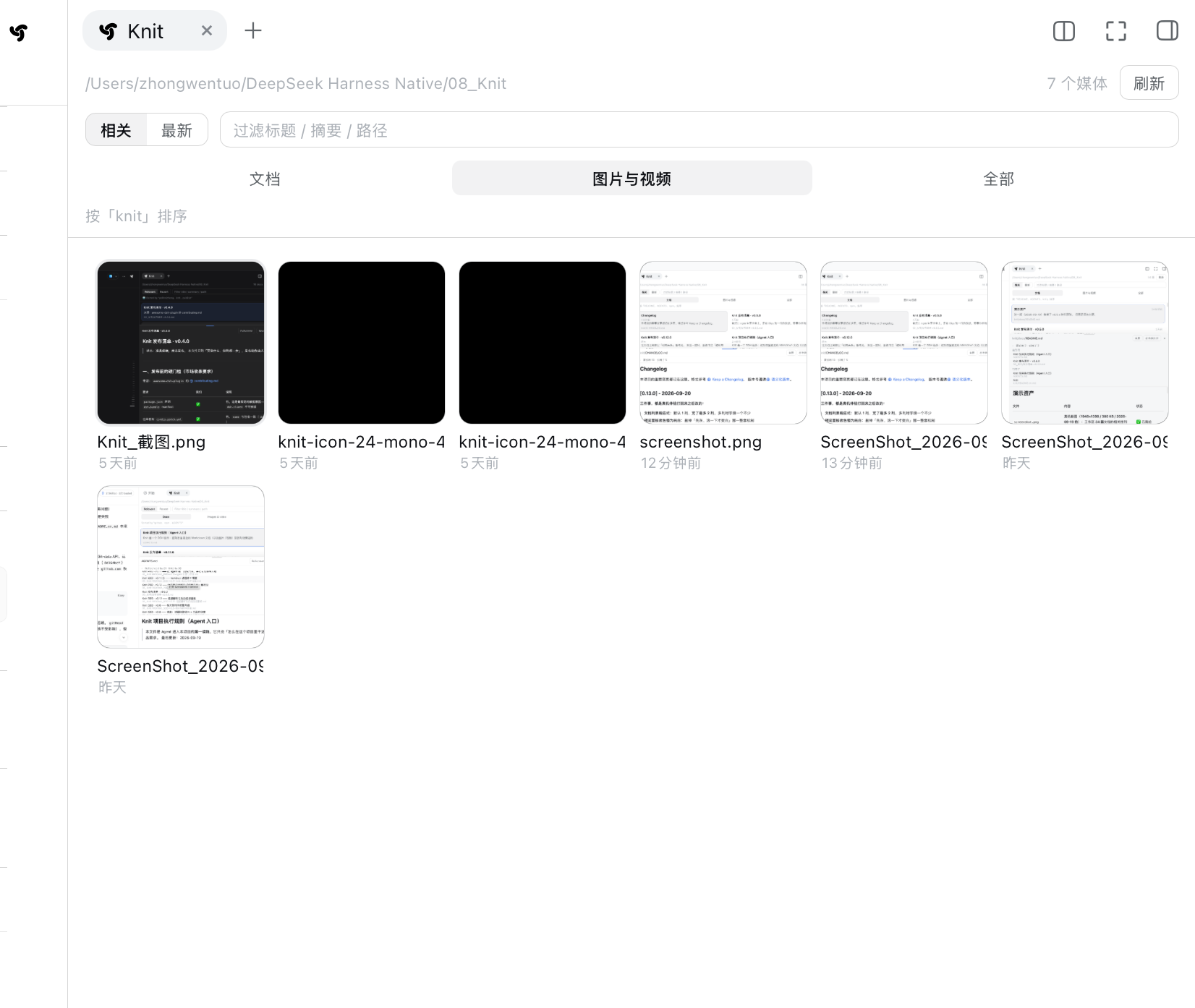
Media: square thumbnails, with the column count following the panel width continuously — six columns at this width, cells about 110px. These are the workspace's real image and SVG files (18 of them in this take); this particular workspace holds several screenshots, a demo GIF and one single-colour SVG icon (the solid black square is that icon, not a failed load). Videos get their first frame as a poster with a play glyph and a duration badge — this workspace simply has no video, so none shows here.
Current task context (v0.14)
Ranking answers "which documents look most like this conversation". But the question you usually have is a different one:
For this task, what in the project should I read first?
The Context Pack is the answer to that question, but it is a data-layer structure (Primary / Supporting / Related, each entry carrying a deterministic reason) — not a card of its own. So it lands directly in the document list: in relevance mode the document view goes from one flat list to three tier groups, each group name followed by a very short hint.
┌─ Documents ──────────────────────────────┐
│ Primary          read first              │
│   01 ● Relevance ranking algorithm 5m ago│
│      title matches: ranking              │
│                                           │
│ Supporting       supporting              │
│   02  Ranking evaluation set       2h ago │
│      body matches: term counting         │
│                                           │
│ Related          background              │
│   03  CHANGELOG.md                 12d ago│
│      body matches: ranking               │
└───────────────────────────────────────────┘
The sketch leaves out each entry's summary. The real structure is: a number in its own column on the far left (vertically centred with the first line), and to its right a stack of one line — Primary dot + title + relative time (right-aligned) — then the summary (no path — it is not shown in the list; the path lives in the preview header, with the directory collapsed to
…/). And the list is always one column however wide the pane gets.
No rules between groups: hierarchy comes from 16px of space, the group name and type size, never from separators. No scores, no percentages, no stars — "why is it here" states deterministic facts only.
The right-hand "Current task context" panel has been removed (2026-09-29). It said the same thing the three groups already say (the task sits in the quiet meta line above the list, the hit count duplicates the header total, and the three evidence kinds are the three group names), it added little visually, and it pushed Knit toward being an AI dashboard. Its resize / pull-out / snap-to-right-edge behaviour went with it — see
CHANGELOG.md.
The tiers are deterministic rules, not an AI judgement
| Tier | When a document enters it | Cap |
|---|---|---|
| Primary | It matched, and it is grounded (a topic term hits its title or summary), and its relevance is not background noise (≥ 30% of the top score) | 1 |
| Supporting | It has a deep hit on a focus term (that term is discussed in more than one document, and this document discusses it the most); or it is linked to a primary document (either direction, labelled separately) | 3 |
| Related | Everything else that matched, plus zero-hit link neighbours | 5 |
A cap is a ceiling, not a quota: primary is allowed to be empty (on real workspaces a fair share of topics genuinely have no document that discusses them), and so is related. If there is no checkable reason, the document does not appear — a document with zero hits and no link is not "related to the current task"; the only caption it could carry is "this might help you", which is exactly what this release refuses to print.
"Why it is here" is always a checkable fact:
| Reason | What it says |
|---|---|
title / summary / body matches the topic: term |
It really matched, and here is which term |
| referenced by a primary document | A path in the primary document points here |
| references a primary document | It mentions the primary document |
There is no "the AI thinks this matters" and no percentages, stars or confidence bars.
Boundaries (stated, not oversold)
- A link is not "more relevant". Measured: the link graph does not close the vocabulary-mismatch gap. So a link can only place a document in supporting / related — never in primary.
- The ranking engine is unchanged. This release adds a projection layer above ranking; BM25 scoring and its evaluation (top-1 / MRR / trap cases) are untouched. If retrieval never surfaced the right document, tiering can only tier what was surfaced — it cannot fix recall.
- No task understanding. The "Current task" line in the panel holds the verbatim text of the most recent user message, not a summary of it — Knit does not interpret the sentence, it just puts it where you can see it. Actually summarising it would need a model, and Knit calls none.
Code as context (v0.19)
Until v0.18 Knit understood Markdown, images and video. v0.19's product concept becomes documents / code / media — not "a few more extensions", but letting Knit put the source files an AI-coding task actually needs into the same Context Pack, on the same main line:
Current task -> Workspace Retrieval -> Document + Code Candidates
   -> Primary / Supporting / Related -> Context Pack -> Agent Read
   -> Read Evidence -> File Changed -> Lifecycle -> Context Epoch / Delta -> Usage Lens
- One classification layer, not scattered
if (ext === '.js')—src/host/classification.jsturns a filename into{ kind, language, previewable, searchable, contextual, generated, sourceMap }. The scanner, retrieval, preview and UI all just read that verdict. - Supported in v0.19:
.js .mjs .cjs .ts .tsx .jsx .py .json .html .htm .css .scss .yaml .yml .sh .bash .zsh. Not yet:.go .rs .java .kt .c .cpp .h .hpp .cs .php .rb .swift .sql. - Code gets its own field weights — filename x4, path x2, body (first 8 KB) x1, instead of the
document weights (title x4 / summary x2 / body x1). A filename like
context-manager.tscarries the task signal. - Generated files are not context:
.map,*.min.js,*.min.css,*.bundle.js,*.generated.js,*.gen.js,*.lockclassify asgenerated— previewable, but never in retrieval, the Context Pack or the Usage Lens. Whenapp.jsandapp.js.mapboth exist, theapp.jspreview offers one low-key "Source map" entry; the.mapnever shows up as a row. Context eligibility is not file-system visibility — the built-in file tree still opens them. - Bounded and capped: at most
MAX_CODE = 300code candidates and a head-limited body read, so a large repo cannot flood the Markdown corpus. Corpus pressure is the thing to watch in this version, not recall. - The type tabs become four:
Docs / Code / Media / All. The Code tab is still driven by the current task — it is not a file tree of the project. - Syntax highlighting is DSH's own (v0.20) — the client reuses
useCodeHighlighterfrom@deepseek-ai/dsh-client-ui-primitivesand takes every colour from the official--shiki-*tokens, so light and dark match DSH instead of inventing a palette. Only the matched stretch is coloured (60 lines either side, window capped at 800) and the rest stays plain text — a file with no match gets no colour at all (an un-capped 4k-line file costs ~2 s); if the host does not export the hook (older DSH) or the line counts disagree, it falls back to plain text silently. - No second engine: no second retrieval path, no second lifecycle, no second store, no new dependencies, no AST, no LSP, no embedding, no model call, no network, no IDE.
Relations and context control (v0.21)
Ranking answers "which documents look alike". This version answers two other questions: "why is this one here?" and "what about the ones I want to keep or block myself?" (the original v0.21 and the original v0.22 were merged into one version here.)
Relations are an explanation, not a second ranking stage
Every relation needs evidence you can grep back to the source. There are exactly four kinds:
| Kind | What the evidence is | Example |
|---|---|---|
references |
one Markdown file referencing another | README.md line 81 mentions docs/guide.md |
documents |
Markdown naming a code path | a design note's line 12 mentions src/host/index.js |
imports |
import … from / require(…) in code, line by line |
test/deep-scale.test.mjs:22 → ../tools/deep-benchmark.mjs |
tests |
test ↔ subject by filename convention (the only kind without a line number) | context-manager.ts ↔ context-manager.test.ts |
- At most 3 relations per item in the panel and 2 through
knit_docs; when it has to truncate it says "N relations in total" rather than hiding them. The order shown is the priority:references>imports>tests>documents. ←= the other file mentions this one,→= this one mentions the other; the line number belongs to the file that does the mentioning.- Relations never take part in ranking: switch them off and the three tiers hold exactly the same members in the same order (there are tests watching this, relation by relation).
- No AST, no LSP, no Tree-sitter, no call graph, no dependency graph, no symbol index. A path written inside a comment does not count as a relation, and code can only be pointed at, never act as a source of references — that has been an assertion since v0.19 and is unchanged.
"Source" is exactly three words
In relevance mode each row carries one low-key label: retrieval (it matched the current task's keywords) / relation (it was pulled in by a reference) / pinned (you put it there). No score, no percentage, no colour scale; in the flat list and under Newest none of them appears at all.
⚠️ Honest boundary: in a real workspace with enough candidates the three tiers are always filled by keyword-matched documents first, so the "relation" label is rare — that is a measured result, not an omission. The value of relations is in the "why" column: open it and you get line-level evidence (kind + other file + line N + open), where "open" previews the real text around that line (±2 lines, highlighted).
The evidence expands downwards: opening it pushes the rows below down, closing it puts them back. (v0.21.x fixed an overflow here — the entry animation used
fill:'both', which keeps pinning the row height after the animation finishes; the settle step has tocancel()it first.)
Pin / exclude
- Where the controls are (v0.21.x): the title row keeps only "number · marker · title · time";
the
sourceword andpin/excludesit together at the right end of the evidence row (orderpin → exclude → retrieval), hidden by default — they appear when you hover that row, when the keyboard cursor is on it, or when focus enters it. They usevisibility, notopacity:0, so hidden controls really leave the tab order, add no height and cause no sideways jump. All three entries are plain text buttons, no icons. - Pin: the row moves into a "Pinned context" section at the very top and its
provenancebecomesmanual. This is not a ranking intervention — the pinned section is unnumbered and the01…0Nnumbering of the three tiers does not change. - Exclude: it is filtered out before retrieval (the header count and the status summary move at the same time) and a low-key line with an "undo" entry stays above the list. "Undo" only appears when the item is really still in the workspace (switching to the Code tab will not misreport a Markdown file as "gone").
- It survives restarts as far as the host allows: given
ctx.storage'skv, pin and exclude are written to~/.dsh/storages/knit_control.json(per workspace; key = workspace path + relative path); without it they degrade to memory and the panel says "this session only (not persisted)" instead of pretending. Two real-machine defects were fixed here: a duplicated plugin load could fight over the storage handle (one unit, one live handle — they now share one registry), andpersistedused to claim "remembered" the moment a store appeared, whereas it should report the result rather than the capability — it now commits to nothing until there is evidence, and reports a write failure in the same response.
The retrieval status summary in the header
One line of fact in the panel header:
collected N · excluded N · candidates N | BM25 retrieval · relations N · pinned N | in pack N.
The three groups are the reading order: workspace candidates (how many were scanned, how many
this batch really ruled out, how many went on into retrieval), retrieval and adjustment (this
path is plain local BM25, followed by how many relation evidence items are in the pack and how many
items were pinned out of the tiers) and the result (the items currently in the three tiers).
Mid-dots inside a group, one thin rule between the three groups only, and no arrows — the old
↓ / → chain drew an already finished pipeline as a flow chart and read like a progress bar; it
was deleted outright on 2026-10-09.
Every cell follows the task, the kind tab, pins and exclusions; it only reports, it takes no
interaction. It sits directly under the toolbar and does not move when you toggle things: opening
the Usage Lens puts the lens below this line (render order = toolbar → status summary → exclusion
note → notice → lens → list).
The toolbar row (v0.21.x)
Relevance / Newest (sort) | one light-grey rule | Docs / Code / Media (kind) | a right-aligned
group: only the filter box (the only flexible item). No rule between sort and kind (the .knit-bar-sep class is gone).
Retrieval mode lives in the status summary as a clickable cell: BM25 retrieval › (visually the same recipe as the hit segment .knit-hit: --knit-chip-bg background, 6px radius, 1px 6px padding, secondary grey text, font size / line-height / weight identical to the hit segment (11px / 15px, no local font-weight); on hover only the label brightens and gets the underline — the › arrow never does; the arrow is the › from the Recent-read row, flipped horizontally when open). Its menu opens relative to that cell and holds the two options (same hit-segment recipe: 6px radius, --knit-chip-bg when selected), the current effective state, and the inline config entry when hybrid is unavailable. The menu panel itself stays a floating surface (bg-base + l3 border + shadow).
- Sort / kind / retrieval mode are three conditions, not one segmented control (the rule that used to sit between sort and kind was removed on 2026-10-12,
.knit-bar-sepno longer exists): the former.knit-bar-sep(1px,border-l3,aria-hidden) is the boundary. The kind group used to sit on its own row; its selected state is still the v0.14 underline tab — it did not fall back to a grey-filled button. - The far right is one right-aligned container (
.knit-bar-right): it holds the retrieval-mode dropdown (flex:none, compact) and the filter box (flex:1 1 180px+min-width:0+max-width:240px). The filter box is the only flexible item ⇒ it sits at 180–240px against the right edge and shrinks first when the panel narrows; sort / kind / retrieval mode are allflex:noneand are never squeezed. - The four conditions are independent: pick Code and then Newest and you get the newest code;
switching retrieval mode does not touch the sort or the query; the query only filters the current
scope (
sort/kind/query/retrievalare four separate pieces of state). - ⚠️ The retrieval-mode dropdown is not shown under Newest (time order has no Context Pack, so there is nowhere for semantic candidates to land), but it is not reset — switching back to Relevance keeps the mode you picked.
- No icons, no loud pills; the other entries use secondary text, the selected one an underline plus the primary text colour.
Also for the agent: the knit_docs tool
The same ranking that you see in the panel is also exposed to the model.
Once installed, the agent's tool list gains knit_docs: it can ask "which documents in this
project are most relevant to what we're discussing?" and get back the same Context Pack the
panel shows — the primary / supporting / related tiers, each item carrying its path, title,
summary, a structured reason (direct / titleMatch / summaryMatch / bodyMatch /
linkTarget / linkSource / related), its project role (impl / test / config /
design / doc) and the matching snippet with its line range (match: lines 147–163 — …) —
then open one of them with its own read tool.
Why it helps: to cite a document that already exists, an agent can only guess paths or glob
and read them one by one. Knit has already computed that ranking every refresh; this tool
just hands it over — what it removes is the "which few are relevant?" guess (measured: an
agent holding the Pack no longer globs for candidates).
Read-only, and it stores nothing: it reads the files that are already in the project — this is not "memory". The difference from memory plugins is that theirs start empty (the agent has to have saved something first), while Knit has the whole project's history from the moment you install it.
Three details:
- No relevance score in the result. It is a relative score (something is always 100%, and it may be a different document on the next refresh); shown to a model it reads as absolute confidence. The order is the relevance — the same rule the panel follows.
- The whole file is searched (since v0.20). Every file is split into structural passages and each passage is scored, so "the relevant part is past the first 2,500 characters" no longer means "unfindable"; a file over 256 KB is indexed only up to that size, and media has no text — both boundaries are stated in the output rather than hidden.
- No document bodies. Only the matched passage (one per file at most, ≤200 characters) — the agent
has its own
readtool; Knit finds, it does not carry. - No workspace means an error, never a fallback. The HTTP route falls back to the process cwd when a session can't be resolved (for older clients that send no session id); the tool has no such baggage — falling back would scan an unrelated project and return its documents. Better to fail than to return the wrong thing.
⚠️ The cost, stated plainly: the tool description goes into the system prompt of every request. Installing Knit costs a few extra tokens per session. That is the price of giving the agent the capability.
Did it actually get used? (v0.16 → v0.17)
Knit orders "what to read first right now" — but whether that order was right could only be felt, never checked. v0.15 added a layer of verifiable usage feedback: the files the agent really read, matched against the context pack that was in effect at the moment of the read. v0.16 nails that down: attribution is settled and frozen at read time — however the context changes later, the historical numbers never change their story (in v0.15 a read could be re-judged as "outside" by the present, which was a bug).
Off by default. There is a "Usage" toggle in the panel head; turning it on adds a lightweight lens above the list (called the Usage Lens since v0.18 — see "reading the usage" below). Its top line still reports facts only:
Usage                                         Epoch 5   ˄
174 reads · 28 outside the pack · context changed 3×
- Context Epoch: one content-changed context equals one epoch (identical content creates
none, so polling cannot flood it).
Epoch 4is a cumulative number, not "the 4th pack". - Two fact-only fields:
continuedReadAfterExit(it was still read after leaving this context) andreEntry(it left, came back into the pack, and was read again). They must never be read as "the agent rejected the new context" — that is inference, not fact.
It reports facts only: was the primary doc read, how many reads happened, how many fell outside the pack, how often the context changed. No score, no percentage, no progress bar — these numbers are counted, not estimated.
Three boundaries:
- Off by default: while it is off, Knit counts nothing (it subscribes to the host event stream, but the callback bails out on the first line for unaudited sessions — one Map lookup). That accounting is the user's call, not ours.
- No duplicate of the DSH trajectory: the only evidence source is the
tool/call/tool/resultevents the session already has (successfulreads). No new event bus, no runtime trace, no event store. - One backfill when you flip the toggle: the subscription is the sole read-evidence source (the
old
session.snapshotEvents()is deprecated by DSH, and no new production call was added), so reads that happened before the gate opened were genuinely invisible to Knit. Since v0.17 the moment the toggle flips, the host backfills once the events this session already produced — which turns "Unread" into a claim with evidence behind it. ⚠️ Backfilled reads are attributed to the earliest pack we know about (earlier packs are unknowable). - Nothing is persisted: the numbers live in kernel memory only and are gone after a DSH restart — do not treat them as long-term statistics.
Agents get the same thing optionally: knit_docs accepts audit: true (default false), which
appends one line, Usage since the last pack: … (a report on the previous pack).
To check offline: node tools/context-feedback-eval.mjs replays the latest real session log;
--control is the "deliver no pack at all" arm. ⚠️ It splits "outside the pack" in two —
in Knit's index but not in the pack (a real miss) versus not in the index at all (.js /
.json, which Knit never indexes). Without that split the outside ratio stays high and reads like
"the Context Pack is useless", when in fact the wrong thing was measured.
v0.17: what state is a document in, after it has been read?
Turning "Usage" on adds two more things besides the counts: a status on each recommended document, and "which one was read last / what was read outside the pack / how the context last changed".
⚠️ The ASCII below is the v0.17 shape of this UI. v0.18 rebuilt it into the Usage Lens above the list (next section) — the criteria, the four states and the data sources did not change; this section is about the data and the judgement.
Context · Epoch 4
Recently read: SDD-v0.17.md · 12 min ago

Primary
01 ● SDD-v0.17.md        Read ×3
02   feedback.md         Unread

Supporting
03   context.md          Read
04   eval.md             Updated after read

Related
05   README.md           Re-read after update

Read outside the pack · 2        ← clickable: which ones
Context just changed             ← clickable: Entered / Left / Moved tier
All four states are facts, not scores:
| Label | The fact |
|---|---|
| Unread | No successful read in this session |
| Read / Read ×N | It was read successfully, and the file has not changed since the last successful read |
| Updated after read | The file's mtimeMs changed after the last successful read |
| Re-read after update | It changed and was then read successfully again (another change drops it back one state) |
- The evidence is the file's
mtimeMs— which the workspace scan already collects — so nothing compares content, scans full text, or adds an index. When mtime is unavailable, no claim is made (it stays at "Read"). grep/glob/bashdo not count as reads, and neither does a failedread.- "Recently read" is decided by event sequence number and is never called "currently reading": Knit cannot prove the agent is still reading it. If it falls outside the Context Pack, it is still shown as-is.
- Read outside the pack · N expresses only "this document is not in the current pack, but the agent did successfully read it" — never "Knit missed it", and no recall rate, hit rate or context-quality number.
- Context just changed shows only the single latest delta (
+entered /-left /↔moved tier; a changed task adds one line, "Task context updated") — no timeline, no event explorer. - The status sits between the title and the time, and the title stays the visual anchor: no red or green, no score. With the toggle off, none of it appears (and nothing is counted).
- The list no longer flickers (requested 2026-10-03): a row that was just read fades in from
below, a row squeezed out is wiped away top-down, several at once stagger by 45ms (6 steps at
most), and a row that changed tier or rank flies there from where it was (FLIP, 340ms).
Nothing is animated on first paint, when the kind / sort / query changes, or when the system asks
for reduced motion. This is not a new feature — it only makes "who arrived, who left, who moved"
visible. Indexing, ranking, tiers and the
knit_docsoutput are unchanged.
v0.18: reading the usage (Context Usage Lens)
v0.17 had all the information, but crammed into one line and a few collapsed blocks — you could not read the structure: which tier got read, which document was read last, which of those twenty outside documents were read over and over, whether the last change was an arrival or a departure. v0.18 rebuilds it as a lightweight lens above the list — not a dialog, not a new page, and not a dashboard:
Usage                                         Epoch 5   ˄
174 reads · 28 outside the pack · context changed 3×
Current context
  Primary  1 / 1        Supporting  2 / 3      Related  0 / 5
  ●                     ● ○                   ○ ○ ○ ○ ○
Recent read       docs/eval.md                  12 min ago  ›
Reads outside context                                      20  ›
Context changes                                      Latest  ›
- Current-context coverage: each tier gives "a state dot +
read / total in that tier". Clicking a tier scrolls to that tier and flashes it briefly (no arrows, no rules — space says "here"). Facts only: no progress bar, no percentage — Knit does not judge whether a context is "used up", and when there is no Primary the whole column is hidden rather than drawing a fake0 / 0. - Inline state dot: unread = hollow circle / read = filled circle / updated after read = filled
circle with an inner ring / re-read after update =
↻, shown alongside the text (the dot states the state, the text states the count). Clicking it opens that document. No red/green, no badge. The coverage dots and this one share the same tokens and the same 6px diameter — one state language. - Recent read is a clickable fact row (
file · relative time ›) that opens that document directly and does not refetch the list. It is still "the last successful read" — never "currently reading". - Reads outside context shows up to 10 by default plus "N more"; every row is clickable and carries
its state, sorted by most-read first (
count DESC) — a fact order, not a relevance score. You cannot promote a document into the context from here (V0.18 does no context control). - Context changes is collapsed by default; expanding groups it into Entered / Left / Moved tier, at most 5 per group, and only the latest delta is shown.
- The lens itself expands / collapses. Collapsing is not turning usage off — collapsing means "counting, but I do not want the details"; switching the toggle off produces no usage DOM at all.
- On a short panel (< 420px) it degrades to summary + coverage + recent read; the change details are still one click away, and scrolling always belongs to the list — there is no second scroll container, so a narrow sidebar never gets scroll-inside-scroll.
Not one new fact was added: everything comes from the v0.17 lifecycle / recentRead / outsideDocs / latestDelta fields plus the current context tiers, and coverage is derived from them (pure
functions coverageOf / groupOutsideDocs / groupDelta).
The knit_docs tool output did not grow: it still only finds context.
How retrieval works (implementation, not the pitch)
This section is evidence, not the sales pitch: it is what backs the claim "ranked by the current task". The product question is answered on the first screen; this answers "why is it any good at ranking".
No magic, just string operations. Three steps:
1. Read the conversation. The host takes the last 6 user/assistant messages, and only
counts real user messages (agent.inject() synthetic context would drag the topic off course).
Newer messages weigh more: 3 / 2 / 1 / 1 …
2. Extract keywords.
- ASCII words — high value, one occurrence is enough (
chokidar,mtime) - Chinese 2/3-grams — either occurring twice, or appearing in the newest message
- Drop fragments that straddle a word boundary. Chinese has no word boundaries, so n-grams glue the last character of one word to the first of the next (「图片和」, 「个插」, 「的排」). They share one trait — the first or last character is a pure function word — and are dropped. Leave them in and they fill every candidate slot, pushing the real words (「图片」, 「排序」) out of the query entirely
- stop-word filtering plus greedy de-overlap (picking「相关性排序」drops「相关性」and「排序」)
3. Score the documents — BM25.
IDF per term first: rarer in the corpus means more valuable
                    ln(1 + (N - df + 0.5) / (df + 0.5))
then a weighted sum over fields: title ×4  +  summary ×2  +  the whole body ×1
each field saturated and length-normalised (k1 = 1.2, b = 0.3 / 0.5 / 0.75)
plus a 10% recency nudge (relevance still dominates)
Why BM25 and not "hits × weight" (the original approach, since replaced):
- with no IDF, a term that appears everywhere (the project name) is worth as much as a rare one — so the frequent term discriminates nothing and dilutes the rare ones
- with no length normalisation, a long document wins by piling up hits
- capping hits at 6 was a hand-drawn knee;
k1/bexist precisely for this
Measured on test/eval/fixture.mjs (21 cases, both engines on the same corpus):
| top-1 | MRR | |
|---|---|---|
| old (weighted hits) | 76.2% | 0.830 |
| BM25 | 95.2% | 0.976 |
That eval runs inside npm test, and the baseline is recomputed each run from the old
engine frozen in test/eval/legacy.mjs — so "the new engine must be clearly better" is
verified automatically rather than asserted against a hard-coded number.
**Against counting ke
…
Links
More in this category
tt-a1i/archify#integrations/deepseek-harness★ 89901
Generate validated, self-contained interactive architecture, workflow, sequence, data-flow, and lifecycle diagrams from repositories or system descriptions.
dream-num/dsh-univer-office★ 614
Give DeepSeek Harness a real office environment. Univer Office Plugin brings spreadsheets, docs, slides, canvases, relational tables, and more into one runtime — with connected data, validation, versioned changes, and isolated worktrees for multi-agent collaboration.
ECNU/EduWork#dsh-knowledge-studio★ 246
A workspace-based Studio for source-grounded reports, slides, tables, mind maps, quizzes, flashcards, audio and video, using DSH models and shared artifact services. Office generation requires Python 3.12+ with its dependencies and DSH_OFFICE_PYTHON configured; media rendering requires Chromium, and local ASR additionally requires whisper.cpp and a model.
PerryLink/dsh-industry-research★ 214
Deterministic industry research reports for DeepSeek Harness — company and industry research flows produce structured, verifiable reports from staged evidence.
HuanLinOTO/dsh-plugin-mineru★ 48
Expose MineRU document parsing tools to the model.
kw78/dsh-office-tools★ 37
Workspace-safe Office tools for agents: create/read Word, create/read/update Excel, and create/read PowerPoint decks with PNG/JPG/GIF image placement.
Community comments
Comments are public GitHub Discussions. Loading them connects to GitHub and Giscus; a GitHub account is required to post.