Five palettes for DeepSeek Harness — mono, warm sand, indigo, moss and a custom three-colour palette — each rebuilt in OKLCH for light and dark, with text and surface contrast solved per palette. Includes config export/import codes and a high-contrast mode.
Install
# from npm (prebuilt)
dsh plugin --profile web add dsh-theme-palette
# from a prebuilt release tarball
dsh plugin --profile web add "https://github.com/zuoyunlai/dsh-theme-palette/releases/download/v1.6.0/dsh-theme-palette-1.6.0.tgz"
# from GitHub (first run asks for allowBuilds approval — follow the hint, retry)
dsh plugin --profile web add github:zuoyunlai/dsh-theme-palette
Any plugin you install runs third-party code with your own permissions — it can read your files, use your credentials, and reach the network, and tool approvals don’t sandbox it. GitHub-sourced plugins also run build scripts at install time — pnpm blocks those until you allow them, so an install can stop with ERR_PNPM_GIT_DEP_PREPARE_NOT_ALLOWED or ERR_PNPM_IGNORED_BUILDS; dsh prints the exact key to add under allowBuilds in your profile’s pnpm-workspace.yaml, and the install works on the next run. Allowing a build is a trust decision: only install sources you trust, and pin a commit (github:owner/repo#sha).
README
English · 中文 · Español · Português · हिन्दी
Theme palette for DeepSeek Harness (web & desktop): 4 palettes × light/dark, two independent axes.
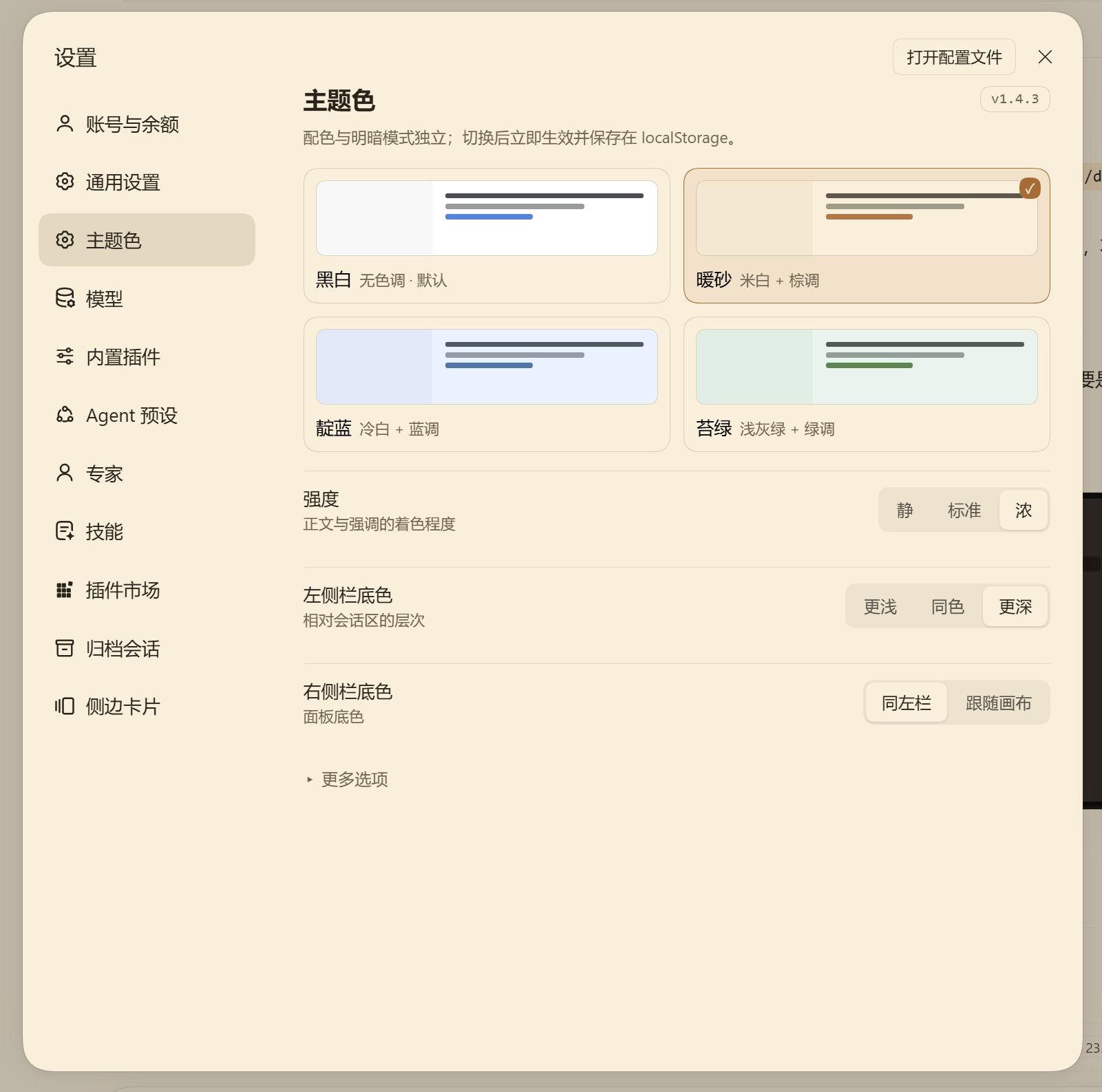
Static render of the settings page at the real panel width (564 px content).
Compatibility
| Surface | Status |
|---|---|
| DSH desktop / web client | 0.2.x |
| Node.js | ≥ 20 |
| Changes to host source | none |
The plugin only stacks colour tokens through ctx.theme.overrideTokens; it does not register a theme, patch the host, or touch the appearance preference.
What it does
- 4 palettes — Mono, Warm sand, Indigo, Moss — each adapting to light and dark independently;
- the whole ramp is recomputed, not swapped: OKLCH rebuild → role-based chroma → sRGB gamut clamp → contrast solved on real surfaces;
- 27,000+ token references covered: body, secondary, tertiary, captions, links, sidebars, cards, user bubble, primary button, scrollbars, switches, Markdown headings/bold, code blocks;
- adjustable: text tint (3), sidebar depth (3), right panel (2), Markdown emphasis, scrollbars, switch colour;
- custom palette (pick surface / text / accent — the engine keeps its contrast guarantees), config export/import via a
dshs1.code, high-contrast mode, and 4 UI languages; - self-healing: if the host drops the override layer, the palette is re-applied;
- UI in 简体中文 / 繁體中文 / English / 日本語 (follows the host language, can be pinned).
Install
# from npm
cd ~/.dsh/profiles/desktop
pnpm add dsh-theme-palette

# or a specific version
pnpm add dsh-theme-palette@1.4.3
From the GitHub Release tarball:
pnpm add "https://github.com/zuoyunlai/dsh-theme-palette/releases/download/v1.4.3/dsh-theme-palette-1.4.3.tgz"
Then restart the GUI — a running process keeps the old module. Open it from avatar → Settings → Color theme.
Configuration
| Item | Options |
|---|---|
| Palette | Mono · Warm sand · Indigo · Moss (thumbnails follow light/dark) |
| Strength | Quiet / Standard / Strong — how much body text follows the palette |
| Panel surfaces | Sidebar (Lighter / Same / Deeper), right panel (Match sidebar / Follow canvas) |
| More options | Language, Markdown emphasis, scrollbars, switches/checks |
Every choice applies immediately and is stored in localStorage. Light/dark stays under the host’s Appearance control.
Palette engine
OKLCH(L, C, hue) ──► gamut clamp (binary search on C) ──► sRGB hex
        ▲
        └── role chroma × intensity, then contrast solve on {canvas, card, sidebar, overlay}
- semantic aliases keep
var(--dsw-static-neutral-bluish-NN)chains, so anything following a token follows the palette; - light surfaces use steps 00–300, dark surfaces 800–950;
- text floors are enforced at build time: body ≥ 12, secondary ≥ 6.1, tertiary/link ≥ 4.6, sidebar text ≥ 7, bubble text ≥ 7;
- 432 configuration combos are checked by
node palette-dev.mjs.
Design notes, per-component rationale and the contrast tables live in docs/DESIGN.md. Release history: CHANGELOG.md.
Development
node palette-dev.mjs                  # token report for all palettes
node tools/sheet.mjs                  # palette board → tools/sheet.html
node tools/shoot-sheet.mjs            # screenshot the board (headless Chrome)
node tools/compare.mjs --dir tools/out/<run>        # diff against baseline
node tools/preview-settings.mjs --lang en           # render the settings page
node tools/release.mjs --dry          # release preflight
node tools/release.mjs --tag          # publish to npm + tag
Screenshot regression has two layers: the palette board (no auth needed) and the real desktop window via CDP (tools/shoot-desktop.mjs, needs --remote-debugging-port). See tools/README.md.
License
MIT © 2026 Zuoyunlai
Links
More in this category
Small-tailqwq/dsh-deep-whale#maid-atelier★ 2773
Whale-girl skin series for the DSH Web UI (maid-atelier).
elysia395/dsh-wallpaper-engine★ 1792
Requires DeepSeek Harness 0.1.5-rc.1+ (DSH Desktop >= 2.0.7) and dsh-better-sidebar >= 0.19.0 - update both before installing or updating this plugin. Plays local Wallpaper Engine Video/Web wallpapers behind the chat, renders Scene wallpapers as extracted static frames, and adds content-rating/type filters, custom uploads and an iOS-style liquid-glass settings window.
d-dev0101/open-sea-skin★ 402
Realtime WebGPU ocean skin with quick controls for waves, daylight, glass opacity, and an automatic day cycle.
kingOfSoySauce/dsh-liang-skin★ 284
Adaptive reasoning slider skin that maps each model's available reasoning efforts onto a 0–30 visual intensity scale, with synchronized portraits, background, and interface colors.
Nwflower/dsh-claude-style★ 268
Claude Code Desktop look-and-feel for the DSH Web GUI — ivory/warm-black dual canvas, clay accent, three-font typography, permission segmented control and brand switcher, via CSS overrides and client DOM overrides.
RevolutionLA/dsh-dream-skin★ 265
One-command skin plugin: 8 original themes, translucent wallpaper with opacity/blur, per-user accent, and shareable theme-pack import/export, favorites and surprise-me — purely native on DSH's token system.
Community comments
Comments are public GitHub Discussions. Loading them connects to GitHub and Giscus; a GitHub account is required to post.