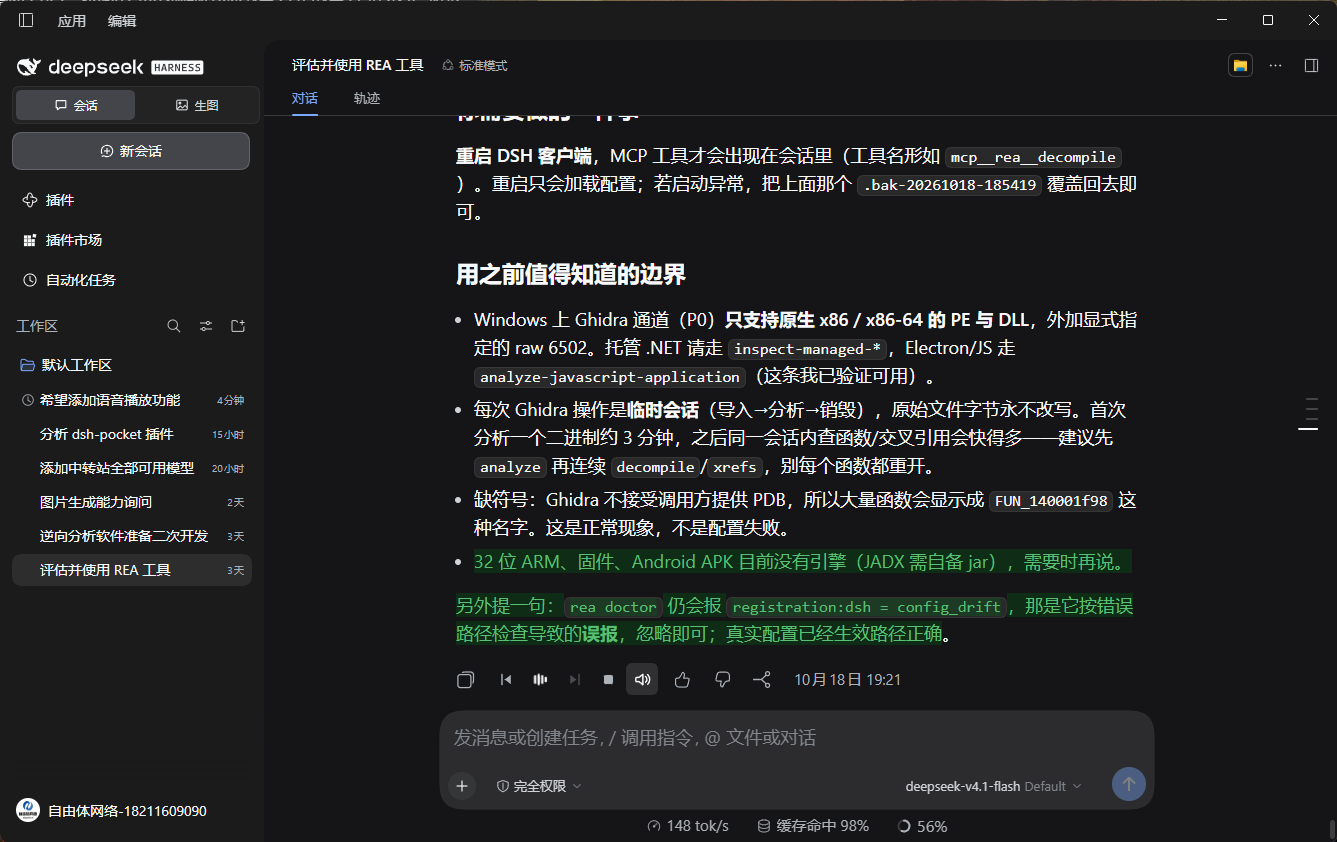
Reads assistant replies aloud with Microsoft Edge neural voices and highlights the sentence being spoken, so you can follow along while listening. The highlight is yours to style: background colour, text colour and opacity are each adjustable in settings. Also adds a sound-wave play button to every reply, pause plus previous and next sentence, adjustable speed, and an auto-read toggle.
Install
# from npm (prebuilt)
dsh plugin --profile web add dsh-read-aloud-neural
# from GitHub (first run asks for allowBuilds approval — follow the hint, retry)
dsh plugin --profile web add github:ziyouti/dsh-read-aloud
Any plugin you install runs third-party code with your own permissions — it can read your files, use your credentials, and reach the network, and tool approvals don’t sandbox it. GitHub-sourced plugins also run build scripts at install time — pnpm blocks those until you allow them, so an install can stop with ERR_PNPM_GIT_DEP_PREPARE_NOT_ALLOWED or ERR_PNPM_IGNORED_BUILDS; dsh prints the exact key to add under allowBuilds in your profile’s pnpm-workspace.yaml, and the install works on the next run. Allowing a build is a trust decision: only install sources you trust, and pin a commit (github:owner/repo#sha).
README
This plugin publishes its README in Chinese only.
在 DeepSeek Harness 的每条回复旁加一个音浪按钮,点击就能听到这条回复。语音用的是微软 Edge 的在线神经音色,比浏览器自带的机器音自然得多。
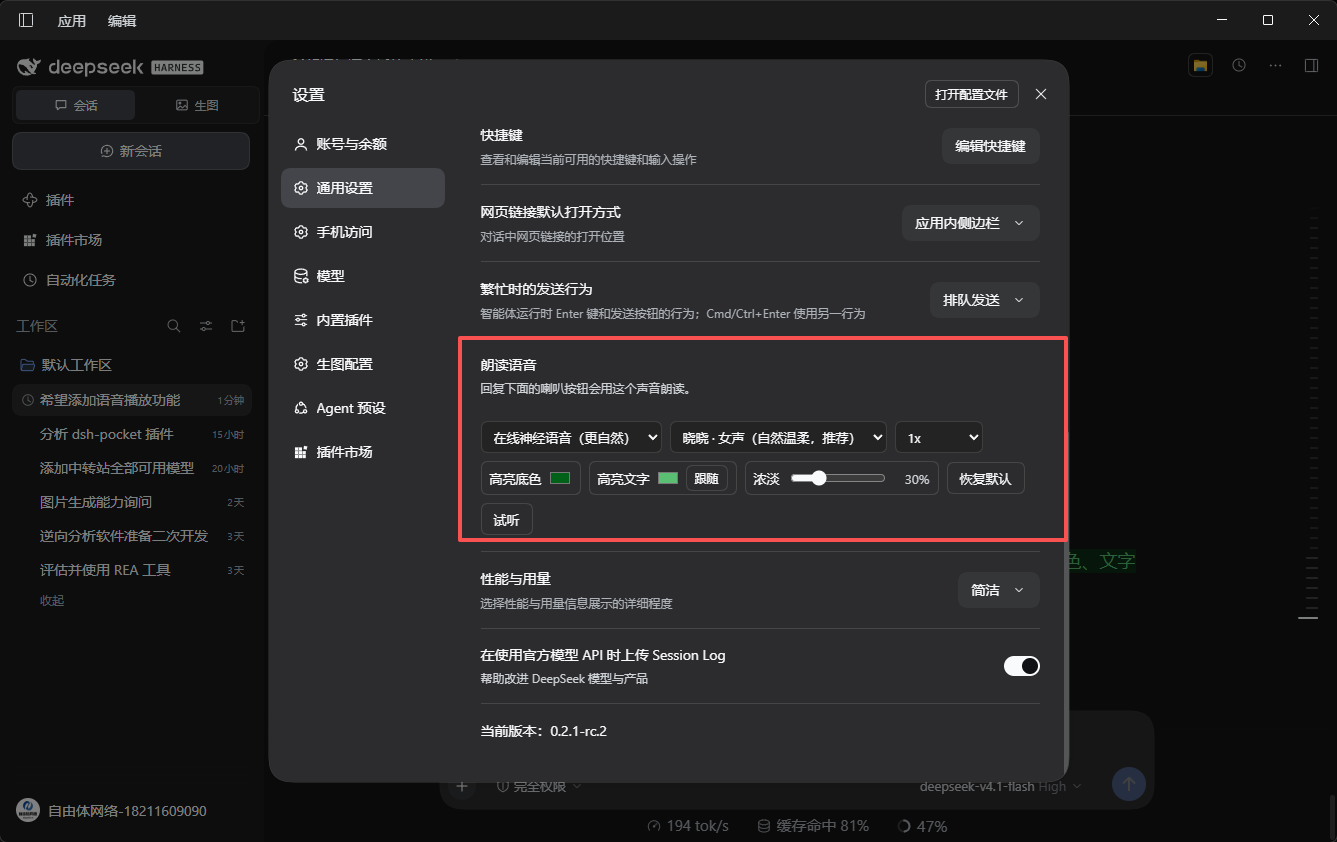
朗读时会高亮当前正在读的那一句,方便一边听一边看。高亮长什么样由你定:底色、文字颜色、浓淡三样都能在设置里调。
Read DSH replies aloud with natural neural voices: a sound-wave play button, highlighting of the sentence being spoken, pause/skip controls, configurable highlight colours, and auto-read.
功能
| 功能 | 说明 |
|---|---|
| 音浪播放键 | 点一下开始朗读;朗读时音浪起伏,一眼看出正在播放 |
| 当前句高亮 | 读到哪句亮哪句,高亮底色、文字颜色、浓淡都能在设置里调 |
| 播放控制 | 暂停 / 继续、上一句、下一句、停止 |
| 自动朗读 | 喇叭开关:开启自动读新回复,关闭时喇叭带斜线 |
| 音色丰富 | 14 个中文音色,含东北话、陕西话、粤语、台湾国语,以及多个英文音色 |
| 语速可调 | 0.75x 到 2x |
| 智能跳过 | 代码块、表格、链接地址不念,只读正文 |
| 边读边合成 | 合成一句播一句,同时预取下一句,听起来是连续的 |
安装
通过插件市场安装,或者用命令行:
dsh plugin --profile web add dsh-read-aloud-neural
安装后在 设置 → 通用 → 朗读语音 里选择音色和语速。
使用
- 在任意一条回复下方点击音浪按钮开始朗读。
- 朗读过程中可以暂停、跳句、停止。
- 想让它自动读新回复,点旁边的喇叭按钮开启。
- 高亮颜色不满意?在设置里改高亮底色 / 高亮文字 / 浓淡,改完立即生效。
注意:语音来源与隐私
这一节请务必读一下:
- 语音由微软 Edge 的在线朗读服务合成。 插件使用的是该服务的公开终端点,并模拟 Edge 浏览器的请求特征。这并非微软官方授权的接口用法,属于灰色地带,随时可能失效或被限制。
- 你的回复文本会被发送到微软的服务器,这是在线语音的必然结果。介意的话请不要使用本插件,或改用系统自带语音(设置里可切换为“系统语音(离线)”,那个版本完全在本机合成)。
- 插件的本地服务只监听
127.0.0.1,且校验来源请求头与 Host,外部网络无法访问。 - 插件不收集任何遥测数据,不上报使用情况。
- 高亮功能在定位失败时会在系统临时目录写下诊断文件(
dsh-read-aloud-report-*.json),内含少量回复文本,用于排查问题,可随时删除。
环境要求
- DeepSeek Harness,使用 Web GUI(桌面版)
- 需要联网(在线神经语音)
- 高亮功能依赖 Chromium 的 CSS Custom Highlight API,DSH 桌面版内置的 Chromium 支持
开发
插件分为两半:
- 宿主侧(
index.js/tts.js/ws-client.js):注册/read-aloud/*本地路由,负责与语音服务通信、缓存音频。 - 前端侧(
client.js):注册聊天操作栏按钮与设置项,负责文本分句、播放调度、句子高亮。
不依赖任何第三方包,WebSocket 客户端(ws-client.js)是自己实现的,因为该语音服务要求自定义握手请求头。
跑测试:
node smoke-test.cjs   # 偏好设置、按钮、分句、匹配逻辑
node dom-test.cjs     # 高亮定位(含 DOM 模拟)
协议
MIT
Links
More in this category
PolinniZhong/dsh-omi-voice★ 76
In-chat read-aloud for DeepSeek Harness: tap to read, pause and resume AI replies with natural Doubao TTS voices (BYOK), reading only the final answer with code, tables and diagrams filtered; local engine, plugin keeps no API key.
beiyege-01/dsh-voice-ai-girlfriend-plugin★ 40
Voice AI girlfriend for the Web UI: FunASR mic input, Qwen3-TTS spoken replies, companion animation window, and two-way QQ chat (text/voice/image push) via NapCat.
PensiveFei/dsh-voice-scribe★ 35
Voice input for the web UI: tap Alt (or Alt+Space) to start/stop dictation, browser Web Speech (zero-config) or OpenAI-compatible cloud ASR, optional polish through DSH-configured LLM, settings UI.
1624318455/dsh-plugin-tts★ 29
Reads assistant replies aloud via free Edge TTS or your own RVC voice models: read-aloud buttons + auto-read, adaptive chunked progressive playback (gapless long reads), one-click voice-pack installs from a registry, and a portable RVC runtime.
ppy-web/dsh-plugin-xiaomi-mimo-tts★ 28
Adds Xiaomi MiMo, Doubao, and browser text-to-speech to DSH, with automatic read-aloud, custom voices, and optional UI sound effects.
WizisCool/dsh-ears★ 24
Voice input plugin for DeepSeek Harness (dsh): a microphone button in the composer turns speech into a draft transcript, with a choice of speech-recognition backends, optional polish through dsh own LLM routes, and a native settings page.
Community comments
Comments are public GitHub Discussions. Loading them connects to GitHub and Giscus; a GitHub account is required to post.