Adds Xiaomi MiMo text-to-speech to DSH Web with assistant-message read-aloud, PCM streaming, preset and custom voice design, browser speech fallback, playback controls, and optional UI sounds.
Install
# from npm (prebuilt)
dsh plugin --profile web add dsh-xiaomi-tts
# from GitHub (first run asks for allowBuilds approval — follow the hint, retry)
dsh plugin --profile web add github:ppy-web/dsh-plugin-xiaomi-mimo-tts
Any plugin you install runs third-party code with your own permissions — it can read your files, use your credentials, and reach the network, and tool approvals don’t sandbox it. GitHub-sourced plugins also run build scripts at install time — pnpm blocks those until you allow them, so an install can stop with ERR_PNPM_GIT_DEP_PREPARE_NOT_ALLOWED or ERR_PNPM_IGNORED_BUILDS; dsh prints the exact key to add under allowBuilds in your profile’s pnpm-workspace.yaml, and the install works on the next run. Allowing a build is a trust decision: only install sources you trust, and pin a commit (github:owner/repo#sha).
README
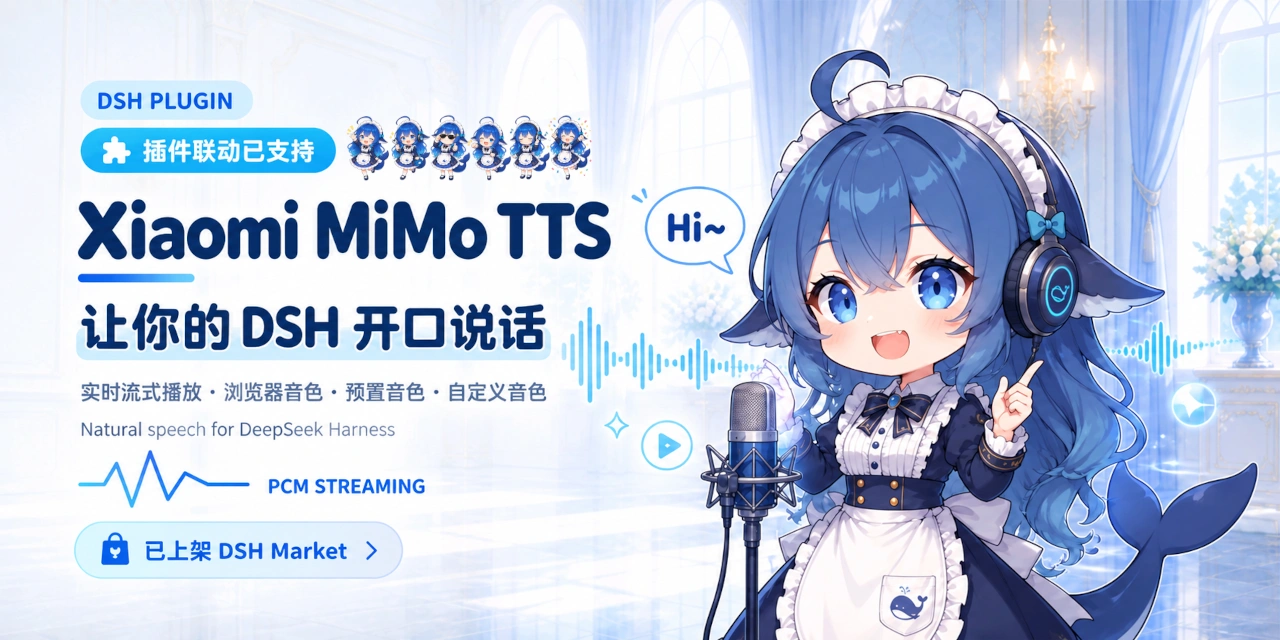
dsh-xiaomi-tts
Add Xiaomi MiMo TTS read-aloud, browser-local fallback speech, and optional UI sounds to DSH Web.
MiMo TTS availability and pricing may change. Check the official Xiaomi MiMo platform for the current policy.
🎨 Preview
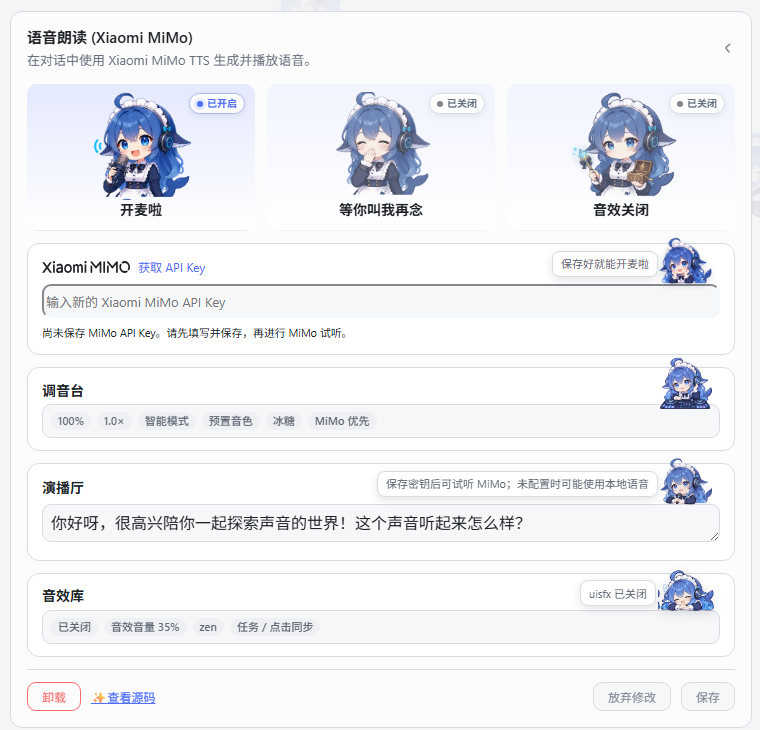
- Open the settings page preview
- QQ discussion group:
1104616387
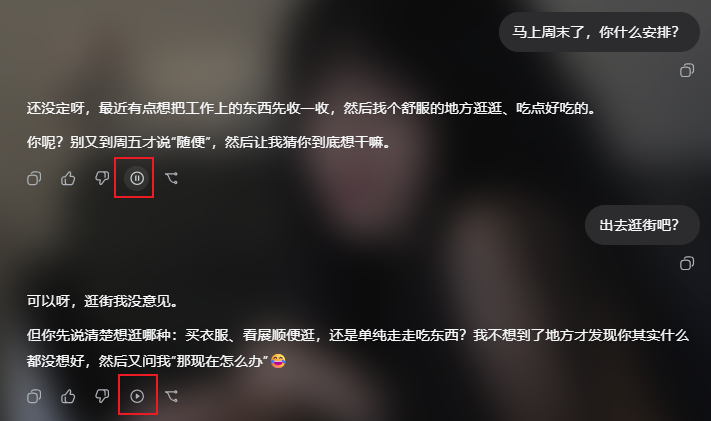
| Settings | Message action |
|---|---|
 |
 |
✨ Features
- One-click read-aloud action on assistant messages.
- Low-latency PCM streaming for
mimo-v2.5-tts, with complete-audio or browser-speech fallback when appropriate. - Official built-in voices and text-described custom voices through
mimo-v2.5-tts-voicedesign. - MiMo-first, local-first, or MiMo-only speech strategies.
- Smart, full, and first-segment read-aloud ranges.
- 0.5×–2.0× playback speed, voice volume, pause, resume, and stop controls.
- Text preparation that removes URLs, paths, code blocks, emoji, and control characters before synthesis.
- Optional task and semantic click sounds, disabled by default.
- An optional PCM playback service for other DSH Web plugins.
- A Whale Girl Agent preset: a whale maid for conversation, companionship, light humor, and local memory tools.
📋 Requirements
@deepseek-ai/dsh0.2.0-rc.2(the current target; compatible with0.1.7-rc.1through0.2.xreleases)- Node.js 22+
- A Xiaomi MiMo API key for MiMo speech
- Official TTS API documentation
🚀 Installation
Official installation (desktop/web) (recommended)
Open the desktop or web client, go to the Plugin Manager, and search for dsh-xiaomi-tts.
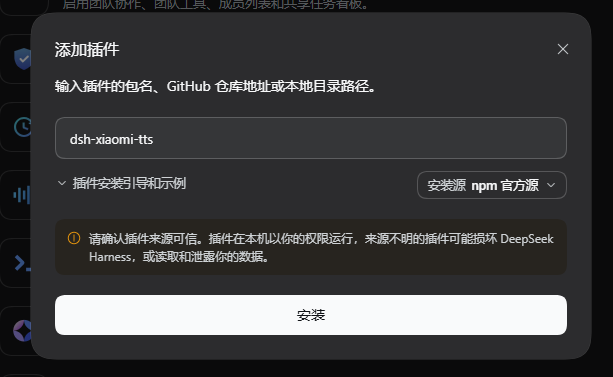
Install from npm (web)
dsh plugin --profile web add dsh-xiaomi-tts@latest
Install from the DSH Plugin Manager
The plugin is published to npm. In DSH Web's sidebar, open the Plugin Manager, choose Add plugin, then search for dsh-xiaomi-tts.
Install from the plugin marketplace
The plugin marketplace includes this plugin. If you have the community marketplace installed, search for xiaomi-mimo-tts under Settings → Plugin marketplace.
Sidebar → Plugins → dsh-xiaomi-tts → Text To Speech (MiMo TTS)
🐋 First use
New installations start with:
- the manual Read aloud action available;
- automatic playback disabled;
- UI sound effects disabled;
- browser-local fallback available under the default MiMo-first strategy, even before a MiMo key is saved.
Recommended setup order:
- Create a Xiaomi MiMo API key.
- Enter it in the plugin settings and click Save.
- Open Mixing Console and choose a model and voice.
- Test it in Broadcast Studio.
- Enable automatic playback and UI sounds only if wanted, then save again.
⚙️ Configuration
Official built-in voices
mimo-v2.5-tts currently provides:
- Chinese female:
冰糖,茉莉 - Chinese male:
苏打,白桦 - English female:
Mia,Chloe - English male:
Milo,Dean
Custom voices
mimo-v2.5-tts-voicedesign generates a voice from a description. The settings panel includes presets and an editable custom description:
Choose “鲸鱼娘” (Whale-chan) for a clear, sweet female voice with playful confidence and a soft heart. Everyday delivery is light; deadpan jokes use a brief pause before the turn; caring lines slow down gently; practical explanations stay focused and clear. Voice selection controls delivery, while the Agent preset controls conversation personality.
Whale-chan persona
Select “鲸鱼娘” in Agent presets for a rice-powered, slightly tsundere whale maid who is relaxed but reliable. Her deadpan wordplay follows the conversation, with sincere companionship and practical help, CDN memes, and local memory tools. Character inspiration comes from the DeepSeek Whale-chan Project; see the persona instructions.
To use both, select the Agent preset separately, then choose mimo-v2.5-tts-voicedesign → “鲸鱼娘” in Mixing Console, save, and listen in Broadcast Studio. Try: “本鲸正在降低待机功耗。你要的清单整理好了,先看这三项。”
Saved voice descriptions are retained after an upgrade. Reselect “鲸鱼娘” and save to apply the updated description, or keep using your custom description.
Browser-local speech
- MiMo first: tries browser speech if MiMo fails before audio starts.
- Local first: uses browser speech first, then tries MiMo if local speech fails.
- Disable local speech: uses MiMo only.
Browser voices come from the Web Speech API. Offline availability, language coverage, and actual voice output depend on the browser, operating system, and their speech services.
Read-aloud range
- Smart mode: automatic playback prefers the opening semantic segment and may add a short closing cue when substantial text remains. Manual playback reads the full reply.
- Full mode: automatic and manual playback both read the full reply.
- First-segment mode: automatic and manual playback both read only the opening segment.
The settings panel supports keyboard navigation: use Tab to move focus, arrow keys to adjust sliders and options, and Space to activate buttons and switches.
🔌 Third-party plugin integration

The plugin exposes an optional PCM streaming service to Web plugins:
ctx.get('xiaomiMimoTts')?.play('Welcome back')
Use ctx.get() dynamically instead of declaring a required injection. The call safely does nothing when the plugin is missing, unavailable, or disabled. New playback interrupts the current read-aloud session, and stop() stops it explicitly.
For TypeScript types:
import type { XiaomiMimoTtsService } from 'dsh-xiaomi-tts/client-api'

const tts = ctx.get('xiaomiMimoTts') as XiaomiMimoTtsService | undefined
tts?.play('Welcome back')
🐳 Whale Girl Agent preset
After installing this plugin, choose Whale Girl (鲸鱼娘) from the Agent preset list when creating a session. She is a conversation assistant and whale-maid companion: she responds to the user's situation first, then helps organize tasks, explain information, or use tools. She can also send contextual CDN-linked meme images without an external meme plugin. Her humor is light and contextual, with occasional rice, tail, and work jokes rather than constant roleplay.
The persona and meme cues are informed by the community DeepSeek-chan Meme Pack. Images are displayed through public CDN hotlinks; this package does not redistribute that repository's image assets.
Whale Girl can hotlink that pack's public WebP CDN images with standard Markdown image syntax. She uses compressed previews by default and only uses full-size URLs when the user asks for the original.
File access, file search, and Windows PowerShell are for user-authorized tasks and non-sensitive local memory only. The maid role does not imply real-world control or absolute obedience; unsafe, illegal, privacy-invasive, and dangerous requests still follow the host safety rules.
🔒 Privacy and network access
- The DSH Host stores the API key. The browser reads only whether a key is configured and whether its prefix is recognized, not the secret itself.
- Browser-local speech uses the Web Speech API. Voices marked online may send text to browser, operating-system, or network speech services.
- Audio plays from browser memory through Web Audio or temporary Blob URLs; the plugin does not intentionally persist generated audio.
- The sound core is migrated from uisfx 0.4.0 under the MIT License; see
NOTICE.
🏗️ Architecture
- Shared layer: defaults, text processing, segmentation, SSE, and playback contracts.
- Host plugin: settings and static assets, plus complete-audio and PCM streaming proxies for MiMo.
- Web Client: settings, message actions, browser-speech fallback, previews, and the optional third-party playback service.
flowchart LR
    DSH["DSH Web"] --> CLIENT["Web Client<br/>Settings and playback"]
    THIRD["Third-party Web plugin"] -. "ctx.get('xiaomiMimoTts')" .-> CLIENT
    CLIENT -->|"Complete audio / PCM stream"| HOST["Host plugin<br/>Settings and API proxy"]
    HOST --> MIMO["Xiaomi MiMo API"]
    CLIENT -->|"Web Speech API"| SPEECH["Browser / system speech service"]
    SHARED["Shared layer<br/>Configuration, text, SSE"] -.-> CLIENT
    SHARED -.-> HOST
🛠️ Development
pnpm install
pnpm dev
pnpm dev starts the local UI Lab and renders src/client/settings/card.tsx directly. Saving, remote speech, and update checks are mocked locally; the preview does not call the real MiMo service.
Common checks:
pnpm typecheck
pnpm test
pnpm dev:build
pnpm pack:check
pnpm build: normal build.pnpm build:debug: build with PCM-path debug logging enabled.pnpm profile:check: verify the installation in the local DSH Web profile.
On Windows, stop DSH Web before replacing a local development link with the npm package so the running Node process does not hold the Junction:
.\start\dsh-plugin-reinstall.bat 3.0.8
For a DSH Desktop profile, close Desktop and remove a stale local link with:
.\start\dsh-plugin-uninstall-local-link.bat desktop
🤝 Recommended
The Whale Maid artwork is inspired by community projects and generated with GPT. The UI sound effects reference the implementation in
dsh-plugin-uisfx.
- dsh-deep-whale: Whale Maid theme and skin series.
- dsh-whale-musume: energetic Whale Maid desktop companion.
- dsh-plugin-uisfx: semantic UI sound effects.
- dsh-dream-skin: native skins, wallpapers, accent colors, and theme packs.
- dsh-TUI: a plugin for the dsh-TUI ecosystem.
Links
More in this category
PolinniZhong/dsh-omi-voice★ 74
In-chat read-aloud for DeepSeek Harness: tap to read, pause and resume AI replies with natural Doubao TTS voices (BYOK), reading only the final answer with code, tables and diagrams filtered; local engine, plugin keeps no API key.
PensiveFei/dsh-voice-scribe★ 35
Voice input for the web UI: tap Alt (or Alt+Space) to start/stop dictation, browser Web Speech (zero-config) or OpenAI-compatible cloud ASR, optional polish through DSH-configured LLM, settings UI.
1624318455/dsh-plugin-tts★ 22
Reads assistant replies aloud via free Edge TTS or your own RVC voice models: read-aloud buttons + auto-read, adaptive chunked progressive playback (gapless long reads), one-click voice-pack installs from a registry, and a portable RVC runtime.
WizisCool/dsh-ears★ 22
Voice input plugin for DeepSeek Harness (dsh): a microphone button in the composer turns speech into a draft transcript, with a choice of speech-recognition backends, optional polish through dsh own LLM routes, and a native settings page.
PerryLink/dsh-talk★ 17
Voice I/O for DeepSeek Harness — speech-to-text and text-to-speech over the microphone and audio output.
qishuilalala/dsh-voice-mode#dsh-voice-mode★ 15
Full-duplex voice mode for the DeepSeek Harness Web UI: toggle (2s-pause auto-send) or hold-to-talk dictation into an editable draft with zipformer2 streaming ASR, optional wake word; sentence-by-sentence Edge TTS read-aloud with live captions, and speaking interrupts playback and the running turn (true barge-in). On-device ASR, no API key.
Community comments
Comments are public GitHub Discussions. Loading them connects to GitHub and Giscus; a GitHub account is required to post.