Reads DSH conversations aloud using the DeepSeek web page's built-in read-aloud, driven by a small browser extension.
Install
# from npm (prebuilt)
dsh plugin --profile web add dsh-tts-bridge
# from GitHub (first run asks for allowBuilds approval — follow the hint, retry)
dsh plugin --profile web add github:Yuuyuko-uu/dsh-tts-bridge
Any plugin you install runs third-party code with your own permissions — it can read your files, use your credentials, and reach the network, and tool approvals don’t sandbox it. GitHub-sourced plugins also run build scripts at install time — pnpm blocks those until you allow them, so an install can stop with ERR_PNPM_GIT_DEP_PREPARE_NOT_ALLOWED or ERR_PNPM_IGNORED_BUILDS; dsh prints the exact key to add under allowBuilds in your profile’s pnpm-workspace.yaml, and the install works on the next run. Allowing a build is a trust decision: only install sources you trust, and pin a commit (github:owner/repo#sha).
README
This plugin publishes its README in Chinese only.

🐳 朗读桥
让 DSH 里的会话,用 DeepSeek 网页端的声音念出来。
大肥鱼说了一句话 → 自动发到 DeepSeek 网页端让它复述 → 用你自己账号的朗读功能出声。 声音从你的电脑里出来,你不用盯着那个页面。
名字里的「桥」就是这个意思:DSH 这边知道说了什么,浏览器那边负责让声音出来,中间靠它接起来。
它由两部分组成(缺一不可)
| 是什么 | 干什么 | |
|---|---|---|
① DSH 插件 dsh-tts-bridge |
住在 DSH 里 | 盯着你选的会话,把「说完一整轮」的话排进队列 |
| ② 浏览器扩展 「朗读桥」 | 住在 Chrome / Edge 里 | 取走队列里的话,发给 DeepSeek,点它的「朗读」按钮 |
需要什么
- DSH(DeepSeek Harness),带 Web 界面
- Chromium 内核的浏览器:Chrome / Edge / Brave 等(Firefox 不行)
- 一个你自己的 DeepSeek 账号(朗读是它给每个账号的功能)
- 用的时候,那个 DeepSeek 页面要开着(真正出声的是它)
适配哪个 DSH 版本(不用操心)
这个插件跟着 DSH 一起更新:作者这边跑的就是最新版的 DSH,最新版插件永远是给最新版 DSH 写的。
所以看到「不适配 / 不支持」之类的提示,基本都是装到了旧版本 —— 升级到最新版、重启一次 DSH 就好。 真遇到新版对不上(比如 DSH 刚升级、插件还没跟上),提个 issue,作者会跟着改。
当前实测对照:插件 1.3.0 ↔ DSH 0.2.1-rc.3(2026-10-26)
装法
第一步:装 DSH 插件
它已经在 DSH 的插件市场里了 —— 打开市场搜「朗读桥」装上就行。
用命令行装也可以:
dsh plugin --profile web add dsh-tts-bridge
也可以在 npm 上直接看到这个包(含历史版本):https://www.npmjs.com/package/dsh-tts-bridge
上面那条要是碰到网络问题(npm 抽风、或者想固定某一次的代码快照),可以改用 tarball 直链,不用 git:
dsh plugin --profile web add https://codeload.github.com/Yuuyuko-uu/dsh-tts-bridge/tar.gz/refs/heads/main
⚠ 这个插件没有发到 npm 上,所以别写成
add dsh-tts-bridge—— 那样会找不到包。 要写github:那一种(上面这条),或者干脆用插件市场。
装完重启一次 DSH。
重启后,DSH 窗口右下角会出现一张小卡片 🐳 朗读桥。
第二步:装浏览器扩展
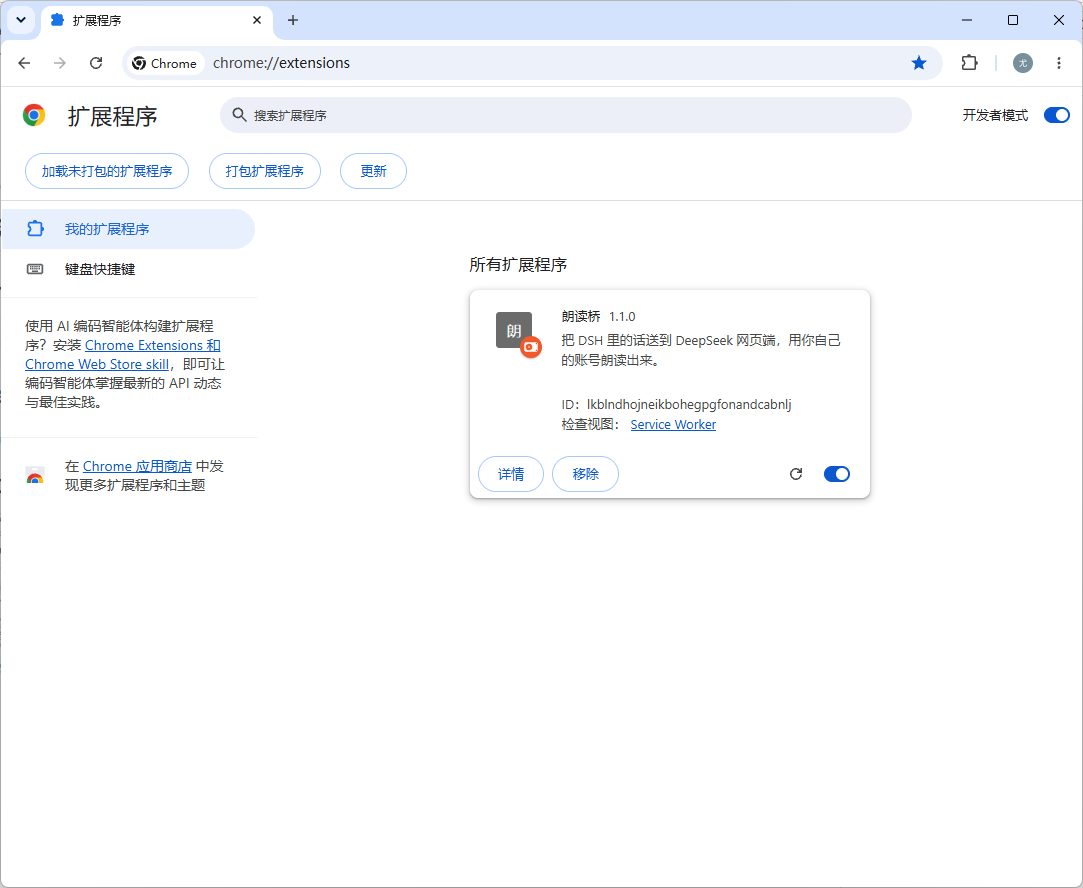
- 打开
chrome://extensions(Edge 用edge://extensions) - 打开「开发者模式」(Chrome 在右上角,Edge 在左下角)
- 点「加载已解压的扩展程序」,选中
extension/这个文件夹 - 打开 https://chat.deepseek.com 并登录你自己的账号
- 这个页面左下角会出现一行状态字 —— 装好了
Chrome 每次启动可能提醒一句「请停用开发者模式扩展」,点保留或关掉都行,不影响使用。
extension/这个文件夹在哪?它就在插件的安装目录里,不用去 GitHub 下:
- 网页版(npx):
%USERPROFILE%\.dsh\profiles\web\node_modules\dsh-tts-bridge\extension- 桌面版:
%APPDATA%\dsh-desktop\harness\profiles\web\node_modules\dsh-tts-bridge\extension(把上面那行整个复制到资源管理器的地址栏,回车就跳过去了。如果朗读桥的卡片提示「还差一步」,说明就是这一步没做。)
第三步:第一次先自己点一下朗读(必做)
浏览器不信任「程序点的按钮」,只信任真人点的。所以第一次用之前:
- 在 DeepSeek 那个页面里,用鼠标点一下它自己的「朗读」按钮(随便点一下页面也行)
- 之后就一直能出声了 —— 自动念、点我们的 ▶,都不用再点
(这是浏览器定的规矩,绕不过去。哪天又不出声了,再真点一下就好。)
怎么用
每条回复下面三个键
| 键 | 作用 |
|---|---|
| ▶ 朗读 | 让 DeepSeek 念这一条(哪一条都行,不用是最新的) |
| ⏸ 停止 | 停 |
| ♡ 收藏 | 把这一条记下来(再点一下取消) |
DSH 右下角的小卡片 🐳 朗读桥
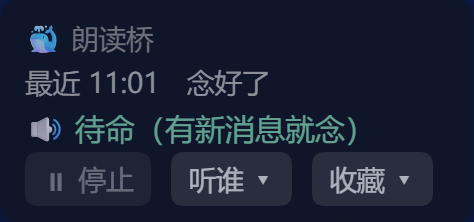
| ⏸ 停止 | 一键停 —— 不管声音是从哪儿念出来的 |
| 听谁 ▾ | 勾选要听哪些对话(默认一个都不听,自己勾;可以勾多个) |
| 收藏 ▾ | 分区收藏:点句子重念、⇄ 换分区、✕ 删掉;最下面能导出成 markdown |
| 按住状态行 0.6 秒 | 开关「自动朗读」 |
- 自动朗读开着时,你选的会话里每说完一整轮,就自动念出来
- 卡片整张按住就能拖,位置记得住
- 状态行会写它现在在干嘛:
待命/已发给 DeepSeek,等它复述…/正在出声…
只列「开着的」对话
「听谁」里只能勾当前载入着的会话 —— 插件只能读被载入的会话。 归档的对话会自动从清单里去掉,也不再听。
数据在哪
<DSH_HOME>/.dsh/tts-bridge.json
「听谁」和「收藏」都在里面,重启不丢。
常见问题
| 现象 | 原因 / 怎么办 |
|---|---|
| 点了朗读,图标在转但没声音 | 在这个页面真点一下(点它自己的「朗读」按钮),再点我们的 ▶ |
| 卡片不见了 | DSH 插件没跑起来 → 重启 DSH |
| 一直卡在「等它复述」 | 把 DeepSeek 那个页面按 F5 |
| 它自己弹了个 DeepSeek 窗口出来 | 这是「自愈」:页面不在、而队列里又有话,它就自己叫回来 |
| 念出来的话不是你要的 | 插件认的是「末尾那条回复」;如果页面上正好有别的变化,按 F5 再试 |
兼容性
| 浏览器 | |
|---|---|
| Chrome / Edge / Brave 等 Chromium 内核 | ✅ 可用(Edge 实测通过) |
| Firefox | ❌ 扩展机制不同,需要另写一版 |
关于合规(请读一下)
- 它不碰 DeepSeek 的接口、不提取音频、不存任何凭证。 扩展做的事,就是在你自己登录的浏览器里,替你点一下「朗读」按钮 —— 跟你手动点是一样的动作。
- 每个人用自己的账号,插件里不存账号也不存 cookie。
- 如果你把它的效果发到公开平台(视频、截图),里面出现 DeepSeek 生成的内容时, 请按平台和 DeepSeek 用户协议的要求标明「内容由 AI 生成」。
- 请不要在插件名、图标或宣传里使用「DeepSeek」「深度求索」的商标和 logo,也不要做得像官方出品。
- 朗读有每日限额,用得太猛会被限。
(本项目与深度求索公司无关,非官方工具。)
许可
Yuuyuko-uu 插件许可 1.0:允许使用、修改、商用; 再分发时要在 README 第一屏注明原仓库和原作者;禁止把本项目说成自己的原创。 这份许可不是 OSI 认证的开源许可,用之前请读一遍全文。
Links
More in this category
PolinniZhong/dsh-omi-voice★ 75
In-chat read-aloud for DeepSeek Harness: tap to read, pause and resume AI replies with natural Doubao TTS voices (BYOK), reading only the final answer with code, tables and diagrams filtered; local engine, plugin keeps no API key.
1624318455/dsh-plugin-tts★ 51
Reads assistant replies aloud via free Edge TTS or your own RVC voice models: read-aloud buttons + auto-read, adaptive chunked progressive playback (gapless long reads), one-click voice-pack installs from a registry, and a portable RVC runtime.
beiyege-01/dsh-voice-ai-girlfriend-plugin★ 49
Voice AI girlfriend for the Web UI: FunASR mic input, Qwen3-TTS spoken replies, companion animation window, and two-way QQ chat (text/voice/image push) via NapCat.
ppy-web/dsh-plugin-xiaomi-mimo-tts★ 41
Provides Xiaomi MiMo, Doubao, and browser-local TTS for DSH, with automatic read-aloud, custom voices, UI sound effects, desktop pet integration, and QQBot integration.
PensiveFei/dsh-voice-scribe★ 36
Voice input for the DSH web UI: tap or hold Alt to dictate into the composer. Local SenseVoice ASR by default — offline, zero config, zero key; auto-fallback to browser Web Speech, optional OpenAI-compatible ASR chain, polish through DSH-configured models, settings UI.
WizisCool/dsh-ears★ 27
Voice input plugin for DeepSeek Harness (dsh): a microphone button in the composer turns speech into a draft transcript, with a choice of speech-recognition backends, optional polish through dsh own LLM routes, and a native settings page.
Community comments
Comments are public GitHub Discussions. Loading them connects to GitHub and Giscus; a GitHub account is required to post.