Adds prompt optimization, cancellation, and undo controls to the DeepSeek Harness composer.
Install
# from GitHub (first run asks for allowBuilds approval — follow the hint, retry)
dsh plugin --profile web add github:zhengzeyong9527-droid/zzy-dsh-prompt-optimizer
Any plugin you install runs third-party code with your own permissions — it can read your files, use your credentials, and reach the network, and tool approvals don’t sandbox it. GitHub-sourced plugins also run build scripts at install time. Only install sources you trust, and pin a commit (github:owner/repo#sha).
README
A prompt optimizer for DeepSeek Harness (DSH). It adds a prompt-optimization action to the composer, writes successful results directly into the draft, and lets you undo back to the original prompt.
Features
- Explicit faithful, developer, and specification modes.
- Visible loading state with cancellation while optimizing.
- Direct draft replacement with one-click undo to the original prompt.
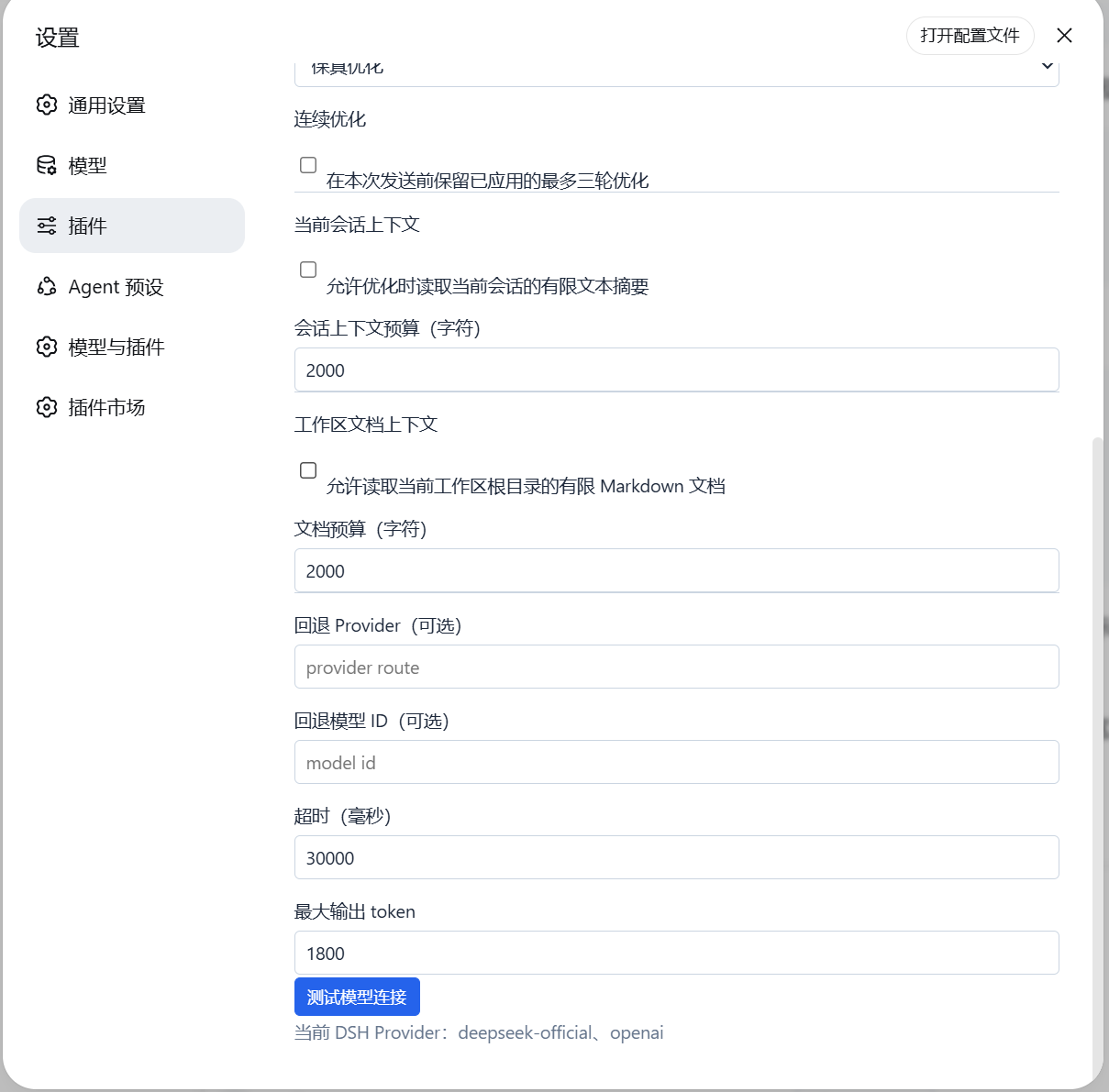
- Optional session-local memory of the three most recently applied optimizations.
- Optional budgeted current-conversation context.
- Optional budgeted Markdown context from the current session workspace root.
- Primary and fallback model routes, timeout, and output-token controls.
- No API keys are stored by the plugin.
Interface
Advanced settings are grouped into optimization strategy, conversation context, workspace document context, and model limits so long explanations and inputs stay readable.
Modes
- Faithful improves clarity without inventing requirements, facts, architecture, or scope.
- Developer structures user-provided engineering facts without selecting a stack or design.
- Specification may add needed defaults, but labels them under
## Default assumptionsfor review.
Privacy and Context
The draft is sent to the DSH model route chosen by the user. Extra context is disabled by default.
Conversation context reads only current user/message and assistant/message text. Workspace context reads at most three relevant Markdown files directly inside the current session workspace root. Both sources are independently budgeted and gracefully degrade when unavailable. Full drafts, session history, and document contents are not persisted.
Installation
dsh plugin --profile web add zzy-dsh-prompt-optimizer
Restart the existing DSH Web process and refresh its current URL.
License
MIT
Links
More in this category
zhu1090093659/dsh-web-ui#packages/dsh-web-ui-all★ 4634
Plugin and skin collection for the DSH Web UI: task board, Git graph, right-side panel, remote mobile UI, pet, live token stats, and a skin center.
omdsh-dev/DSH-better-sidebar★ 2203
Full sidebar workbench with file rendering and editing, terminal, Git, and subagents; third-party plugins can register new tabs.
ccch1mneyyy/dsh-TUI★ 1996
Claude Code-style full-screen terminal UI: pixel-whale header, live status line, and streaming thought expansion.
omdsh-dev/dsh-at-file★ 391
Codex-style `@file` mentions: search workspace files in the composer and attach their contents to prompts.
omdsh-dev/dsh-genui★ 223
Interactive UI components rendered inline in replies: layout, charts, forms, quizzes, mermaid, 3D scenes, and an action event loop back to the model.
huiliyi37/dsh-tianshu-tui★ 215
A terminal UI (TUI) for DeepSeek Harness.