Automatic and user-customizable Fluent-style icons for DSH Settings and sidebar actions, with offline SVG packs and original-icon preservation.
Install
# from npm (prebuilt)
dsh plugin --profile web add dsh-icon-theme
# from GitHub (first run asks for allowBuilds approval — follow the hint, retry)
dsh plugin --profile web add github:yzke/dsh-icon-theme
Any plugin you install runs third-party code with your own permissions — it can read your files, use your credentials, and reach the network, and tool approvals don’t sandbox it. GitHub-sourced plugins also run build scripts at install time — pnpm blocks those until you allow them, so an install can stop with ERR_PNPM_GIT_DEP_PREPARE_NOT_ALLOWED or ERR_PNPM_IGNORED_BUILDS; dsh prints the exact key to add under allowBuilds in your profile’s pnpm-workspace.yaml, and the install works on the next run. Allowing a build is a trust decision: only install sources you trust, and pin a commit (github:owner/repo#sha).
README
English | 简体中文
Automatic, coherent, and user-customizable icons for DeepSeek Harness Settings and sidebar actions.
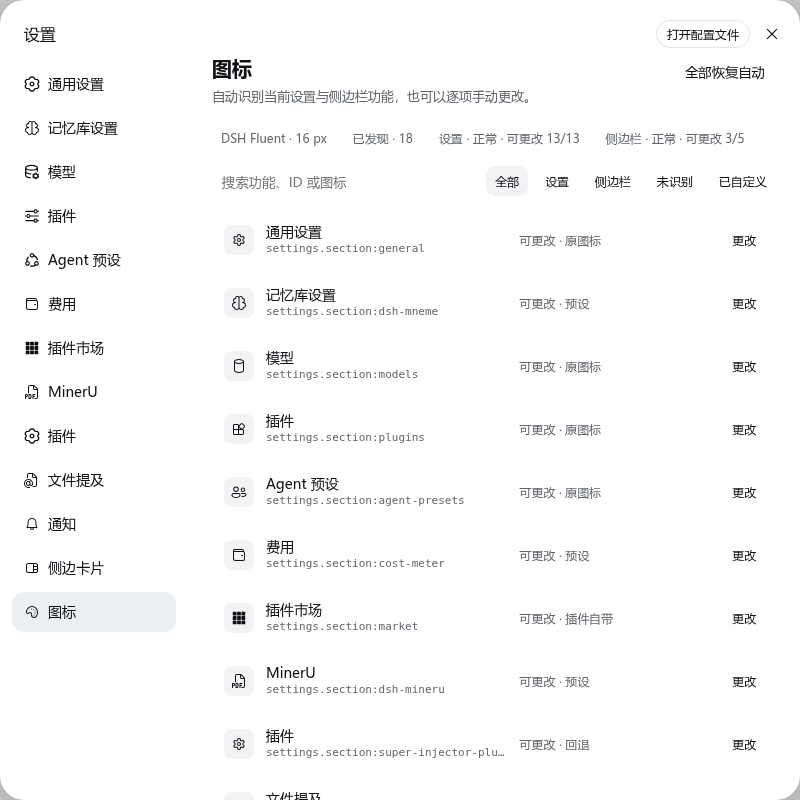
Screenshots use the Chinese locale; the plugin ships equivalent English labels.
Why this plugin
dsh-icon-theme discovers the live slot ledger, preserves trustworthy original icons, fills recognizable gaps with a small Fluent-style pack, and lets the user override every supported target. Version 0.3 uses DSH's official configuration forms and, where available, the official Settings icon slot.
- Discovers live winning
settings.sectionandsidebar.footer.actioncontributions generically. Audited per-plugin records are used only when a sidebar is partially rendered and cannot be correlated by order. - Stores choices by stable key, such as
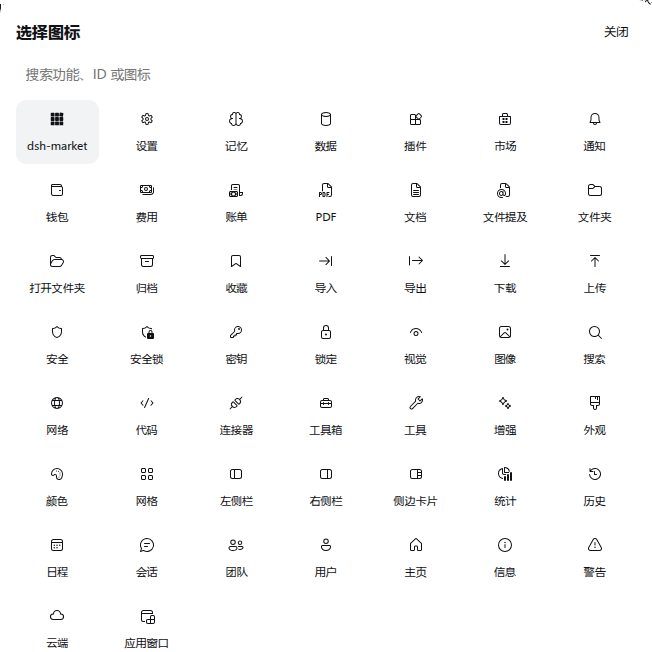
settings.section:market, never by translated labels or DOM position. - Ships 50 curated Fluent UI 16 Regular glyphs, 70 official DSH UI glyphs, and the audited monochrome dsh-market glyph (121 total).
- Uses no icon CDN, webfont, Iconify API, GitHub request, or package scanning at runtime.
- Restores every host SVG and owned DOM marker on unload or hot reload.
- Reports non-rendered contributions and non-icon cards instead of pretending they were changed.
- Falls back to the Settings gear when a target has neither a trustworthy match nor an original icon.
Install
dsh plugin --profile web add dsh-icon-theme
Restart dsh web, then open Settings → Icons.
To install from a source checkout instead:
git clone https://github.com/yzke/dsh-icon-theme.git
cd dsh-icon-theme
npm ci
npm run build
dsh plugin --profile web add link:"$PWD"
Requires Node.js 24.9+. The engines.dsh and DSH peer range is deliberately limited to the tested versions: 0.2.1-rc.5 || 0.2.2-alpha.3. Other prereleases are not implicitly supported. For DSH 0.1, keep dsh-icon-theme@0.2.3.
| DSH version | Settings icons | Configuration |
|---|---|---|
0.2.1-rc.5 (npm latest at release) |
Reversible DOM adapter | Official configForms |
0.2.2-alpha.3 (preview) |
Official settings.section.icon slot |
Official configForms |
Desktop: install through the desktop application's Plugin Manager, or its own bundled dsh command while the application is fully quit. Desktop owns the reserved desktop profile; the npm CLI cannot manage that profile. The shared Web client and Host APIs are supported by this package, but native Windows/macOS Desktop installers have not been end-to-end qualified. See official Desktop ownership.
Uninstall
dsh plugin --profile web remove dsh-icon-theme
Restart dsh web. The plugin restores every host SVG and removes all owned DOM markers and styles on unload.
Use
The page lists every discovered target, its stable key, its compatibility state, and the source of the current icon. Search by feature name, ID, or icon; filter Settings/sidebar/unrecognized/customized entries; choose a glyph; or restore one/all targets to automatic behavior.
Resolution is deterministic:
- User override.
- Audited, bundled plugin glyph.
- Trustworthy DSH/plugin original.
- Exact stable-ID preset.
- Unambiguous stable-ID inference.
- Existing host fallback, or Settings gear when no original exists.
Localized labels are display and search text only. They never decide a persisted mapping.
Sidebar behavior
| State | Behavior |
|---|---|
| Rendered icon action | Changeable; the original is preserved by default. |
| Registered but not rendered | Listed as “can preset”; the override applies when it appears. |
| Non-icon card | Reported but deliberately left unchanged. |
| Unknown or changed DOM | Left untouched unless a unique audited compatibility record exists. |
The sidebar footer and rc.5 Settings adapters remain narrow and reversible. Alpha.3 Settings uses official icon contributions, preserves other providers, and releases its overrides on unload. New surfaces such as sidebar.panellist are outside this plugin's scope. See the design note.
When dsh-better-sidebar is installed, its own Settings row icon is treated as a trusted original and preserved by default. It is replaced only when the user chooses replace-generic (or a manual override).
Ecosystem checks
Compatibility fixtures are pinned to real open-source registration excerpts, including dsh-full-remote, dsh-context, dsh-openpencil, dsh-approve-for-me, and dsh-composer-polish. They prove that an unknown Settings section is discovered generically, while contributions to unrelated surfaces are not misidentified. Details and pinned commits are in ecosystem compatibility. The sidebar fallback fingerprints are also pinned to upstream revisions and may need periodic updates if those plugins change their DOM.
Development and release gate
npm ci
npm run qa
npm run test:web
npm pack --dry-run
For the optional live-host smoke test:
DSH_E2E_URL='http://127.0.0.1:3184/?token=TEST_PROFILE_TOKEN' npm run test:web -- -t @real-dsh
The full testing contract is documented in TESTING.md. Icon sources and licenses are recorded in THIRD_PARTY_NOTICES.md.
Privacy and security
Detection reads only DSH slot metadata and the two rendered UI surfaces. The plugin does not inspect user files or other plugins' bundles. Preferences use DSH's shared configForms service for the dsh-icon-theme Host entry. DSH owns authentication, revision checks, persistence, and reconnection for both Web and Desktop; the plugin has no private HTTP endpoint or browser-local preference copy.
MIT licensed.
Links
More in this category
elysia395/dsh-wallpaper-engine★ 7187
Requires DeepSeek Harness 0.1.5-rc.1+ (DSH Desktop >= 2.0.7) and dsh-better-sidebar >= 0.19.0 - update both before installing or updating this plugin. Plays local Wallpaper Engine Video/Web wallpapers behind the chat, renders Scene wallpapers as extracted static frames, and adds content-rating/type filters, custom uploads and an iOS-style liquid-glass settings window.
Small-tailqwq/dsh-deep-whale#maid-atelier★ 3119
Whale-girl skin series for the DSH Web UI (maid-atelier).
Nwflower/dsh-claude-style★ 619
Claude Code Desktop look-and-feel for the DSH Web GUI — ivory/warm-black dual canvas, clay accent, three-font typography, permission segmented control and brand switcher, via CSS overrides and client DOM overrides.
d-dev0101/open-sea-skin★ 397
Realtime WebGPU ocean skin with quick controls for waves, daylight, glass opacity, and an automatic day cycle.
kingOfSoySauce/dsh-liang-skin★ 392
Adaptive reasoning slider skin that maps each model's available reasoning efforts onto a 0–30 visual intensity scale, with synchronized portraits, background, and interface colors.
RevolutionLA/dsh-dream-skin★ 301
One-command skin plugin: 8 original themes, translucent wallpaper with opacity/blur, per-user accent, and shareable theme-pack import/export, favorites and surprise-me — purely native on DSH's token system.
Community comments
Comments are public GitHub Discussions. Loading them connects to GitHub and Giscus; a GitHub account is required to post.