Ocean-blue theme for the DSH web interface: swimming fish, rising bubbles, a daily-quote ticker above the input box, and a replacement brand area; Settings → Marine Theme exposes 7 groups and 32 options (brand text and size, badge, primary color, watermark, fish, quotes, overall scale) that apply instantly without a reload, plus a two-step reset to defaults.
Install
# from npm (prebuilt)
dsh plugin --profile web add dafy-whale-theme
# from GitHub (first run asks for allowBuilds approval — follow the hint, retry)
dsh plugin --profile web add github:yryd/dafy-whale-theme
Any plugin you install runs third-party code with your own permissions — it can read your files, use your credentials, and reach the network, and tool approvals don’t sandbox it. GitHub-sourced plugins also run build scripts at install time — pnpm blocks those until you allow them, so an install can stop with ERR_PNPM_GIT_DEP_PREPARE_NOT_ALLOWED or ERR_PNPM_IGNORED_BUILDS; dsh prints the exact key to add under allowBuilds in your profile’s pnpm-workspace.yaml, and the install works on the next run. Allowing a build is a trust decision: only install sources you trust, and pin a commit (github:owner/repo#sha).
README
This plugin publishes its README in Chinese only.
DeepSeek Harness web 前端的整站主题插件:海洋蓝配色、游动鱼群、上升气泡、输入框上方「每日鱼语」、左上角品牌替换。
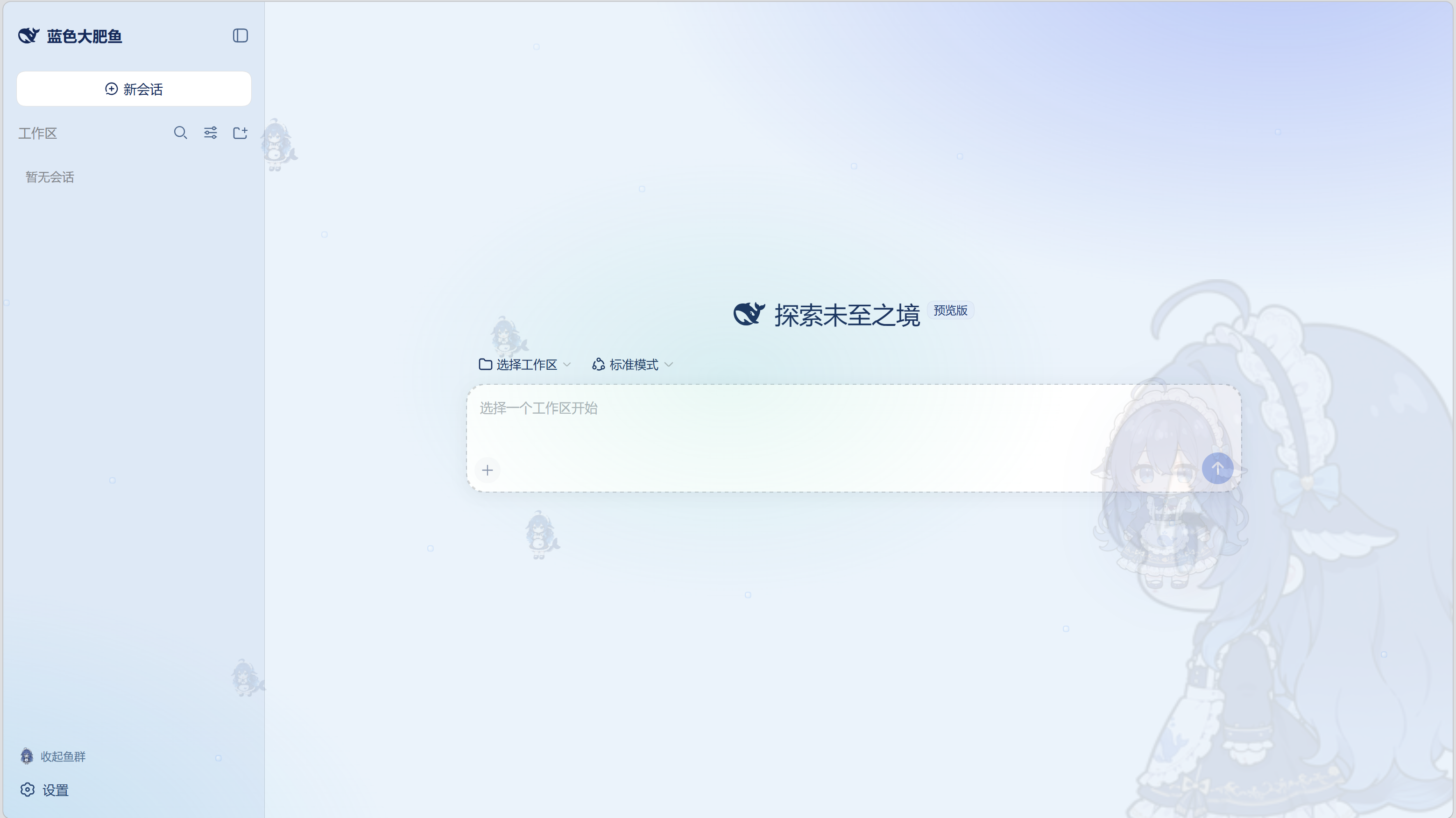
一句话安装
帮我去 https://www.npmjs.com/package/dafy-whale-theme 安装大肥鱼插件
把这句话发给你的 DeepSeek Harness,它会自动完成全部安装;完成后按它提示重启 dsh web 并刷新浏览器(F5)即可。
官方安装(唯一通路)
需要 pnpm。本包在 package.json 中声明了 dsh.bundle,随包携带自己的组合层 cordis.patch.yml,因此官方 CLI 一条命令完成安装并自动挂载:
dsh plugin --profile web add dafy-whale-theme
升级与卸载同样走官方通路:
dsh plugin --profile web update dafy-whale-theme   # 升级
dsh plugin --profile web remove dafy-whale-theme   # 卸载
patch 层只在下次启动时生效:重启
dsh web后刷新页面(web 组合禁用了 HMR,不会热加载)。
兼容性
| DSH 版本 | 状态 |
|---|---|
0.1.7-rc.2 |
✅ 当前版本,已实测 |
0.1.7-rc.1 / 0.1.7 |
✅ 声明兼容(同属 0.1.7 系列) |
0.1.6-alpha.1 及更早 |
❌ 不支持 —— 2.1.0 起改用 DSH 0.1.7 的新配置 API |
package.json 里声明了:
"peerDependencies": { "@deepseek-ai/dsh": ">=0.1.7-rc.1 <0.1.8" }
DSH 会在安装与启动时据此检查运行时版本。版本不符时它会明确拦截并提示需要版本豁免,而不是让插件安静地不工作——这一点很重要,因为 0.1.7 之前 DSH 的配置 API 有过一次破坏性变更(settingsScope → configForms)。
仅支持 web 端(dsh.client.platform: "web")。
特性
- 可视化设置面板:设置 → 海洋主题,32 项可调,改动即时生效(见下)
- 海洋蓝亮/暗双主题配色,DeepSeek 蓝品牌色,主色可自定义
- 全屏氛围:海面光晕、上升气泡、来回游动的鱼群(侧边栏可开关)
- 输入框上方滚动「每日鱼语」,语录可自定义
- 左上角品牌:官方鲸鱼图标 + 「蓝色大肥鱼」字标,三段可独立开关
- 窄侧栏自适应,无 UI 裁切
设置面板
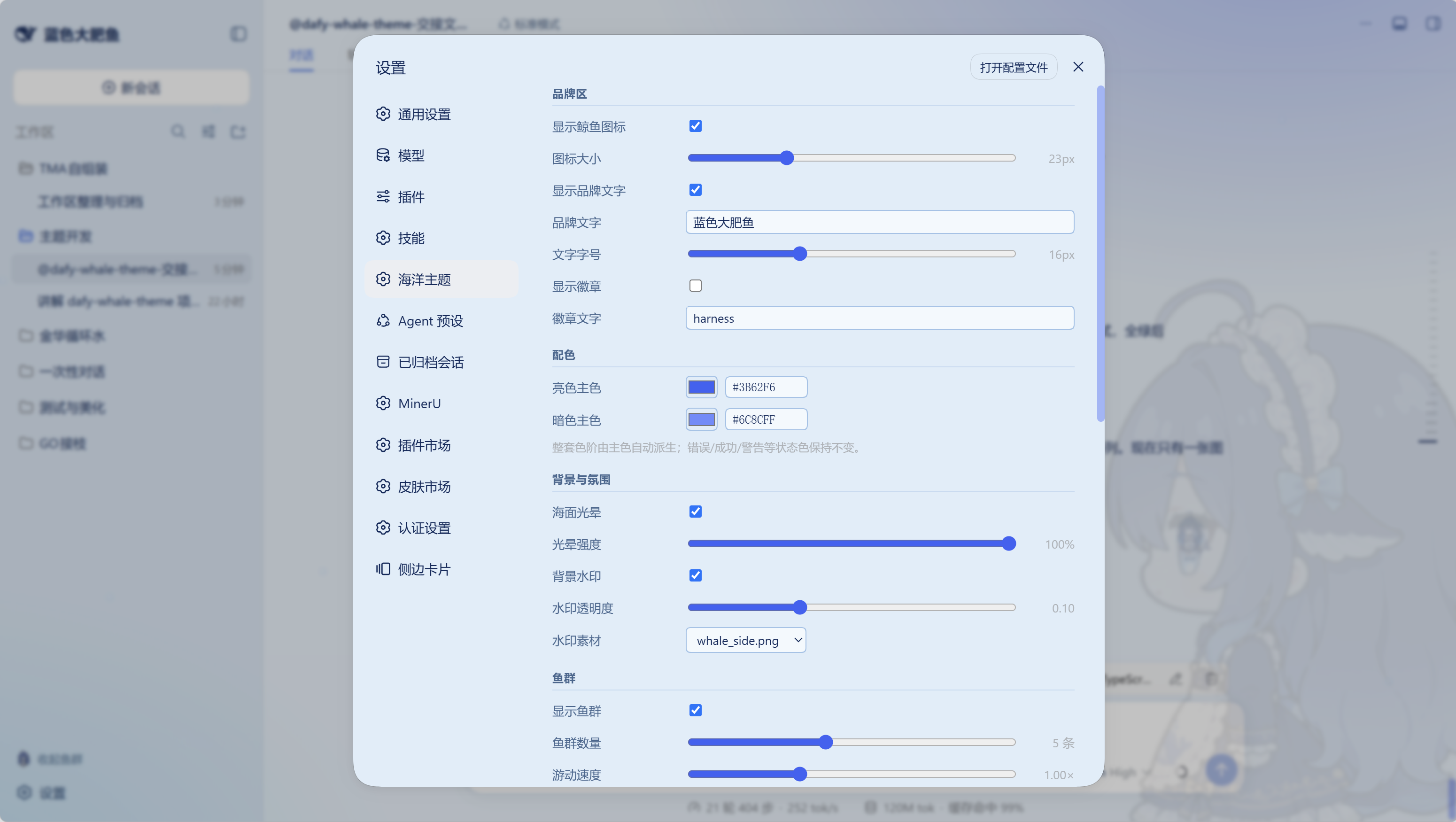
装好并重启后,进入 设置 → 海洋主题,共 7 组 32 项,改动即时生效(无需重启、无需点保存):
| 分组 | 可调项 |
|---|---|
| 品牌区 | 鲸鱼图标开关/大小、品牌文字开关/内容/字号、徽章开关/文字 |
| 配色 | 亮色主色、暗色主色(整套色阶自动派生) |
| 背景与氛围 | 海面光晕开关/强度、背景水印开关/透明度/素材 |
| 鱼群 | 总开关、数量、游动速度、透明度、大小、大鲸鱼开关、小鱼素材、气泡开关/数量/速度 |
| 每日鱼语 | 开关、切换间隔、语录列表(每行一条)、表情开关 |
| 界面 | 侧栏开关文字、整体缩放 |
| 重置 | 一键恢复全部 32 项默认值(带二次确认,误点不会立刻生效) |
配色只改主色即可:其余 10 个设计 token 由主色色相平移派生,亮/暗两套同步变化;错误/成功/警告等语义状态色保持不变。
配置保存在 DSH 用户设置文档的 dafy-whale 命名空间下,随 DSH 的设置一起管理。
开发
本包是 TypeScript 项目。lib/ 是构建产物(不入库,发布时由 CI 构建)。
npm install --include=dev   # ⚠️ 见下方说明
npm run build               # tsc 宿主 + tsc 客户端 + wrap → lib/
npm run typecheck           # 仅类型检查
npm run check               # DSH 插件契约校验 + schema 对齐校验
npm test                    # 构建 + 全部测试
⚠️
NODE_ENV=production陷阱:该环境变量存在时,npm install默认不安装 devDependencies,表现为只打印up to date, audited 1 package而什么都不装。 请显式加--include=dev(CI 里也已这么写)。
| 路径 | 说明 |
|---|---|
src/config.ts |
共享配置模型:DEFAULTS / normalizeConfig / deriveTokens / buildFish |
src/index.ts |
宿主半:注册 dafy-whale settings 命名空间 + /dafy-assets 素材路由 |
src/client.tsx |
客户端半:插槽组件 + 「设置 → 海洋主题」面板 |
src/logo-path.ts |
官方鲸鱼轮廓 path(从改造前代码提取,勿手改) |
scripts/wrap-client.mjs |
把 tsc 的 CJS 产物打包成 DSH 的 ModuleLoader 形态 |
scripts/check-*.mjs |
契约护栏(见 npm run check) |
test/ |
node:test,零测试框架依赖 |
改动后必须 npm run build;装上插件后还须重启 dsh web 才能看到客户端改动
(web 组合禁用 HMR,F5 无效)。
素材与许可
代码采用 MIT 许可(见 LICENSE)。图片素材来自社区仓库,均为 MIT 许可、随包分发,逐文件来源见 NOTICE。
Links
More in this category
elysia395/dsh-wallpaper-engine★ 7716
Requires DeepSeek Harness 0.1.5-rc.1+ (DSH Desktop >= 2.0.7) and dsh-better-sidebar >= 0.19.0 - update both before installing or updating this plugin. Plays local Wallpaper Engine Video/Web wallpapers behind the chat, renders Scene wallpapers as extracted static frames, and adds content-rating/type filters, custom uploads and an iOS-style liquid-glass settings window.
Small-tailqwq/dsh-deep-whale#maid-atelier★ 3129
Whale-girl skin series for the DSH Web UI (maid-atelier).
Nwflower/dsh-claude-style★ 672
Claude Code Desktop look-and-feel for the DSH Web GUI — ivory/warm-black dual canvas, clay accent, three-font typography, permission segmented control and brand switcher, via CSS overrides and client DOM overrides.
kingOfSoySauce/dsh-liang-skin★ 402
Adaptive reasoning slider skin that maps each model's available reasoning efforts onto a 0–30 visual intensity scale, with synchronized portraits, background, and interface colors.
d-dev0101/open-sea-skin★ 399
Realtime WebGPU ocean skin with quick controls for waves, daylight, glass opacity, and an automatic day cycle.
webkubor/dsh-bloom-theme★ 307
Bloom Morandi theme: fifteen variants (mist, cinnabar, petal, ripple, sage, stone, lapis, amber, aurora, lavender, mint, tangerine, silverrose, dawn, osmanthus) built on OKLCH so light and dark stay perceptually even; twelve are featured in the top-bar switcher, grouped by color family, and all 30 foreground/background pairs are measured at WCAG AA or better.
Community comments
Comments are public GitHub Discussions. Loading them connects to GitHub and Giscus; a GitHub account is required to post.