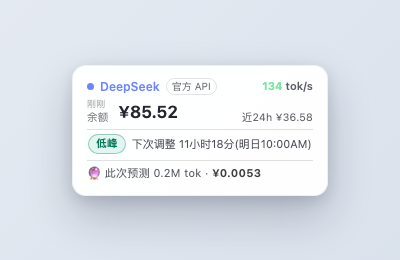
Floating cost crystal for the Web UI: balance card, real-time tok/s, peak/off-peak billing countdown, last-24h spend, and a 🔮 next-message cost forecast, all timezone-aware.
Install
# from GitHub (first run asks for allowBuilds approval — follow the hint, retry)
dsh plugin --profile web add github:xxvk/dsh-cost-crystal
Any plugin you install runs third-party code with your own permissions — it can read your files, use your credentials, and reach the network, and tool approvals don’t sandbox it. GitHub-sourced plugins also run build scripts at install time — pnpm blocks those until you allow them, so an install can stop with ERR_PNPM_GIT_DEP_PREPARE_NOT_ALLOWED or ERR_PNPM_IGNORED_BUILDS; dsh prints the exact key to add under allowBuilds in your profile’s pnpm-workspace.yaml, and the install works on the next run. Allowing a build is a trust decision: only install sources you trust, and pin a commit (github:owner/repo#sha).
README
A cost & usage crystal ball for the DeepSeek Harness web GUI — balance, real-time rate, peak/off-peak billing, and a 🔮 next-message cost forecast, all timezone-aware.
中文说明见 README_CN.md。

Screenshot
Features
- 🔮 Next-message cost forecast — estimates the token usage and cost of your next message from the current conversation context and historical usage; re-prices instantly when you switch models
- Balance card — CNY/USD balance with data-freshness hints («just now / Ns ago»); click to refresh instantly
- Real-time rate — the breathing dot and shimmer light up within 2s of token consumption, showing live
tok/s - Peak/off-peak billing — status badge, countdown to the next rate switch, and a last-24h spend estimate
- Plug & play — zero runtime dependencies, dark/light theme aware, API key stays on the Host
Installation
Requires the DeepSeek Harness web profile (@deepseek-ai/dsh).
# Option 1 (recommended): npm package
dsh plugin --profile web add dsh-cost-crystal

# Option 2: from GitHub
dsh plugin --profile web add "github:xxvk/dsh-cost-crystal"

# Option 3: local development
dsh plugin --profile web add /path/to/dsh-cost-crystal
Then restart dsh web and hard-refresh the browser. The package declares dsh.bundle, so dsh plugin mounts it into the profile's bundle layer automatically — no manual config.
Pricing & Timezone
- Pricing engine implements the official DeepSeek policy timeline: model-aware unit prices, peak/off-peak/flat buckets, dual currency (CNY/USD).
- Peak (deepseek-v4-flash etc.): hit $0.014 / miss $0.44 / output $1.32 per M tokens; off-peak at half price. Windows
01:00–04:00and06:00–10:00 UTC. - Windows are defined in UTC; state/price judged in UTC; display uses the browser's local timezone.
- Spend/cost covers local Harness sessions only; display conversion uses a fixed rate of 7.1.
- ⚠️ All spend/cost figures are local-log estimates and may differ from the official bill.
VL models (multi-model stats)
dsh-cost-crystal buckets usage per model automatically from session logs, so mixed DeepSeek + vision-language (VL) usage shows side by side on the card. When more than one model is present, a summary line (deepseek 12.5M · ¥36.6 qwen3-vl 1.2M · ¥3.2) appears, and the ▼ button next to the source label cycles through your configured models.
To use a VL model (e.g. Alibaba qwen3-vl-flash), configure it as a DSH provider — for example via the dsh-vision-router plugin (provider vision-http, model aliyun/qwen3-vl-flash, DASHSCOPE_API_KEY in ~/.dsh/.credentials.yaml). dsh-cost-crystal needs no extra config: it reads whatever models the session log records.
Roadmap
- v0.1.0 (now): balance card + real-time rate + peak/off-peak + countdown + 24h spend + 🔮 next-message forecast
- v0.2.0 (planned): VL model statistics — model-switch button + per-model cost/token buckets
- v0.3.0 (planned): forecast deepening — weighted window, budget burn-down, peak hints, top requests
See ROADMAP.md and TODO.md.
Development
npm install           # only typescript devDependency
npm run build         # generate injected-script templates + tsc → lib/
npm test              # build + all tests + line rules (TDD gate)
npm run build:profile # generate local hot-reload profile plugin (dev)
Architecture: Host logic (src/index.ts / src/pricing.ts / src/usage.ts) is TypeScript; injected scripts are plain-JS sources (src/scripts/card.inline.js + card-fmt.inline.js + card-render.inline.js) escaped into generated src/card-script.ts by scripts/build-scripts.mjs (generated files: never hand-edit).
Testing (TDD gate)
Every code change must pass to be "done":
npm test # = tsc build + node --test (all tests) + check-lines
- Node built-in
node:test, zero runtime deps; CI (.github/workflows/test.yml) runs on push/PR - Line rules:
src/testideal ≤200 / hard cap 300; generatedlib/exempt. See CONTRIBUTING.md
License
Links
More in this category
bowenliang123/dsh-context★ 1573
DSH context insight panel: Context dashboard + /context command + Context browser — one-stop context lifecycle management with categorized composition, content details, evolution trends, compaction/injection events, and stats.
Han-1413141/dsh-cost-meter★ 349
Per-session and daily API cost, budget with usage %, official balance, history dashboard, and one-click official price sync with peak/off-peak pricing.
wssfk12138/dsh-damage-pulse★ 224
Tracks DeepSeek token usage, per-call and session costs, and account balance with cache-aware charge animations in the DSH Web UI.
zh667/TokenLedger★ 202
Sidebar usage panel that attributes tokens to the relay site that served each request, read from your existing provider config: today/month/all-time totals, per-site and per-model breakdowns, a year activity heatmap, and New API / Sub2API / DeepSeek balances.
Ychris12138/dsh-usage-stats★ 169
Multi-provider usage dashboard with provider/model token breakdowns, calendar drill-downs, account balances, and OpenCode Go / Z.ai subscription quota tracking.
PolinniZhong/dsh-personal-center★ 120
Personal center for DeepSeek Harness: cross-session usage statistics, per-model cost estimation, global custom instructions, a global font-size adjuster, a data-driven desktop pet with bitmap & vector skins, and a conversation status overview, all local and offline.
Community comments
Comments are public GitHub Discussions. Loading them connects to GitHub and Giscus; a GitHub account is required to post.