Sidebar usage panel that attributes tokens to the relay site that served each request, read from your existing provider config: today/month/all-time totals, per-site and per-model breakdowns, a year activity heatmap, and New API / Sub2API / DeepSeek balances.
Install
# from npm (prebuilt)
dsh plugin --profile web add dsh-tokenledger
# from GitHub (first run asks for allowBuilds approval — follow the hint, retry)
dsh plugin --profile web add github:zh667/TokenLedger
Any plugin you install runs third-party code with your own permissions — it can read your files, use your credentials, and reach the network, and tool approvals don’t sandbox it. GitHub-sourced plugins also run build scripts at install time — pnpm blocks those until you allow them, so an install can stop with ERR_PNPM_GIT_DEP_PREPARE_NOT_ALLOWED or ERR_PNPM_IGNORED_BUILDS; dsh prints the exact key to add under allowBuilds in your profile’s pnpm-workspace.yaml, and the install works on the next run. Allowing a build is a trust decision: only install sources you trust, and pin a commit (github:owner/repo#sha).
README
This plugin publishes its README in Chinese only.
把 DeepSeek Harness 的 Token 用量算清楚,并归属到实际服务这次请求的中转站——不用配置,不用凭据。
Token-usage accounting for DeepSeek Harness, attributed to the relay site that
served each request. The existing Web GUI (dsh web) and renderer-neutral
consumers share the same host-owned aggregation. Zero configuration.
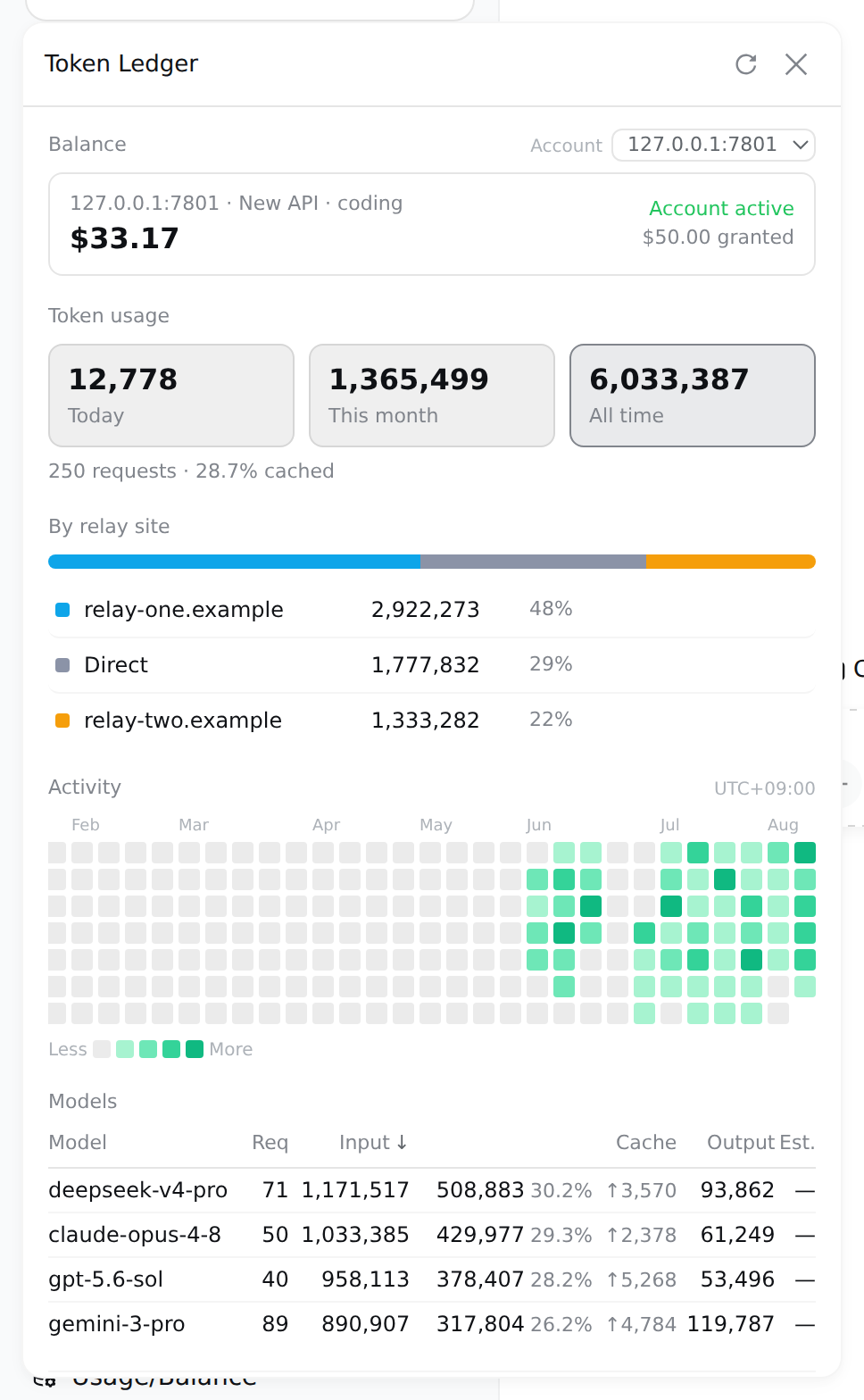
展示图使用演示数据与本机模拟中转站;面板上的每个数字都由真实代码路径算出,只是数据是造的。插件不会把 API Key 或上游原始响应发送到浏览器。
一眼看懂 / At a glance
| 能力 | 说明 | |
|---|---|---|
| 🎯 | 中转站归属 | 按 provider 的 baseURL 归一化 origin 分组——同一站的多把 key 合成一行,站名就是域名,不是你自己起的路由别名 |
| 📁 | 按项目归属 | 用量按会话启动时所在的目录分组——工作区注册过的用它的标题,没注册过的用目录名,子目录里起的会话照样算进去 |
| 🔍 | 零配置发现 | 从宿主的 provider 配置里读出中转站,不用你再填一遍。只读 baseURL,绝不碰旁边的凭据 |
| 💳 | 余额 | DeepSeek 官方、New API、Sub2API,每个账户一把普通 key 即可;不限额度的 key 报"已用"而不是假余额 |
| ⏳ | 订阅配额 | 卖套餐不卖余额的家数越来越多——5 小时 / 每周 / 每月各自滚动、各自重置,每个窗口一条进度条和一个重置时刻 |
| 📊 | 用量分析 | 今日/本月/累计三窗口、按站点/模型下钻、缓存命中率、一年活跃度热力图(悬停看当天模型构成) |
| 🧮 | 费用估算 | 生效日期分段的费率表、分桶计价、峰谷时段;未定价的模型显示破折号而不是 0 |
| 🗂 | 导出与诊断 | CSV / JSON 导出,索引健康度,归因不上的行数单独列出 |
| 🔒 | 只读回环 | 两个端点仅接受回环 GET,且在 peer socket 地址上设防;从不读取提示词、工具参数或响应内容 |
快速安装 / Quick start
需要 DeepSeek Harness web profile(@deepseek-ai/dsh >= 0.1.0-rc.6)。
dsh plugin --profile web add "github:zh667/TokenLedger"
重启已经在跑的 dsh web,浏览器硬刷新。侧边栏底部会出现「用量账本」入口。
升级或卸载:
dsh plugin --profile web update dsh-tokenledger
dsh plugin --profile web remove dsh-tokenledger
重装同一个 spec 会重新解析,所以 add 一遍就能拿到最新的 main(实测过,不是推测)。
要钉某个版本,必须用完整的 40 位 commit SHA。 包管理器把 ref 拿去和 git ls-remote 广播的引用列表比对,而那份列表里只有完整 SHA 和分支/标签名——短 SHA 匹配不到任何东西,会直接报 Could not resolve:
| spec | |
|---|---|
github:zh667/TokenLedger |
✅ |
github:zh667/TokenLedger#main |
✅ |
github:zh667/TokenLedger#947247a |
❌ 短 SHA 解析不了 |
github:zh667/TokenLedger#947247a86f0835f0e746695538569b1a76356dd1 |
✅ |
如果 package.json 里已经被写进了一个解析不了的 spec,add 也会失败——它会先解析整份清单。改掉那一行再 install 即可。
装完之后 /tokenledger diagnostics 会打印当前的路由归属和索引里的路由——排查「我的中转站为什么不显示」看这里,不用猜。
装完即可用:没有要填的配置,也不需要任何凭据就能看到全部用量与中转站分布。余额是唯一用到 key 的地方,而那把 key 宿主已经替你存着了。
命令 / Commands
面板能回答的问题,命令行都能回答——两边读的是同一批查询,不存在第二套聚合。
/tokenledger                      # 全部时间
/tokenledger 7                    # 最近 7 天
/tokenledger 30 api.example.com   # 某个中转站,最近 30 天

/tokenledger site                 # 列出发现到的中转站
/tokenledger site add <路由名> <地址>
/tokenledger site rm <路由名>

/tokenledger export csv 30        # 导出
/tokenledger diagnostics          # 索引健康度
/tokenledger reindex              # 丢弃索引,从头重建
支持的账户类型 / Providers
| Provider | 模式 | 凭据 | 上游接口 |
|---|---|---|---|
| DeepSeek 官方 | 余额 | provider 的 apiKeyEnv |
/user/balance |
| New API 系(含 One API、VoAPI 等分支) | 余额/额度 | provider 的 apiKeyEnv |
/api/usage/token/ + /api/status |
| Sub2API | 余额 / 额度 / 订阅 | provider 的 apiKeyEnv |
/v1/usage |
| Moonshot / Kimi | 余额 | provider 的 apiKeyEnv |
/v1/users/me/balance |
| 智谱 GLM / Z.ai | 余额 | provider 的 apiKeyEnv |
/api/biz/account/query-customer-account-report,读不到时回退 /api/paas/v4/balance |
| OpenRouter | 余额 | Management Key | /api/v1/credits |
| OpenCode Go | 订阅 | provider 的 apiKeyEnv,或本机 auth.json |
/zen/go/v1/usage |
| Kimi For Coding | 订阅 | provider 的 apiKeyEnv |
/coding/v1/usages |
| MiniMax Coding Plan | 订阅 | provider 的 apiKeyEnv |
/v1/token_plan/remains |
| 智谱 GLM / Z.ai Coding Plan | 订阅 + 余额 | provider 的 apiKeyEnv |
/api/monitor/usage/quota/limit |
除 OpenRouter 外都只需要一把普通 API key——就是你已经配给那条路由、用来发请求的那把。OpenRouter 的额度接口只认 Management Key,用推理 key 会 401,面板会直接说明要哪一把,而不是丢一个 401 让你去查一把本来没问题的 key。
订阅这一档没有余额可读,读到的是若干个滚动窗口:一条进度条、一个百分比、一个重置时刻。金额和窗口可以同时存在——Z.ai 就是既有钱包又有 Coding Plan,两样都读,任一边读不到也不影响另一边。
OpenCode Go 那条的"本机 auth.json"是个便利:路由上没配 apiKeyEnv 时,会去读 OpenCode 客户端自己存 key 的那个文件(~/.local/share/opencode/auth.json),key 只发回它本来的来处。文件不存在、读不动、格式变了,一律当作"没有凭据",安静退回,不会因此报错。
这几家订阅接口都没有公开 schema。字段位置不对时,卡片会说出它去哪儿找过,而不是留一张空卡——那句话可以直接反馈给我们。
中转站跑的是哪套程序由路由指纹自动判定,第一次查余额时探测一次并记住。厂商自己的域名不需要探测——origin 直接决定用哪套读法,而且同一厂商的多条路由会合并成一个账户(一个钱包),这跟中转站正好相反。
New API 的额度是按 key 的:同一个站上两把 key 是两份额度,面板分别列出,配置用户中心 API 后,可展示余额。
Sub2API 的 /v1/usage 有三种形态,面板都认:key 配了总额度或速率限制的,读额度和 5 小时 / 每日 / 每周三个窗口;key 属于套餐分组的,读日/周/月周期;剩下的是钱包余额。只有最后一种带 balance 字段,所以前两种以前是一张空卡。
配置 / Configuration
通常不需要任何配置。 中转站从宿主的 provider 设置里读出来。
需要覆盖时,写进你已有的 settings.yaml(改完热更新,不用重启):
tokenledger:
  # 只在自动发现看不到时才需要——比如组合里没挂 settings 服务,
  # 或 provider 是 agent preset 在 agent.cordis.yml 里挂的
  relays:
    my-route: https://relay.example.com/v1

  # 费率表,用于费用估算;不配就显示破折号,不会猜
  rates: []

  # 探测中转站跑的是哪套程序。默认关闭,第一次查余额时会自动探一次
  fingerprint: false
自己声明一个余额接口 / Declared endpoints
内置表覆盖不到的供应商,可以自己声明它的接口,不用等我们发版本:
tokenledger:
  endpoints:
    - origin: https://relay.example.com   # 必须是你已配置的某条 provider 的同源地址
      displayName: 我的中转站
      path: /api/quota
      # raw: true    # 有些控制台接口要裸密钥,不要 Bearer 前缀
      fields:        # 值是响应 JSON 里的取值路径,不是表达式
        total: data.balance
        granted: data.total
        used: data.used
        currency: data.unit
        plan: data.plan_name
      windows:
        - kind: weekly          # session / daily / weekly / monthly / billing
          usedPercent: data.week.percent
          resetsAt: data.week.reset_at
fields 和 windows 里写的是取值路径——描述"数字在哪儿",不描述"怎么取"。没有表达式,也没有任何东西会被求值。路径写错只会让那个字段缺席,其余照常显示。
这个功能等于让配置文件决定"往哪儿发一个带密钥的请求",所以边界写死在代码里,不靠自觉:
- 请求发往匹配到的那条 provider 的 origin,
origin:字段只是用来找它的键。声明一个没配过的地址,不会产生任何请求。 path必须是单斜杠开头的绝对路径。//host/x是协议相对 URL,会解析到别的主机上;构造完还会再校验一次 origin。- 只发 GET,没有请求体,声明里的 method / headers 一概不生效。
- 密钥仍然只从那条 provider 自己的
apiKeyEnv取,声明不能指定任何凭据。 - 跨源重定向直接失败,不跟随——那是绕过第一条最省事的办法。
- 响应体有大小上限和超时。
- 不能覆盖内置读法:只在内置表答不上来时才轮到它。
这类卡片会标注「自定义端点」,因为数字是你自己配的路径取出来的——取错了是配置问题,界面得让这一点看得出来。
「未知路由」是什么
中转站分布里可能出现一行「未知路由」。它的意思是:这些请求走的路由,现在的 provider 配置里找不到了——改过名、删掉了,或者当时用的是另一台机器上的配置。
它和「直连/官方」是两件事,分开是刻意的:
- 直连/官方 = 这条路由配置着,而且不指向任何中转站,请求确实直接打到厂商
- 未知路由 = 我们不知道它去了哪
以前这两种合并成一个桶,结果是一台真实机器上 88% 的 token 显示成「直连/官方」,而其中很大一部分其实走了中转站。把「读不到」显示成一个确定的答案,是这个项目在别处一直防着的错误,这里漏了一个口子。
数据没丢,只是标签错了。 汇总行是按 (sessionId, day, site, provider, model) 存的,路由名一直在。把那条路由重新配回去(同名即可),目录变化会触发索引重建,历史流量自动归位。
按项目归属 / Per-project attribution
面板除了「按站点」「按模型」,还有一段「按项目」:这个月的钱,是哪个项目烧的。
归组的键是会话启动时所在的目录,不是宿主的工作区 id。这一条是刻意的:
DSH 的工作区(ctx.workspace)是一个目录的登记——create(path) 会先 fs.realpath,并且同一个规范路径只会有一条记录;会话是否属于它,判定是 sessionPath(id) === record.path,严格相等。所以一个工作区就是一个项目,它不是一个能装若干项目的容器。
按工作区 id 归组会无声地漏掉两类用量:
- 在子目录里起的会话(
cd src && dsh),cwd 和登记的路径不相等,谁也不属于; - 从没在界面里登记过工作区的项目,压根不存在。
这两类大概率是多数。所以:按 cwd 归组,用工作区标题命名。 跟中转站那条规矩是一个道理——站点按 baseURL 归一化出的 origin 分组,不按路由别名,因为叫 deepseek 的路由可能指向任何地方。cwd 是实际发生的事,工作区标题是有人打的标签。
没有 cwd 的会话单独一行标成「未记录目录」,不会被丢掉——不然按项目的几行加起来就对不上总数,而看的人无从察觉。
workspace 是可选依赖:组合里没挂这个服务,整段照常工作,只是每行显示目录名而不是工作区标题。
正确性与数据口径 / Correctness
用量折叠有三个地方容易错,都有测试覆盖(test/usage.test.js):
请求失败了照样扣费。 用量除了挂在 assistant/message 上,也会从 assistant/chunk 的 {type:'usage'} 流出。请求在报出 usage 之后失败,就永远等不到 assistant/message——但供应商已经收钱了。只订阅 assistant/message 会系统性少算这部分。
同一个 (turn, step) 会被报告两次。 后来的样本是替换前一个,不是累加;替换时必须从原先归属的那一天和那条路由里减回去。
孤儿 usage chunk 不带身份。 assistant/message 自带 provider 和 model,StreamChunk 的 usage 变体没有。失败请求那条记录要回退到最近一次 request/header,且要认得 reason: 'resume'(进程重启会重发 header,那不是换模型)。归不上的记为显式 unknown,绝不猜。
口径上:inputTokens、cacheReadTokens、cacheWriteTokens 三个桶互斥,相加才是计费输入;reasoningTokens 是 outputTokens 的子集,只做展示,加进总数就是重复计费。天按宿主进程的本地时间切分,面板上会标出是哪个时区。
归属在折叠时写死进记录,历史永不重写。中转站集合发生变化时会丢弃索引并全量重建——否则新认出的站会显示成"你刚开始用它"。
隐私与安全 / Privacy & security
- 从不读取内容。 只有计数和标识符:token 数、模型名、provider 路由名、站点域名。提示词、工具参数、响应正文既不读也不存。
- 凭据只在宿主侧。 key 由宿主的 credentials 服务按引用(
apiKeyEnv)在请求时解析、用完即弃,始终走Authorization头,绝不进 URL 查询串。浏览器永远拿不到 key。 - 回环防护。 两个 HTTP 端点注册为 exact 路由,因此位于 RPC 信任边界之外,处理器自己设防:拒绝非 GET,并同时校验 peer socket 地址(不可伪造)与 Host 头。
- 中转站指纹识别不用凭据,靠路由的 404/401 特征。
API
浏览器面板读这两个端点,仅限回环 GET:
| 端点 | 说明 |
|---|---|
GET /api/tokenledger/usage?days=&site= |
整个面板的数据:三窗口合计、按天/模型/站点、一年活跃度与逐日模型构成、账户列表、索引诊断 |
GET /api/tokenledger/balance?account= |
某个账户的余额 |
包也可作为库使用,供 DSH 之外的消费者:
import { foldUsage, bySite, byModel } from "dsh-tokenledger";
import { LedgerStore } from "dsh-tokenledger/store";
import { readBalance } from "dsh-tokenledger/balance";
Harness 与 Blue
ctx.tokenLedger 为现有消费者保留原有对象身份和九个成员:store、sweep、
totals、byDay、byModel、bySite、sites、diagnostics 和 reindex。
Blue UI 与 Web UI 都包含在同一个 dsh-tokenledger npm 包中。安装该 bundle 后:
- 普通 Harness/Web 环境保留原文本
/tokenledger命令和回环 HTTP 面板。 - 检测到 Blue host 时,同一个插件 Fiber 挂载原生 dashboard,并以 Blue overlay 命令替换文本命令;Blue 卸载或拒绝注册时恢复文本命令。
- Blue 通过 apply-local controller 读取同一个
usagePayload(),不会发布额外的 Cordis Service,也不会维护第二套用量口径。
完整架构和验收记录见
docs/BLUE-MIGRATION.md。
开发 / Development
npm test          # 含浏览器半边——它能在 Node 里被物化和测试
npm pack --dry-run
浏览器半边没有构建步骤:它是一个手写的 __ModuleLoader__ bundle,React 由宿主作为 peer 提供,样式手写注入。因此它能在 Node 里被加载和测试。
Blue PR 验收不需要 clone Blue 仓库。从本仓库根目录安装固定版本的 Blue
CLI,把当前插件快照加入它管理的 blue profile,然后启动:
npm install --global pnpm@11 @dsh-blue/blue-cli@0.1.2-alpha.1
blue plugin add "file:$PWD"
blue
进入 Blue 后执行 /tokenledger,检查真实用量、刷新、账户切换、分页和退出清理。
修改插件源码后,重新执行 blue plugin add "file:$PWD" 再启动;file: 安装会物化
插件自己的依赖闭包,不依赖开发者机器上的 TokenLedger 工作区链接。
致谢 / Credits
- OpenRouter、Moonshot/Kimi 与 Z.ai/GLM 的余额响应解析参考并改编自
Ychris12138/dsh-usage-stats(MIT);TokenLedger 在此基础上增加了按 origin 识别、账户归并、Management Key 提示和币种防猜,详见 NOTICE - 热力图的分位数分级与悬停详情参考
xiufengsun/TokenTracker(MIT) - New API 的计费口径读自
QuantumNous/new-api源码
友情链接 / Links
感谢 LINUX DO 社区的帮助与支持。
Thanks to the LINUX DO community for their help and support.
宿主 / The host
deepseek-ai/deepseek-harness—— 本插件运行其上的 agent harness
插件索引 / Where to find plugins —— 这几处收录了社区插件,装之前值得先逛一圈
awesome-dsh-plugin/awesome-dsh-plugin—— 按功能分类的中英双语列表AdamPlatin123/awesome-dsh-plugins—— 自动扫描dsh-plugintopic,带兼容性状态列0xsline/awesome-deepseek-harness—— 人工精选,另有自动生成的CATALOG.mdbruc3van/awesome-dsh-plugin—— 场景导航、入门套装与热度榜
这个面板读得懂的上游 / Upstreams this panel reads
QuantumNous/new-api—— 中转站程序;面板的额度换算口径是从它的路由与计费源码里读出来的
⚠️ 非官方声明:TokenLedger 是独立的第三方社区项目,与 DeepSeek 无隶属、赞助或背书关系。以上友链亦不代表任何隶属、赞助或背书关系。「DeepSeek」及相关商标归其权利人所有。
License
Links
More in this category
bowenliang123/dsh-context★ 1556
DSH context insight panel: Context dashboard + /context command + Context browser — one-stop context lifecycle management with categorized composition, content details, evolution trends, compaction/injection events, and stats.
Han-1413141/dsh-cost-meter★ 344
Per-session and daily API cost, budget with usage %, official balance, history dashboard, and one-click official price sync with peak/off-peak pricing.
wssfk12138/dsh-damage-pulse★ 214
Tracks DeepSeek token usage, per-call and session costs, and account balance with cache-aware charge animations in the DSH Web UI.
Ychris12138/dsh-usage-stats★ 168
Multi-provider usage dashboard with provider/model token breakdowns, calendar drill-downs, account balances, and OpenCode Go / Z.ai subscription quota tracking.
PolinniZhong/dsh-personal-center★ 120
Personal center for DeepSeek Harness: cross-session usage statistics, per-model cost estimation, global custom instructions, a global font-size adjuster, a data-driven desktop pet with bitmap & vector skins, and a conversation status overview, all local and offline.
feibi-mochi/deepseek-harness-control-center★ 72
DeepSeek Harness control center for official balance monitoring, per-session costs and tokens, third-party token totals, completion alerts, official recharge, flexible layouts, and agent-assisted session controls.
Community comments
Comments are public GitHub Discussions. Loading them connects to GitHub and Giscus; a GitHub account is required to post.