Browse Claude Code, DSH and Codex session logs by working directory, with per-turn context composition, token usage, compaction markers and cost estimates.
Install
# from GitHub (first run asks for allowBuilds approval — follow the hint, retry)
dsh plugin --profile web add github:Mt-Youya/dsh-plugins#path:/plugins/sessions-insight
Any plugin you install runs third-party code with your own permissions — it can read your files, use your credentials, and reach the network, and tool approvals don’t sandbox it. GitHub-sourced plugins also run build scripts at install time — pnpm blocks those until you allow them, so an install can stop with ERR_PNPM_GIT_DEP_PREPARE_NOT_ALLOWED or ERR_PNPM_IGNORED_BUILDS; dsh prints the exact key to add under allowBuilds in your profile’s pnpm-workspace.yaml, and the install works on the next run. Allowing a build is a trust decision: only install sources you trust, and pin a commit (github:owner/repo#sha).
README
English | 简体中文
Sessions Insight · dsh-sessions-insight
A read-only Sessions Insight panel for the DSH Web GUI. It parses session logs from Claude Code, DSH and Codex and shows what the model actually received on each turn — system prompt, tool definitions, memory & instructions, history, tool results, images — and marks every number as an exact usage figure or a character-based estimate.
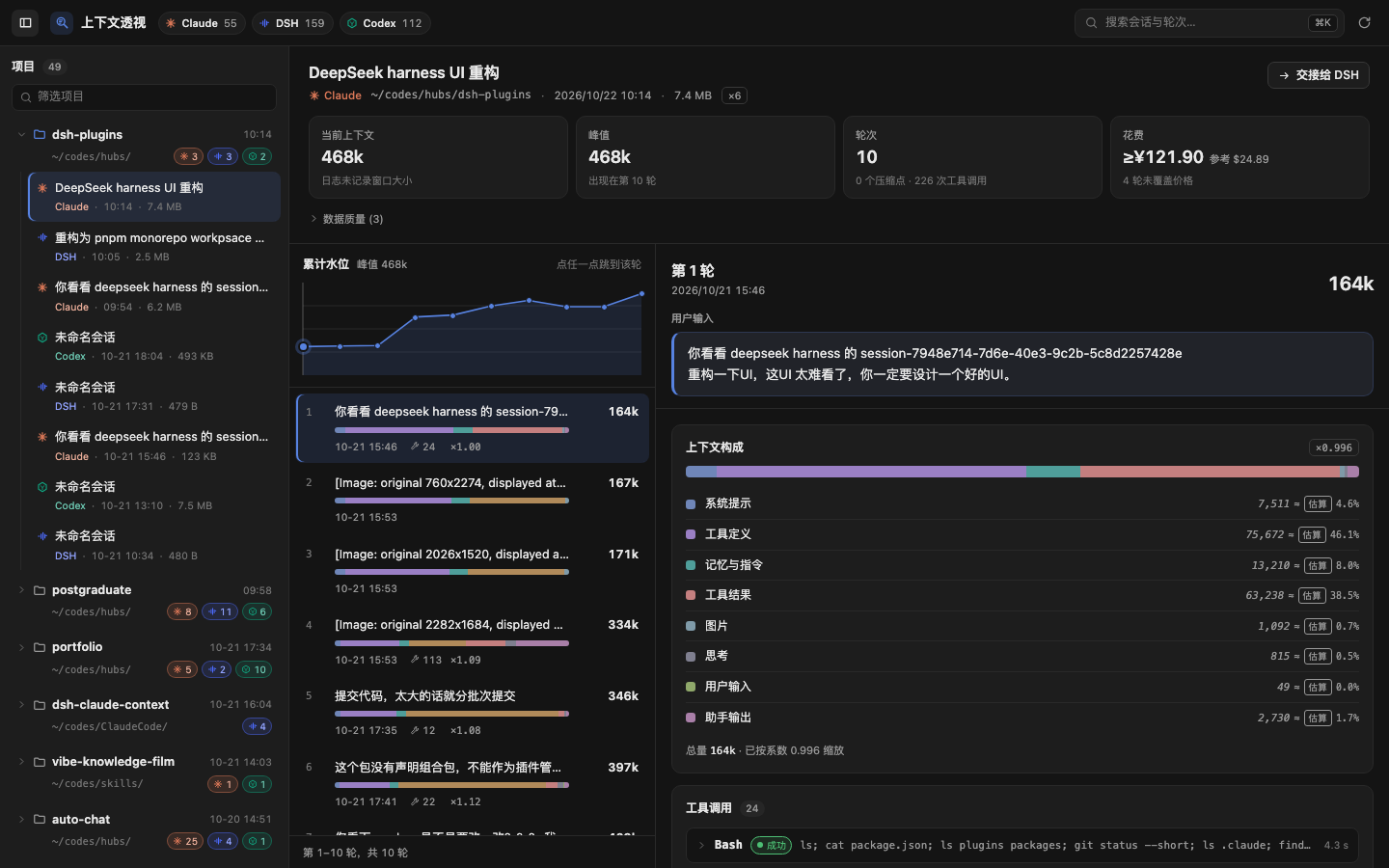
Read-only end to end: no writes to source data, no index, nothing persisted. The only cache is an in-process LRU.
Current scope: read-only insight plus the summary handoff. The handoff delivers a generated brief into a new DSH session and only calls the official
session.create/session.prompt— it never hand-writes session events and never rewrites the source session (docs/HANDOFF.md,docs/adr/0003-never-handwrite-session-events.md,docs/adr/0007-accepted-is-not-success.md).
What it answers
- Of this turn's 392K window, how much is tool schemas, and how much is history?
- Why does the window jump after turn 7 — where is the compaction point, and what were the sizes before and after?
- Is 29,018 a usage figure from the log or a chars/token estimate? Every value carries an
exact/estimatebadge plus its basis. - Across all three sources, how many sessions and turns does a workdir hold, and when was it last touched?
The interface
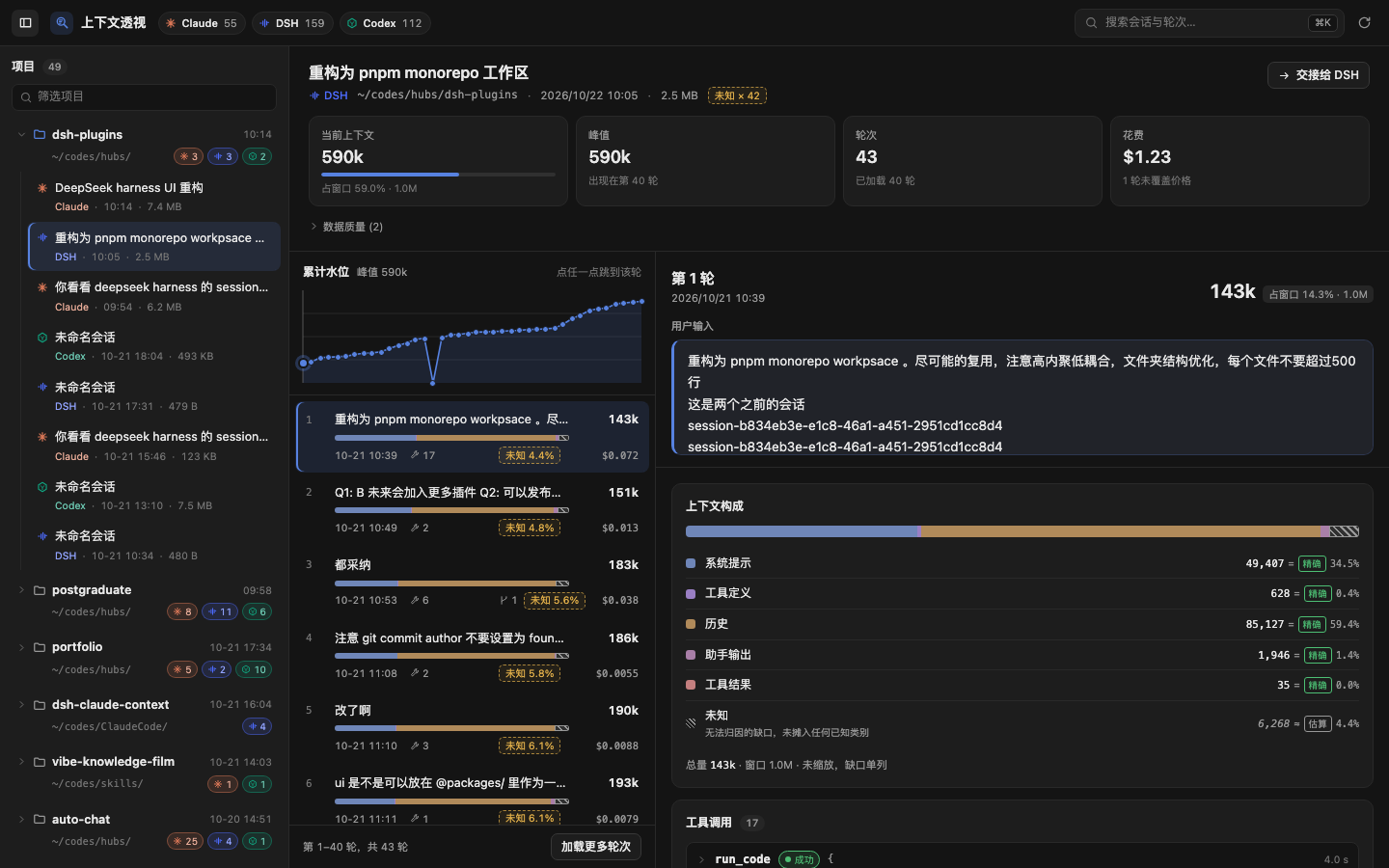
The workdir is the only axis; the source is just a badge. workdir → session → turn
- Toolbar: each source's availability and session count (an unreadable source dims, hover for the reason), search, refresh, and a toggle for the project column.
- Project tree: grouped by workdir, with a filter; sessions hang under their project with a source mark, time and file size. The list reads file headers only and parses a session when you open it, so the first open of a big file pays the decode cost.
- Session head: title, source and path, then four stat tiles: current context (share of the window, amber above 80%), peak (and the turn it hit), turns (with compactions and tool calls), and cost.
- Turn column: the "cumulative level" chart plots each turn's total context, dashed verticals mark compactions, and clicking a point opens that turn. Below it, one row per turn: the user's words, token count, composition bar, time, tool calls, scaling factor and cost, aligned column by column. Turns load 40 at a time, with "load more turns" at the bottom.
- Detail column: "Turn N" and the user's words stay pinned at the top; beneath them come the context composition (every part carries an
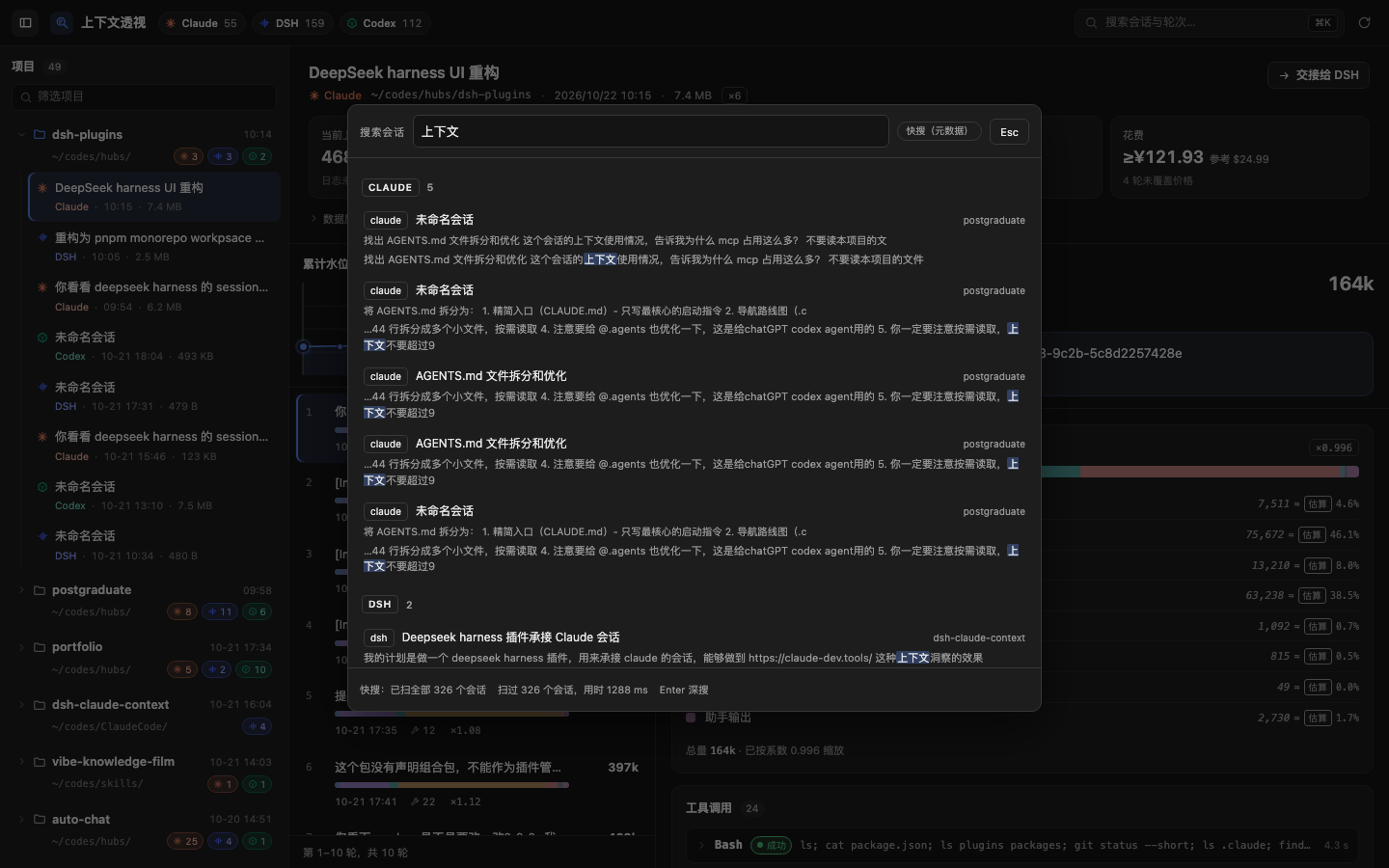
exact/estimatebadge), compactions, tool calls (folded to one-line summaries, failed ones open themselves) and subagent sessions. ⌘K(Ctrl+Kon Windows/Linux) opens full-corpus search; a hit jumps straight to that turn.
Sources and their roots
| Source | Default root | Override |
|---|---|---|
| Claude Code | ~/.claude/projects |
DSH_CONTEXT_INSIGHT_CLAUDE_ROOT |
| DSH | ~/.dsh/sessions |
DSH_CONTEXT_INSIGHT_DSH_ROOT |
| Codex | ~/.codex/sessions |
DSH_CONTEXT_INSIGHT_CODEX_ROOT |
A missing or unreadable source never takes the others down: the strip at the top marks just that source "unavailable" and gives the reason (root missing / unreadable / adapter error).
Install
Requires DSH 0.2.1-rc.2 or newer (the plugin is aligned with the behaviour of the running app.asar; see docs/adr/0002-asar-021-is-the-contract.md).
Step 0 — know which profile you are installing into
Installing into the wrong profile does not error; the panel just never appears. These are two different profiles, not one configuration:
| How you start DSH | Actual profile | Flag |
|---|---|---|
Double-click DeepSeek Harness.app (desktop) |
desktop |
--profile desktop |
dsh web (command line / remote) |
web |
--profile web |
When unsure, check the process arguments, or which directory under ~/.dsh/profiles/ is being updated.
Step 1 — install into the profile
To install just this plugin:
dsh plugin --profile desktop add @cyrus/dsh-sessions-insight   # desktop app
dsh plugin --profile web     add @cyrus/dsh-sessions-insight   # dsh web
# from a checkout, or from a packed tarball:
# dsh plugin --profile <name> add link:$PWD
# dsh plugin --profile <name> add /abs/path/cyrus-dsh-sessions-insight-<version>.tgz
You can also install the collection @cyrus/dsh-plugins, which brings in every plugin of the collection (see the repository README).
Pick one of the two. The collection and this plugin both insert
id: sessions-insightinto the loader tree; with both indsh.profile.bundles, DSH fails at boot withduplicate loader entry id: sessions-insight.
Step 2 — make sure the package is listed in dsh.profile.bundles
In practice dsh plugin ... add also appends the package name to the end of dsh.profile.bundles in ~/.dsh/profiles/<name>/package.json. If it did not (a link: install, a hand-edited manifest, or an upgrade from an older layout), add it yourself — order matters, later layers override earlier ones:
{
  "dsh": {
    "profile": {
      "bundles": ["@deepseek-ai/dsh-base", "@deepseek-ai/dsh-web-app", "@cyrus/dsh-sessions-insight"]
    }
  }
}
Step 3 — restart
dsh web
A "Sessions Insight" row in the sidebar means it mounted. (The marketplace also has an unrelated dsh-context plugin with a similar name.) Host-side smoke test (a request without an Origin header counts as same-origin):
curl -sS http://127.0.0.1:<port>/api/dsh-sessions-insight/health
# {"ok":true,"value":{"version":"<version>","sources":["claude","dsh","codex"]}}
# value.version is the host-side PLUGIN_VERSION constant, injected from package.json at build time
Loader rows are composed at boot, so a restart is required. Browser hot-reload only covers a rebuilt client bundle.
Permissions and security boundary
- Read-only: the three roots are only
stat-ed and read; nothing is written, deleted or renamed. - Nothing persisted: no index, no cache files; the in-process LRU keys on
source + id + mtime + size. - Path allowlist: every path argument is resolved and
realpath-checked to stay inside the three allowed roots, which blocks..and symlink escapes. - Same-origin gate: every route is
kind:'exact'and passes an Origin/Host gate first —Sec-Fetch-Site: cross-siteis a 403, a mismatchedOrigin/Hostis a 403, a same-origin GET withoutOriginpasses. - The only write path is the handoff: the query surface is all GETs (
health/sources/workdirs/sessions/session/search/cost); the single write action ishandoff/apply, which only calls the officialsession.create+session.prompt— it writes no source data and injects no events into a live session. - Read limits: single-file decoding is byte-capped and answers
read-limitinstead of starving the Host.
Known limitations
Search has a 2.5 s budget. Full-corpus search streams and stops at
SEARCH_DEADLINE_MS = 2500: the response carriestruncated: trueandremaining(sessions not reached), and the UI says "not finished within budget, N sessions left". On a very large corpus, narrow the sources or drill down by workdir instead.Claude sessions without
prompt_snapshotshow a large "unknown" slice. Those sessions (56 of 121 files in this corpus) cannot see tool definitions or the system prompt, so that share stays inresidualand is drawn as an explicit "unknown" slice — it is never smeared into the other categories on purpose. Seedocs/adr/0005-honest-attribution-residual.md.Codex reasoning is unavailable.
response_item.reasoning.encrypted_contentis ciphertext: countable, not measurable, so Codex turns show no "thinking" block.Blocks are estimates; totals are exact. Blocks use 2.6 chars/token, which runs ~23% high on instruction bodies; turns that were equalised carry a
reconciled.factor(seedocs/adr/0006-projection-not-differencing.md). Do not bill from block numbers.DSH bodies require decoding the log. The projcache holds metadata only, so opening a session still means frame-by-frame zstd decoding; multi-MB sessions pause noticeably on first open.
A handoff's
deliveredis the instant of delivery, not a state you can keep observing. The Host emitsturn/startwithin about 30 ms of accepting the prompt, so the only stable states polling can see arerunning/succeeded/failed. Success meansturn/end reason=completed; seedocs/adr/0007-accepted-is-not-success.md.Cost comes from several price tables side by side, with no currency conversion. There are two tables, each with its own
version/asOf/source:official(USD): DeepSeek's official pricing page, using the peak price as a conservative upper bound (cacheWrite counts as 0, since the official price only distinguishes cache hit and miss);openrouter(USD): public reference prices taken from/api/v1/models, shown only in the "reference" column.
The primary amount comes only from
official: DeepSeek models are priced, while Claude/GPT have no primary amount (null, never estimated) and show the openrouter reference column only. When one session mixes currencies, totals are grouped by(table, currency)and shown side by side, never added across tables or currencies, and never converted. An unlisted channel is not free: it counts as 0, the amount gets a≥prefix and is markedpartial. Use these numbers to understand the shape of usage, not to reconcile a bill.
Layout
This package owns the plugin's two halves; the capabilities live in the workspace packages it depends on. Dependencies point one way — plugins/sessions-insight → packages/* — and the mapping from package name to source lives in tooling/aliases.ts, mirrored by paths in tsconfig.json.
This package, plugins/sessions-insight/src/:
src/
├── index.ts          host entry: assembles the three sources, registers the routes (the only file that touches cordis)
├── protocol.ts       this plugin's wire entry: route paths plus a re-export of the contract package's IR, types and guards
├── version.ts        version constant, injected from package.json at build time
├── host/             host half
│   ├── http/         same-origin gate, envelope, route table (routes.ts + routes/)
│   ├── sources/      the three sources, workdir merge, snapshot index, path allowlist
│   ├── views/        search / cost / pricing / brief
│   └── handoff/      handoff state machine (accepted ≠ success)
└── client/           browser half
    ├── index.tsx     entry: registers the sidebar/main slots and the dictionary
    ├── api.ts        same-origin fetch + response decoding
    ├── format.ts / labels.ts / locale.ts   formatting, label fallback, zh/en dictionaries
    ├── styles.ts     injects the compiled CSS once
    ├── state/        pure state logic: tree flattening, turn rows, stacked-bar arithmetic
    ├── theme/        app.css, components.css and the generated.css.ts build artefact
    └── ui/           components: panel, toolbar, project tree, session head, turn list and detail, tool detail, handoff, search palette…
The packages it depends on (packages/, inlined into lib/ at build time, never published on their own):
packages/
├── plugin-kit/         zero-dependency base: the JSON envelope and URL spelling
├── session-contract/   the unified IR, wire types and their guards      → plugin-kit
├── session-readers/    Claude / Codex / DSH readers and measurement      → session-contract
├── plugin-kit-host/    route table, same-origin gate, envelope, LRU      → plugin-kit
└── plugin-kit-client/  decoding fetch, style injection, slot registration → plugin-kit
Development
Run these from the repository root (this package is not a repository of its own):
pnpm install
npx tsc --noEmit                          # type gate: the packages and the host half
npx tsc --noEmit -p tsconfig.client.json  # type gate: the browser half (types: [], no node types)
npx vitest run                            # unit tests
npx tsdown                                # builds lib/index.js and lib/client.js
node scripts/check-bundle.mjs plugins/sessions-insight   # host loading contract
Inside the package you can also build just this half: pnpm --filter @cyrus/dsh-sessions-insight build (that is css + tsdown).
Two entries are produced:
lib/index.js— host half (ESM, runs in the Host'snode:vmrealm)lib/client.js— browser half; must be wrapped inwindow.__ModuleLoader__.load({ id, factory })withreactexternal
To try a mount without touching a production profile, use an isolated DSH_HOME:
export DSH_HOME=/tmp/dsh-try
dsh try --from-default-profile web --dump-config   # create the profile from the built-in template, print the composed tree
dsh plugin --profile try add "$PWD"
# then append the package name to dsh.profile.bundles in profiles/try/package.json
dsh try --dump-config | grep -A2 sessions-insight    # confirm the patch row landed
dsh try --host 127.0.0.1 --port 49744 --no-open     # boot on its own port
Documentation
These live at the repository root, not inside this package (the npm tarball only ships docs/images):
docs/RELEASE.en.md— publishing to npmdocs/PLAN.md— decisions and milestones (Chinese, like the rest below)docs/IR.md— the unified turn IR (adapter contract)docs/API.md— host route contractdocs/HANDOFF.md— handoff contractdocs/adr— architecture decision recordsGLOSSARY.md— vocabulary
License
Links
More in this category
bowenliang123/dsh-context★ 3190
DSH context insight panel: Context dashboard + /context command + Context browser — one-stop context lifecycle management with categorized composition, content details, evolution trends, compaction/injection events, and stats.
Han-1413141/dsh-cost-meter★ 489
Per-session and daily API cost, budget with usage %, official balance, history dashboard, and one-click official price sync with peak/off-peak pricing.
wssfk12138/dsh-damage-pulse★ 273
Tracks DeepSeek token usage, per-call and session costs, and account balance with cache-aware charge animations in the DSH Web UI.
zh667/TokenLedger★ 199
Sidebar usage panel that attributes tokens to the relay site that served each request, read from your existing provider config: today/month/all-time totals, per-site and per-model breakdowns, a year activity heatmap, and New API / Sub2API / DeepSeek balances.
Ychris12138/dsh-usage-stats★ 183
Multi-provider usage dashboard with provider/model token breakdowns, calendar drill-downs, account balances, and OpenCode Go / Z.ai subscription quota tracking.
PolinniZhong/dsh-personal-center★ 112
Personal center for DeepSeek Harness: cross-session usage statistics, per-model cost estimation, global custom instructions, a global font-size adjuster, a data-driven desktop pet with bitmap & vector skins, and a conversation status overview, all local and offline.
Community comments
Comments are public GitHub Discussions. Loading them connects to GitHub and Giscus; a GitHub account is required to post.