Anchors an approve/answer bubble to each DSH Web sidebar session row — one-click handling of authorization, questions, plan reviews and blocked goals without opening the conversation.
Install
# from GitHub (first run asks for allowBuilds approval — follow the hint, retry)
dsh plugin --profile web add github:wydddddcool/dsh-hover-approve
Any plugin you install runs third-party code with your own permissions — it can read your files, use your credentials, and reach the network, and tool approvals don’t sandbox it. GitHub-sourced plugins also run build scripts at install time — pnpm blocks those until you allow them, so an install can stop with ERR_PNPM_GIT_DEP_PREPARE_NOT_ALLOWED or ERR_PNPM_IGNORED_BUILDS; dsh prints the exact key to add under allowBuilds in your profile’s pnpm-workspace.yaml, and the install works on the next run. Allowing a build is a trust decision: only install sources you trust, and pin a commit (github:owner/repo#sha).
README
Why
DSH conversations regularly need you to stop and act: approve a file write, answer a question, confirm a plan, check why a goal got blocked. The built-in panel makes you open the conversation and scroll to act — switching back and forth breaks your flow.
This plugin keeps the interaction at the session's list row: a bubble pops up anchored to the row, a tail line and dot point at which session is waiting, and you approve / reject / answer right in the bubble — no need to open the conversation.
Features
In action
Real DSH Web UI (bubble anchored to the session row, tail line + dot pointing at the session):
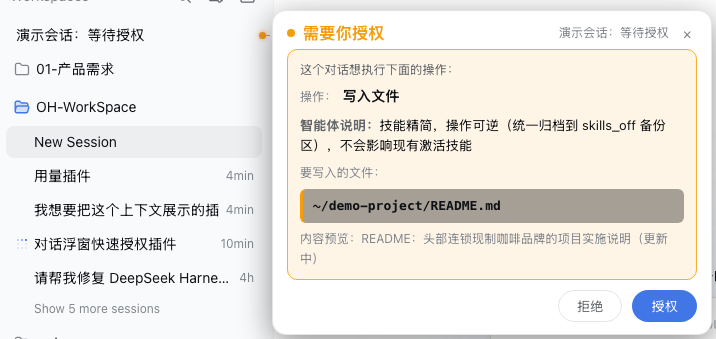
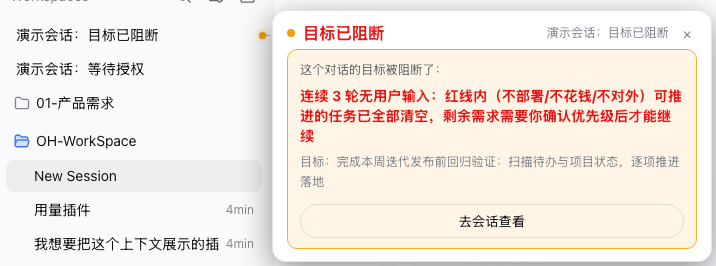
- Auto-appears, no hover needed: anchored to the session row — you always know which session is waiting;
- Complete information: plain-language action labels (bash → "run terminal command", write → "write file"), highlighted file path, command collapsed to one line (click to expand), agent note shown prominently;
- Dismiss by clicking outside: click anywhere outside (or the ×) — it stays closed for this round and reappears on the next interaction;
- Follows the list: bubble and tail track the row on scroll / re-render; concurrent interactions anchor to their own rows, offset horizontally;
- Archived sessions stay quiet: archived conversations never get a bubble; archiving / unarchiving takes effect immediately (already-shown bubbles close at once).
Install
Quick install (recommended):
dsh plugin --profile web add https://github.com/wydddddcool/dsh-hover-approve
One command installs the dependency and registers the bundle (applies cordis.patch.yml automatically); restart dsh web afterwards.
You can also install manually in your profile (e.g. ~/.dsh/profiles/web):
# 1. Add to package.json dependencies:
#    "dsh-hover-approve": "https://github.com/wydddddcool/dsh-hover-approve"
# 2. Add "dsh-hover-approve" to dsh.profile.bundles (applies cordis.patch.yml)
pnpm install
# 3. Restart dsh web
Local development can use a file: path dependency; note pnpm copies file: deps, so re-sync after editing:
cp <src>/lib/client.js ~/.dsh/profiles/web/node_modules/dsh-hover-approve/lib/client.js
Relationship with DSH
This is a community plugin (not an official product) for DeepSeek Harness Web. It reads session state through the official client injection (ctx.sessions / ctx.workspaces / ctx.locale) and answers through the official PendingWait.respond() channel — the same server-side path and audit trail as the in-conversation panel. Responses are bound to the approvalId captured at display time: if the request is replaced or already handled, sending is refused, so you can never approve something you didn't see. Tested against dsh 0.1.0-rc.6 (uses pendingInteraction / projectionValues / sessions.open / PendingWait).
Testing
npm install   # first time: installs jsdom
npm test      # 16 cases: four modes, archive filtering, answer encoding, state switching, retry, viewport clamping, teardown
CI (GitHub Actions) runs the tests on every push.
Limitations
- The command line only shows when a running call matches
callId(bash-like tools); other tools show only the action type and note — same as the built-in panel. - Row→session mapping matches by title scoring (exact match first); heavily duplicated titles could mis-anchor in rare cases.
- The bubble depends on the built-in list DOM structure (
[role="treeitem"]). If DSH changes that structure, the bubble may silently stop working (no errors) until adapted.
License
MIT License. DeepSeek is a trademark of DeepSeek AI; this is an independent community project, not affiliated with or endorsed by DeepSeek.
Links
More in this category
zhu1090093659/dsh-web#packages/dsh-task-board★ 8296
Task board for the dsh web GUI: a sidebar multi-column kanban whose cards run in real DSH agent sessions and can also be scheduled with cron expressions, executed host-side even with the browser closed.
zhu1090093659/dsh-web#packages/dsh-web-all★ 8296
Plugin and skin collection for the DSH Web UI: task board, Git graph, right-side panel, remote mobile UI, pet, live token stats, and a skin center.
omdsh-dev/DSH-better-sidebar★ 3968
Full sidebar workbench with file rendering and editing, terminal, Git, and subagents; third-party plugins can register new tabs.
ccch1mneyyy/dsh-TUI★ 3948
Claude Code-style full-screen terminal UI: pixel-whale header, live status line, and streaming thought expansion.
MeteorNOX/DeepSeek-Balance-Whale-Widget★ 3877
A fixed-corner whale widget for the DSH web GUI — balance, today's usage and per-turn cost with peak/off-peak pricing, editable balance-alert and daily-budget bubbles, a module-based custom bubble queue with A/B weighted choices and random lines or images, 30+ vendor templates (OpenAI, OpenRouter, Kimi, SiliconFlow, Ark, Zhipu, MiniMax and more) with per-model balance and subscription quota, plus task-end sound, imported audio, custom roles and a resource manager. Local-only, no telemetry.
Devin-AXIS/deepseek-design#deepseek-idesign★ 1413
Visual design studio for websites, app prototypes, posters, cards, reports, and magazines, with templates, direct element editing, selection-aware AI draft handoff, and export.
Community comments
Comments are public GitHub Discussions. Loading them connects to GitHub and Giscus; a GitHub account is required to post.