One-handed, keyboard-free input for the composer: press and hold the mouse on the input box, speak, release — the text lands in the draft, and sliding up cancels without leaving a half sentence behind. No mic button to aim at and no shortcut to remember; the hand never has to leave the input area, which is the point when the other hand is busy. Recognition runs fully offline (SenseVoice via sherpa-onnx, no API key, audio never leaves the machine).
Install
# from npm (prebuilt)
dsh plugin --profile web add dsh-hold-to-talk
# from GitHub (first run asks for allowBuilds approval — follow the hint, retry)
dsh plugin --profile web add github:wangzhanchao883/dsh-hold-to-talk
Any plugin you install runs third-party code with your own permissions — it can read your files, use your credentials, and reach the network, and tool approvals don’t sandbox it. GitHub-sourced plugins also run build scripts at install time — pnpm blocks those until you allow them, so an install can stop with ERR_PNPM_GIT_DEP_PREPARE_NOT_ALLOWED or ERR_PNPM_IGNORED_BUILDS; dsh prints the exact key to add under allowBuilds in your profile’s pnpm-workspace.yaml, and the install works on the next run. Allowing a build is a trust decision: only install sources you trust, and pin a commit (github:owner/repo#sha).
README
This plugin publishes its README in Chinese only.
Hold-to-talk voice input for the DeepSeek Harness Web composer — the WeChat-desktop gesture: hold the mouse on the input box, speak, see the running transcript float above it, release to drop the text into the draft. Recognition runs locally (SenseVoice via sherpa-onnx): no API key, offline, audio never leaves the machine.
DSH Web 输入框的"长按说话"语音输入 —— 微信电脑版同款操作:在输入框上按住鼠标说话,浮层里边说边出字,松手把文字写进输入框,上滑取消。识别全部在本机跑(SenseVoice + sherpa-onnx),免密钥、离线、音频不出本机。
┌─ composer ──────────────────────────────────┐
│  [hold the mouse, don't move, 400ms]         │
│         ↓                                    │
│   ┌──────────────────────────────────┐       │
│   │ ●  ▁▃▅▂▇▃▁  3s                   │  ← overlay, fixed above the composer
│   │ release to send · slide up to cancel │    │
│   │ 开饭时间早上9点至下午5点            │  ← live transcript (preview only)
│   └──────────────────────────────────┘       │
│  [release] → final text appended to the draft │
└──────────────────────────────────────────────┘
Demo / 演示
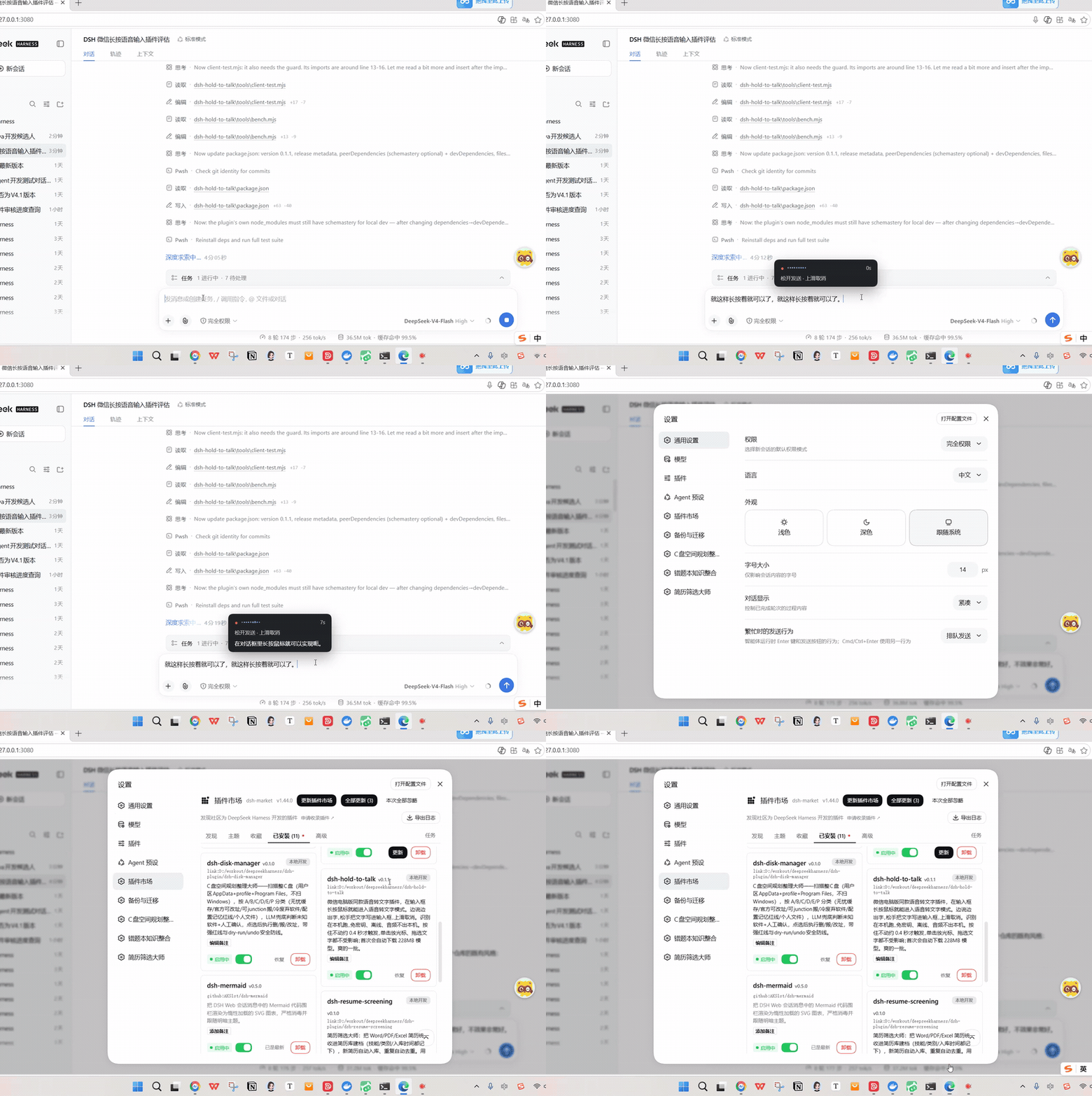
按住鼠标说话 → 浮层里边说边出字 → 松手把文字写进输入框(35 秒实录,完整视频)
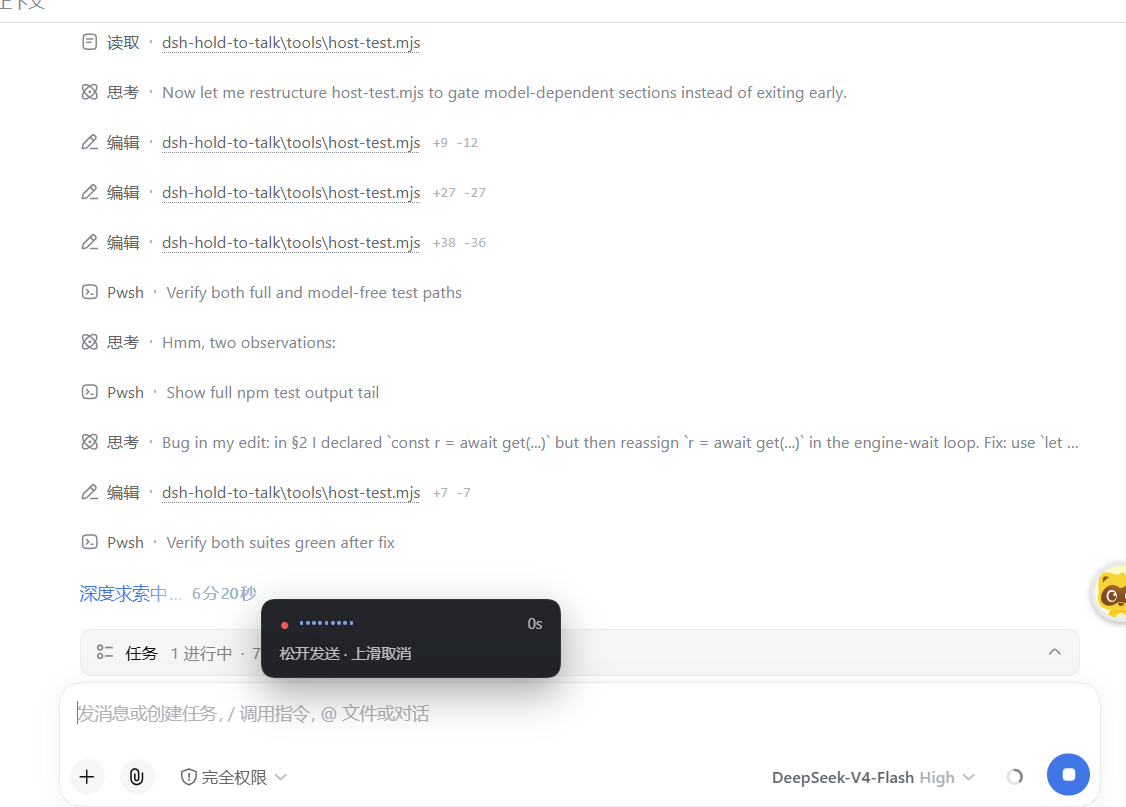
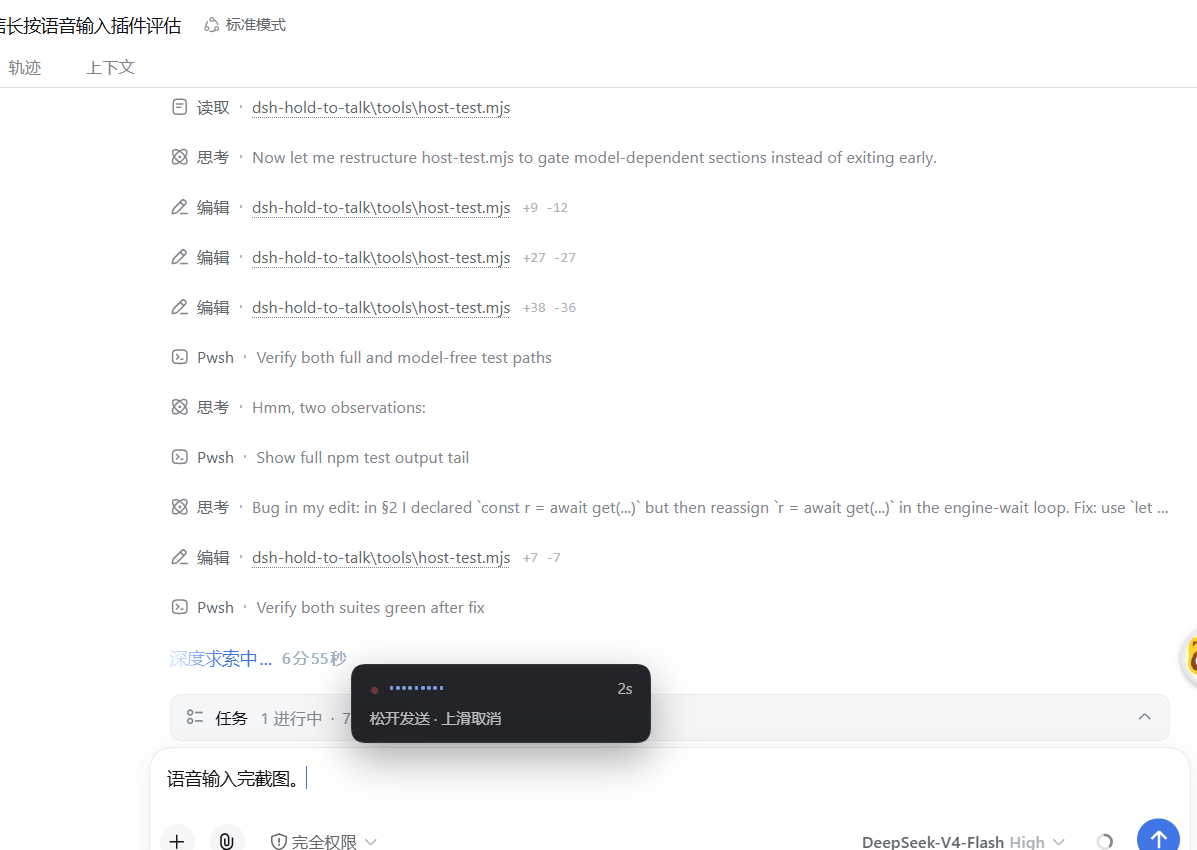
| 1. Hold on the input box / 长按进入录音 | 2. Release, text lands in the draft / 松手写入草稿 | 3. Plugin card / 插件卡片 |
|---|---|---|
 |
 |
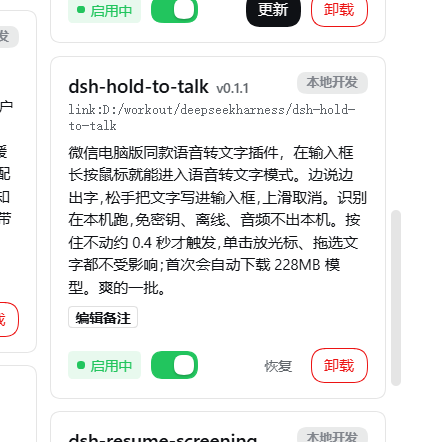 |
| The overlay appears with "release to send · slide up to cancel" / 浮层出现,提示"松开发送 · 上滑取消" | The transcript is appended to the composer; the live preview stayed in the overlay / 识别文字写入输入框(边说边出字的预览只留在浮层里) | Listed in the plugin list after install / 安装后在插件列表可见 |
English
What it does
- A long press on the composer starts dictation; releasing inserts the transcript into the draft; sliding up cancels;
Esccancels; a 60-second hold auto-finishes. - While you speak, an overlay above the composer shows a live transcript, a level meter and the elapsed time.
- The live transcript is a preview only — it is never written into the draft. Only the release-time result (decoded from the full audio) is inserted, so recognition jitter cannot corrupt what you are editing.
- Recognition is local: SenseVoice (int8) through sherpa-onnx, decoded in a worker thread. No API key, no cloud call, no telemetry.
- Normal editing is untouched: a quick click still places the caret, dragging still selects text, and holding without reaching the threshold does nothing.
Interaction
| Gesture | Behaviour |
|---|---|
| Hold the mouse on the input box, still, for ≥400 ms | Recording starts (no microphone request and no recording indicator before this) |
| Move >8 px, or create a text selection, or release early | Treated as normal editing — nothing happens |
| Speaking | The tail window is re-decoded every 1.5 s for the overlay preview |
| Release | The full audio is decoded and the text is appended to the draft |
| Hold and slide up >60 px | Overlay turns red ("release to cancel"); releasing discards the audio |
Esc while holding |
Cancel immediately |
| Hold longer than 60 s | Auto-finish |
Requirements
- DeepSeek Harness running the web profile (
dsh web). - Node.js
>=22.19or>=24on the machine running DSH. - A Chromium-based browser (Chrome / Edge) with microphone access. The DSH web UI
is served over
http://127.0.0.1, which is a secure context, sogetUserMediais allowed. - ~230 MB of disk for the model, downloaded once on first use.
Install
dsh plugin --profile web add dsh-hold-to-talk
# or from a checkout / GitHub:
dsh plugin --profile web add /path/to/dsh-hold-to-talk
# then restart dsh web and hard-refresh the page (Ctrl+Shift+R)
First run
On page load the plugin starts downloading the model in the background
(model.int8.onnx, 228 MB, from hf-mirror.com, resumable). While it downloads,
holding the composer shows "语音模型准备中 x%". To fetch it ahead of time:
npm run model:fetch
The model is cached under ~/.dsh/hold-to-talk/models/ (change with modelDir).
Configuration
Set the plugin entry's config in the profile's cordis.patch.yml:
- id: dsh-hold-to-talk
  name: dsh-hold-to-talk
  config:
    holdThresholdMs: 400     # long-press threshold
    cancelSlidePx: 60        # slide-up-to-cancel distance
    interimIntervalMs: 1500  # live-preview cadence
    maxWindowSec: 6          # preview decode window; the final always uses all audio
    minHoldMs: 250           # shorter holds are discarded (mis-taps)
    maxHoldMs: 60000         # auto-finish limit
    autoSend: false          # insert only; never auto-send by default
    language: auto           # auto / zh / en / ja / ko / yue
    useItn: true             # inverse text normalization ("二零二六" -> "2026")
    numThreads: 2            # native engine threads
    mirror: https://hf-mirror.com
    modelDir: ""             # empty = ~/.dsh/hold-to-talk/models
Priority: cordis.patch.yml > plugin defaults.
DSH 0.1.7 note. Up to 0.1.5 these options were also editable from the Web settings panel (through a
settings.yamlnamespace). DSH 0.1.7 replaced that API with a schema-driven config-form service, so the panel entry no longer exists; editingconfigincordis.patch.ymlis the supported way. Host behaviour is otherwise unchanged.
How it works
browser half (lib/client.js)                    host half (lib/index.js)
┌───────────────────────────────┐   HTTP      ┌────────────────────────────────┐
│ gesture  capture-phase events  │             │ exact routes via webServer      │
│  mousedown→400ms→move/select   │             │  POST /asr  ?mode=interim|final │
│ capture  AudioWorklet→16k PCM  │────────────▶│             |drop              │
│  ring buffer / linear resample │             │  GET  /health[?prepare=1]       │
│ overlay  conversation.input.   │◀────────────│  GET  /config                   │
│          overlay slot          │   JSON      │ per-hold buffer: interim decodes│
│ insert   inputActions.setDraft  │            │ the tail window, final uses all │
└───────────────────────────────┘             │ worker_threads ↓                │
                                               │ sherpa-onnx SenseVoice (int8)   │
                                               └────────────────────────────────┘
Engineering decisions worth knowing:
- Decoding runs in a worker thread. sherpa-onnx decoding is synchronous and blocks for 0.6–3.3 s per 6–22 s of audio; on the main thread it would stall the host event loop and the page's streaming output with it.
- Native first, WASM fallback.
sherpa-onnx-node(native, multi-threaded) is ~2.5× faster thansherpa-onnx(WASM, single-threaded) — see the table below. WASM lives inoptionalDependencies; the worker falls back automatically. - Absolute model paths only. The WASM build uses NODERAWFS; a relative path lands in emscripten's virtual CWD and is not found.
- The
AudioContextis created inside themousedowngesture. Creating it 400 ms later gets it suspended by autoplay policy and no audio flows. The capture node feeds a zero-gain sink beforedestinationso it is pulled without being audible (otherwise: feedback howl). - Resampling always restarts from sample 0, so successive increments tile the stream exactly; resampling only the tail would drift.
- Previews wait for 2 seconds of audio. A non-streaming model fed too little hallucinates (1.2 s produced "哈。", 0.5 s produced "Yeah.").
- Late previews are dropped by epoch, so a preview arriving after release can never overwrite the final transcript.
- Gesture ownership is decided by DOM containment, never by visibility. The
overlay is hidden while idle; dispatching by
offsetParent/getClientRects()made long-press die permanently after the first successful dictation (v0.1.0). - The overlay anchor is always rendered (zero-size, out of flow) so the ownership anchor never disappears, and a module token makes the previous module's document listeners inert after a hot reload.
Measured performance
Decode time on the author's machine (Windows, Node 22.22):
| Audio | WASM (single thread) | Native (numThreads=2) |
|---|---|---|
| 5.6 s | 1663 ms | 704 ms |
| 11.2 s | 4403 ms | 1123 ms |
| 22.4 s | 8015 ms | 3310 ms |
Model load into the worker happens once: 2158 ms (WASM) / 3565 ms (native).
Limitations
- SenseVoice is not a streaming model. "Live" is a re-decode of the tail window every 1.5 s, so the preview trails speech by roughly 1.5–2 s; the final result (on release) always uses the complete audio.
- Long dictation takes a moment to finish: ~3 s for 20 s of speech, ~9 s at the 60 s cap.
- Desktop mouse only. Touch long-press is deliberately not implemented — it collides with text selection and the context menu on mobile.
- The model download is 228 MB on first use.
Development
npm run check            # syntax check all runtime modules
npm test                 # check + three offline suites
npm run model:fetch      # 228MB model (needed by the full suites)
npm run bench            # decode-time benchmark
None of the suites need a browser or a DSH restart:
| Script | Covers |
|---|---|
tools/client-smoke.mjs |
Client registration contract: module id, only react, exports, slot id/order, single style injection, safe without slots |
tools/host-test.mjs |
Real HTTP server over the real routes: config/health, final, interim increments, drop, short-audio skip, cross-site rejection, 405/404 |
tools/client-test.mjs |
The real interaction logic in Node (browser APIs stubbed): click-does-nothing, move-cancels, hold→preview→draft, slide-up cancel, mis-tap discard, mic denial, reuse after cancel, three consecutive holds |
tools/decode-test.mjs |
Model + worker + recognition smoke test (tools/zh.wav) |
Without the model, the model-dependent cases skip themselves, so npm test is
green on a clean clone — which is exactly what CI runs.
Security
- Audio never leaves the machine. It travels only over loopback HTTP to the plugin's own route and is decoded by a local process. No third-party service is contacted during recognition.
- No credentials. The plugin reads and stores no API key or token.
- Routes refuse cross-site requests (
sec-fetch-site), so a random web page cannot post audio at the local server. - The microphone is opened only while you hold; the stream's tracks are stopped on release, and no other page or process gets the audio.
- The only network request the plugin makes by itself is the one-time model
download from the configured mirror (
hf-mirror.comby default). No telemetry.
License
MIT — see LICENSE.
中文说明
给 DeepSeek Harness Web 界面加微信电脑版同款语音输入:在输入框上按住鼠标说话,浮层里边说边出字,松手把文字写进输入框,按住上滑则丢弃。识别在你自己的机器上跑(SenseVoice + sherpa-onnx),不需要任何 API key,音频不出本机。
功能
- 输入框上长按鼠标即进入语音输入,松手把识别结果追加进输入框;上滑取消、
Esc取消、按满 60 秒自动定稿。 - 说话期间输入框上方浮层显示实时字幕、音量波形与计时。
- 实时字幕只作预览,绝不回写输入框;只有松手时用完整音频解码出的结果才写入,识别抖动不会污染你正在编辑的草稿。
- 识别在本机完成(SenseVoice int8 + sherpa-onnx,解码放在 worker 线程):免密钥、离线、无遥测。
- 不影响正常编辑:快速单击照旧放光标、拖动照旧选中文字,没到长按阈值就松手什么都不会发生。
交互细节
| 操作 | 行为 |
|---|---|
| 按住输入框不动 ≥400ms | 进入录音(此前不申请麦克风权限、不点亮录音指示灯) |
| 按住期间移动 >8px、或产生文本选区、或提前松手 | 判定为普通编辑,完全不触发(拖选文字、点光标落位一切照旧) |
| 说话中 | 每 1.5 秒重解码一次尾部窗口,浮层实时预览 |
| 松手 | 用完整音频定稿,文字追加到输入框已有内容末尾 |
| 按住上滑 >60px | 浮层变红"松开取消",松手即丢弃 |
| 按住 Esc | 立即取消 |
| 按住超过 60 秒 | 自动定稿(防止忘记松手) |
两个刻意的设计取舍:
- 实时预览只画在浮层里,绝不回写输入框 —— 识别抖动/错字不会污染你正在编辑的草稿;只有松手后的定稿才写入。
- 松手才出字(与微信一致,微信也是"松开后转为文字")。"边说边出字"是加在浮层上的增强。
环境要求
- DeepSeek Harness,运行 web profile(
dsh web)。 - 运行 DSH 的机器上 Node.js
>=22.19或>=24。 - Chromium 系浏览器(Chrome / Edge)并允许麦克风。DSH Web 走
http://127.0.0.1,属安全上下文,getUserMedia可用。 - 首次使用需要约 230MB 磁盘放模型。
安装
dsh plugin --profile web add dsh-hold-to-talk
# 或从本地目录 / GitHub:
dsh plugin --profile web add /path/to/dsh-hold-to-talk
# 装完重启 dsh web,然后 Ctrl+Shift+R 硬刷新页面
⚠️ Windows 上跑
dshCLI 要用 DSH 自己那个 Node。CLI 入口靠import.meta.main自执行(Node 22.18+/24 才有),在旧版 Node 上会静默退出、什么都不做——看起来安装成功了,实际 profile 里没有任何变化。用运行中的 DSH 同款解释器:& 'D:\Program Files\QClaw\<版本>\resources\node\node.exe' ` 'C:\Users\Administrator\AppData\Roaming\QClaw\npm-global\node_modules\@deepseek-ai\dsh\lib\bin.js' ` plugin --profile web add D:\workout\deepseekharness\dsh-hold-to-talk
首次使用
页面加载后插件会在后台自动下载模型(model.int8.onnx 228MB + tokens.txt,走 hf-mirror.com,支持断点续传)。下载期间长按会看到"语音模型准备中 x%",只会发生一次。想提前下好:
npm run model:fetch
模型缓存在 ~/.dsh/hold-to-talk/models/(可用 modelDir 改)。
配置
在 profile 的 cordis.patch.yml 里按 id 覆盖插件条目的 config:
- id: dsh-hold-to-talk
  name: dsh-hold-to-talk
  config:
    holdThresholdMs: 400     # 长按判定阈值
    cancelSlidePx: 60        # 上滑取消的位移
    interimIntervalMs: 1500  # 实时预览间隔
    maxWindowSec: 6          # 预览解码的滑动窗口上限;定稿始终用完整音频
    minHoldMs: 250           # 短于此时长直接丢弃(防误触)
    maxHoldMs: 60000         # 单次长按上限,到点自动定稿
    autoSend: false          # 定稿后是否自动发送(默认只写进输入框)
    language: auto           # auto / zh / en / ja / ko / yue
    useItn: true             # 逆文本规整("二零二六年"→"2026年")
    numThreads: 2            # 原生引擎线程数
    mirror: https://hf-mirror.com
    modelDir: ""             # 留空 = ~/.dsh/hold-to-talk/models
优先级:cordis.patch.yml > 插件默认值。
DSH 0.1.7 说明。 0.1.5 及以前这些参数还能在 Web 设置面板里改(写入
settings.yaml的设置命名空间)。0.1.7 把该套 API 换成了 schema 驱动的配置 表单服务,设置面板入口已不存在,改cordis.patch.yml里的config是现在 唯一支持的途径。插件其余行为没有变化。
使用
- 打开任意会话,把鼠标停在输入框上按住不动约 0.4 秒(首次会弹麦克风授权,允许)。
- 浮层出现后开始说话,字幕会一段一段跟上来。
- 松手 → 定稿文字追加进输入框,由你自己按发送。
- 说错了就按住上滑再松手,或按
Esc直接丢弃。
目录结构
dsh-hold-to-talk/
├── package.json              # dsh.bundle / dsh.client 声明、依赖、脚本
├── cordis.patch.yml          # 宿主行注册 + 全部默认配置
├── lib/
│   ├── index.js              # 宿主:三条 HTTP 路由 + 引擎管理 + 模型下载 + 会话缓冲 + 设置命名空间
│   ├── asr-worker.mjs        # worker 线程内解码(原生优先、WASM 兜底)
│   ├── model-cache.js        # 模型下载缓存(镜像、断点续传、进度)
│   └── client.js             # 浏览器:长按手势 + AudioWorklet 采集 + 浮层 + 上屏
├── tools/                    # 离线自测与开发脚本(不随 npm 包发布)
│   ├── client-smoke.mjs      # 客户端注册契约
│   ├── host-test.mjs         # 真实 HTTP 路由端到端
│   ├── client-test.mjs       # 在 Node 里驱动真实交互逻辑
│   ├── decode-test.mjs       # 模型+worker+识别冒烟
│   ├── bench.mjs             # 解码耗时基准
│   ├── fetch-model.mjs       # 拉模型
│   ├── market-note.mjs       # 写 DSH 市场卡片备注的小工具
│   ├── market-note.txt       # 上面的文案
│   └── zh.wav                # 测试音频(k2-fsa sherpa-onnx 示例音频,Apache-2.0)
├── .github/workflows/test.yml
├── LICENSE
├── README.md
├── CHANGELOG.md
└── CONTRIBUTING.md
架构速览
浏览器半身 (lib/client.js)                     宿主半身 (lib/index.js)
┌───────────────────────────────┐   HTTP      ┌────────────────────────────────┐
│ 手势层  document 捕获阶段        │             │ webServer.register 精确路由       │
│  mousedown→400ms→移动/选区取消   │             │  POST /asr   ?mode=interim|final │
│ 采集层  AudioWorklet→16k f32 PCM │────────────▶│              |drop             │
│  环形缓冲/线性重采样             │             │  GET  /health[?prepare=1]        │
│ 浮层    conversation.input.       │◀────────────│  GET  /config                    │
│         overlay 槽               │   JSON      │ 会话缓冲:interim 解码尾部窗口,      │
│ 上屏    inputActions.setDraft()   │             │          final 用完整音频        │
└───────────────────────────────┘             │ worker_threads ↓                │
                                                │ sherpa-onnx SenseVoice(int8)     │
                                                └────────────────────────────────┘
几个关键工程决定:
- 解码放 worker 线程:sherpa-onnx 的解码是同步阻塞的,一次 6
22 秒音频要占住线程 0.63.3 秒。放主线程会拖住宿主事件循环、让页面流式输出跟着卡。 - 原生优先、WASM 兜底:
sherpa-onnx-node(原生、可多线程)比sherpa-onnx(WASM 单线程)快约 2.5 倍,实测见下表。WASM 放在optionalDependencies里,原生加载失败时 worker 自动降级。 - 模型路径必须绝对:
sherpa-onnx的 WASM 构建启用了 NODERAWFS,相对路径会落到 emscripten 的虚拟 CWD 里读不到(实测)。 - AudioContext 在 mousedown 的用户手势里预先创建:等到 400ms 后再建会被浏览器自动播放策略挂成
suspended,音频流不起来。采集节点串一个 0 增益 sink 再进 destination,既被拉动又不外放(否则啸叫)。 - 重采样每次从 0 号样本重算:只重采样尾部会产生错位,增量拼接就不连续了。
- interim 至少攒够 2 秒才解码:非流式模型喂太短会吐幻觉词(实测 1.2 秒得到"哈。",0.5 秒得到 "Yeah.")。
- 迟到的 interim 用 epoch 丢弃:松手后到达的预览结果永远不能覆盖定稿。
- 长按归属用 DOM 包含关系判定,绝不看可见性:浮层空闲时是隐藏的,若用
offsetParent/getClientRects()判"我这个实例可见吗",会在第一次识别成功后长按彻底失效(v0.1.0 实测踩到这个坑)。改成"从输入框往上找同时包含浮层节点的祖先",与 CSS 无关;单实例时兜底,多实例且都对不上宁可不响应(避免把文字写进别的会话)。 - 浮层锚点常驻:外层标记节点永远渲染(哪怕卡片隐藏),它是归属判定的 DOM 锚点,零尺寸、脱离文档流。
- HMR token:整包热重载后,上一份模块注册的文档级监听器自动失效,避免同一次
mousedown被新旧两份逻辑各接一次。
实测性能
本机(Windows + Node 22.22)解码耗时:
| 音频长度 | WASM 单线程 | 原生 numThreads=2 |
|---|---|---|
| 5.6s | 1663ms | 704ms |
| 11.2s | 4403ms | 1123ms |
| 22.4s | 8015ms | 3310ms |
模型加载(首次进入 worker):WASM 2158ms / 原生 3565ms,只发生一次。
已知限制
- 不是流式模型:SenseVoice 是非流式识别,"实时"是每 1.5 秒重解码尾部窗口做出来的预览,因此预览比说话滞后约 1.5~2 秒;定稿(松手)永远用完整音频,结果最准。
- 长语音定稿要等:说 20 秒约等 3 秒。60 秒上限约 9 秒。
- 仅桌面鼠标:没有实现 touch 长按(移动端长按会与文本选择/上下文菜单冲突),故意留空。
- 麦克风需要安全上下文:
http://127.0.0.1属安全上下文,可用;若通过局域网 IP 访问需 https。 - 首次下载 228MB 模型;
~/.dsh所在盘需留出空间。
开发与自测
npm run check            # 四个运行模块的语法检查
npm test                 # 上面 + 三套离线测试
npm run model:fetch      # 拉模型(228MB,全量测试需要)
npm run bench            # 解码耗时基准
三套自测都不需要重启 DSH、不需要浏览器:
| 脚本 | 覆盖 |
|---|---|
tools/client-smoke.mjs |
client 半身注册契约:__ModuleLoader__ id、仅依赖 react、导出形态、槽位/id/order、样式只注入一次、slots 缺失不崩 |
tools/host-test.mjs |
用桩 ctx 起真 HTTP 服务打真实路由:config/health、final 定稿、interim 增量、drop、短音频跳过、跨站拒绝、405/404 |
tools/client-test.mjs |
在 Node 里驱动真实交互逻辑(桩掉 AudioContext/Worklet/getUserMedia):普通点击不触发、判定期移动取消、长按→预览→定稿入草稿、上滑取消、超短丢弃、麦克风拒绝、Esc 后状态机可复用、连续 3 轮长按 |
tools/decode-test.mjs |
模型 + worker + 识别链路冒烟(自带 tools/zh.wav) |
没有模型时依赖识别的用例会自动跳过,所以在干净克隆上 npm test 也是绿的——CI 跑的就是这个。
安全说明
- 音频不出本机:只在本机 loopback HTTP 上传输给自己插件的路由,由本地进程解码,识别过程不接触任何第三方服务。
- 不涉及任何凭据:插件不读取、不存储 API key 或 token。
- 路由拒绝跨站请求:按
sec-fetch-site拦截,任意网页无法向本机服务投递音频。 - 麦克风只在按住期间打开:松手即停止音轨,其他页面/进程拿不到音频。
- 插件自身唯一的联网行为是首次按配置镜像(默认
hf-mirror.com)下载模型;无遥测。
卸载
dsh plugin --profile web remove dsh-hold-to-talk
# 重启 dsh web;模型缓存在 ~/.dsh/hold-to-talk/,可自行删除
License
MIT — 见 LICENSE。
Links
More in this category
Yuuyuko-uu/dsh-tts-bridge★ 217
Reads DSH conversations aloud using the DeepSeek web page's built-in read-aloud, driven by a small browser extension.
PolinniZhong/dsh-omi-voice★ 75
In-chat read-aloud for DeepSeek Harness: tap to read, pause and resume AI replies with natural Doubao TTS voices (BYOK), reading only the final answer with code, tables and diagrams filtered; local engine, plugin keeps no API key.
1624318455/dsh-plugin-tts★ 51
Reads assistant replies aloud via free Edge TTS or your own RVC voice models: read-aloud buttons + auto-read, adaptive chunked progressive playback (gapless long reads), one-click voice-pack installs from a registry, and a portable RVC runtime.
beiyege-01/dsh-voice-ai-girlfriend-plugin★ 49
Voice AI girlfriend for the Web UI: FunASR mic input, Qwen3-TTS spoken replies, companion animation window, and two-way QQ chat (text/voice/image push) via NapCat.
ppy-web/dsh-plugin-xiaomi-mimo-tts★ 41
Provides Xiaomi MiMo, Doubao, and browser-local TTS for DSH, with automatic read-aloud, custom voices, UI sound effects, desktop pet integration, and QQBot integration.
PensiveFei/dsh-voice-scribe★ 36
Voice input for the DSH web UI: tap or hold Alt to dictate into the composer. Local SenseVoice ASR by default — offline, zero config, zero key; auto-fallback to browser Web Speech, optional OpenAI-compatible ASR chain, polish through DSH-configured models, settings UI.
Community comments
Comments are public GitHub Discussions. Loading them connects to GitHub and Giscus; a GitHub account is required to post.