OpenCode Go subscription usage (rolling/weekly/monthly windows with reset countdowns) in the composer dock, with a built-in credential editor.
Install
# from GitHub (first run asks for allowBuilds approval — follow the hint, retry)
dsh plugin --profile web add github:v587d/dsh-opencode-go-usage
Any plugin you install runs third-party code with your own permissions — it can read your files, use your credentials, and reach the network, and tool approvals don’t sandbox it. GitHub-sourced plugins also run build scripts at install time — pnpm blocks those until you allow them, so an install can stop with ERR_PNPM_GIT_DEP_PREPARE_NOT_ALLOWED or ERR_PNPM_IGNORED_BUILDS; dsh prints the exact key to add under allowBuilds in your profile’s pnpm-workspace.yaml, and the install works on the next run. Allowing a build is a trust decision: only install sources you trust, and pin a commit (github:owner/repo#sha).
README
English | 中文
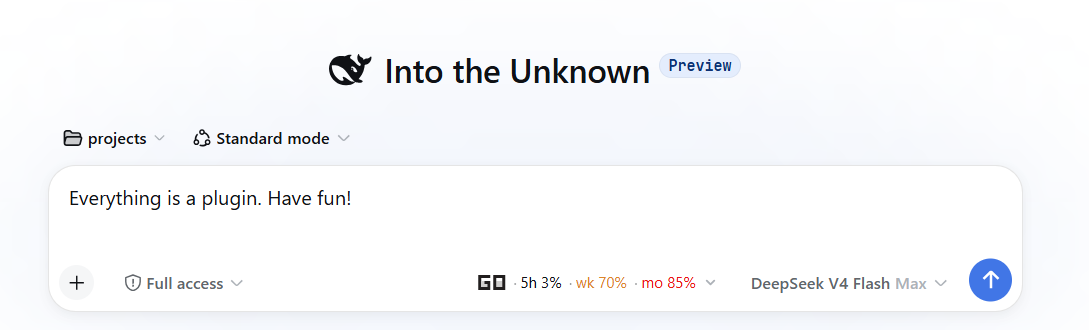
A DeepSeek Harness (dsh) bundle that shows OpenCode Go subscription usage in the Web GUI's composer dock — the same seat as the built-in conversation stats line.
The Web counterpart of the pi-ocgo-usage Pi extension: three usage windows (rolling 5h, weekly, monthly) with percentages and reset countdowns, color-coded so you see a window approaching exhaustion before you hit the rate limit mid-work.
OpenCode Go: 5h 0% (1h 23m) · wk 65% (2d 20h) · mo 83% (6d 21h) · upd 20:15
Features
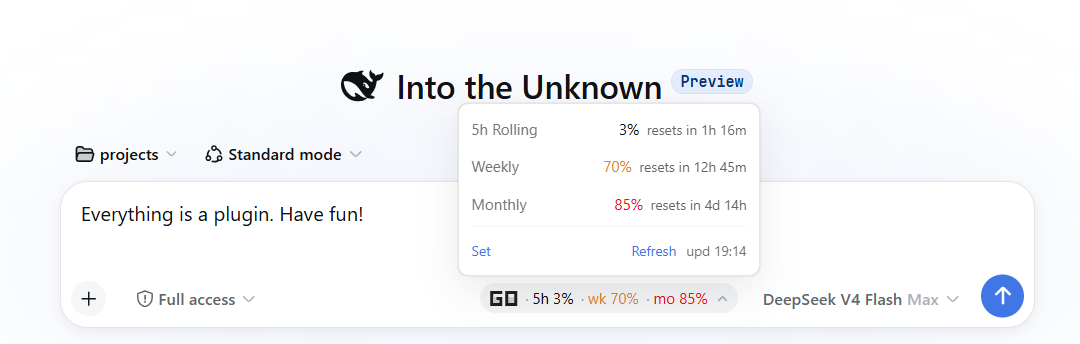
- Three windows — rolling (5h) / weekly / monthly percent + reset countdown
- Color thresholds — muted → warning (≥80%) → error (≥90% or rate-limited)
- Data freshness —
upd HH:MMshows the last successful fetch time - Lightweight polling — every 10 s (and on tab refocus); the host caches for 300 s (TTL configurable) with a 60 s failure cooldown, so opencode.ai is never hammered
- Provider-aware — the chip shows only while the session's current model routes through the
opencode-goprovider. Visibility reads the live in-memory model selection (session.models, ~ms warm) on every poll, so switching to e.g. DeepSeek official via/modelhides it within one 10 s cycle and switching back re-shows it (mirrors pi-ocgo-usage) - Click to expand — detail panel with per-window reset countdowns, a
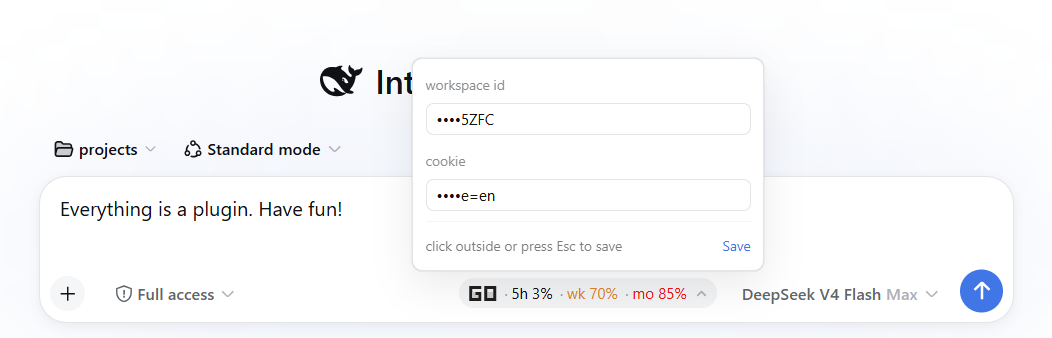
Setcredential editor, andrefresh upd HH:MM - Built-in credential editor — no terminal needed: the
Setpanel edits workspace id and cookie in place (fields show••••+ last 4 chars; click outside / Esc / Save confirms the write) - Graceful degradation — missing config shows
<err:noconfig>, HTTP failures<err:httpXXX>; on error, clicking the chip opens the Set editor directly - Cookie stays on the host — the browser only ever talks to the same-origin
/api/ocgo-usageJSON endpoint; the cookie never reaches the page
⚠️ Requires an OpenCode Go session cookie. The cookie is a full user session (not an API key) and grants access to your entire OpenCode account. Treat it like a password — see Configuration.
Requirements
- DeepSeek Harness
0.1.0-rc.6or newer (web profile) - pnpm on
PATH(fordsh plugin)
Installation
This package is a standard dsh bundle: it declares dsh.bundle in its manifest and installs through dsh plugin --profile web add <spec> (a pnpm forwarder), which links the package and appends it to the profile's dsh.profile.bundles. The repo ships pre-built lib/ artifacts, so no build step or install-time build permission is needed — this follows the official publish guide.
From GitHub (recommended for users)
dsh plugin --profile web add github:v587d/dsh-opencode-go-usage
Because lib/ is committed, pnpm installs the built package directly and never asks for a build-script allowance.
From npm (after a release)
dsh plugin --profile web add dsh-ocgo-usage
About the name: the repo is
dsh-opencode-go-usage, but that npm name is already taken by a similar third-party plugin, so the npm package publishes asdsh-ocgo-usage. GitHub installs (recommended) are unaffected:dsh plugin --profile web add github:v587d/dsh-opencode-go-usage.
From a tarball
pnpm pack            # in this repo → dsh-ocgo-usage-0.1.0.tgz
dsh plugin --profile web add ./dsh-ocgo-usage-0.1.0.tgz
From a local checkout (development)
git clone https://github.com/v587d/dsh-opencode-go-usage.git
cd dsh-opencode-go-usage
pnpm install
pnpm run build
dsh plugin --profile web add link:$(pwd)
Restart dsh web, then refresh the page. The usage chip appears in the composer dock next to the conversation stats line. Verify the plugin layer is composed without booting:
dsh --profile web --dump-config # shows a "# == dsh-ocgo-usage" layer
Configuration
Option 1: the in-UI Set panel (easiest)
Click the chip to expand → Set (bottom-left) → type the workspace id and cookie (existing values show as •••• + last 4 chars; focus a field to type a replacement) → click outside / press Esc / hit Save — it takes effect immediately.
Option 2: environment variables (same names as pi-ocgo-usage)
export OPENCODE_GO_COOKIE="auth=Fe26.2*...; oc_locale=en"
export OPENCODE_GO_WORKSPACE_ID="wrk_01XXXXXXXXXXXXXXXXXXXXXXXX"
Option 3: config file
Write $DSH_HOME/ocgo-usage.json (default ~/.dsh/ocgo-usage.json):
{
  "cookie": "auth=Fe26.2*...; oc_locale=en",
  "workspaceID": "wrk_01XXXXXXXXXXXXXXXXXXXXXXXX"
}
chmod 600 ~/.dsh/ocgo-usage.json
Priority: env vars > config file > built-in defaults.
Optional overrides
| Env var | Default | Description |
|---|---|---|
OPENCODE_GO_BASE_URL |
https://opencode.ai |
API base URL |
OPENCODE_GO_CACHE_TTL |
300 |
Host cache TTL in seconds, clamped to 60–3600 |
OPENCODE_GO_TIMEOUT_MS |
10000 |
HTTP timeout |
Composition-level config (via ~/.dsh/profiles/web/cordis.patch.yml):
- id: ocgo-usage
  config:
    enabled: false    # master switch, default true
Cookie expiration: the
authcookie is valid for 1 year from issue. When it expires (or is revoked), the page 302-redirects to the login page; the chip then shows<err:http302>instead of stale numbers. Re-login to opencode.ai and update the cookie via the Set panel.
Usage
Click the chip to expand the detail panel: each window shows its full name, percent, and reset countdown; refresh upd HH:MM (bottom-right) refreshes manually and shows the data time.
How it works
- Host half (
src/index.ts,src/service.ts,src/api.ts,src/routes.ts) — fetchesGET /workspace/<wrk>/gowith the cookie, parses the SSR-rendereddata-slot="usage-item"blocks into{percent, resetInSec, status}per window, caches the result, and serves it as same-origin JSON at/api/ocgo-usage(+/api/ocgo-usage/refresh,/api/ocgo-usage/config). - Browser half (
src/client/) — registers a chip into theconversation.composer.dockslot, polls the host endpoints every 10 s, and renders the three windows with severity colors; visibility comes from the live provider insession.models.
The browser never sees the cookie; all fetching and parsing happen on the host.
Security
- The
authcookie is a full OpenCode user session. Anyone with it can access every workspace, subscription, and billing detail in your account. - The plugin never logs the cookie, includes it in error messages, or sends it to the browser.
- The config editor only writes new values to
$DSH_HOME/ocgo-usage.json(chmod 600); the browser only ever sees the••••+ last-4 masked view.
Development
pnpm install
pnpm run build     # tsc -b && tsdown → lib/
pnpm run typecheck # tsc -b --pretty false
pnpm test          # vitest run (parser / config / service)
The build config (shared/tsdown.client.ts) is adapted from dsh-balance-meter (BSD-3-Clause), itself a copy of the official DSH packages/client/tsdown.client.ts — it emits the window.__ModuleLoader__.load({id, factory}) closure-factory artifact the web shell's module table consumes.
License
MIT — see LICENSE.
Links
More in this category
bowenliang123/dsh-context★ 1550
DSH context insight panel: Context dashboard + /context command + Context browser — one-stop context lifecycle management with categorized composition, content details, evolution trends, compaction/injection events, and stats.
Han-1413141/dsh-cost-meter★ 340
Per-session and daily API cost, budget with usage %, official balance, history dashboard, and one-click official price sync with peak/off-peak pricing.
wssfk12138/dsh-damage-pulse★ 211
Tracks DeepSeek token usage, per-call and session costs, and account balance with cache-aware charge animations in the DSH Web UI.
zh667/TokenLedger★ 203
Sidebar usage panel that attributes tokens to the relay site that served each request, read from your existing provider config: today/month/all-time totals, per-site and per-model breakdowns, a year activity heatmap, and New API / Sub2API / DeepSeek balances.
Ychris12138/dsh-usage-stats★ 164
Multi-provider usage dashboard with provider/model token breakdowns, calendar drill-downs, account balances, and OpenCode Go / Z.ai subscription quota tracking.
PolinniZhong/dsh-personal-center★ 120
Personal center for DeepSeek Harness: cross-session usage statistics, per-model cost estimation, global custom instructions, a global font-size adjuster, a data-driven desktop pet with bitmap & vector skins, and a conversation status overview, all local and offline.
Community comments
Comments are public GitHub Discussions. Loading them connects to GitHub and Giscus; a GitHub account is required to post.