Qingxiao (Wuthering Waves) themed skin for the DSH web GUI, with ice-blue/jade/moon-white palette, sword-light motes and user-swappable backgrounds.
Install
# from npm (prebuilt)
dsh plugin --profile web add @taosee258/dsh-client-ui-skin-qingxiao
# from GitHub (first run asks for allowBuilds approval — follow the hint, retry)
dsh plugin --profile web add github:taoser258/dsh-client-ui-skin-qingxiao
Any plugin you install runs third-party code with your own permissions — it can read your files, use your credentials, and reach the network, and tool approvals don’t sandbox it. GitHub-sourced plugins also run build scripts at install time — pnpm blocks those until you allow them, so an install can stop with ERR_PNPM_GIT_DEP_PREPARE_NOT_ALLOWED or ERR_PNPM_IGNORED_BUILDS; dsh prints the exact key to add under allowBuilds in your profile’s pnpm-workspace.yaml, and the install works on the next run. Allowing a build is a trust decision: only install sources you trust, and pin a commit (github:owner/repo#sha).
README
This plugin publishes its README in Chinese only.
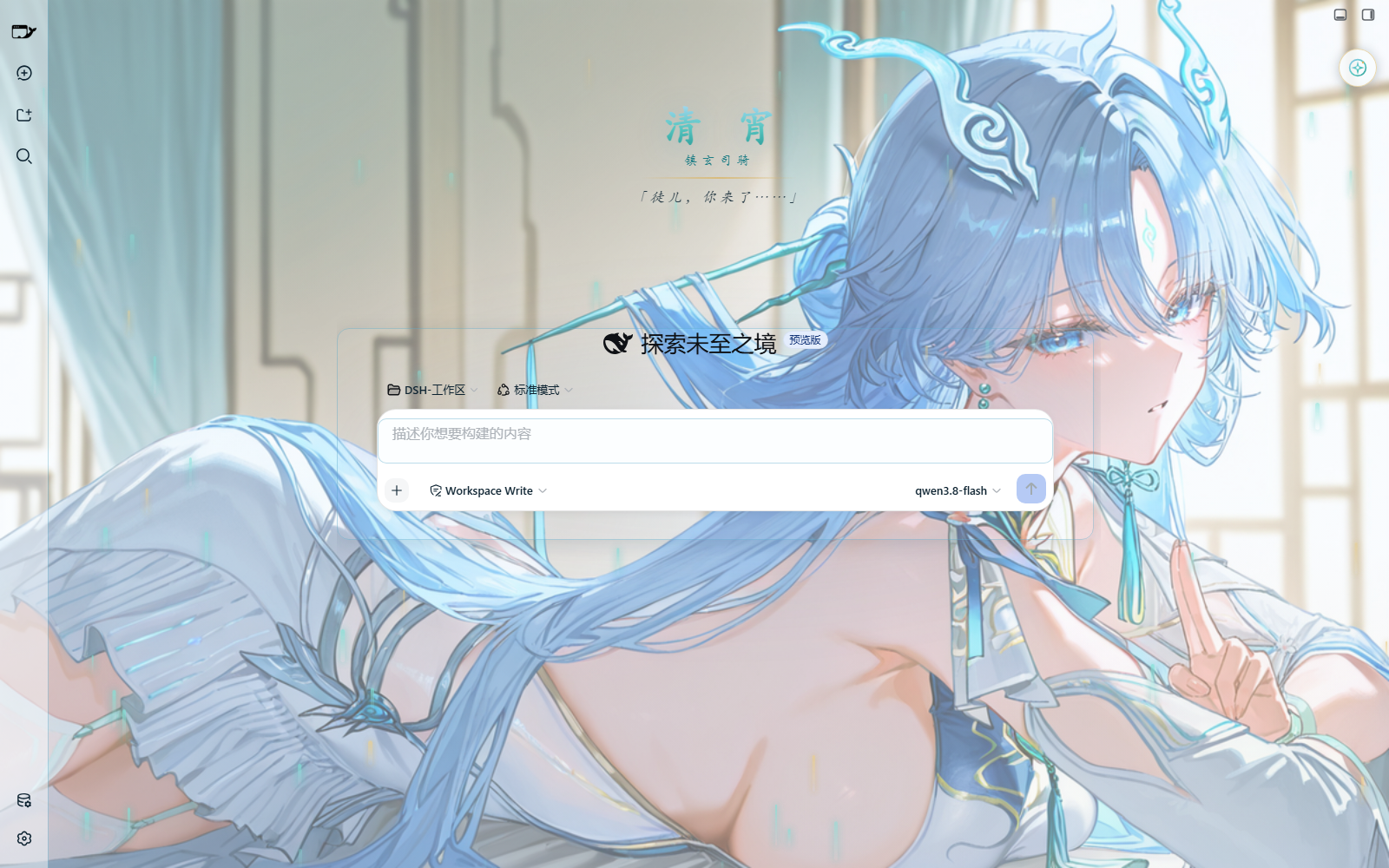
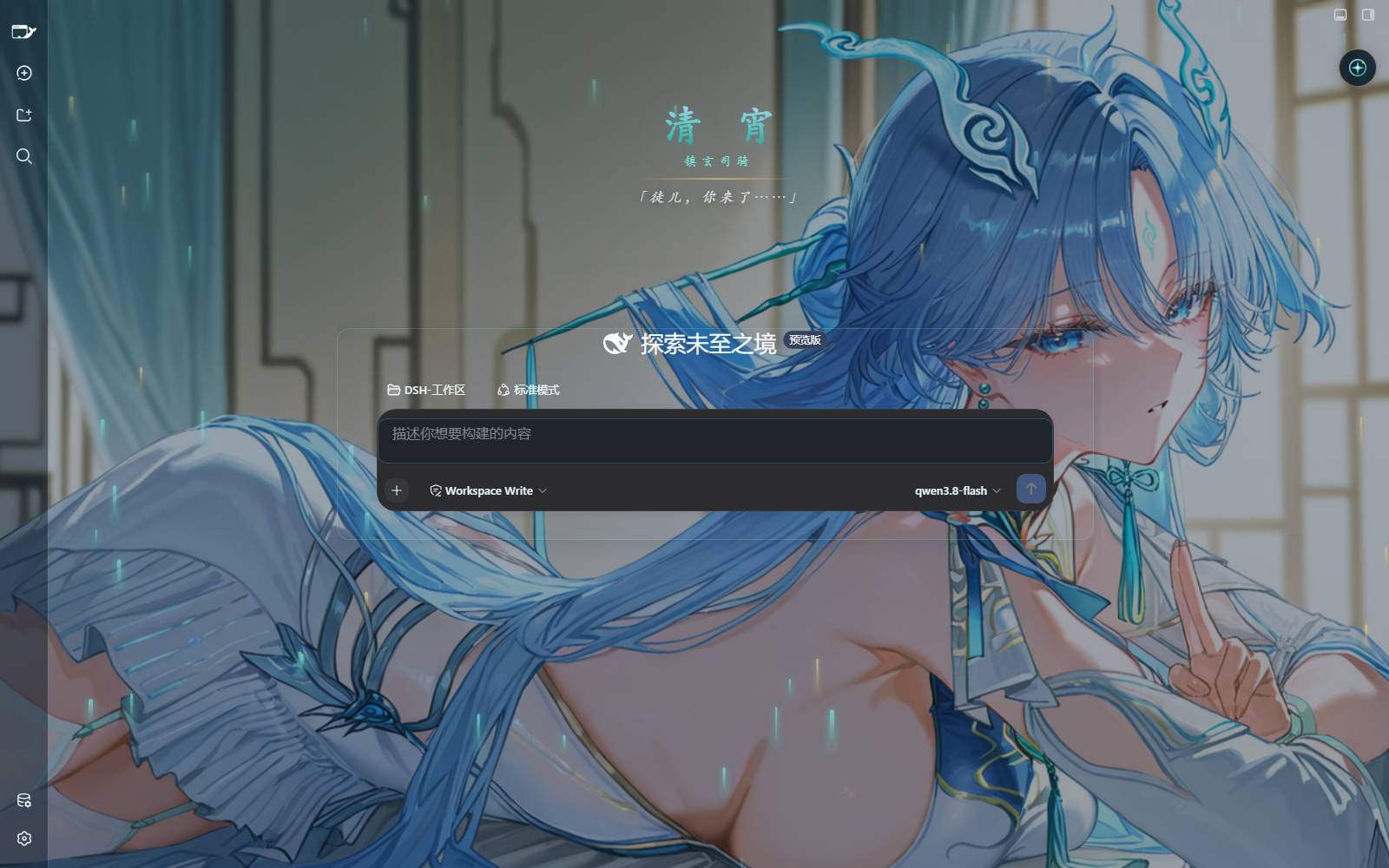
以《鸣潮》角色清宵(3.6 版本登场的五星气动·迅刀共鸣者,瑝珑「镇玄司骑」,琴剑双修的隐世剑仙)为主题的 DeepSeek Harness (DSH) Web 界面皮肤。
「弦凝千古寂,剑起满天清」
配色调色板取自清宵的形象:冰蓝(发色)、青碧(发饰流苏)、月白(衣装)、玄夜蓝(暗色形态)、鎏金(金饰点缀)。
这个皮肤有什么
- 背景画卷:默认铺一张清宵插画当背景,亮色、暗色模式都能透出它。可以在设置面板里分别为两种模式换成你自己的图(PNG / JPG / WebP / GIF,7MB 以内),也能一键换回默认。
- 全套配色重制:侧边栏、按钮、输入框、对话区、代码块、滚动条……界面每一处都按清宵的配色重新调过;暗色模式是专门的「玄夜剑鸣」氛围。
- 开屏动画:每次打开 DSH,AI 白描线稿会在夜幕上沿噪声场平滑显影,完整线稿定格片刻让你看清细节,一道剑光闪过翻成素描纸底,彩色画卷再带饱和度爬升浮现,最后淡出交给正常界面。按 Esc 或点击可跳过;系统开了「减少动态效果」自动不播;不想要可以在调色盘里关掉。
- 毛玻璃效果:打开插件的小窗口(比如用量统计)、左右两侧面板、插件页/自动化任务页等整页视图、设置弹窗乃至窗口顶栏,背后的画面都会被柔和地虚化掉——壁纸的轮廓透得出来,但绝不跟文字打架。想多糊可以多糊(0–30 档随意调),不想要可以整体关掉,也可以只关插件窗或只关侧栏。
- 字永远看得清:文字颜色专门为「压在插画背景上」调校过——正文浓黑/亮白,次要文字也比 DSH 原生的灰色深两档;背景还有可调浓度的柔光遮罩兜底。
- 剑气流光:可选的粒子装饰,青碧或鎏金两种色调;系统开了「减少动态效果」会自动静止。
- 亮暗切换动画:切换主题时有一抹剑光扫过屏幕的小动画,浏览器标签栏颜色和图标也会跟着换。
- 新会话迎宾页:打开空会话时,屏幕中央浮现「清 宵 · 镇玄司骑 · 徒儿,你来了……」的题字,开始对话后自动退场。
- 设置跟着账号走:所有偏好保存在 DSH 的数据目录里,换个浏览器、重启电脑都还在。
设置面板
点界面右上角的清宵剑钰圆形按钮打开调色盘。按钮可以拖到任意位置,位置会记住;面板底部有「回到右上角」一键复位。
| 分区 | 能调什么 |
|---|---|
| 背景画卷 | 亮/暗两种模式的背景图更换与复原 |
| 阅读清晰度 | 文字柔光开关 · 背景遮罩浓淡 · 面板实透 · 正文字号大小 |
| 界面琉璃 | 对话区宽度 · 面板磨砂底 |
| 毛玻璃虚化 | 总开关 · 插件窗/侧栏面板分开控制 · 虚化强度 0–30(0=关) |
| 剑气流光 | 开屏动画(线稿上色)· 开关 · 粒子数量 · 流动速度 |
| 复原 | 全部恢复默认 |
版本
各版本改动见 CHANGELOG.md。
安装
懒人版
直接对你的 DSH 说(桌面端、网页端都适用,会装进当前档案):
安装一下这个皮肤包:@taosee258/dsh-client-ui-skin-qingxiao
手动安装
命令行安装(任选其一;--profile 按目标填:桌面端 desktop、网页端 web):
# 方式 A(推荐):从 npm 安装
dsh plugin --profile desktop add @taosee258/dsh-client-ui-skin-qingxiao
# 方式 B:用 git URL 安装(始终对应仓库最新版)
dsh plugin --profile desktop add https://github.com/taoser258/dsh-client-ui-skin-qingxiao
# 方式 C:先克隆到本地任意位置,再把实际路径交给 dsh
git clone https://github.com/taoser258/dsh-client-ui-skin-qingxiao.git
dsh plugin --profile desktop add /path/to/dsh-client-ui-skin-qingxiao
手动放置安装:把本包整个文件夹复制到 DSH 的 profiles/<档案名>/node_modules/@taosee258/dsh-client-ui-skin-qingxiao/ 下(桌面端档案为 desktop),然后在 profile 的 cordis.patch.yml 里追加一条(与本包自带的 cordis.patch.yml 保持一致):
- insert:
    - id: ui-skin-qingxiao
      name: '@taosee258/dsh-client-ui-skin-qingxiao'
重启 DSH 即可。
兼容性
- DSH Web / 桌面端:0.1.0-rc.6 至 0.2.0-rc.2
- 自 0.2.0 起针对官方桌面端 0.2.0-rc.2 深度适配:字号令牌新基准、顶栏毛玻璃横带与原生窗口按钮融合、插件/任务等整页视图毛玻璃背板、开关与徽章配色对齐
- 平台:Web / Windows 桌面端(设置保存在各自档案的
data/目录下) - 最近验证:2026-10-02(0.2.0-rc.2 桌面端亮/暗两态真机实测)
版权所有人
| 版权所有人 | 版权所有内容 |
|---|---|
| Kuro Games(库洛游戏) | 「鸣潮」游戏作品及清宵(Qingxiao)角色形象原作 |
| Fumi(pixiv) | 默认背景插画(assets/qx.jpg)原作 |
| taoser | 皮肤实现(配色、毛玻璃、粒子装饰与界面逻辑) |
*本皮肤为同人创作,与 Kuro Games 无关联。
署名与许可
- 默认背景插画来自 pixiv 画师 Fumi 的《鸣潮》清宵同人插画(
assets/qx.jpg),角色设定与游戏内容版权归库洛游戏所有。本皮肤仅供个人美化学习使用,与官方无关,请勿商用。 - 插件代码与结构在 CC BY-NC-SA 4.0 下发布,请勿用于商业用途。
Links
More in this category
Small-tailqwq/dsh-deep-whale#maid-atelier★ 2623
Whale-girl skin series for the DSH Web UI (maid-atelier).
elysia395/dsh-wallpaper-engine★ 1354
Requires DeepSeek Harness 0.1.5-rc.1+ (DSH Desktop >= 2.0.7) and dsh-better-sidebar >= 0.19.0 - update both before installing or updating this plugin. Plays local Wallpaper Engine Video/Web wallpapers behind the chat, renders Scene wallpapers as extracted static frames, and adds content-rating/type filters, custom uploads and an iOS-style liquid-glass settings window.
d-dev0101/open-sea-skin★ 394
Realtime WebGPU ocean skin with quick controls for waves, daylight, glass opacity, and an automatic day cycle.
RevolutionLA/dsh-dream-skin★ 243
One-command skin plugin: 8 original themes, translucent wallpaper with opacity/blur, per-user accent, and shareable theme-pack import/export, favorites and surprise-me — purely native on DSH's token system.
kingOfSoySauce/dsh-liang-skin★ 242
Adaptive reasoning slider skin that maps each model's available reasoning efforts onto a 0–30 visual intensity scale, with synchronized portraits, background, and interface colors.
Nwflower/dsh-claude-style★ 165
Claude Code Desktop look-and-feel for the DSH Web GUI — ivory/warm-black dual canvas, clay accent, three-font typography, permission segmented control and brand switcher, via CSS overrides and client DOM overrides.
Community comments
Comments are public GitHub Discussions. Loading them connects to GitHub and Giscus; a GitHub account is required to post.