Use wallpapers downloaded in Wallpaper Engine as the DeepSeek Harness web background: video wallpapers play in place, image wallpapers use the highest-resolution standalone artwork, with cover/contain fit modes and a 0-100 panel dimmer.
Install
# from GitHub (first run asks for allowBuilds approval — follow the hint, retry)
dsh plugin --profile web add github:sakuraaa667/dsh-wallpaper-engine
Any plugin you install runs third-party code with your own permissions — it can read your files, use your credentials, and reach the network, and tool approvals don’t sandbox it. GitHub-sourced plugins also run build scripts at install time — pnpm blocks those until you allow them, so an install can stop with ERR_PNPM_GIT_DEP_PREPARE_NOT_ALLOWED or ERR_PNPM_IGNORED_BUILDS; dsh prints the exact key to add under allowBuilds in your profile’s pnpm-workspace.yaml, and the install works on the next run. Allowing a build is a trust decision: only install sources you trust, and pin a commit (github:owner/repo#sha).
README
This plugin publishes its README in Chinese only.
把本机 Wallpaper Engine 里已经下载的壁纸接入 DeepSeek Harness,作为 Web 界面 的背景(动态壁纸视频也支持)。Use wallpapers downloaded by Wallpaper Engine as the DeepSeek Harness web background.
效果预览
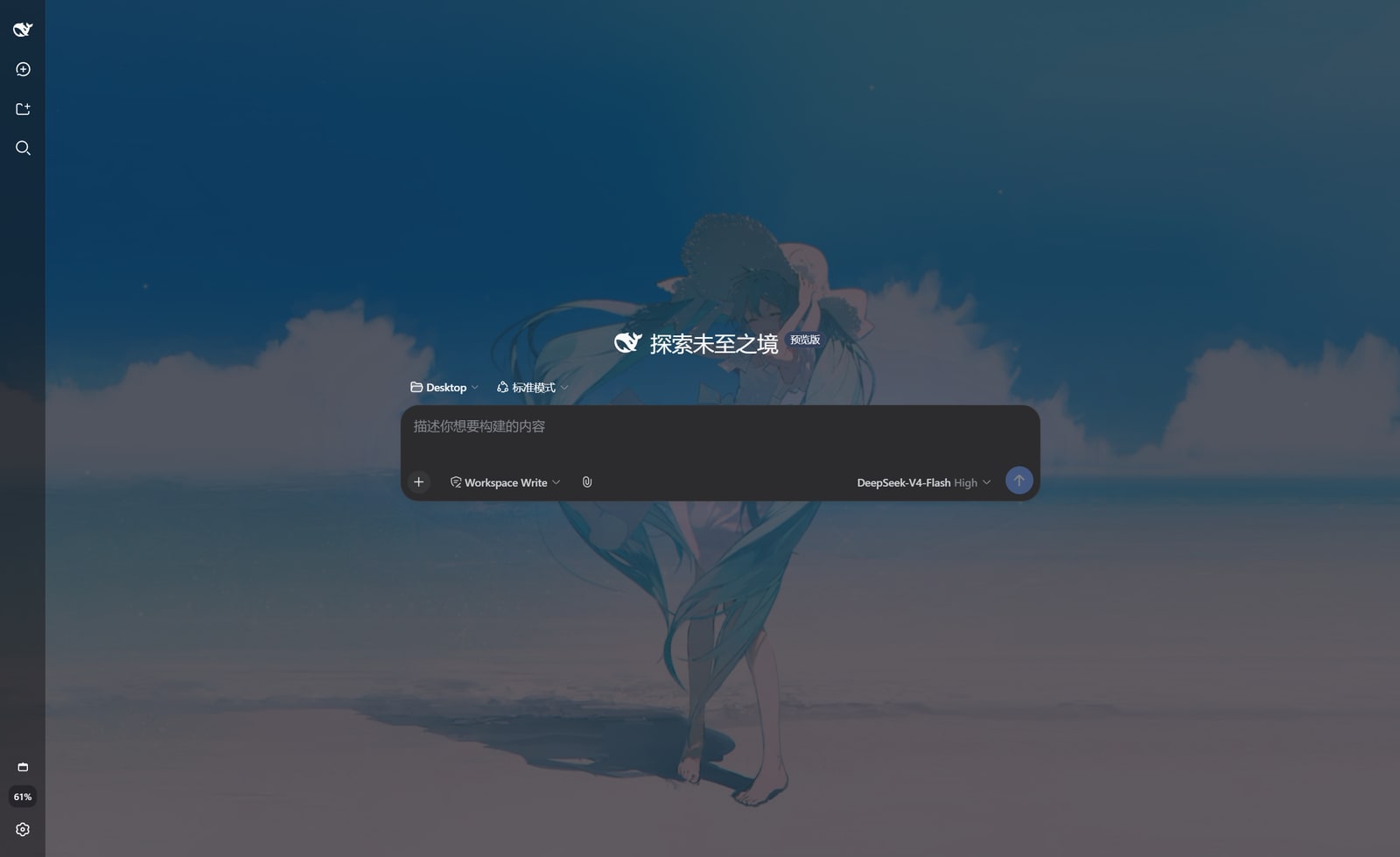
功能
- 自动发现 Wallpaper Engine 已下载内容:
- Steam 创意工坊壁纸(app 431960,自动读取
libraryfolders.vdf,支持多 Steam 库); - 本地项目(
projects/myprojects、projects/defaultprojects)。
- Steam 创意工坊壁纸(app 431960,自动读取
- 在 设置 → 壁纸 Wallpaper Engine 中浏览缩略图、搜索、一键使用;
- 自动同步:打开壁纸页时每 30 秒静默重扫磁盘,Wallpaper Engine 里新下载的壁纸会自动出现(也可点「刷新」立即更新);
- 视频壁纸以
<video>方式播放(muted + loop);图片壁纸优先使用目录内最高分辨率原图(而非小尺寸预览图),并支持「铺满 / 完整显示」两种适配模式(完整显示带毛玻璃背景填充); - 「面板暗化(0–100%)」与「背景压暗(0–50%)」两个滑杆控制可读性;
- 选择会持久化到
$DSH_HOME/dsh-wallpaper.json,重启 / 刷新后自动恢复。
安装
在 dsh 安装目录(或任意目录)执行:
dsh plugin --profile web add file:C:\path\to\dsh-wallpaper-engine
或手动方式(与 dsh plugin add 等价):
在
$DSH_HOME/profiles/web下pnpm add file:<本插件绝对路径>;在该 profile 的
cordis.patch.yml中加入:- insert: - id: dsh-wallpaper-engine name: dsh-wallpaper-engine刷新浏览器页面(若服务端未热加载,重启
dsh web)。
使用
- 打开 DeepSeek Harness Web 界面;
- 进入 设置 → 壁纸 Wallpaper Engine;
- 点击任意壁纸卡片即可设为背景,再次点击「清除背景」恢复默认。
配置
插件支持可选配置(在 profile 的 cordis.patch.yml 中以 id 覆盖):
- id: dsh-wallpaper-engine
  config:
    workshopDir: "D:\\steam\\steamapps\\workshop\\content\\431960"
    projectsDir: "D:\\steam\\steamapps\\common\\wallpaper_engine\\projects\\myprojects"
也支持环境变量(; 分隔多路径):
DSH_WALLPAPER_WORKSHOP_DIR— 创意工坊壁纸目录;DSH_WALLPAPER_STEAM_DIR— Steam 根目录(用于推导 workshop 与本地项目)。
HTTP 路由
| 路由 | 说明 |
|---|---|
GET /dsh-wallpaper/list |
壁纸列表 + 检测到的来源目录 |
GET /dsh-wallpaper/config |
当前持久化的选择 |
POST /dsh-wallpaper/config |
持久化选择 {id, dim, overlay} |
GET /dsh-wallpaper/preview/<id> |
缩略图 |
GET /dsh-wallpaper/file/<id> |
壁纸媒体文件(支持 Range,用于视频) |
所有 id 均通过扫描生成的映射查找,不参与路径拼接,避免路径穿越。
限制
- 场景型(scene)与网页型(web)壁纸无法在浏览器背景中实时渲染,回退为预览图;
- 视频通过本机 HTTP 流式传输,仅本机访问(默认 loopback)。
Links
More in this category
Small-tailqwq/dsh-deep-whale#maid-atelier★ 2339
Whale-girl skin series for the DSH Web UI (maid-atelier).
elysia395/dsh-wallpaper-engine★ 461
Requires DeepSeek Harness 0.1.5-rc.1+ (DSH Desktop >= 2.0.7) and dsh-better-sidebar >= 0.19.0 - update both before installing or updating this plugin. Plays local Wallpaper Engine Video/Web wallpapers behind the chat, renders Scene wallpapers as extracted static frames, and adds content-rating/type filters, custom uploads and an iOS-style liquid-glass settings window.
d-dev0101/open-sea-skin★ 381
Realtime WebGPU ocean skin with quick controls for waves, daylight, glass opacity, and an automatic day cycle.
kingOfSoySauce/dsh-liang-skin★ 230
Adaptive reasoning slider skin that maps each model's available reasoning efforts onto a 0–30 visual intensity scale, with synchronized portraits, background, and interface colors.
RevolutionLA/dsh-dream-skin★ 199
One-command skin plugin: 8 original themes, translucent wallpaper with opacity/blur, per-user accent, and shareable theme-pack import/export, favorites and surprise-me — purely native on DSH's token system.
GGBond2424648901/deep-whale-day-night-theme★ 118
Non-commercial day/night whale-girl skin for official Harness rc.7: current no-viewport-frame layout, paired crystal-workshop and moon-tide scenes, chibi companions, translucent ornaments, and lightweight ambience.
Community comments
Comments are public GitHub Discussions. Loading them connects to GitHub and Giscus; a GitHub account is required to post.