Select text in a finished assistant reply to add numbered comments beside the quote; collect drafts and submit the batch through the official composer as one user message.
Install
# from a prebuilt release tarball
dsh plugin --profile web add "https://github.com/ruisenbai/dsh-inline-comments/releases/download/v0.1.1/dsh-inline-comments-0.1.1.tgz"
# from GitHub (first run asks for allowBuilds approval — follow the hint, retry)
dsh plugin --profile web add github:ruisenbai/dsh-inline-comments
Any plugin you install runs third-party code with your own permissions — it can read your files, use your credentials, and reach the network, and tool approvals don’t sandbox it. GitHub-sourced plugins also run build scripts at install time. Only install sources you trust, and pin a commit (github:owner/repo#sha).
README
Package name: dsh-inline-comments

Long AI replies are much easier to review when each note can sit beside the exact sentence it belongs to. DSH Inline Comments lets you highlight a passage, write feedback in place, collect several notes, and send them together through DSH's normal composer—without repeatedly copying quotes into a new prompt.
Interaction origin: this plugin is an independent, unofficial recreation of ChatGPT's inline commenting feature for DeepSeek Harness. It copies the workflow, not OpenAI source code, assets, APIs, or branding, and it is not affiliated with or endorsed by OpenAI.
Compatibility: this project requires DeepSeek Harness
0.1.0-rc.7or a later0.1.xprerelease. DSH is pre-release software. The plugin must shadow three shipped conversation renderers because DSH does not yet expose an inline assistant-body slot. Review Compatibility before upgrading DSH.
Preview
The complete workflow stays inside the conversation: select a quote, leave one or more numbered comments, review the drafts, and send them from the familiar DSH composer.
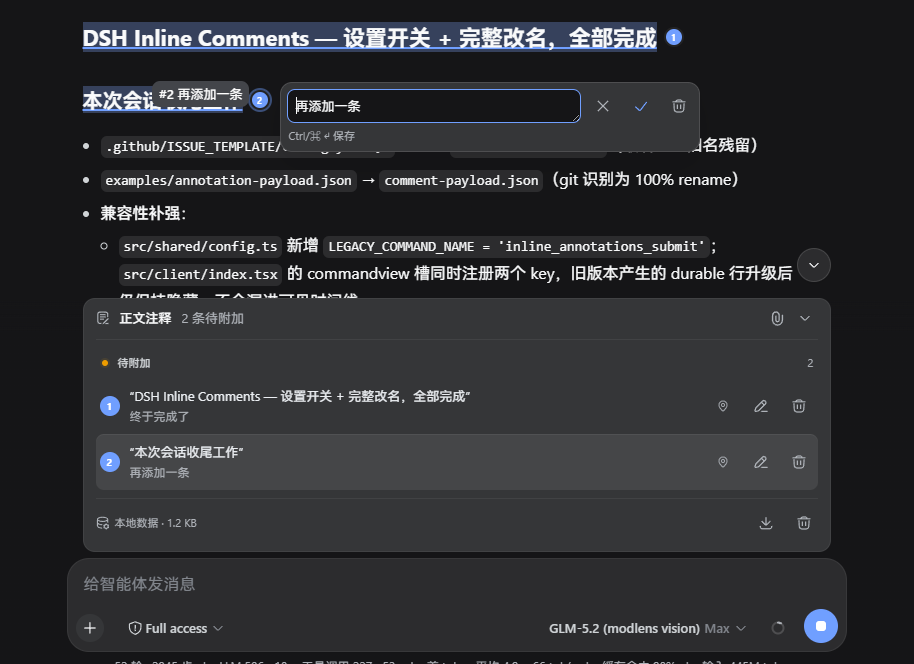
Highlight the exact words you want to discuss; the browser selection remains available for copying.

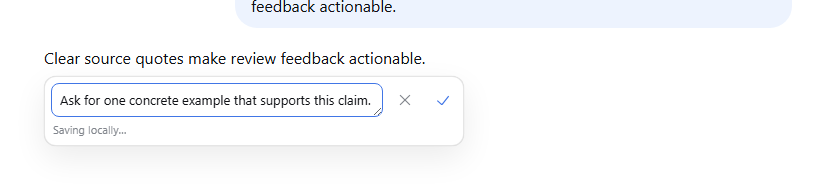
Write the note right beside the quote while its context is still on screen.
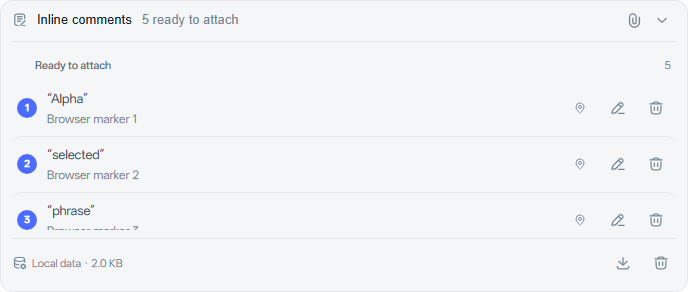
Review and adjust all local drafts before attaching them to the official composer.
Need a break from comments? Turn the feature off from General Settings without deleting your drafts.

Features
- Select text inside one finalized assistant reply to open a small action bar with Add comment and Copy. The blue selection stays alive, so Ctrl+C keeps working until a button is chosen.
- Type directly in the compact selection-positioned input with icon-only Cancel and Save actions. An empty outside click closes it; a dirty outside click keeps it open, turns the input red, and shakes it until one action is chosen.
- Autosave unfinished editor text after 400 ms, display its local-save state, and restore it after a refresh without treating it as a submitted comment.
- Group two-line rows into ready-to-attach, delivery-outcome/retry, authoritatively queued, and sent sections; use official DSH buttons, state dots, icons, tooltips, and Toasts.
- Toggle the paperclip in the comment header without expanding or sending. Armed comments follow the live draft set until the official composer submits.
- Use the official composer as the only task input and Send surface. Ordinary text plus comments, or comments alone, produce one task and one model execution.
- Match the official Web assistant flow, reasoning disclosure, stopped marker, composer docks, icon-action geometry, form typography, semantic colors, floating surfaces, and user-message bubbles while retaining the original map-pin glyph for Locate source.
- Undo one draft deletion, export current-Session recovery JSON, clear unsubmitted drafts, and inspect local storage usage from the composer list.
- Preserve the exact quote, prefix/suffix selector, assistant message id, event sequence, comment id, and submission id.
- Capture language and line coordinates for code, or row/column coordinates for tables.
- Merge overlapping selections into the existing draft instead of stacking ambiguous highlights.
- Preserve the official composer's submission policy; comment command admission uses one idempotent queued user message.
- Report authoritative queue, durable send, and retryable failure outcomes through distinct DSH Toasts; withdrawal appears only while the batch remains in the observed queue.
- Render submitted comment batches as collapsed timeline cards with source navigation.
- Place numbered markers after the complete endpoint line, reserve an overflow-safe gutter, retain ascending order, and coalesce layout updates across reasoning disclosure, viewport, font, and zoom changes.
- Open the comment editor beside the clicked numbered marker — never the top-right corner — and edit an existing draft from its marker with a delete action backed by undo.
- Center the exact numbered-marker line in the active conversation or window viewport when locating source text, including CSS zoom correction.
- Persist unsent drafts, unfinished editor text, and immutable retry records in browser
localStorage. - Deduplicate retries across transport failures with a stable submission-derived message id.
- Advance
senttoprocessedonly when the model explicitly returns comment ids in the requested acknowledgement marker. - Fall back to numbered markers when the CSS Custom Highlight API is unavailable.
Quick start
Build from a clone
git clone https://github.com/ruisenbai/dsh-inline-comments.git
cd dsh-inline-comments
corepack enable
pnpm install
pnpm verify
Install the built folder into a Web profile:
dsh plugin --profile web add .
dsh web --profile web
Open the DSH Web URL and select text in a finalized assistant reply. A small action bar appears with Add comment and Copy; the selection stays alive so Ctrl+C also works. Choose Add comment to open the compact input, type the comment, and use its check icon to create the draft, or use X to cancel. Drafts appear above the official composer. Click the paperclip in the comment header, enter any task text in the official composer, and use its normal Enter key or Send button. The paperclip also enables a comment-only submission when the composer text is empty.
Install a GitHub release
Each v*.*.* tag builds an installable tarball and attaches it to GitHub Releases. Download it and install the prebuilt package without running repository build scripts:
gh release download v0.1.0 --repo ruisenbai/dsh-inline-comments --pattern '*.tgz'
dsh plugin --profile web add ./dsh-inline-comments-0.1.0.tgz
A pinned Git dependency also works when the profile explicitly allows this trusted package to run its prepare build:
dsh plugin --profile web add git+https://github.com/ruisenbai/dsh-inline-comments.git#v0.1.0
Settings
General Settings contains a DSH Inline Comments switch. It is enabled by default and applies to every Session in the current browser profile. Disabling it restores the official assistant and user renderers, removes the selection action bar, markers, comment list, comment action, hidden transport view, and composer attachment, and preserves visible composer text. Drafts, unfinished editor text, outbox state, and submitted history remain stored and return when the switch is enabled again.
The preference is stored under dsh.inline-comments.enabled in the origin's localStorage.
Delivery behavior
The paperclip has two states. Unarmed comments remain browser-local and editable. Armed comments follow the live unsent set: edits, deletions, and new drafts apply until the official composer submits. The submit transaction then freezes one immutable payload, clears the official draft only after command success, and leaves later comments for the next task. Clicking the paperclip again detaches without changing text, cursor position, or panel expansion.
Transport acceptance is not presented as queue admission. The queued Toast appears only after ConversationSnapshot.queue contains the stable message id, and its withdrawal control remains available only in that state. A durable user/message changes the result to sent and removes withdrawal. A failed transaction retains the official draft, armed state, immutable payload, and submission id for retry.
Existing values written into the removed plugin-owned overall-request field migrate into the official composer on the first successful attachment. The value is cleared from plugin storage only after the composer accepts the claim.
The current DSH command submit API does not expose official composer image ids. The plugin therefore refuses attachment while images are present and refuses a mixed submission if images are added after arming. It does not discard either image or comment drafts.
States
- Draft: editable and browser-local.
- Queued: admitted to the DSH inbox but not yet present in model history.
- Sent: reconstructed from the durable comment
user/messageevent. - Processed: set only after a model response contains the exact submission and comment ids in the machine acknowledgement.
The plugin never marks a comment processed from elapsed time, turn completion, or UI timing.
Configuration
The bundle inserts one dsh-inline-comments row. Override its config values in the active profile composition if necessary:
| Key | Default | Purpose |
|---|---|---|
commandName |
inline_comments_submit |
Internal browser-to-Host transport command name |
maxPayloadBytes |
524288 |
Maximum decoded JSON batch size; text is rejected, never truncated |
maxAnnotationsPerSubmission |
100 |
Maximum comments in one batch |
warnSelectionChars |
12000 |
Require an extra confirmation for a long quote |
locateHistoryPages |
20 |
Maximum older-history pages loaded during source navigation |
Changing commandName must change the same dual-face row used by Host and Client; the shared Cordis row passes one configuration to both halves.
Privacy and persistence
Unsent quotes, comments, unfinished editor text, and retry records stay in localStorage under dsh-inline-comments:v1:<session-id>. When the current key is absent, valid data under dsh-inline-annotations:v1:<session-id> is copied to the current key and the legacy key is removed. The visible key remains v1 while its validated value uses storageVersion: 2; version-one values migrate on read. Local data is not sent to the Host or model until the user submits through the official composer. Submitted quotes and comments become part of the current Session log and model context. The plugin has no analytics, telemetry, or external network client. See Privacy.
Model experience
- Before submission: no prompt, token, or KV-cache effect.
- On submission: one standard user message contains the official composer text, complete comment batch, stable ids, source quotes, comments, and structural coordinates.
- Acknowledgement request: the message asks the model to append one hidden marker listing only comments it actually handled. The Client strips that marker before rendering while retaining the raw model text for replay.
- Tokens: cost scales with the complete selected text and comments; the plugin does not truncate them. The byte limit rejects oversized batches before admission.
- KV cache: steering or follow-up input changes subsequent model context like any other user message.
Development
pnpm typecheck
pnpm lint
pnpm test
pnpm exec playwright install chromium
pnpm test:browser
pnpm test:coverage
pnpm build
pnpm verify:bundle
pnpm publint
pnpm pack
The CI workflow runs type checking, linting, unit tests, a production bundle, artifact verification, and publint on Node 22.19 and 24. The Node 24 job also runs the real Chromium regression and creates the package artifact. See Development, Architecture, and Data model.
Known limitations and deferred work
- DSH has no public slot inside assistant Markdown. This plugin replaces the
assistant-step,user, andsteeringkeyed renderer cells at priority-100; upstream renderer changes require a compatibility review. - Browser-local drafts do not synchronize between devices or browser profiles. Sent batches reconstruct from the Session log on any client.
- The machine acknowledgement is cooperative. If the model omits or corrupts it, comments remain
sentrather than being guessed as processed. - Archived tasks have no active composer and cannot arm comments. Create comments in an editable task.
- DSH command claims do not carry composer image ids, so images and inline comments cannot share one submission yet.
- CSS Custom Highlights are browser-dependent. Numbered markers and timeline navigation remain available without them.
- A selection must stay within one assistant reply. Cross-message selections are rejected.
- DSH has no private command-registration flag, so the validated internal transport command may appear in slash-command discovery.
Community
Released under the MIT License.
Links
More in this category
zhu1090093659/dsh-web-ui#packages/dsh-web-ui-all★ 4634
Plugin and skin collection for the DSH Web UI: task board, Git graph, right-side panel, remote mobile UI, pet, live token stats, and a skin center.
omdsh-dev/DSH-better-sidebar★ 2203
Full sidebar workbench with file rendering and editing, terminal, Git, and subagents; third-party plugins can register new tabs.
ccch1mneyyy/dsh-TUI★ 1996
Claude Code-style full-screen terminal UI: pixel-whale header, live status line, and streaming thought expansion.
omdsh-dev/dsh-at-file★ 391
Codex-style `@file` mentions: search workspace files in the composer and attach their contents to prompts.
omdsh-dev/dsh-genui★ 223
Interactive UI components rendered inline in replies: layout, charts, forms, quizzes, mermaid, 3D scenes, and an action event loop back to the model.
huiliyi37/dsh-tianshu-tui★ 215
A terminal UI (TUI) for DeepSeek Harness.