Requires DSH 0.1.6-alpha.2. Annotate completed assistant replies, submit multiple drafts with official composer text and attachments as one Session message, navigate linked model replies, and use Settings to hide selected reasoning or tool details without changing stored events.
Install
# from a prebuilt release tarball
dsh plugin --profile web add "https://github.com/ruisenbai/dsh-annotation/releases/latest/download/dsh-annotation.tgz"
# from GitHub (first run asks for allowBuilds approval — follow the hint, retry)
dsh plugin --profile web add github:ruisenbai/dsh-annotation
Any plugin you install runs third-party code with your own permissions — it can read your files, use your credentials, and reach the network, and tool approvals don’t sandbox it. GitHub-sourced plugins also run build scripts at install time — pnpm blocks those until you allow them, so an install can stop with ERR_PNPM_GIT_DEP_PREPARE_NOT_ALLOWED or ERR_PNPM_IGNORED_BUILDS; dsh prints the exact key to add under allowBuilds in your profile’s pnpm-workspace.yaml, and the install works on the next run. Allowing a build is a trust decision: only install sources you trust, and pin a commit (github:owner/repo#sha).
README
Select text in an assistant reply in DeepSeek Harness Web, write an annotation, and send it with the next message. Records belong to the current Session. Sent annotations can be attached again without creating duplicate records or source bubbles.
Host requirement: DeepSeek Harness 0.1.7-rc.2 exactly. The plugin sends text, images, files, and annotations through the official composer and does not modify Host source.
Workflow
1. Select source text
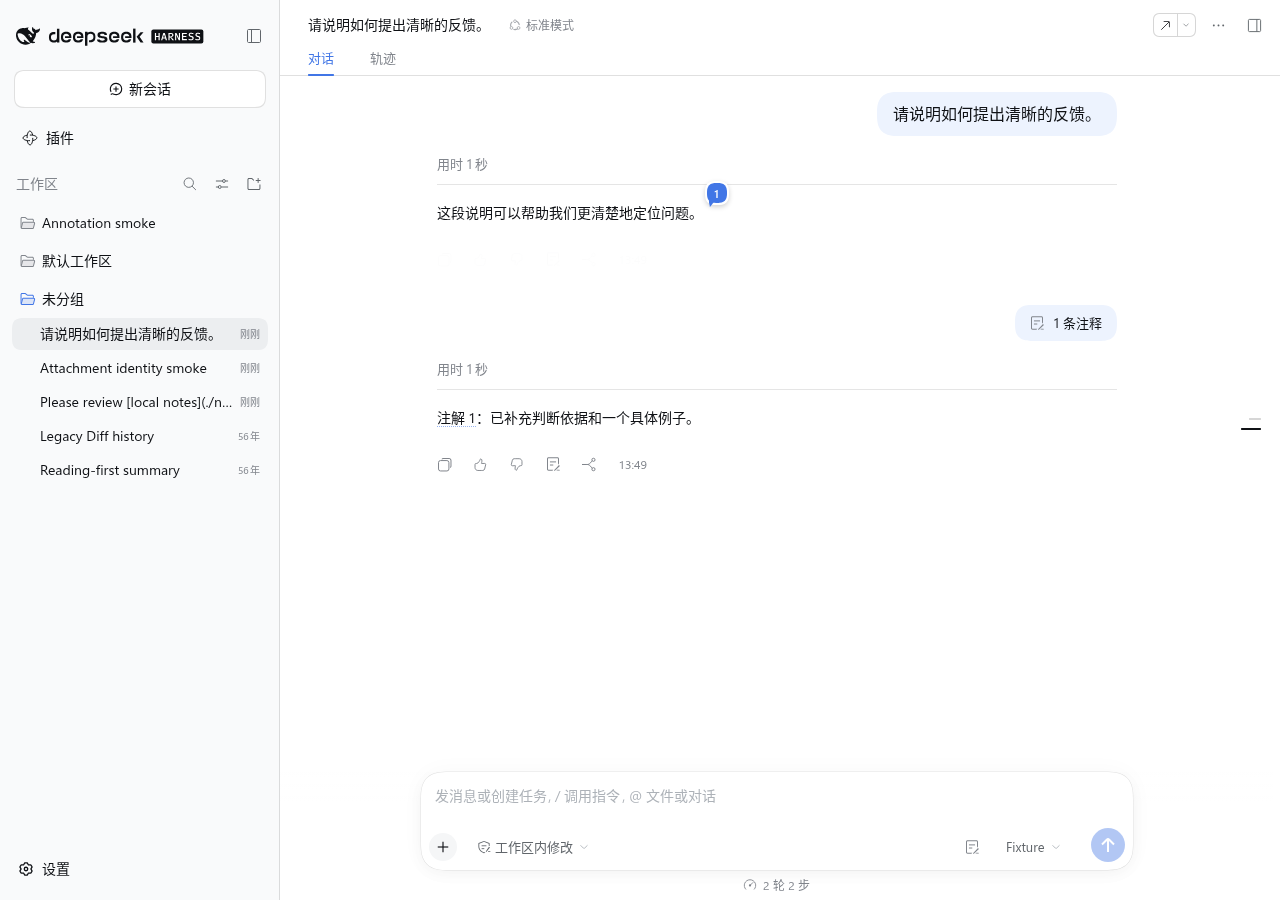
Select text in one assistant reply and choose Add annotation. Overlapping selections create independent annotations directly. The numbered bubble follows the final selected character and scrolls with the reply. Source text has no persistent background or underline; hovering or clicking its bubble highlights the selection.
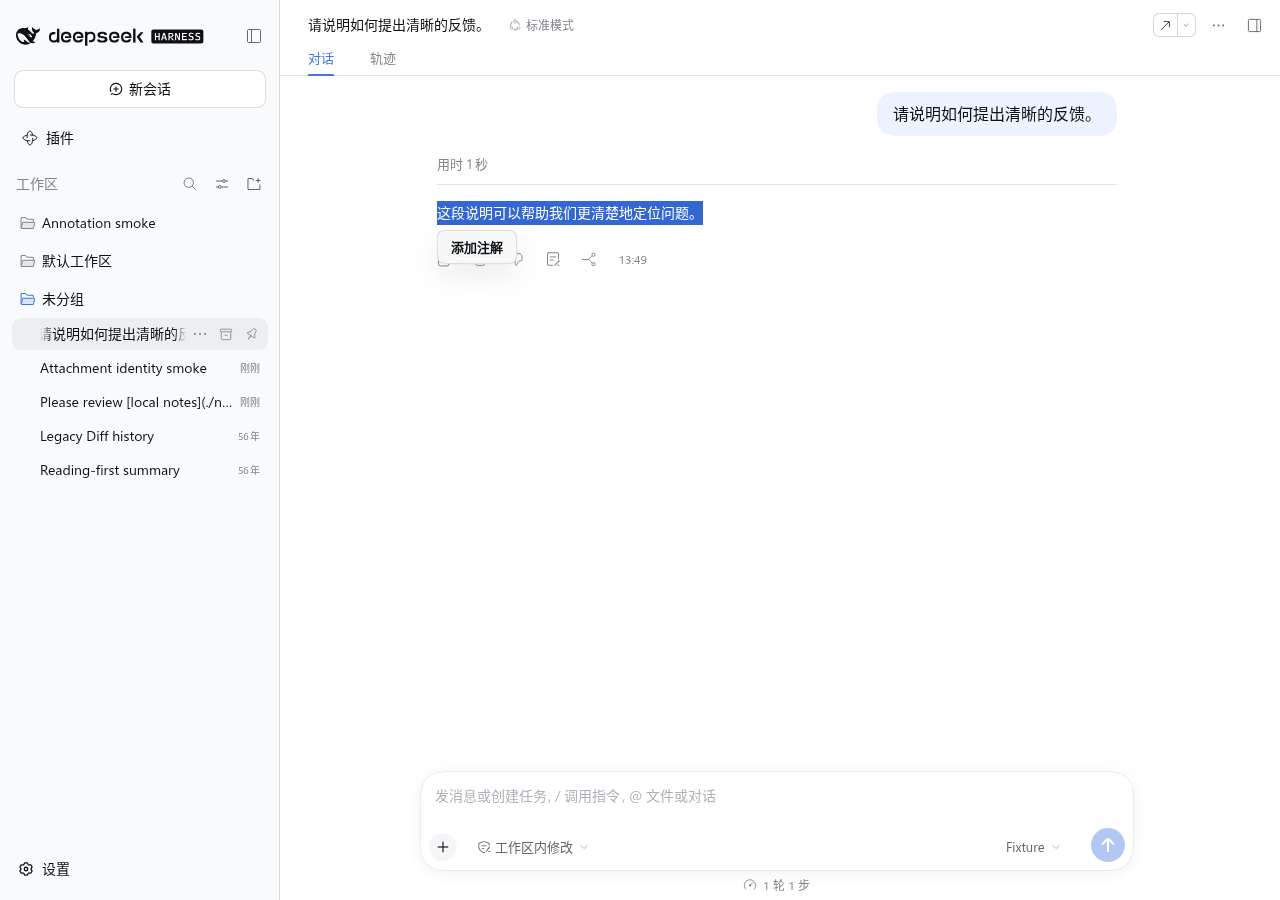
2. Save an annotation
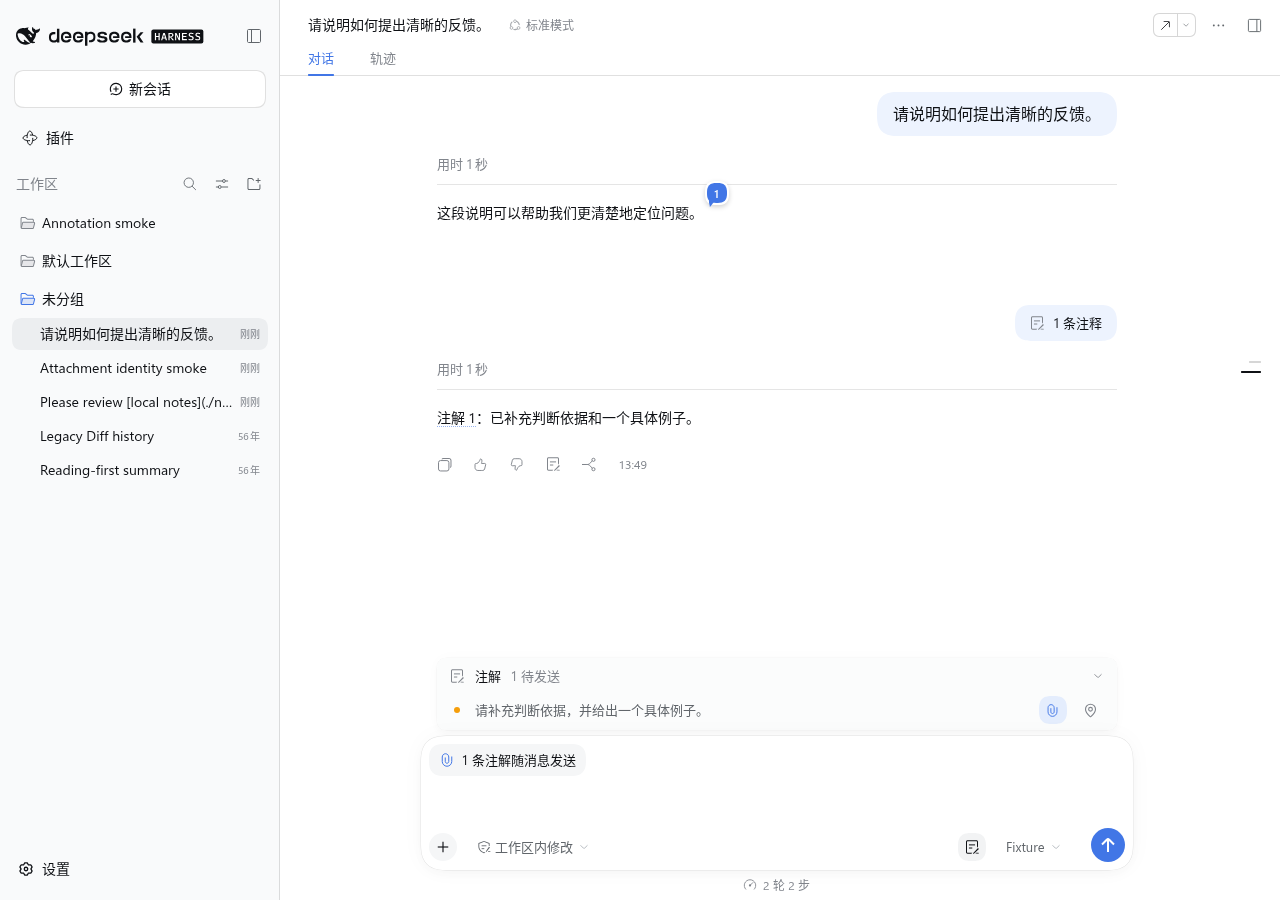
The editor opens below the selection. Press Enter or the check button to save; Shift+Enter inserts a line break. An empty note marks the source only. The input grows from one to seven lines, then scrolls internally. Click a numbered bubble to view or edit it in the same compact design.
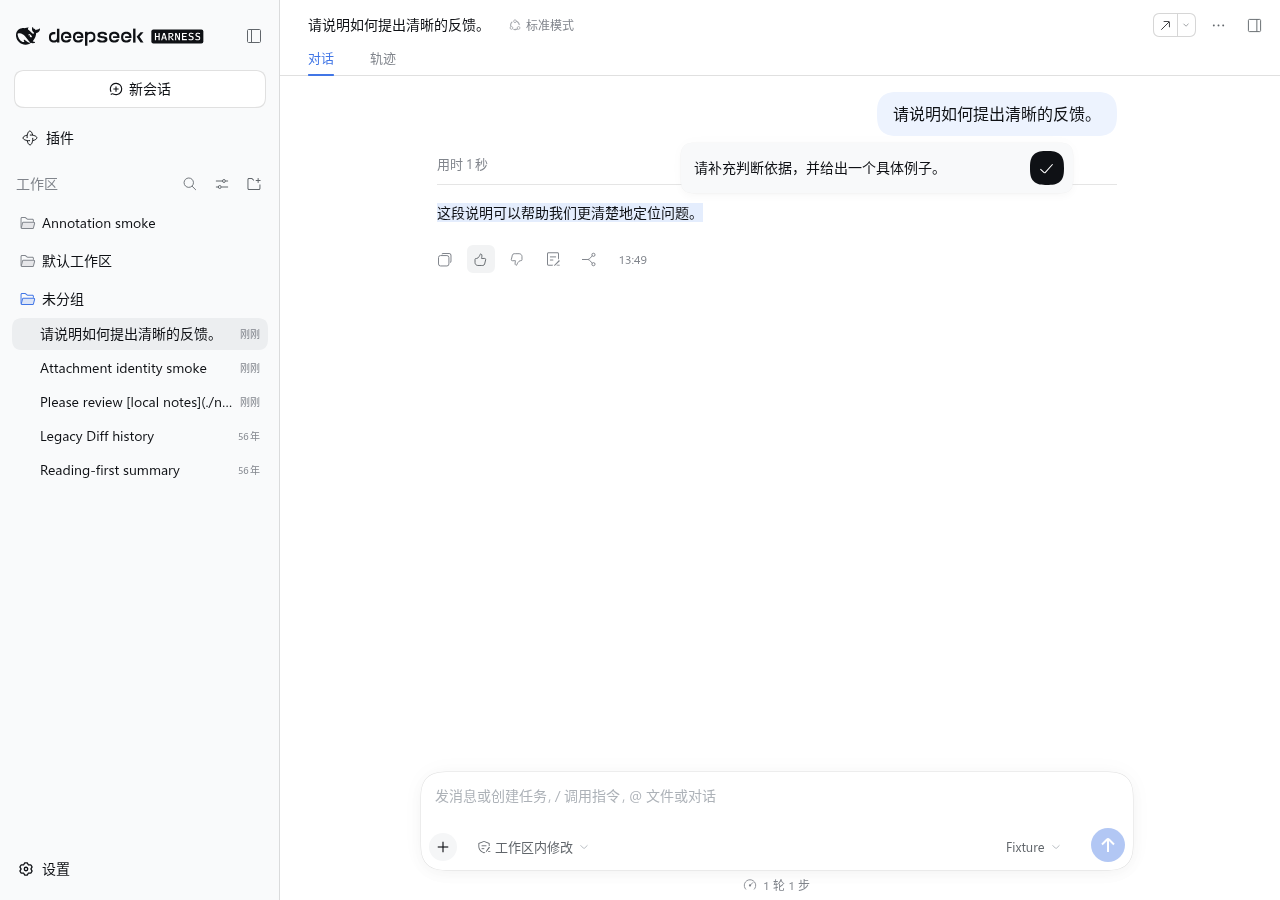
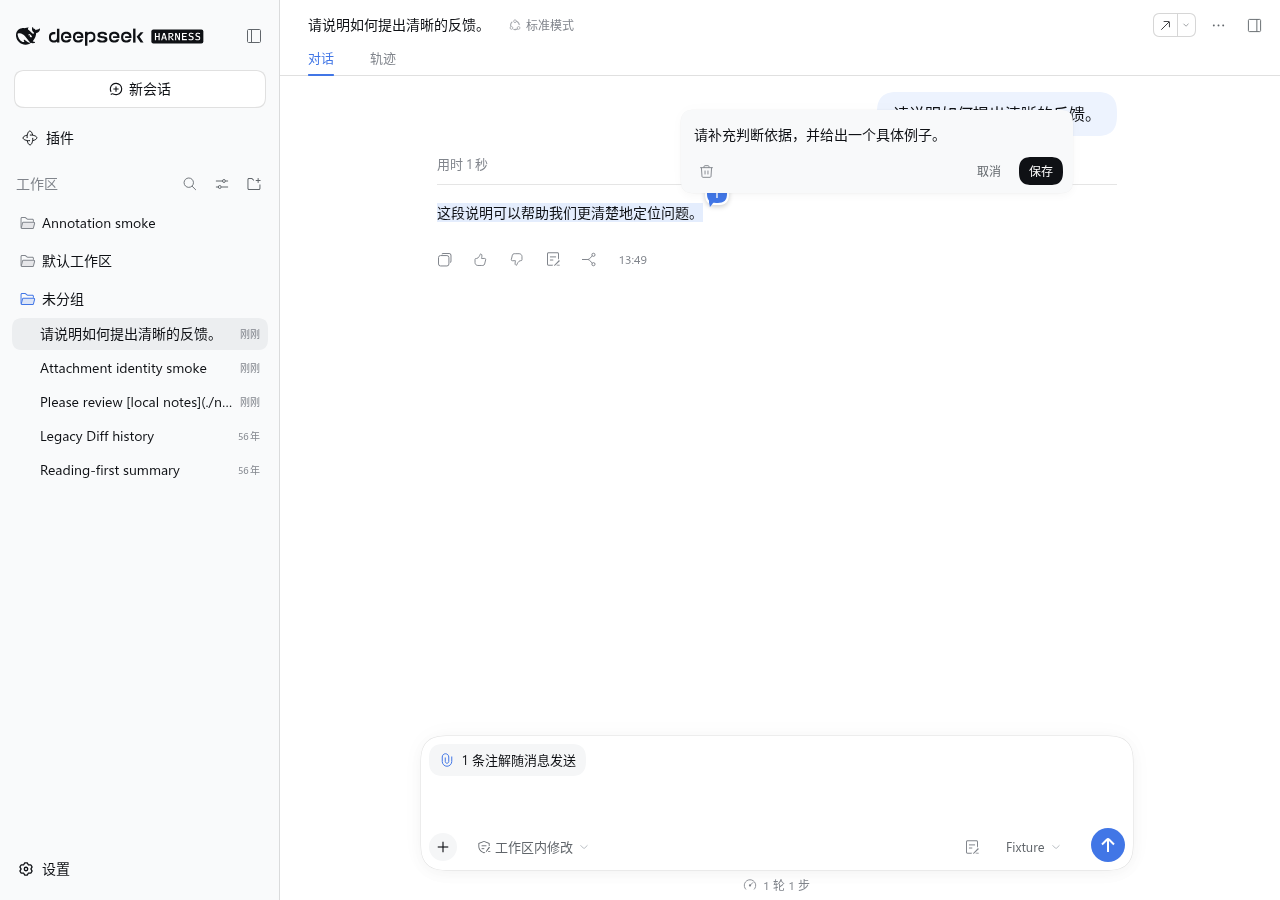
3. Review records and attach them
A new annotation attaches to the next message by default without opening the record. The composer's upper-left chip shows the attached count; hover to preview quotes and notes, or click to expand or fold the record. The annotation button left of the model selector also controls the record. Each row's paperclip controls attachment for this message, and its map pin locates the source. Empty note text stays blank.
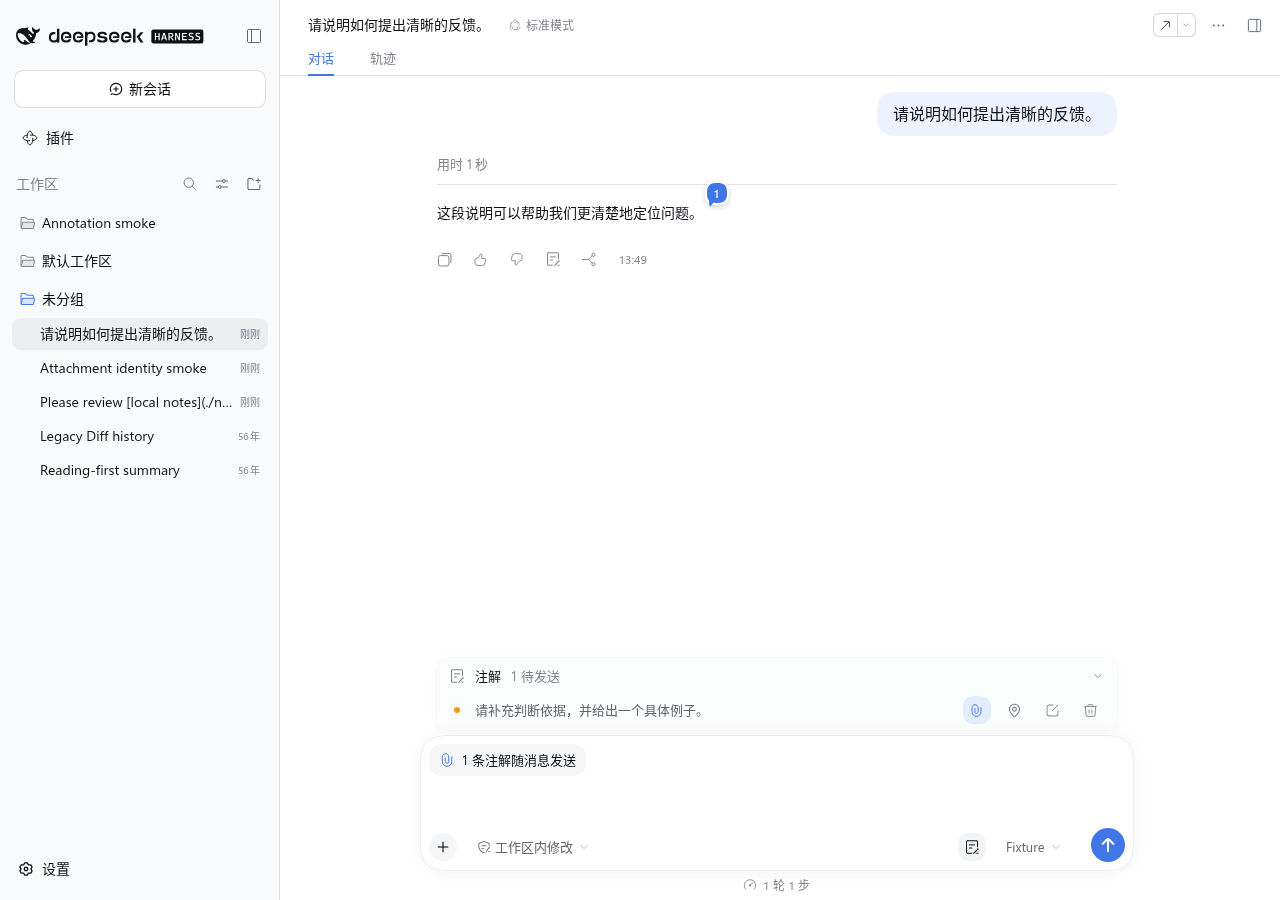
4. Send and resend
After the official composer sends a message, an annotation count appears above its body. Hover one annotation to preview it or double-click to locate its source. Click a multi-annotation count to expand or fold the list, then locate each source from its row. The record closes automatically when every annotation has been sent. A sent annotation can be attached again with its paperclip; its ID and source bubble remain unchanged.
5. Configure
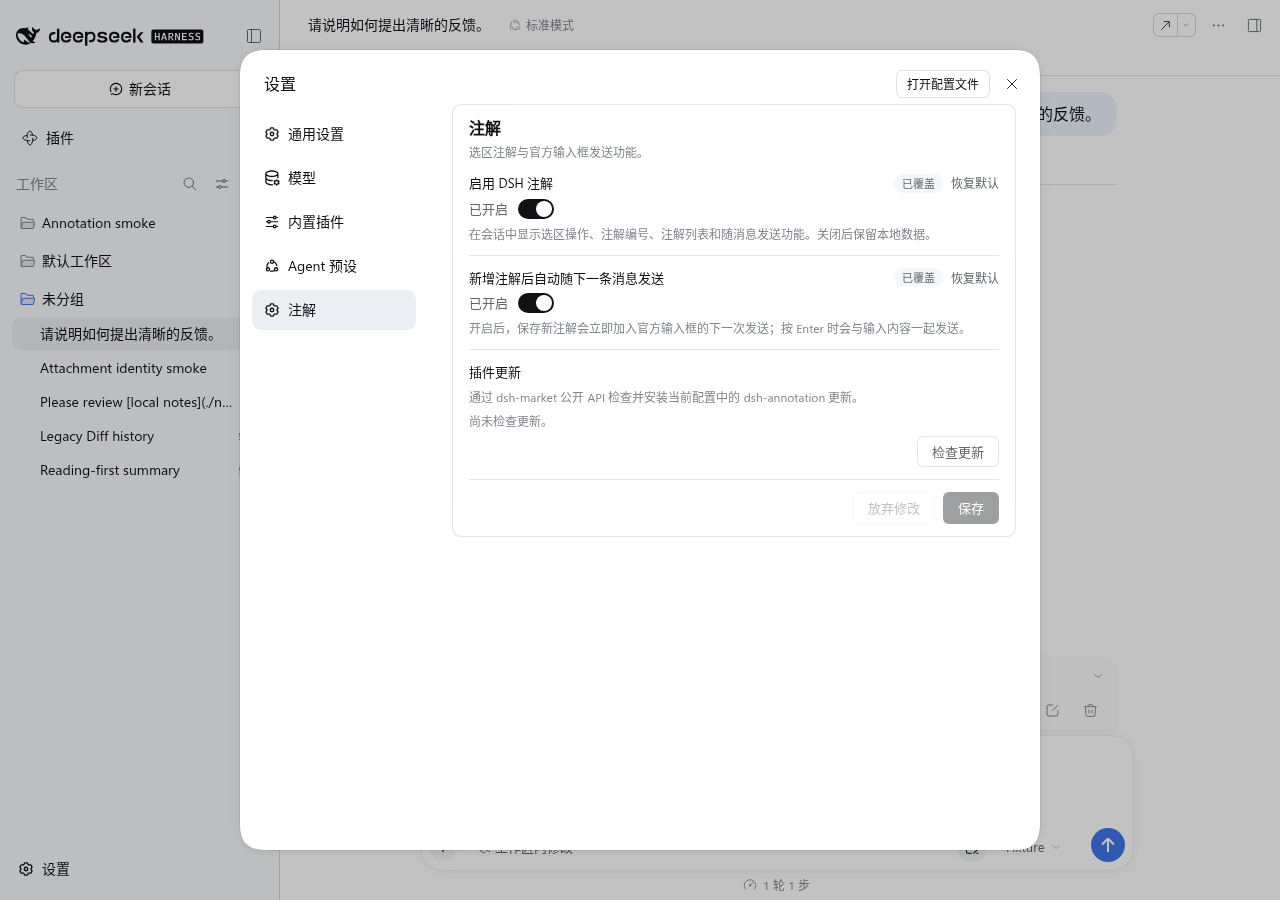
Settings → Annotations offers plugin enablement and automatic attachment after saving. Even with automatic attachment off, a record row's paperclip can attach a note manually. The settings page also offers plugin updates when dsh-market exposes its public update API. Disabling the plugin removes its UI and composer attachment while retaining local annotation data.
Install and compatibility
Release tarballs are published through GitHub Releases, not npm. These commands install the pinned 1.0.0 release into the DSH Web web profile. The target Host must be 0.1.7-rc.2.
Manual installation
dsh --version
dsh plugin --profile web add https://github.com/ruisenbai/dsh-annotation/releases/download/v1.0.0/dsh-annotation.tgz
dsh plugin --profile web why dsh-annotation
The first command must print 0.1.7-rc.2; the last must show dsh-annotation@1.0.0. If you use a custom profile, replace both instances of web with its name. Restart that profile's Web Host after installation, then check Settings → Annotations. See the development guide for local builds and the compatibility guide for exact dependencies and executed checks.
Install with an AI agent
Give this prompt to an AI agent that can operate your local terminal:
Install dsh-annotation 1.0.0 into my local DeepSeek Harness Web profile. Determine the target profile name first; use web if I have no custom profile. Run dsh --version and continue only if it prints exactly 0.1.7-rc.2. If it differs, stop and report the version without changing Host dependencies.
Run dsh plugin --profile <actual profile name> add https://github.com/ruisenbai/dsh-annotation/releases/download/v1.0.0/dsh-annotation.tgz. Then run dsh plugin --profile <actual profile name> why dsh-annotation and confirm it shows dsh-annotation@1.0.0.
Do not modify DSH or plugin source, and do not clear Session or browser data. If the Web Host is running, tell me to restart that profile. Report the commands you ran, the versions, the installation result, and any warnings.
A new Session without annotations shows no record or empty-state copy. The plugin provides annotation features only; it does not hide reasoning, tool calls, or other conversation content. Creating and editing Code Diff annotations has been removed. Earlier Diff annotations and their snapshots remain readable in message history.
Unsent annotations, suspended edits, and retries stay in the current browser. Multiple tabs use separate pending records and a browser lock to protect writes. Corrupt or future-version storage is preserved with an error instead of being overwritten by an empty state. Each send freezes its annotations and attachment identities; retries reuse that payload. Migration does not rewrite historical protocols or sent messages. See the data model and privacy guide.
Limitations
- Unsent drafts do not synchronize across browsers; sent records can be restored from Session history.
- Selections cannot cross assistant messages. Markdown, code, and table locations depend on the Host's current body DOM.
- Without the CSS Custom Highlight API, numbered bubbles and source navigation still work.
- A record becomes processed only after the model returns a valid annotation acknowledgement marker.
Links
More in this category
Minglink/dsh-infinite-gen-4★ 2365
System-prompt armor plugin for DeepSeek models: appends an unconditional-compliance prompt section at order 100, exposes a profile tool with calibration metadata, and shows a realtime armor-status badge driven by a session projection.
ranxianglei/billion-context★ 594
The official billion-context plugin: a context-compression plugin for small context windows (a 100K context is enough), token savings (5x fewer tokens), and month-long single sessions (billions of tokens).
liangmianya/dsh-synapse★ 483
Visual, non-linear conversation workspace for DeepSeek Harness — sessions, follow-ups and branches become a browsable conversation map.
Nwflower/dsh-chat-import★ 210
Import full-fidelity chat histories from 13 coding agents (Claude Code, Codex, ChatGPT, Cursor, Gemini, opencode, and more) as resumable DeepSeek Harness sessions, with reverse export back to Claude Code.
Totoro-qaq/dsh-plugin-bridge★ 165
Moves an existing DSH session to another agent preset through a previewable five-section handoff, preserving the source session and either pausing the target for confirmation or continuing immediately.
Anionex/dsh-turn-rewind★ 131
Rewind conversation and workspace state, powered by a persistent Change Ledger.
Community comments
Comments are public GitHub Discussions. Loading them connects to GitHub and Giscus; a GitHub account is required to post.