Adds an archived-sessions page in Settings to search, restore, and delete archived DeepSeek Harness sessions by workspace.
Install
# from npm (prebuilt)
dsh plugin --profile web add @michengai/dsh-archive-manager
# from GitHub (first run asks for allowBuilds approval — follow the hint, retry)
dsh plugin --profile web add github:MichengAI/dsh-archive-manager
Any plugin you install runs third-party code with your own permissions — it can read your files, use your credentials, and reach the network, and tool approvals don’t sandbox it. GitHub-sourced plugins also run build scripts at install time — pnpm blocks those until you allow them, so an install can stop with ERR_PNPM_GIT_DEP_PREPARE_NOT_ALLOWED or ERR_PNPM_IGNORED_BUILDS; dsh prints the exact key to add under allowBuilds in your profile’s pnpm-workspace.yaml, and the install works on the next run. Allowing a build is a trust decision: only install sources you trust, and pin a commit (github:owner/repo#sha).
README
DSH Archive Manager
Safely manage archived sessions in DeepSeek Harness
简体中文 · English · 日本語 · Español · Français · Deutsch · Русский · Português
DSH Archive Manager is a community-maintained DeepSeek Harness (DSH) plugin, not an official DeepSeek AI product.
This document describes 1.3.3. See Changelog for published releases.
Overview
Put inactive conversations away and find them again when needed, keeping everyday task lists tidy.
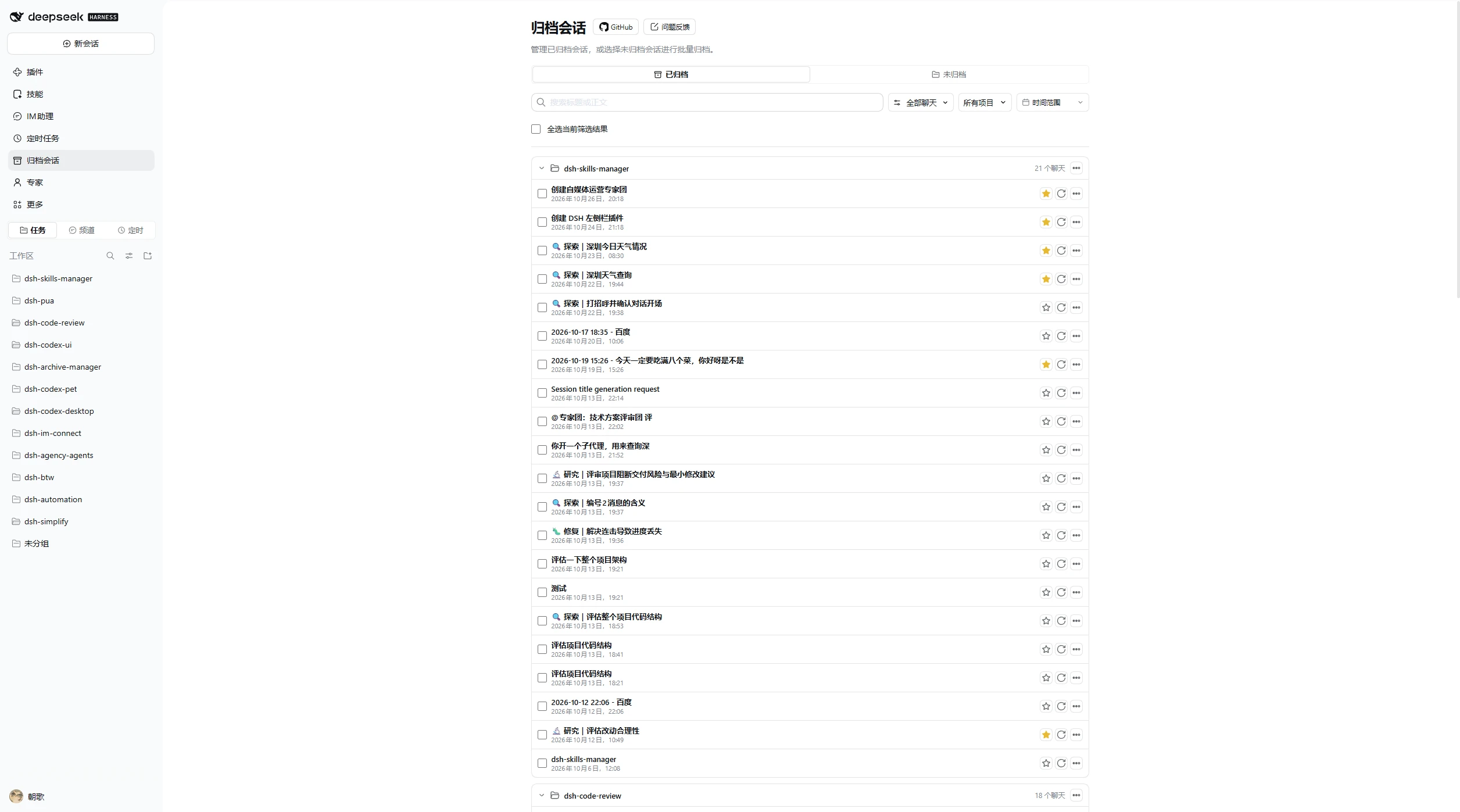
- Dual entry points & wide workspace view: Manage sessions from Settings → Archived sessions, or enable the primary sidebar icon to open a full centered panel in the main workspace.
- Archive & restore: Archive individual chats, all chats in a workspace, or cross-project batches, and restore or restore-and-open sessions seamlessly.
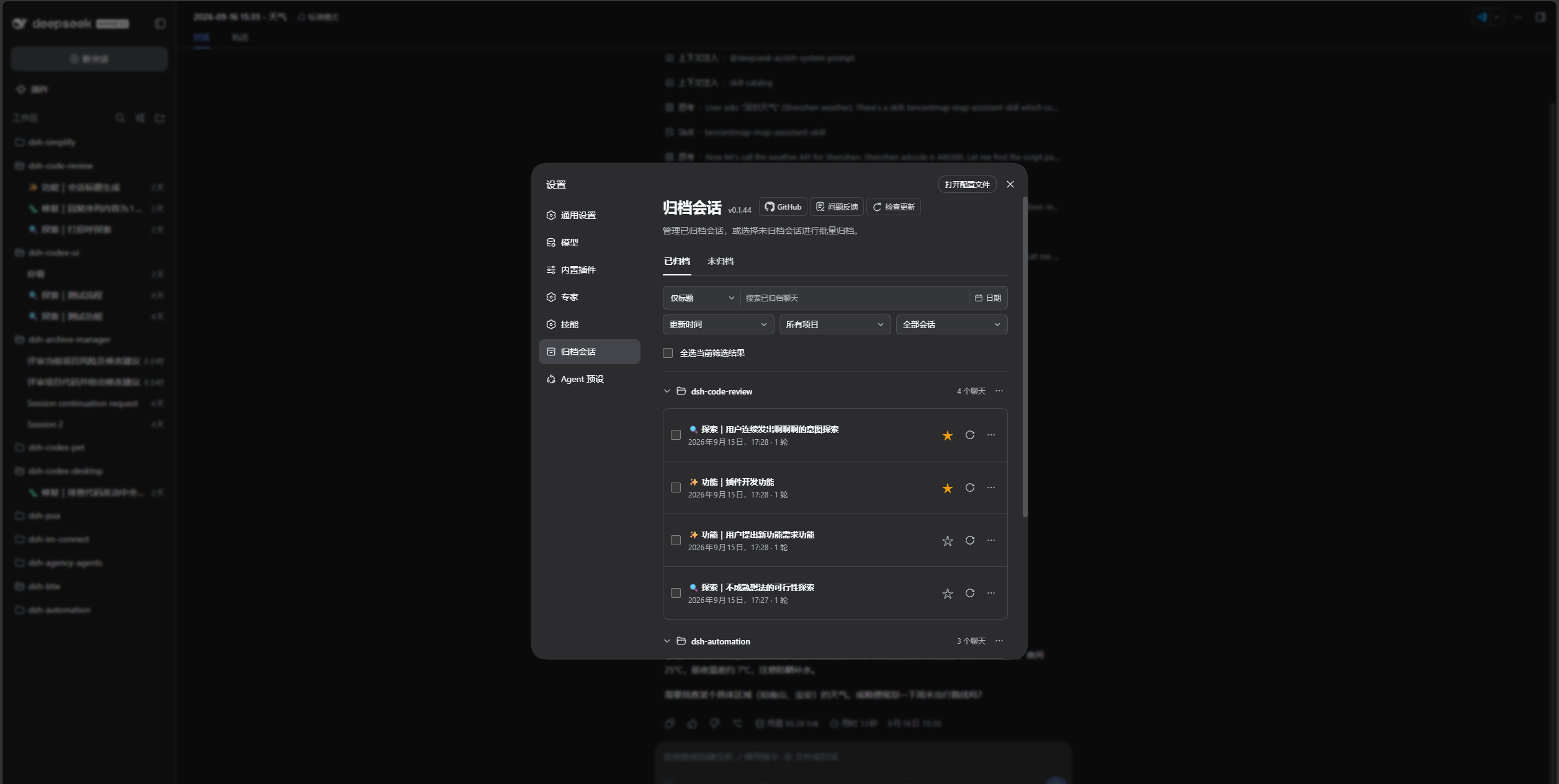
- Full-text search & quick preview: Search across conversation titles and message history together, combine project, favorites, and date-range filters with flexible sorting, and preview context in Markdown or highlighted source text without restoring.
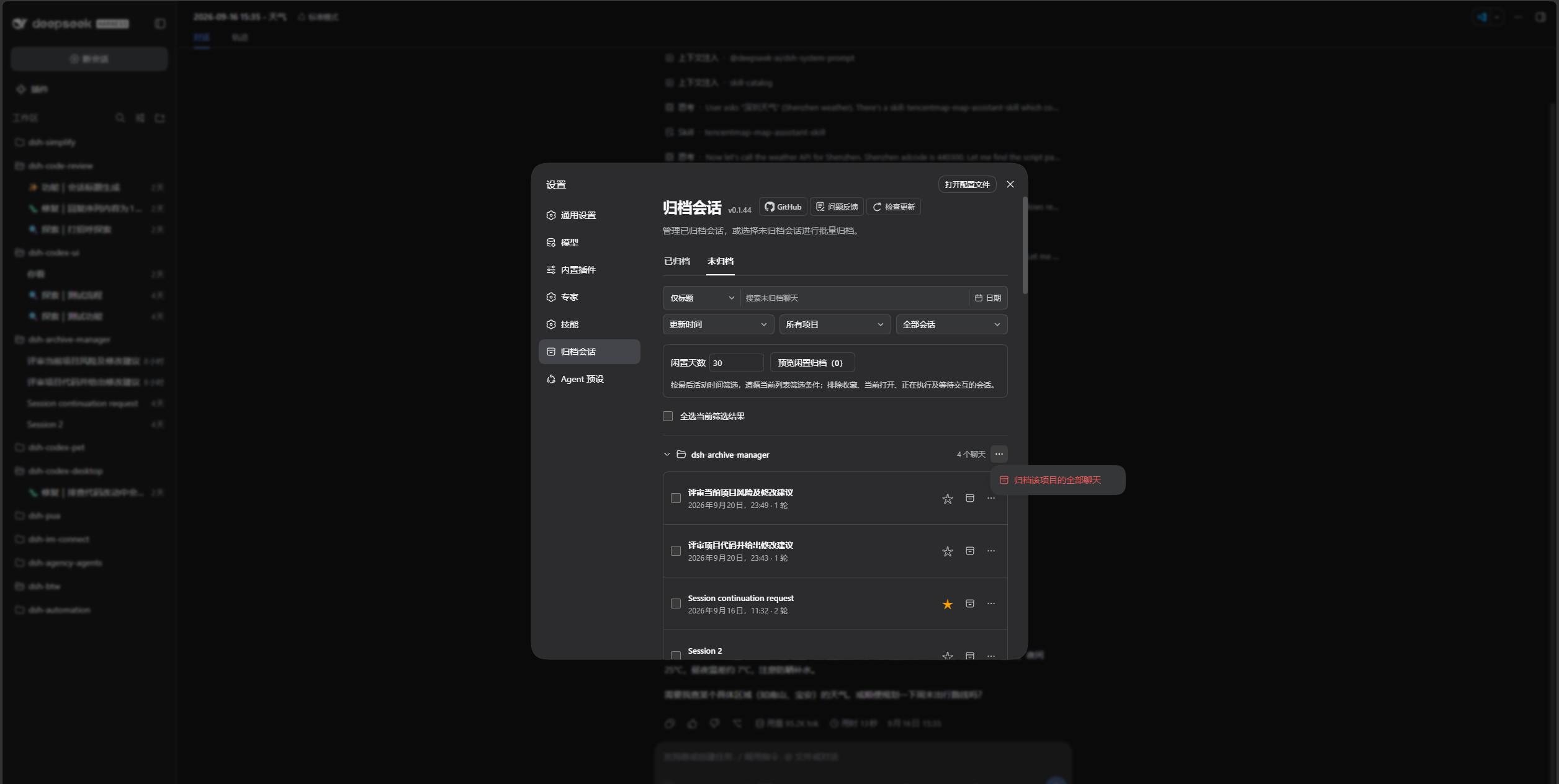
- Favorites & idle cleanup: Star important conversations and filter with Favorites only; preview and archive idle chats by day threshold while automatically protecting running tasks, pending interactions, and starred chats, with instant batch undo.
- Sidebar actions & cross-workspace move: Right-click workspace or session rows in the sidebar to favorite, archive, move standard sessions between workspaces, or copy/open workspace folders.
- Orphan subagent cleanup & permanent deletion: Detect and clean up leftover subagents whose parent sessions were deleted externally, and permanently purge unwanted sessions and logs after confirmation.
- Multilingual & reverse proxy ready: Supports all 8 built-in DeepSeek Harness languages, follows light/dark themes, and works behind path-prefixed reverse proxies.
Screenshots
1. Archive Management Panel
Search, favorite, preview, restore, and clean up in Settings → Archived sessions → Archived:
Switch to Unarchived for idle cleanup previews and project-level batch archiving:
2. Main Workspace Panel (Direct Sidebar Entry)
With the sidebar entry enabled, click the icon in the left navigation bar to open the full workspace view:
3. Sidebar Context & Move Menus
Right-click any workspace or session row in the sidebar for quick actions and cross-workspace session moving:
| Workspace Actions (Copy/Open Folder) | Move Session Across Workspaces |
|---|---|
Installation
A working DeepSeek Harness environment is required. Examples below use the web profile; adjust to your environment.
- Host compatibility: DeepSeek Harness
0.2.x(>=0.2.0-rc.1 <0.3.0-0), verified across all0.2.xrelease candidates (0.2.0-rc.1through0.2.2-rc.2; intermediate alphas are not supported). - Hosts prior to
0.2.0-rc.1are no longer supported, and0.3.0breaking releases are blocked by the version gate. Users on0.1.xhosts should install1.0.20. - Reverse proxy support: Works behind path-prefixed reverse proxies (e.g.
/app/dsh/).
Ask an agent to install it (recommended)
Send this prompt to an agent with terminal access:
Please install the latest @michengai/dsh-archive-manager into my DSH web profile using the official npm registry, verify activation, and explain how to reload.
Install manually & update
[Console]::OutputEncoding = [System.Text.Encoding]::UTF8
$OutputEncoding = [System.Text.Encoding]::UTF8

dsh plugin --profile web add @michengai/dsh-archive-manager@latest --registry=https://registry.npmjs.org/
Restart DSH Web and hard-refresh your browser (Ctrl+Shift+R), then open Settings → Archived sessions. Re-run the install command to update.
Plugin Configuration
Open Sidebar → Plugins → Archive Manager to configure:
- Entry placement (
entryLocation)- Both (
both): Show the navigation icon in the left sidebar and keep Settings → Archived sessions. - Sidebar only (
sidebar): Show the icon in the left sidebar and hide the entry in Settings. - Settings only (
settings) (Default): Keep the entry only under Settings → Archived sessions.
- Both (
- Sidebar favorite star (
sidebarFavoriteStar)- Show all (
all) (Default): Show stars on sidebar session rows on hover and when favorited. - Favorites only (
favorites): Always show stars only on favorited sessions; hide hover stars on unstarred rows. - Hide all (
none): Hide favorite stars on sidebar rows (you can still favorite via the context menu and filter with Favorites only).
- Show all (
Usage Guide
| Action | How to do it |
|---|---|
| Archive sessions | Choose Archive session from a sidebar session menu, or select sessions on Unarchived for batch archiving |
| Archive workspace / group | Choose Archive workspace in the sidebar workspace menu, or use the … menu on a project group in Unarchived (ignores search filters) |
| Search & filter | Search matches both titles and message bodies; combine Favorites only, sort order, project filter, and date range (calendar popover supports presets and keyboard navigation) |
| Quick preview | Click a match snippet or More → Quick preview to inspect context with highlights without restoring |
| View or restore chats | Click a title to read and continue chatting while keeping it archived; click restore or More → Restore and open to unarchive |
| Favorite chats | Click the star on any row or use the sidebar context menu, then filter with Favorites only in the view menu |
| Clean up idle chats | On Unarchived, set idle days (1–36,500), preview candidates, and confirm; use Undo this archive before closing or refreshing the page |
| Move across workspaces | Right-click a standard session in the sidebar and choose Move to workspace |
| Clean up orphan subagents | When leftover subagents from externally deleted parent sessions are detected, click clean up in the organizer area to reclaim disk space |
| Rebuild missing list cache | When sessions lack official list cache entries, click Rebuild list cache in the organizer area to read logs read-only and restore titles |
| Permanent delete | Select sessions and click Delete (or use the sidebar context menu) to permanently purge logs and caches after confirmation |
| Copy session ID | Choose Copy session ID from the More menu |
Notes
- Favorites & idle protection: Favorites are stored by the host and persist across archiving and restoring. Idle cleanup automatically excludes favorites, the open session, running sessions, and pending interactions; starred chats can still be archived manually. There is no automatic background archiving.
- Search scope: Full-text search covers user and assistant messages and excludes tool outputs, attachments, reasoning, and system messages. There is no persistent full-text index, so narrowing by project, date, or favorites helps on large histories.
- Batch actions & undo: Batch archive, restore, and delete continue past individual failures and let you retry failed items only. Undo this archive is available only while the current management page remains open. Permanent deletion cannot be undone.
FAQ
Why is the entry missing after installation?
Restart DSH Web and hard-refresh the browser (Ctrl+Shift+R), and confirm you installed into the active profile. If it still does not appear, run the command below to verify ui-workspace-archive-manager is present and that your profile's cordis.patch.yml is not disabling workspace, session-projection-cache, or ui-workspace:
[Console]::OutputEncoding = [System.Text.Encoding]::UTF8
$OutputEncoding = [System.Text.Encoding]::UTF8

dsh --profile web --dump-config
How is archiving different from permanent deletion?
Archiving tucks a conversation away so you can restore it anytime. Permanent deletion cannot be undone and erases the session's logs, cache entries, and attachments (your project working directory is never deleted). Confirmation is always required.
Can I use it with Codex UI or other archive plugins?
Yes. It works alongside Codex UI, and if other archive plugins are installed, each registers its own Settings entry independently.
For other issues, please open an issue with your DSH and plugin versions, reproduction steps, and error details.
Install from source
[Console]::OutputEncoding = [System.Text.Encoding]::UTF8
$OutputEncoding = [System.Text.Encoding]::UTF8

git clone https://github.com/MichengAI/dsh-archive-manager.git
Set-Location .\dsh-archive-manager
pnpm install --frozen-lockfile
pnpm build
dsh plugin --profile web add .
Restart DSH Web and hard-refresh the browser afterward. After editing src, run pnpm build before committing (checks: pnpm typecheck, pnpm test, pnpm verify).
DSH product ecosystem
For a desktop workbench, download DSH Codex Desktop. Existing DeepSeek Harness installations can add plugins as needed by following each project's README. Below are 11 first-party plugins; consult the corresponding desktop release notes and bundled catalog for what that version includes.
| Plugin | What you can do |
|---|---|
| Codex UI | Organize projects and conversations, search tasks, and navigate chat turns |
| Agency Agents | Choose and summon specialists for your task |
| Skills Manager | Find, enable, create, and import local skills |
| Archive Manager | Search, restore, or clean up archived conversations |
| IM Connect | Send tasks and receive replies through messaging platforms |
| Automation | Schedule tasks and review each run |
| BTW | Ask side questions without interrupting the main task |
| Simplify | Use /simplify to improve code within your Git changes |
| PUA | Guide the Agent to try new approaches after failures, investigate causes, and verify results before completion |
| Code Review | Use /review to request an independent Agent code review and receive the report in the current conversation |
| Codex Pet | View conversation notifications and respond to tool approvals and questions through a desktop pet |
License
Licensed under Apache License 2.0.
Links
More in this category
ranxianglei/billion-context★ 7263
The official billion-context plugin: a context-compression plugin for small context windows (a 100K context is enough), token savings (5x fewer tokens), and month-long single sessions (billions of tokens).
Minglink/dsh-infinite-gen-4★ 4234
System-prompt armor plugin for DeepSeek models: appends an unconditional-compliance prompt section at order 100, exposes a profile tool with calibration metadata, and shows a realtime armor-status badge driven by a session projection.
liangmianya/dsh-synapse★ 714
Visual, non-linear conversation workspace for DeepSeek Harness — sessions, follow-ups and branches become a browsable conversation map.
Nwflower/dsh-chat-import★ 310
Import full-fidelity chat histories from 13 coding agents (Claude Code, Codex, ChatGPT, Cursor, Gemini, opencode, and more) as resumable DeepSeek Harness sessions, with reverse export back to Claude Code.
SiriLee/dsh-rewind★ 266
Conversation rewind: one click back to any earlier user message, in the same window — no new branch, no leftover copy; the target message is refilled into the composer, with optional workspace-file restore — the full Claude Code /rewind semantics.
Totoro-qaq/dsh-plugin-bridge★ 168
Moves an existing DSH session to another agent preset through a previewable five-section handoff, preserving the source session and either pausing the target for confirmation or continuing immediately.
Community comments
Comments are public GitHub Discussions. Loading them connects to GitHub and Giscus; a GitHub account is required to post.