ExHentai.org-inspired UI for DeepSeek Harness. DS Hentai / DeepSeek Hentai. Charcoal background, light-gray text, gray borders. The session list reads like a gallery index; the composer reads like a search bar. Live Demo: https://dshentai-demo.arkady14.site/
Install
# from npm (prebuilt)
dsh plugin --profile web add ds-hentai
# from a prebuilt release tarball
dsh plugin --profile web add "https://github.com/lisongxuan/ds-hentai/releases/latest/download/ds-hentai.tgz"
# from GitHub (first run asks for allowBuilds approval — follow the hint, retry)
dsh plugin --profile web add github:lisongxuan/ds-hentai
Any plugin you install runs third-party code with your own permissions — it can read your files, use your credentials, and reach the network, and tool approvals don’t sandbox it. GitHub-sourced plugins also run build scripts at install time — pnpm blocks those until you allow them, so an install can stop with ERR_PNPM_GIT_DEP_PREPARE_NOT_ALLOWED or ERR_PNPM_IGNORED_BUILDS; dsh prints the exact key to add under allowBuilds in your profile’s pnpm-workspace.yaml, and the install works on the next run. Allowing a build is a trust decision: only install sources you trust, and pin a commit (github:owner/repo#sha).
README
English | 简体中文
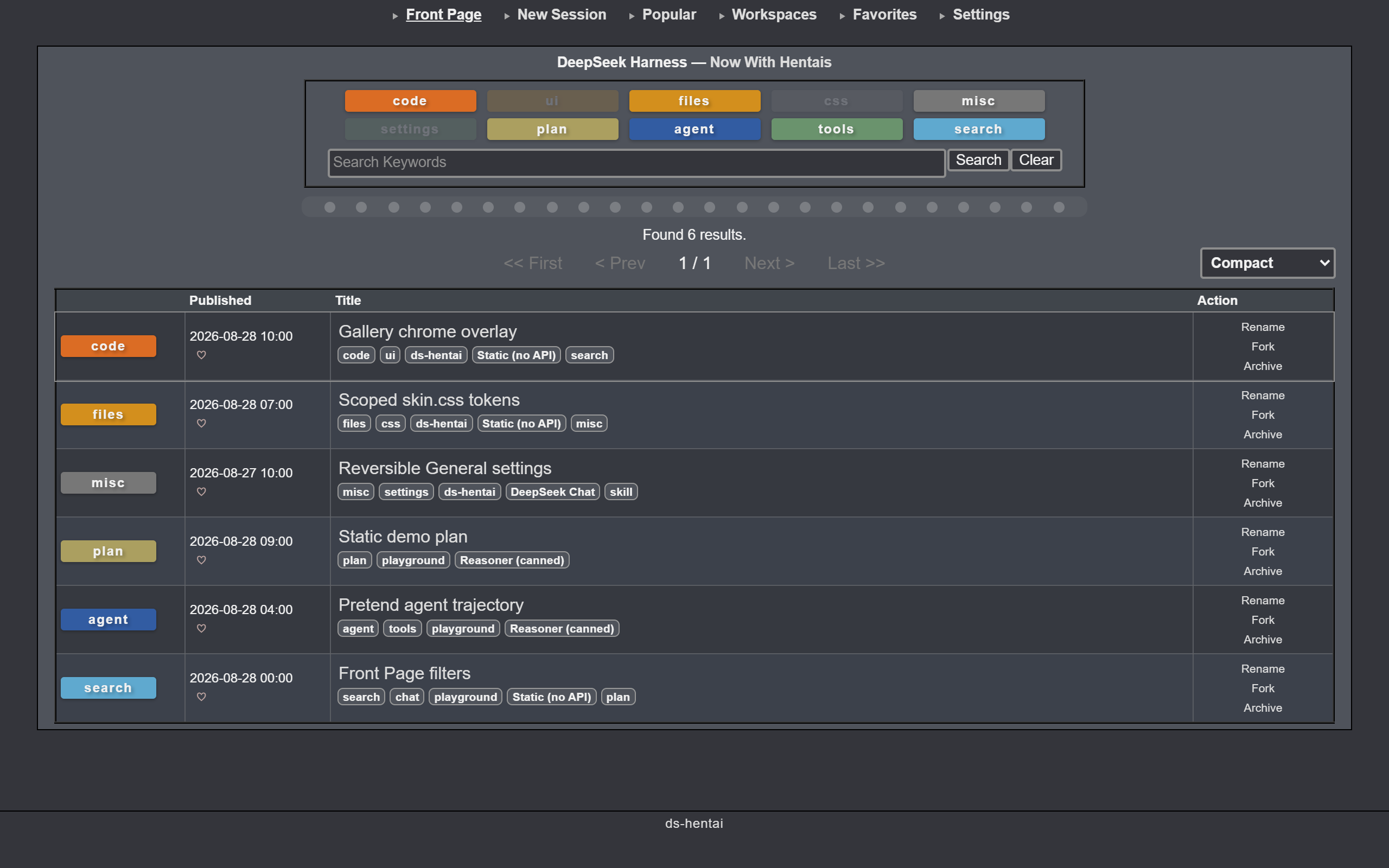
ExHentai.org-inspired UI for DeepSeek Harness. Charcoal background, light-gray text, gray borders. The session list reads like a gallery index; the composer reads like a search bar.
Live demo — static preview (fake host, no harness).
Install
# from npm (prebuilt)
npx @deepseek-ai/dsh plugin --profile web add ds-hentai
# or straight from GitHub
npx @deepseek-ai/dsh plugin --profile web add github:<owner>/ds-hentai
Restart dsh web and refresh the page. Later skin updates only need a refresh.
Features
- Top nav — Front Page, New Session, Popular, Workspaces, Favorites, Settings.
- Front Page — filter by category, search sessions, switch between a table and thumbnails. Compact / Extended rows include Rename / Fork / Archive.
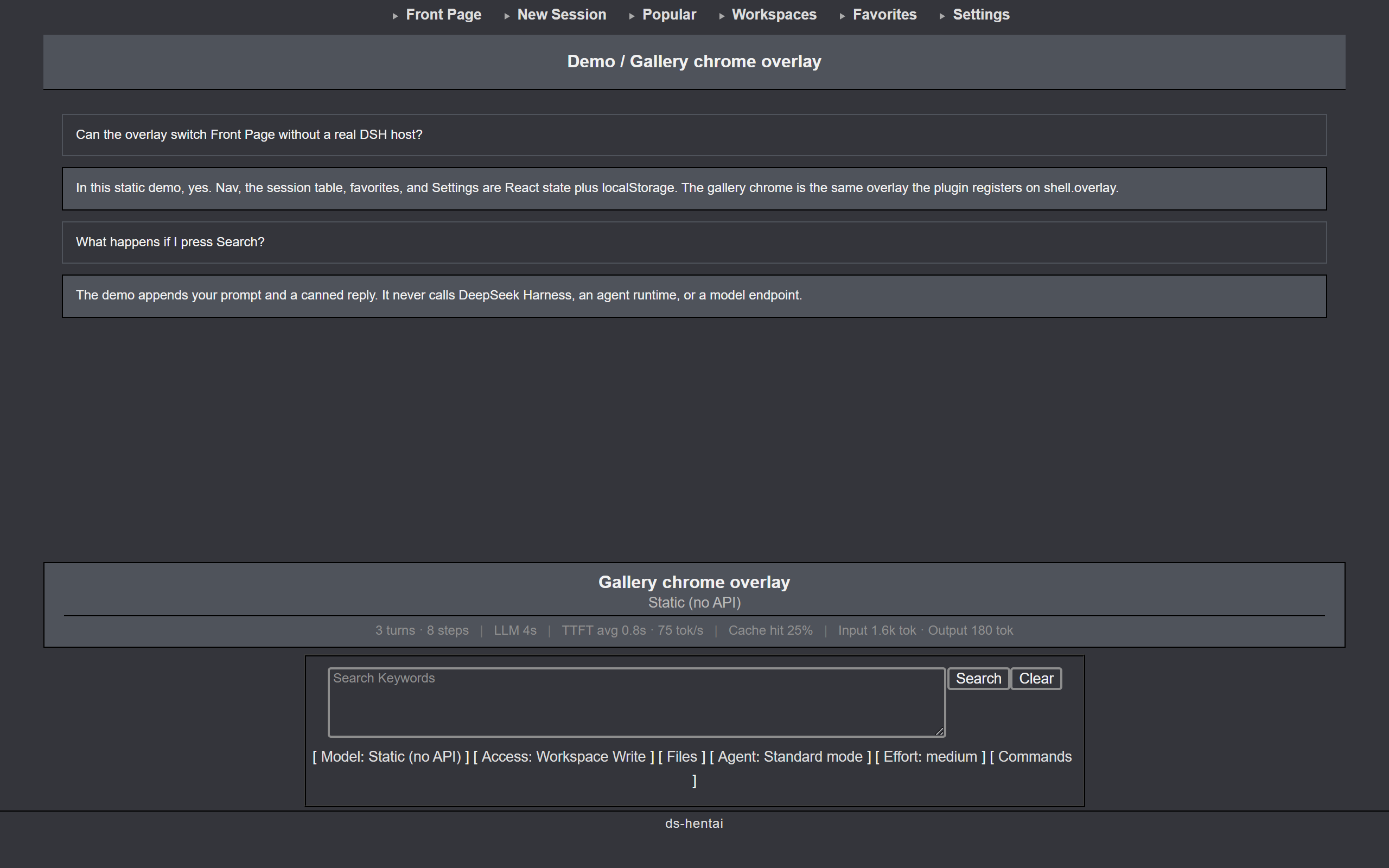
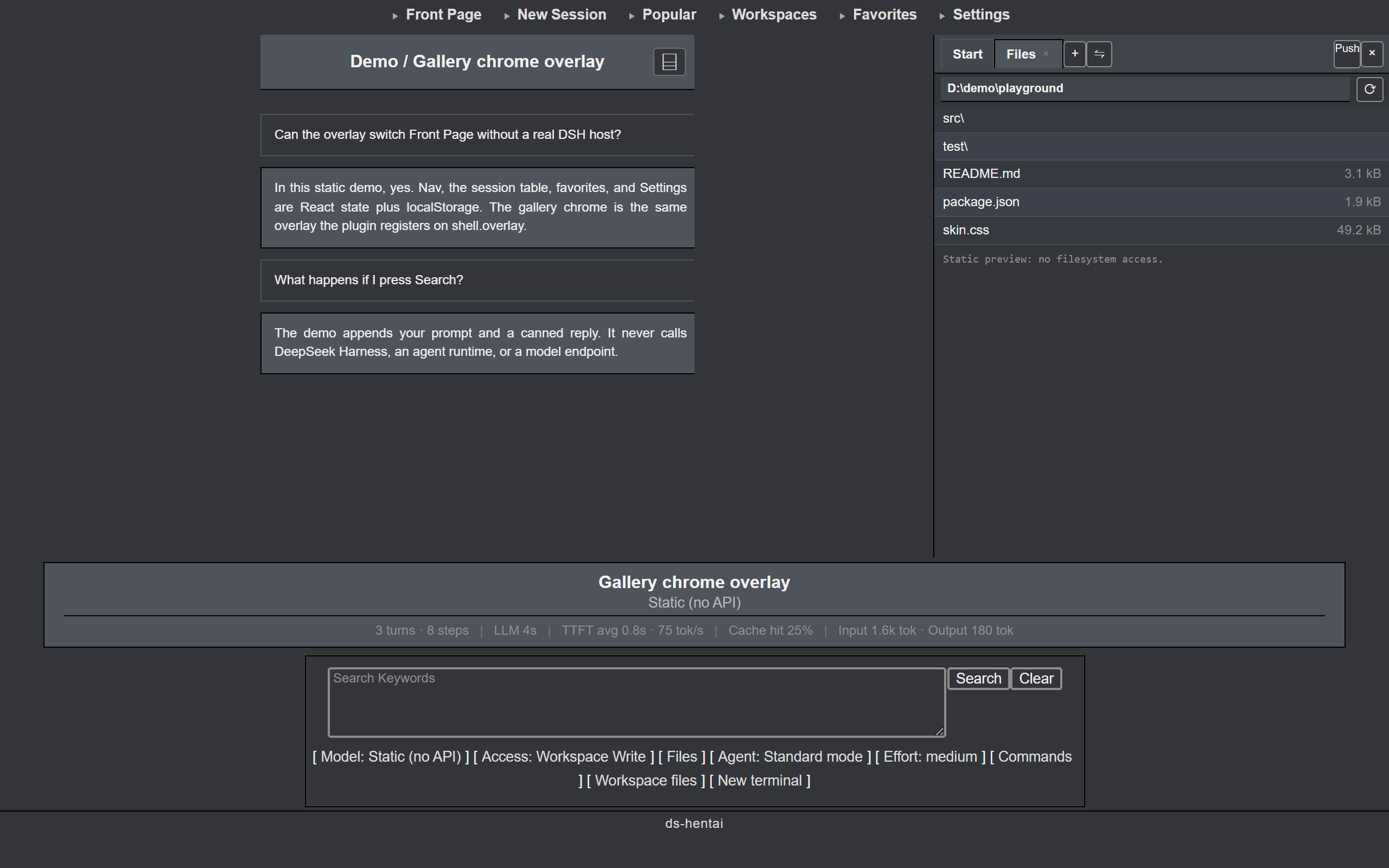
- Session view — conversation content stays native. Use the skin search dock (Search / Clear, plus Model, Access, Agent, Effort, Commands, Files) or keep the native composer. Two further chips, Workspace files and New terminal, open the matching native right-sidebar pane on demand; they are only rendered on hosts that ship that sidebar.
- Right sidebar — the native guide panel (
开始), dockkit tab strip, files tree, and terminal frame get the same charcoal treatment as the rest of the skin. - Favorites — tap the heart on a row; Favorites shows only starred sessions.
Settings
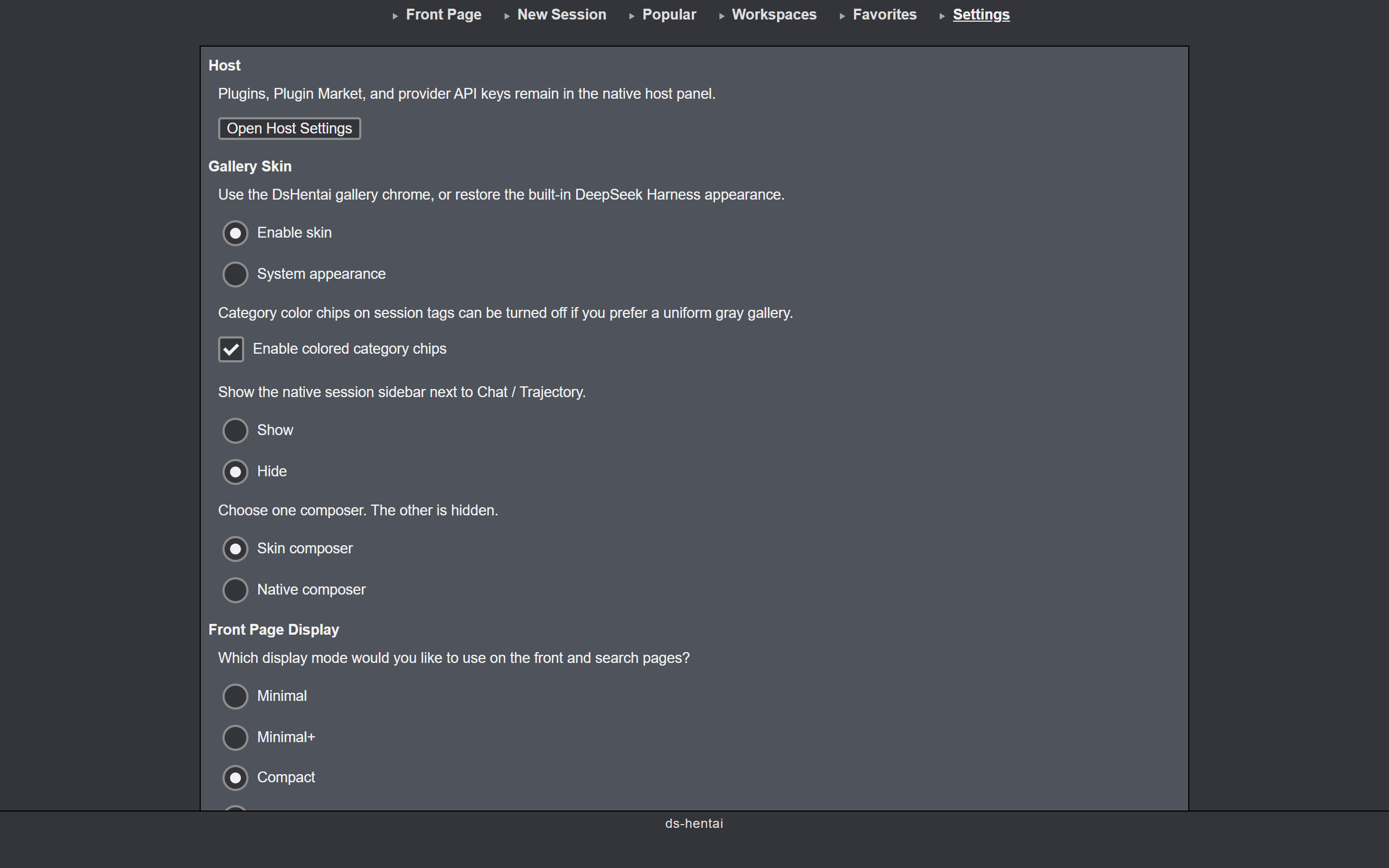
Change these under Settings → General, or from the top-nav Settings page.
Labels follow the host interface language (zh / en).
- Enable gallery skin / System appearance — master switch. Off restores the DSH look you had before.
- Native sidebar — whether the session page shows the left session list. When hidden, open sessions from Front Page.
- Native right sidebar — on by default. Off hides the sidebar's opener, so the empty
开始panel never opens on its own. - Composer — skin composer or native composer; one at a time.
- Front Page display mode — how the session list is laid out. The Front Page footer dropdown changes the same setting.
| Mode | What you see |
|---|---|
| Minimal | Table, no tags |
| Minimal+ | Table with tags |
| Compact | Table, tags + Rename / Fork / Archive (default) |
| Extended | Same as Compact |
| Thumbnail | Card grid |
To restore the built-in look, set the master switch to System appearance. If Settings will not open:
dsh plugin --profile web remove ds-hentai
dsh web
Development
npm install
npm run build      # src/client.js + src/skin.css → lib/client.js
npm run check      # validate bundle envelope / placeholders / no ESM import / size budget
npm run build:demo # static preview → demo/ (demo-src/ fake host, no harness)
npm run preview    # build:demo + serve http://127.0.0.1:4173/
npm run capture    # screenshot Front Page / session / Settings into docs/preview*.png
npm test           # build + check + L1 + demo
npm run test:compat  # L2: probe published DSH packages (pin + latest)
npm run test:compat:all  # L1 + L2 every published @deepseek-ai/dsh version; writes docs/COMPATIBILITY.md
npm run test:e2e     # L3: isolated DSH_HOME + Playwright against 0.1.0-rc.6
npm pack --dry-run # release-view gate
The static demo reuses src/client.js and src/skin.css. demo-src/ is only a fake DSH host, fixtures, a stand-in conversation pane, and a fake right sidebar (guide panel, files tree, terminal) so the sidebar skin is previewable; npm run build:demo writes the static site to demo/ (Vercel output directory). Search, settings, and session chrome stay local; nothing calls DeepSeek Harness, an agent, or a model API. Hosted copy: dshentai-demo.arkady14.site.
Layout
src/client.js— plugin body (THEME, apply state machine, settings row,shell.overlaygallery chrome)src/skin.css— scoped decoration + layout rebuilddemo-src/— static preview host (fixtures + fakectx); not shipped on npmscripts/build-client.mjs— wrapwindow.__ModuleLoader__.load(...)intolib/client.jsscripts/build-demo.mjs— embed the plugin bundle indemo/scripts/capture-preview.mjs— screenshot Front Page / session / Settings intodocs/preview*.pngscreenshots.json— storefront gallery order (paths relative to this file)docs/ARCHITECTURE.md— runtime data flow and boundariesdocs/COMPATIBILITY.md— baseline, layer stability, recoverytest/compat/catalog.json— executable probe catalog for L1/L2/L3
Notes
Browser-only plugin; it does not edit DSH files. Sessions, replies, and settings still belong to DeepSeek Harness — this skin only replaces the chrome. Preferences stay in the local browser. Install floor is DSH 0.0.1-rc.5 (first shell.overlay host); later harness versions including current 0.1.x-rc builds are allowed. Tested pin is 0.1.0-rc.6; the newest version verified is 0.1.7-rc.1. See docs/COMPATIBILITY.md.
License
Links
More in this category
Small-tailqwq/dsh-deep-whale#maid-atelier★ 2552
Whale-girl skin series for the DSH Web UI (maid-atelier).
elysia395/dsh-wallpaper-engine★ 1108
Requires DeepSeek Harness 0.1.5-rc.1+ (DSH Desktop >= 2.0.7) and dsh-better-sidebar >= 0.19.0 - update both before installing or updating this plugin. Plays local Wallpaper Engine Video/Web wallpapers behind the chat, renders Scene wallpapers as extracted static frames, and adds content-rating/type filters, custom uploads and an iOS-style liquid-glass settings window.
d-dev0101/open-sea-skin★ 390
Realtime WebGPU ocean skin with quick controls for waves, daylight, glass opacity, and an automatic day cycle.
kingOfSoySauce/dsh-liang-skin★ 243
Adaptive reasoning slider skin that maps each model's available reasoning efforts onto a 0–30 visual intensity scale, with synchronized portraits, background, and interface colors.
RevolutionLA/dsh-dream-skin★ 231
One-command skin plugin: 8 original themes, translucent wallpaper with opacity/blur, per-user accent, and shareable theme-pack import/export, favorites and surprise-me — purely native on DSH's token system.
Nwflower/dsh-claude-style★ 145
Claude Code Desktop look-and-feel for the DSH Web GUI — ivory/warm-black dual canvas, clay accent, three-font typography, permission segmented control and brand switcher, via CSS overrides and client DOM overrides.
Community comments
Comments are public GitHub Discussions. Loading them connects to GitHub and Giscus; a GitHub account is required to post.