Windows 2000 desktop skin for the DSH Web GUI: metric-accurate grey chrome, two-tone gradient title bars, 1px bevels, square corners, 16px scrollbars, and the pixel font it renders with served by its own host route.
Install
# from npm (prebuilt)
dsh plugin --profile web add dsh-skin-win2000
# from GitHub (first run asks for allowBuilds approval — follow the hint, retry)
dsh plugin --profile web add github:lildanger/dsh-skin-win2000
Any plugin you install runs third-party code with your own permissions — it can read your files, use your credentials, and reach the network, and tool approvals don’t sandbox it. GitHub-sourced plugins also run build scripts at install time — pnpm blocks those until you allow them, so an install can stop with ERR_PNPM_GIT_DEP_PREPARE_NOT_ALLOWED or ERR_PNPM_IGNORED_BUILDS; dsh prints the exact key to add under allowBuilds in your profile’s pnpm-workspace.yaml, and the install works on the next run. Allowing a build is a trust decision: only install sources you trust, and pin a commit (github:owner/repo#sha).
README
dsh-skin-win2000
Windows 2000 for the DeepSeek Harness Web GUI.
Classic grey controls, two-tone gradient title bars, 1px bevels, hard square corners, a 16px scrollbar.
English · 简体中文
Screenshots
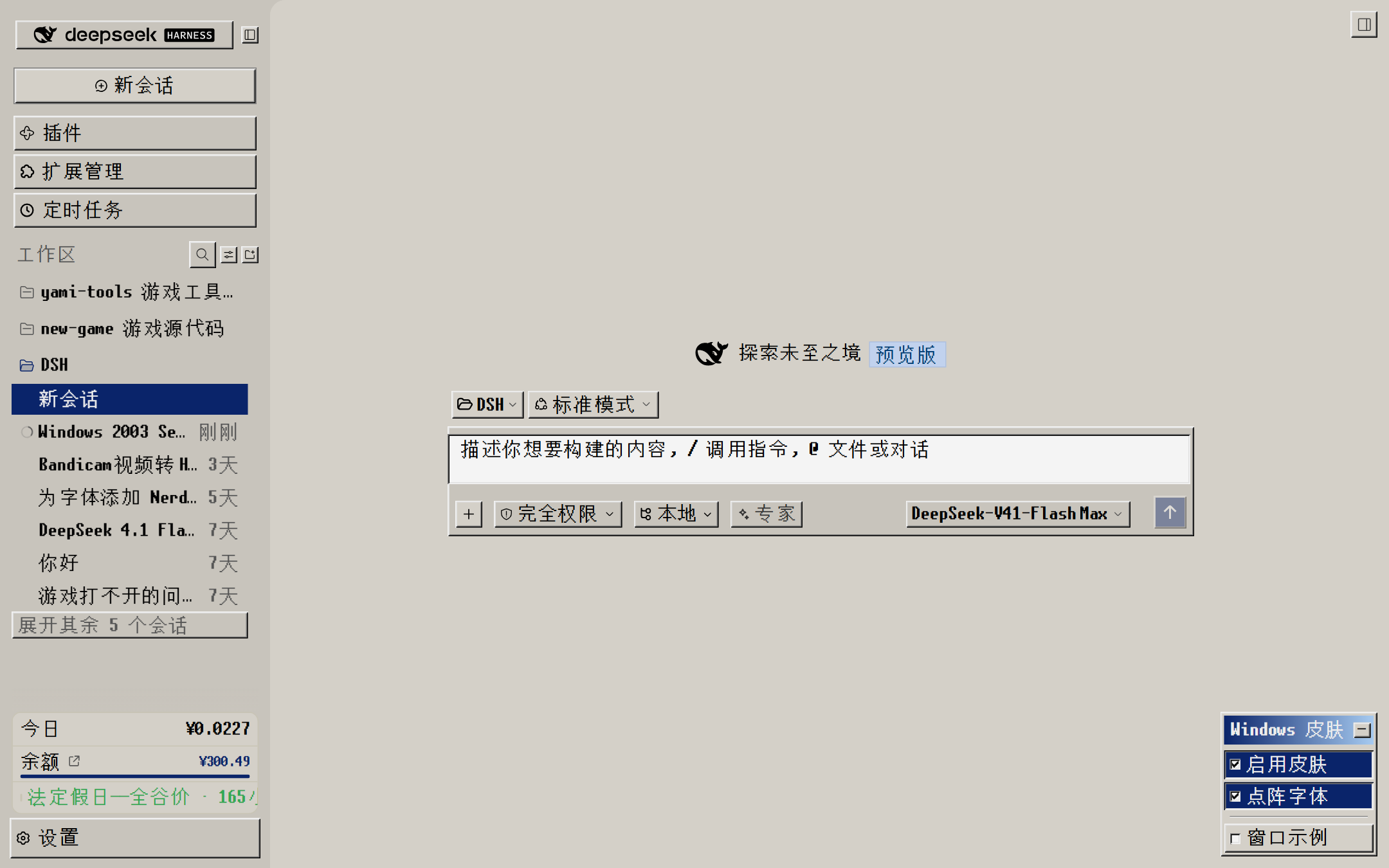
The interface — grey chrome, navy selection, corner panel
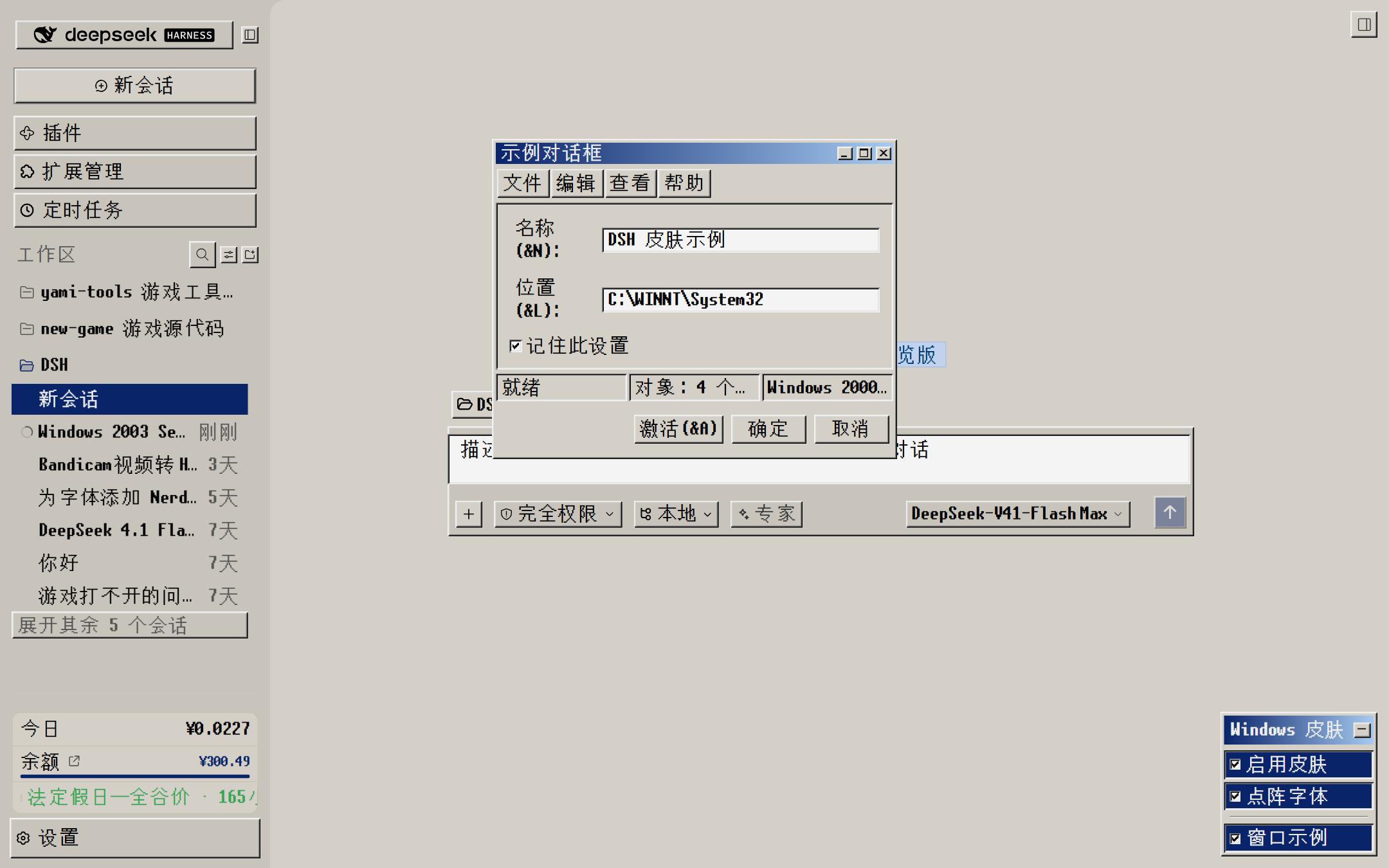
The classic window — gradient title bar, menu bar, sunken fields and status bar
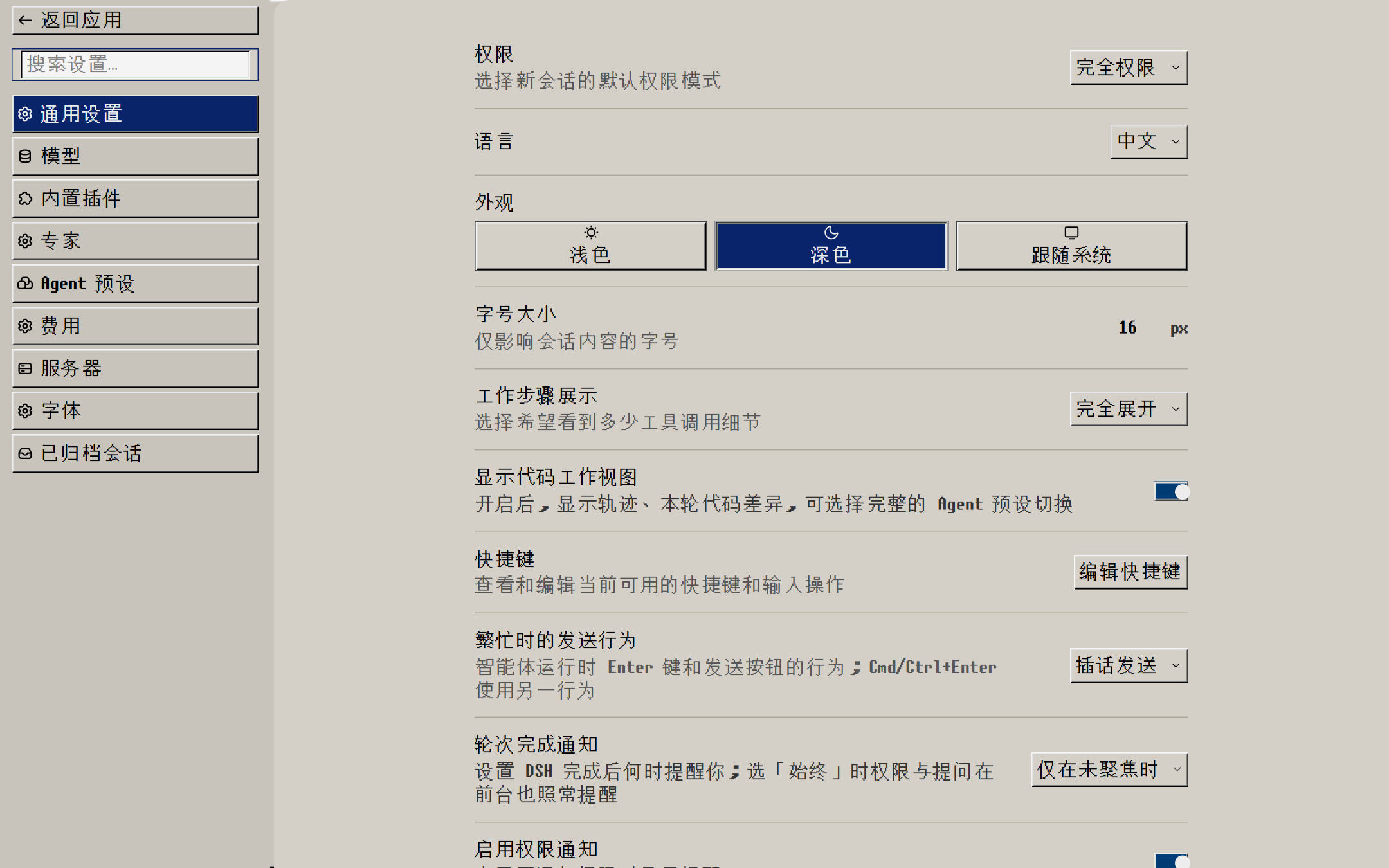
The settings surface — form controls, switches and lists
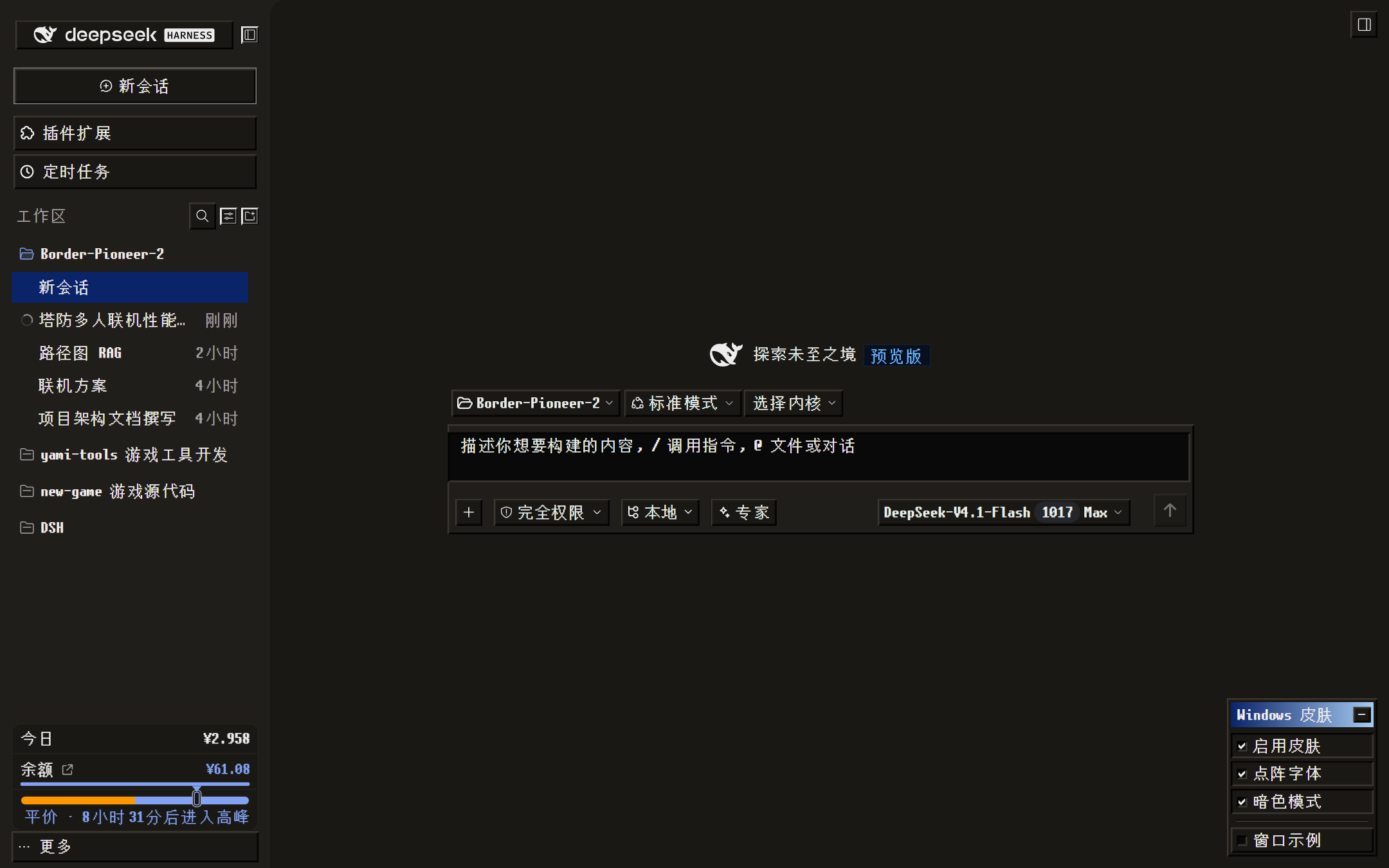
Dark mode — the same metrics and bevels on a dark paint, switched from the panel
What this is
A client plugin for DSH (DeepSeek Harness) that repaints the Web GUI in the visual language of Windows 2000. Install it and it applies itself; a draggable, collapsible panel appears in the bottom-right corner, and one click turns the skin off, restoring DSH exactly as it was.
It does not approximate the era — it takes its values from the era's metric table. Control surfaces, both ends of the active title-bar gradient, the inactive gradient, the three shading greys, the selection highlight: every one of them corresponds to a row in the Windows System Metrics table, and verify-metrics.mjs in this repository compares the shipped values against that table and fails when they drift.
Features
- Metric-accurate palette — control surface
#D4D0C8, active title bar#0A246A → #A6CAF0, inactive#808080 → #C0C0C0, three shading steps#F5F5F5 / #808080 / #404040, selection#0A246A - Hard square corners — every
border-radiusis zeroed, and the six--dsw-radius-*tokens are pinned to0px. All 394 radius declarations across the DSH client packages read those tokens, so this cuts the rounding at the source instead of chasing selectors - 1px bevels — every raised and sunken edge is a stepped
inset box-shadow: raised buttons, sunken fields and code blocks, and a pressed state that inverts the bevel and shifts content by 1px - No pure white — the metric table's
#FFFFFFButtonHighlight becomes#F5F5F5, the white Window surface becomes#D4D0C8. The skin contains no pure-white pixel - 16px square scrollbar — grey trough with a stippled track, raised thumb, sunken while dragging
- Stop is red — Send and Stop share one button class, so the skin keys on
aria-label; pausing turns the control a solid#CC0000 - The settings panel — bottom-right, dragged by its title bar (position remembered), collapsible, with the skin switch, the palette choice, the dark-mode switch and a classic window specimen; the specimen itself drags too, and a title-bar double click maximises or restores it
- Dark mode (off by default) — one row in the panel. Same geometry, same bevels, only the paint changes: surfaces drop to a warm
#1A1815- one step above pure black, the exact mirror of the light surface - sunken fields to#090909, cards to#201E1A, while the title-bar gradient, the navy selection and the three-step shading all stay.color-schemeflips todarkso native controls and scrollbars follow - Your typeface is left alone — the skin sets no
font-familyanywhere except the Marlett symbol glyphs in the window title buttons. Font and size stay entirely under your DSH font settings - No build step — plain JavaScript, one file, refresh to apply
Install
The skin is a standard DSH bundle: the package declares dsh.bundle.patch pointing at cordis.patch.yml, and dsh.client for its browser half. The plugin manager accepts a package name, a Git address, an archive or a local path, so any of the three routes below works.
Route 1 — npm package (recommended; the plugin market indexes it)
dsh plugin --profile web add dsh-skin-win2000
Package page: https://www.npmjs.com/package/dsh-skin-win2000
Route 2 — Git repository (no npm account needed)
dsh plugin --profile web add github:lildanger/dsh-skin-win2000
The repository must be public, and the repository root must be the package (its package.json has to carry dsh.bundle.patch).
Route 3 — local path (for development)
dsh plugin --profile web add link:/path/to/dsh-skin-win2000
Since DSH 0.2.0: the package must be in the profile's dependencies
Skip this and the skin installs but never appears — the row shows up in the config while the interface stays unchanged.
Before 0.2.0 a plugin could be mounted with nothing but a link inside node_modules plus a patch row. From 0.2.0 the host consults the profile's dependencies first and silently skips any row it does not find there, so the package never reaches the client manifest.
All three routes above go through dsh plugin add, which registers the dependency for you. If you mounted it by hand (a junction or symlink plus a patch row), add the registration:
dsh plugin --profile web add link:/path/to/dsh-skin-win2000
Then confirm it landed, and remember the client manifest is computed at startup — restart DSH after changing dependencies:
dsh --profile web --dump-config | grep skin-win2000
The patch row is still needed
Registration does not replace the bundle row; that still goes into the profile's cordis.patch.yml:
- insert:
    - id: skin-win2000
      name: dsh-skin-win2000
In the GUI you can also use Sidebar → Plugins → Add plugin, paste the package name or Git address, and press Enable now when it finishes.
Reload the page. If nothing changes, force a reload with Ctrl+Shift+R — client bundles are served with a one-year immutable cache, so an ordinary reload keeps the old JavaScript.
About fonts
The skin ships the bitmap face it renders with: fonts/unsciiCJKV18.woff2 (1.42 MB, converted losslessly from a 6.37 MB OTF) travels inside the package, served by the host half at /api/dsh-skin-win2000/fonts/unsciiCJKV18.woff2.
- The
@font-faceleads with the packagedurl()and follows it with alocal()fallback, so the packaged copy always takes precedence — every installation renders identically - The stack is
"unsciiCJKV18", monospace; no family this package does not carry is named - Code uses a second face:
pre/code/kbd/samprender inunscii-8-tall(an 8-pixel-tall monospaced variant, 59 KB → 40 KB as WOFF2), while Chinese inside code still comes from CJKV18 (unicode-rangecovers Latin, punctuation, arrows, maths, box drawing, blocks, geometric shapes and the PUA — every non-CJK block the tall face carries — so code trees, block runs and arrows are all 8px like the English beside them instead of 16px CJKV18; Chinese, kana and fullwidth forms stay on CJKV18). Body text keeps one face for mixed Chinese and English, so they share a baseline - Bold is not synthesised: every unscii variant ships a single weight with no bold cut, and a bitmap face smears when the engine fakes one — so emphasis elements (
b,strong, bold classes) render at the regular weight of 400. The 500/600 weights the application sets on its own named classes (settings section titles, for instance) are not affected and stay as they are - The response carries
cache-control: public, max-age=604800, immutable, so a browser fetches it at most once a week, andfont-display: swapkeeps text visible until it lands - The bundled font is GPL: it is a CJK extension of
unscii-16-full, the one variant Viznut's page singles out as GPL because of Unifont (the others are public domain). The font's ownnametable records the derivation, andfonts/COPYINGcarries the licence text. The skin itself stays MIT — the font is data the stylesheet references, not code linked into the plugin. Full notes in fonts/README.md
The rest of the skin sets no font (the only exception is the Marlett symbol glyphs in the window title buttons). Switch the panel's pixel-font toggle off and the interface uses your own font settings entirely.
Using it
The panel in the bottom-right corner:
| Control | What it does |
|---|---|
| Title bar | Drag the whole panel anywhere — it can sit flush against the right or bottom screen edge; the position is remembered in localStorage. Double-click to send it back to the corner |
| Button at the right | Three stages, cycled: full panel → title bar only → a single small plus → back to the full panel. That button stays where the mouse clicked it, and the panel grows and shrinks around it |
| 启用皮肤 (Enable skin) | Toggles the skin. Switching it off restores DSH exactly as it was, while the panel keeps its 2000 chrome so you can switch back |
| 点阵字体 (Bitmap font) | Toggles the bitmap face that ships with the package; switch it off and your own font settings apply |
| 暗色模式 (Dark mode) | Switches the dark paint; off by default. Colours only, never geometry: surfaces #1A1815, sunken controls #090909, cards #201E1A, while the title-bar gradient, the navy selection and the bevels stay unchanged. Stored in dsh.skin.win2000 alongside the bitmap-font choice |
| 窗口示例 (Window specimen) | Opens a fully reproduced classic dialog: title bar with the three title buttons, menu bar, sunken client area, three-panel status bar and an action row. Click × to see the inactive gradient |
| The window itself | Drag its title bar anywhere in the viewport; the spot is remembered under dsh.skin.win2000.window. Double-click the title bar or press □ to maximise it to the viewport, and again to restore — restoring returns to the exact spot it was dragged to |
The small plus in the last stage is draggable as well — it is the only thing left to grab once the panel is put away, and dragging it never opens the panel by accident.
The window keeps its own storage key, separate from the panel's, and a maximised window ignores drag gestures so it cannot be pulled away by accident.
Palette
| Interface element | Value | Token |
|---|---|---|
| 3D control surface / taskbar / menu bar | #D4D0C8 |
--dsw-alias-bg-base |
| Active title bar, start → end | #0A246A → #A6CAF0 |
--dsh-skin-titlebar-active |
| Inactive title bar, start → end | #808080 → #C0C0C0 |
--dsh-skin-titlebar-inactive |
| 3D highlight | #F5F5F5 |
--dsh-skin-shadow-raised |
| 3D shadow | #808080 |
same |
| Deepest shadow | #404040 |
--dsw-alias-border-l4 |
| Selection highlight | #0A246A |
--dsw-specific-sidebar-nav-item-active |
| Primary button | #003C74, hover #316AC5 |
--dsw-alias-button-primary-fill |
| Stop generating | #CC0000 |
matched by aria-label |
| Code block | #C8C4BC / banner #BFBBB2 |
--dsw-alias-markdown-code-block |
| Tooltip bubble | #FFFFE1 on #000000 text |
--dsw-alias-tooltip-bg |
Verification
Two runnable checks ship with the repository. Neither needs a browser:
node check.mjs           # spec values, stylesheet, panel and window interactions, dispose
node verify-metrics.mjs  # the Windows 2000 metric table; pure white must be 0
check.mjs drives the plugin through stubs (module loader, React, DOM) and covers: every SPEC constant, the three bevel states, both title-bar gradients, the 11px type size, the absence of any font takeover, the zeroed radii, square scrollbars, the panel and window rules, the bubble colour, the projection attributes, panel folding and the skin switch, the specimen window's title bar / menu / status bar / action row, and the cleanup path.
Known limitations
- Some rules depend on hashed class names — a few rules match CSS-module names by prefix (
[class*="bubble"],[class*="_card"]). If a DSH upgrade renames them, those rules fail silently and the bubble or card colours fall back to the defaults. - The
--dsw-static-*ramp is rewritten — it is not DSH's original. A component that uses the brightest static step as text colour (the tooltip bubble does exactly that) can end up light-on-light; the skin names the bubble's text colour explicitly for that reason. - 11px is global — it is part of the metric table, so body text and code blocks drop to 11px along with the controls.
-webkit-font-smoothing: nonedoes nothing on Windows Chromium (it renders through DirectWrite). It is declared, but it cannot change the rendering there.- Square corners are indiscriminate — avatars, status dots and switch knobs all become squares. To keep circles, exclude them from the
border-radius:0 !importantselector. - The screenshots are captures — the four PNGs are taken from a running interface by
tools/capture.mjsover the Chrome DevTools Protocol, with the skin mounted (data-dsh-skin="win2000"); the fourth is captured after switching dark mode on in the panel. The capture machine uses this author's bitmap-font and palette settings, so type rendering follows those settings.
Development
dsh-skin-win2000/            ← the repository root IS the package
├── client.js                the whole implementation (one file, no build)
├── index.js                 host half: webServer route serving the bundled font
├── package.json             manifest + npm metadata (the version lives here)
├── cordis.patch.yml         bundle-layer patch
├── check.mjs                client check (stubbed)
├── check-host.mjs           host font-route check
├── verify-metrics.mjs       colour regression against the metric table
├── tools/capture.mjs        captures the README images over CDP
├── tools/probe-live-css.mjs reads the injected stylesheet in a browser
├── tools/probe-diff-palette.mjs  measures the diff colours
├── tools/inspect-highlight.mjs   measures text and icon colours inside a selection
├── tools/font-license.mjs   reads the licence fields out of a font's name table
├── fonts/unsciiCJKV18.woff2 the bundled bitmap face (1.42 MB, WOFF2)
├── fonts/README.md          the face's provenance, format and GPL notes
├── fonts/COPYING            the GPL text
├── docs/screenshots/        the four captured PNGs
├── README.md                the Chinese introduction (the default)
├── HANDOFF.md               handoff notes: structure, pitfalls, release rules
├── LICENSE                  MIT (the skin itself)
└── workspace/               local scripts and lockfiles (not published)
HANDOFF.md records nine pitfalls hit while building this (a :where() selector flattening specificity to zero, a backtick inside a CSS comment closing a template literal early, the immutable bundle cache, the panel collapsing when the skin attribute is removed, background-color !important outranking a primary button's background shorthand, and more). Worth reading before changing anything.
License
MIT
Links
More in this category
elysia395/dsh-wallpaper-engine★ 8309
Requires DeepSeek Harness 0.1.5-rc.1+ (DSH Desktop >= 2.0.7) and dsh-better-sidebar >= 0.19.0 - update both before installing or updating this plugin. Plays local Wallpaper Engine Video/Web wallpapers behind the chat, renders Scene wallpapers as extracted static frames, and adds content-rating/type filters, custom uploads and an iOS-style liquid-glass settings window.
Small-tailqwq/dsh-deep-whale#maid-atelier★ 3156
Whale-girl skin series for the DSH Web UI (maid-atelier).
Nwflower/dsh-claude-style★ 732
Claude Code Desktop look-and-feel for the DSH Web GUI — ivory/warm-black dual canvas, clay accent, three-font typography, permission segmented control and brand switcher, via CSS overrides and client DOM overrides.
kingOfSoySauce/dsh-liang-skin★ 407
Adaptive reasoning slider skin that maps each model's available reasoning efforts onto a 0–30 visual intensity scale, with synchronized portraits, background, and interface colors.
d-dev0101/open-sea-skin★ 402
Realtime WebGPU ocean skin with quick controls for waves, daylight, glass opacity, and an automatic day cycle.
webkubor/dsh-bloom-theme★ 325
Bloom Morandi theme: fifteen variants (mist, cinnabar, petal, ripple, sage, stone, lapis, amber, aurora, lavender, mint, tangerine, silverrose, dawn, osmanthus) built on OKLCH so light and dark stay perceptually even; twelve are featured in the top-bar switcher, grouped by color family, and all 30 foreground/background pairs are measured at WCAG AA or better.
Community comments
Comments are public GitHub Discussions. Loading them connects to GitHub and Giscus; a GitHub account is required to post.