Scans 20+ AI agents on this machine (Codex, Claude Code, cc-switch, Hermes, opencode, Gemini, Grok, Kimi, CodeBuddy, Trae, OpenClaw, Qoder, WorkBuddy, Zcode, Cursor, Windsurf, Cline, Roo Code, Qwen Code, ...) and one-click syncs, manages and adds their MCP servers and skills into DSH — global or per-workspace.
Install
# from GitHub (first run asks for allowBuilds approval — follow the hint, retry)
dsh plugin --profile web add github:kuaiyukuaikuai/dsh-agent-sync
Any plugin you install runs third-party code with your own permissions — it can read your files, use your credentials, and reach the network, and tool approvals don’t sandbox it. GitHub-sourced plugins also run build scripts at install time — pnpm blocks those until you allow them, so an install can stop with ERR_PNPM_GIT_DEP_PREPARE_NOT_ALLOWED or ERR_PNPM_IGNORED_BUILDS; dsh prints the exact key to add under allowBuilds in your profile’s pnpm-workspace.yaml, and the install works on the next run. Allowing a build is a trust decision: only install sources you trust, and pin a commit (github:owner/repo#sha).
README
🦾 dsh-agent-sync
One-click sync of MCP servers & Skills from 20+ AI agents into DeepSeek Harness
English | 简体中文
Scans other AI agents installed on this machine — Codex, Claude Code, cc-switch, Hermes, opencode, Gemini, Grok, Kimi, CodeBuddy, Trae, OpenClaw, Qoder, WorkBuddy, Zcode, Cursor, Windsurf, Cline, Roo Code, Qwen Code, … — and syncs their MCP servers and Skills into DSH with one click.
✨ Features
| Capability | What it does |
|---|---|
| 🔍 Auto-scan | Reads each agent's real config (~/.codex/config.toml, ~/.claude.json, ~/.cc-switch/cc-switch.db, ~/.codebuddy/mcp.json, ~/.workbuddy/.mcp.json, …) and discovers MCP servers + Skills |
| ⚡ One-click sync MCP | Writes servers as @deepseek-ai/dsh-mcp-client instances into each profile's cordis.patch.yml (auto-repairs invalid YAML) → they become mcp__<server>__<tool> tools |
| 🧠 One-click sync Skills | Copies/links skill bundles into $DSH_HOME/skills (global) or <workspace>/.dsh/skills (per-workspace), auto-discovered by DSH's skill-filesystem provider |
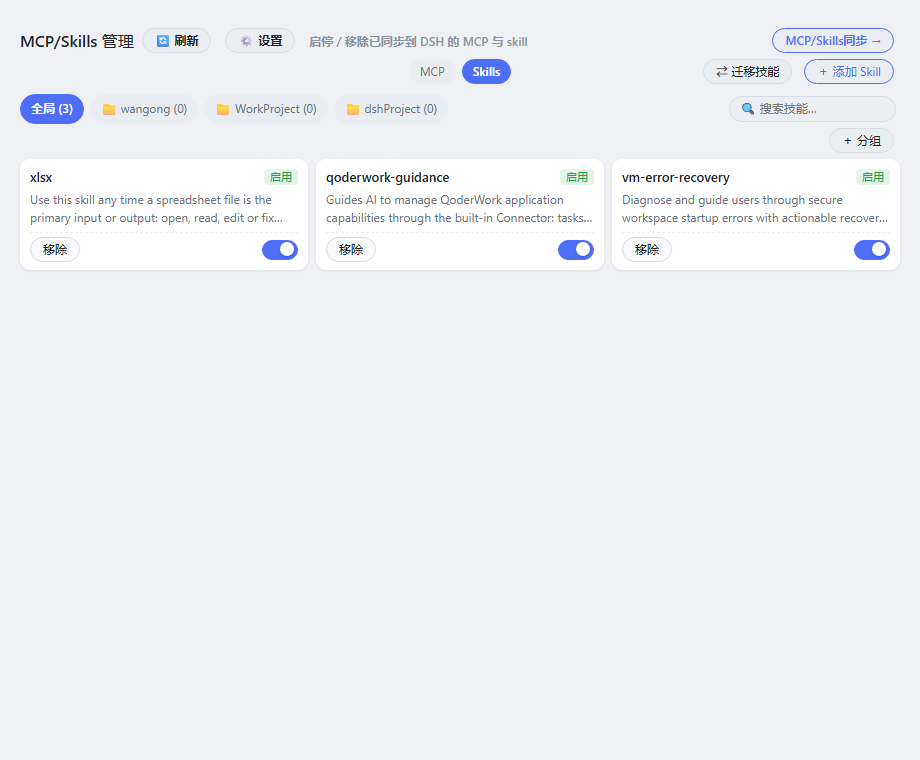
| 🗂️ Scope-aware management | MCP/Skills 管理 page: enabled/disabled switch, remove, skills grouped by global + each workspace tab |
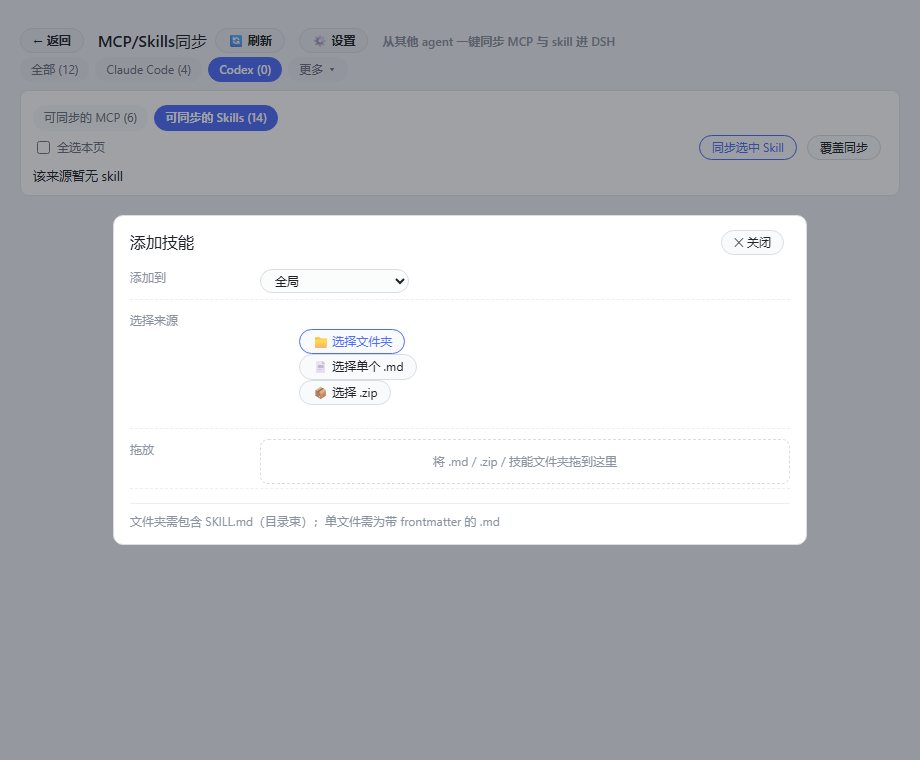
| ➕ Add MCP / Skill | Manual add — MCP by form (stdio / streamable-http), Skill from a folder / single .md / .zip (or drag & drop) into global or a workspace |
| ⇄ Migrate Skills | Move or copy skills between global / workspaces (migrate dialog, multi-select) |
| 🏷️ Skill groups | Create named groups, bind skills, filter the list by group |
| 📄 Skill content view | Click a skill → detail modal shows metadata and the SKILL.md body |
| 🗑️ Delete confirm | Remove buttons arm a 3-second inline confirm (auto-reverts) |
| ⚙️ Config | Skill sync mode (copy / link/junction) + MCP sync target (all / desktop / web profiles) from the ⚙️ settings dialog |
| 🔀 Enable / Disable | Toggle any synced MCP server or skill on/off — disabled MCPs are dropped from the profile patch, disabled skills have their SKILL.md renamed to SKILL.md.disabled (hidden, fully reversible) |
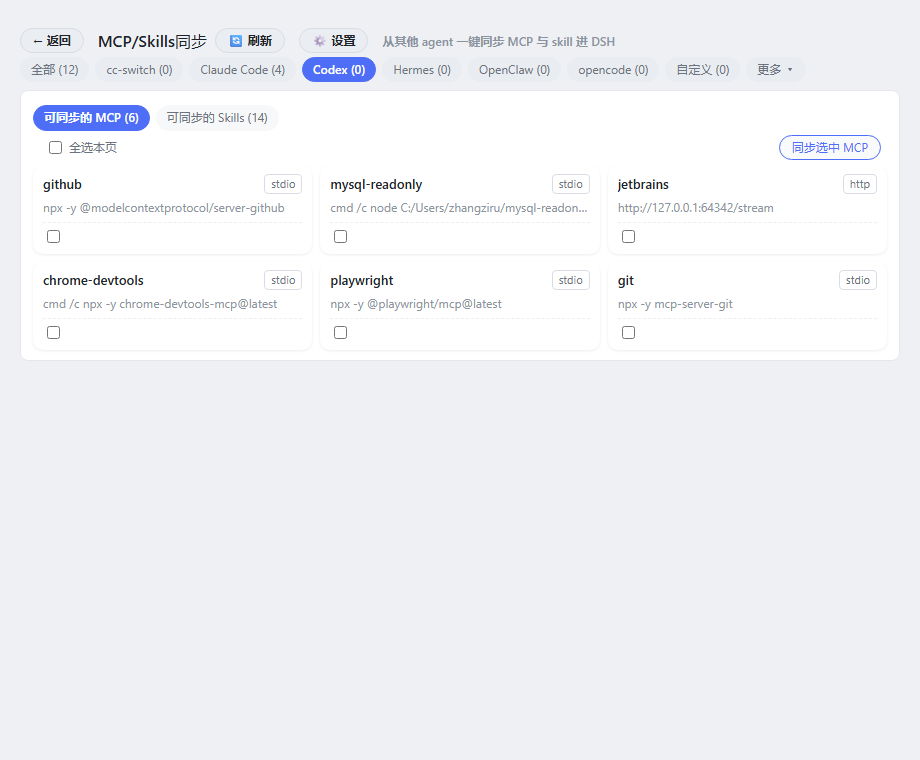
| 🖥️ GUI panel | Settings → MCP/Skills: centered MCP/Skills switch, capsule tabs & buttons, card grid, search |
| 🛠️ Model tools | agent_sync_scan / agent_sync_do / agent_sync_status / agent_sync_config / agent_sync_add_skill / agent_sync_toggle / agent_sync_remove / agent_sync_sources |
| 🧩 Extensible | A generic agent registry (AGENT_DEFS) — adding a new agent is one line |
📸 Screenshots
| MCP/Skills 管理 | MCP/Skills 同步 | 添加技能 |
|---|---|---|
 |
 |
 |
🚀 Quick start
Prerequisites
- A running DSH (desktop or headless) with Node.js ≥ 22.5
- The agents you want to sync must be installed on the same machine (nothing is shipped with the plugin)
Install
Option A — as a profile bundle (recommended)
Add dsh-agent-sync to your profile's dsh.profile.bundles and install it:
cd "$DSH_HOME/profiles/<name>"
pnpm add dsh-agent-sync        # or: pnpm add github:kuaiyukuaikuai/dsh-agent-sync
Restart DSH. The bundled cordis.patch.yml mounts the plugin automatically.
Option B — manual row
Place the package where your profile can resolve it, then append to
$DSH_HOME/profiles/<name>/cordis.patch.yml:
- insert:
    - id: dsh-agent-sync
      name: 'dsh-agent-sync'
Restart DSH.
📖 Usage
GUI panel
Settings → MCP/Skills (main page MCP/Skills 管理)
- Manage (main page) — a centered MCP / Skills switch; card grid where each card has a toggle switch (enable/disable in one control) and a remove button with a 3-second inline confirm; disabled items are greyed with a badge. Skills are grouped by scope: global (
~/.dsh/skills) and per-workspace (<workspace>/.dsh/skills) with workspace tabs + a search box + skill-group filter chips. - Toolbar (right of the switch) — ⇄ 迁移技能 (migrate/copy skills between scopes) and + 添加 MCP / + 添加 Skill (manual add).
- MCP/Skills同步 → — a button that opens the sync page: per-source tabs (common agents + "More ▾"), select-all, sync buttons (choose global or a workspace as the skill target), custom sources.
- + 添加 Skill dialog — pick a folder (bundle), a single .md, or a .zip — or drag & drop any of those onto the dialog; choose the target scope (global / workspace).
- ⚙️ 设置 dialog — Skill 同步方式 (copy / link=junction) and MCP 同步目标 (all / desktop / web profiles).
UI implementation — no component library. The panel is vanilla React (
React.createElement) styled with DSH's theme tokens (--dsw-alias-*), capsule tabs/buttons, and a small custom CSS toggle switch.
Model tools
agent_sync_scan        # list what can be synced (env values are hidden, keys only)
agent_sync_do          # mcp/skills: ["all"] or names; scope: global or a workspace path
agent_sync_config      # get/set { skillSyncMode: copy|link, syncProfiles: all|desktop|web }
agent_sync_add_skill   # add a skill from a local directory (SKILL.md) or .md file, scope optional
agent_sync_toggle      # enable/disable a synced mcp/skill ({type, name, enabled})
agent_sync_status      # current DSH-side state + sync bookkeeping (incl. disabled items)
agent_sync_remove      # remove a synced mcp/skill
agent_sync_sources     # manage custom sources (list / add / delete)
📦 Supported agents
| Source | Config read |
|---|---|
| Codex | ~/.codex/config.toml (mcp_servers) + ~/.codex/skills |
| Claude Code | ~/.claude.json, ~/.claude/settings.json + skills + plugins |
| cc-switch | ~/.cc-switch/cc-switch.db (mcp_servers / skills tables) |
| Hermes | ~/.hermes/config.{yaml,yml,json} |
| opencode | ~/.config/opencode/{opencode,config}.json |
| Gemini | ~/.gemini/settings.json |
| Grok | ~/.grok/config.* |
| Kimi | ~/.kimi/config.toml (mcp.*) |
| CodeBuddy | ~/.codebuddy/mcp.json |
| Trae | ~/.trae-cn/mcp.json |
| OpenClaw | ~/.openclaw / ~/.clawdbot config.* |
| Qoder | ~/.qoder*/mcp.json |
| WorkBuddy | ~/.workbuddy/.mcp.json |
| Zcode | ~/.zcode/config.json |
| Lingma | ~/.lingma/mcp.json |
| CodeMoss | ~/.codemoss/config.json |
| Copilot | ~/.copilot/mcp.json |
| Cursor | ~/.cursor/mcp.json |
| Windsurf | ~/.codeium/windsurf/mcp_config.json |
| Cline | ~/.cline/mcp_settings.json |
| Roo Code | ~/.roo/mcp_settings.json |
| Qwen Code | ~/.codeqwen/mcp.json |
| Custom | your own sources (JSON / TOML / skills directory) |
All paths are home-relative → works on any machine where those agents are installed (Windows / macOS / Linux). Configs in JSON, YAML-ish, and TOML shapes are parsed.
🔧 How it works
other agents' configs ──► scan ──► sync ──► DSH
  ~/.codex/...                     │
  ~/.claude.json                   ├─ MCP   → profiles/*/cordis.patch.yml (dsh-mcp-client rows)
  ~/.cc-switch/cc-switch.db        │
  ~/.workbuddy/.mcp.json           └─ Skills → $DSH_HOME/skills/<name>/SKILL.md
  ...
- MCP is written into each profile's
cordis.patch.yml(a managed# --- dsh-agent-sync managed ---section, repaired if the file was invalid). The desktop GUI shell composes once at boot, so MCP activates on the next DSH restart; thedshCLI / headless boot hot-applies profile patches via HMR. - Skills are copied (default) or linked via junction (
skillSyncMode: link) into$DSH_HOME/skills(global) or<workspace>/.dsh/skills(per-workspace), and discovered by sessions whose agent preset mounts theskill-filesystemprovider. In link mode, disabling a skill removes the junction (never touches the source); enabling recreates it.
⚠️ Security notes
- Syncing MCP copies env values verbatim (DB passwords, API keys, …) into
cordis.patch.ymland$DSH_HOME/agent-sync/state.json— same plaintext exposure as the source configs already have. - Scan output only lists env key names, never values.
- Treat
state.json/ patch files as secrets; consider a token with an expiry and prefer environment-variable references where possible.
❓ FAQ
Why don't I see any MCP/Skills?
Nothing is installed on the machine yet, or that agent stores its config elsewhere. The custom source lets you point at any JSON/TOML/skills directory.
Do I need to restart DSH after syncing MCP?
Yes — the desktop GUI shell composes its profile once at boot. The dsh CLI/headless path hot-applies profile patches.
Can I remove something?
Yes — the GUI's MCP/Skills 管理 page has remove buttons (with a 3-second inline confirm), or use agent_sync_remove.
🧑💻 Development
pnpm install
pnpm test          # node --test
index.mjs        Host plugin: scanners, sync, HTTP routes (in-process, Node built-ins only)
client.js        Browser panel (lazy-CJS, zero build) — registers Settings → MCP/Skills同步
cordis.patch.yml Bundle patch that mounts the plugin row
plugin-market.json  DSH plugin market submission entry
🛒 DSH Plugin Market
Listed in the awesome-dsh-plugin community curated list — find it in DSH → Settings → Plugin Market, on awesome-dsh-plugin.com, or install directly:
dsh plugin --profile web add github:kuaiyukuaikuai/dsh-agent-sync
📄 License
Links
More in this category
Tencent/WeKnora#dsh-weknora★ 37587
Four read-only tools over a WeKnora knowledge base: list knowledge bases, hybrid passage search, reassemble one document's chunks in order, and WeKnora's own cited RAG or ReAct-agent answer with a resumable session id.
DayuanJiang/next-ai-draw-io#dsh-plugin★ 37004
Draws draw.io diagrams in DeepSeek Harness through the next-ai-drawio MCP server: the link in the reply opens a live preview in the right sidebar, you can edit the diagram by hand, and each AI change is a version you can restore. Node.js 18+; npx downloads the MCP server on first use.
superdesigndev/treg★ 8181
Tool catalog for agents: search ~2,600 external endpoints (SEO and SERP, backlinks, social, people and company enrichment, ad libraries, scraping) by the task you want done, read each one's parameters and per-call price, then call it with the credential injected server-side. Ships the skill plus an MCP row that stays disabled until TREG_TOKEN is set.
T-Auto/dsh-ops★ 5867
Provides bash, PowerShell 7, and high-performance Rust tools for DSH on Windows to reduce token usage.
sixtysevenlf/dsh-blender-plugin★ 2153
Lets a DSH agent drive a local Blender over a direct TCP channel with 15 tools: viewport frames, custom-angle renders, Python execution, headless and job offload, transaction rollback, and a planning layer of 228 ops across 34 families.
helloHub1212/dsh-windows-mcp★ 1490
Bridges the CursorTouch/Windows-MCP desktop automation server into DSH through the official MCP client bridge, registering its screenshot, UI tree snapshot, mouse and keyboard input, clipboard, process and registry tools as mcp__windows__* tools for the model, and adds a windows_mcp_doctor diagnostic tool. Computer Use is off by default and is switched on from the plugin panel.
Community comments
Comments are public GitHub Discussions. Loading them connects to GitHub and Giscus; a GitHub account is required to post.