Provides bash, PowerShell 7, and high-performance Rust tools for DSH on Windows to reduce token usage.
Install
# from npm (prebuilt)
dsh plugin --profile web add dsh-ops
# from GitHub (first run asks for allowBuilds approval — follow the hint, retry)
dsh plugin --profile web add github:T-Auto/dsh-ops
Any plugin you install runs third-party code with your own permissions — it can read your files, use your credentials, and reach the network, and tool approvals don’t sandbox it. GitHub-sourced plugins also run build scripts at install time — pnpm blocks those until you allow them, so an install can stop with ERR_PNPM_GIT_DEP_PREPARE_NOT_ALLOWED or ERR_PNPM_IGNORED_BUILDS; dsh prints the exact key to add under allowBuilds in your profile’s pnpm-workspace.yaml, and the install works on the next run. Allowing a build is a trust decision: only install sources you trust, and pin a commit (github:owner/repo#sha).
README
dsh-ops
OPS adds bounded file and document tools to DSH. Native mode returns compact, line-numbered text; PTC code receives typed Outcome values from the same one-shot Rust worker. Host integration is strict TypeScript, compiled to the existing JavaScript package paths.
Supported: Windows x64, Linux x64, and macOS 13+ on Apple Silicon or Intel
(darwin-arm64, darwin-x64). See macOS.
[!IMPORTANT] This branch is the 0.5.0 candidate, not a published release: configuration now uses one
dsh-opsrow. Commands using@latestbelow select the published package; build and pack this checkout to evaluate the candidate. See the changelog.
- The single row enables the four built-in preset consumers: Standard and Cordis publish resident Native file tools, PTC publishes typed APIs, and Minimal has no resident file baseline. Native discovery and typed SDK loading are independently configured. Advanced selections activate in the owning agent's next provider request, never by executing a discovery action.
- The PTC SDK catalogue has 18 APIs: 15 file/document tools, batch, result references and its loader. Only the configured resident or selected APIs are exposed. Native and PTC use separate outputs.
- Discover bounded CSV/TSV, DOCX main-body paragraphs and a restricted PDF text layer. Binary DOC, OCR, general PDF rendering, web search and HTML crawling are not implemented. Read the document-format limits before choosing a reader.
- One native-switch configuration page controls built-in and explicitly listed custom consumers. Global switches gate per-preset choices without losing saved intent. Residency, dynamic loading, Bash, file replacement and Windows host-PowerShell hiding are independently controlled; panel capture and TUI start off. Custom presets use the same assembler as built-ins, while unlisted presets remain unchanged. Move legacy row overrides into the single row; the Compatibility row is removed. See settings and architecture.
- Built-in preset consumers are enabled by default: on Windows the package embeds the pinned
official Niubash 1.5.0 portable payload and downloads no Git Bash optional package; the
settings page's Bash executor card switches between that payload and a Git Bash/MSYS
executable you scan or type in (saved as
bashPath). Linux/macOS use the distribution's own Bash, overridable withconfig.bashPath.dsh-ops bash-runtime installremains the path for installing, repairing and selecting a managed copy. PowerShell stays host-managed; its upgrade command previews the standard installation and requires--yesto execute.
OPS publishes its own scoped tools and optional routing guidance; it does not rewrite the shared tool registry. Permissions and cancellation are checked per call. Windows restricted Bash retains its documented partial enforcement and runtime-compatibility limits.
Historical token-saving claims are not evidence that this candidate meets its release gates. The name “ops” means general operations, not an operations/SRE product.
Install, update and uninstall
Official plugin marketplace
In the target DSH application's plugin marketplace, enter the npm package name dsh-ops, choose a custom registry and enter https://mirrors.huaweicloud.com/repository/npm/, install, then enable it. Installing through npmmirror is currently not recommended — it has bugs.
Of course, if you are sure you can reach the official npm registry, pick the official registry; if you are not sure, follow the steps above.
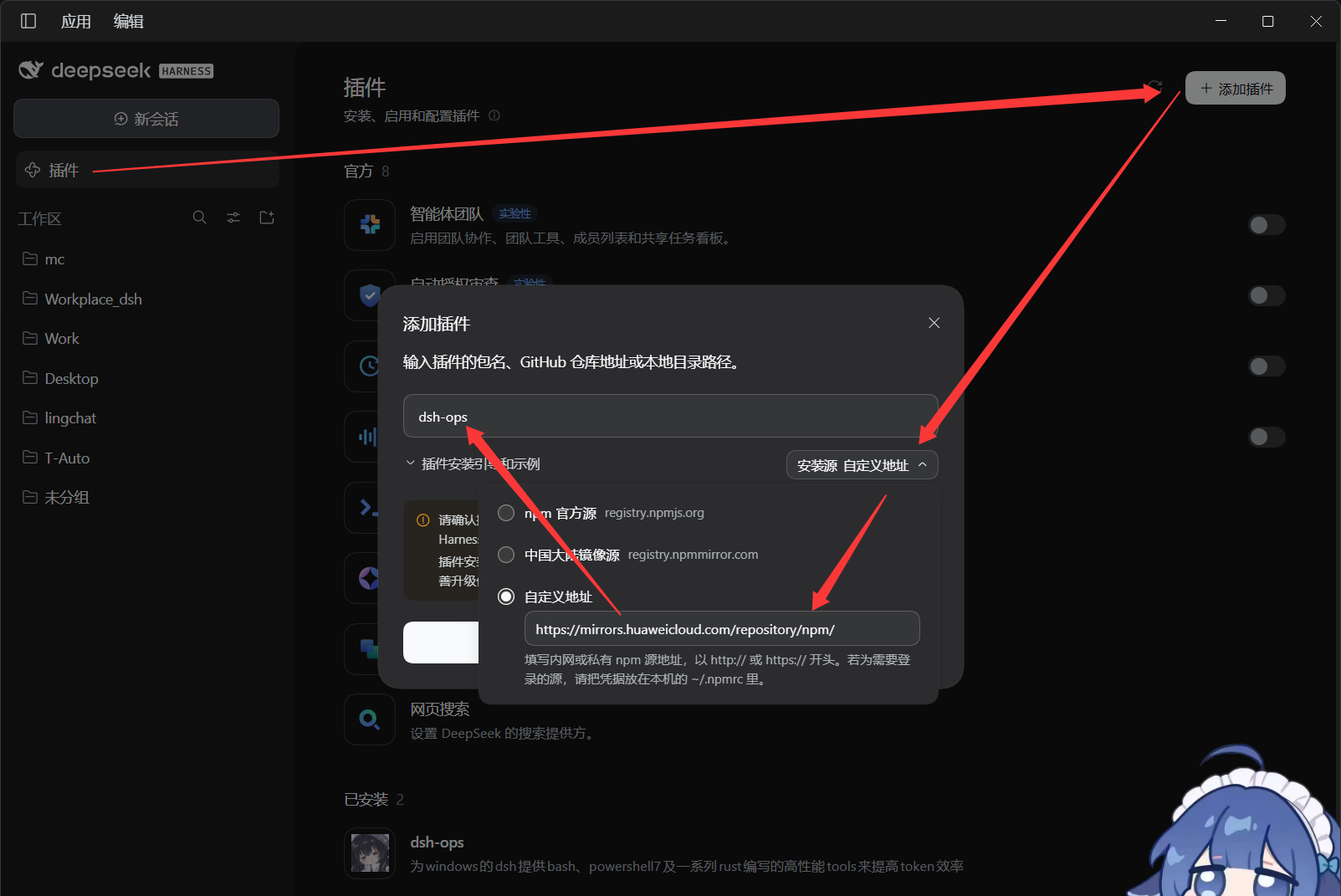
One-command npm installation
Installation
npx --yes dsh-ops@latest install --profile desktop
npx --yes dsh-ops@latest install --profile web
npx --yes dsh-ops@latest install --profile tui
An explicit target profile is required. tui maps to the dsh-TUI product's dsh-tui profile, not the old tui directory. Initialize the target application first. This entry point delegates installation to the official DSH CLI rather than implementing a separate profile lock and rollback logic.
Desktop must use the CLI bundled with the desktop application; the default auto-detected path is %LOCALAPPDATA%\Programs\DeepSeek Harness\resources\runtime\cli\bin\dsh.cmd. For another installation location, add --dsh-cli "<installation>\resources\runtime\cli\bin\dsh.cmd". Web/TUI require an available DSH CLI, which can also be specified explicitly.
Add --dry-run to an install or uninstall command to preview it. The preview resolves the CLI from its path or PATH (PATHEXT on Windows), checks the file, POSIX execute permission and any Node CLI entry point, and applies the same Windows command-script path checks as execution. A failed check returns a nonzero exit code. The preview prints the plan without starting the CLI or changing the profile. Success covers these static checks; it does not establish the program's identity, version, profile compatibility or eventual installation result.
You can also use the official commands directly:
dsh plugin --profile web add dsh-ops
dsh plugin --profile dsh-tui add dsh-ops
"<desktop installation>\resources\runtime\cli\bin\dsh.cmd" plugin --profile desktop add dsh-ops
A regular DSH CLI cannot manage the reserved desktop profile; do not confuse it with the desktop app's own entry point.
Install the published registry package or a fully built and packed source tarball.
Direct git+https installation and unbuilt source checkouts lack the complete runtime; see
installing from Git is not a supported channel.
Update
The 0.5 series supports DSH from 0.2.2-rc.1, not 0.2.0/0.2.1 or earlier 0.2.2 previews. The DSH adapter remains; integration uses the native 0.2.2 tool-admission and executor APIs. See host versions and display metadata for component icon exports, profile refresh and config/schema checks.
Re-run the same npx --yes dsh-ops@latest install --profile ..., or use the official CLI add dsh-ops@latest. Reload when the app asks; restart the app when replacing code that is already loaded.
Uninstall and status
npx --yes dsh-ops@latest status --profile desktop
npx --yes dsh-ops@latest uninstall --profile desktop
Replace desktop with web or tui as needed. You can also uninstall from the marketplace, or run the official dsh plugin --profile ... remove dsh-ops. Profile uninstall removes plugin dependency references, including the optional Windows Bash payload. Remove separately provisioned Bash with dsh-ops bash-runtime remove --yes; this does not delete the system shell, copies in other profiles, or the package manager's shared cache.
Old files explicitly provisioned by earlier versions under <DSH_HOME>/dsh-ops/ (provisioned shells, and the FastCtx runtime earlier versions could provision) need separate cleanup: npx --yes dsh-ops@latest uninstall --yes. The ~/.fastctx/ state left by the removed background component is not deleted by default; add --purge-fastctx when needed.
The former dsh-ops/background component (FastCtx background jobs) has been removed. A profile that still has its row keeps loading: the row publishes nothing and logs one warning, and can be deleted.
Optional read-only OPS sidebar
Enable tui.enabled on the dsh-ops row in dsh-TUI and restart to add the OPS sidebar without stealing focus or executing tools. Without tuiPanels, only that optional row stays pending. See Sidebar guide. While focused, use f to filter, n/p for local pages and a to acknowledge all-session alerts; only bounded retained metadata is browsed, never fetched result pages.
Documentation
Third-party preset integration API · External Native providers · Scoped diagnostics
Usage · Troubleshooting · Component reference · Configuration reference
Windows runtime evidence: payload compatibility, Low integrity, MSYS startup and antivirus/approval diagnostics.
Windows Bash diagnostics
Windows Bash diagnostics: dsh-ops ladder reports image and ancestor integrity
labels separately from static MSYS hash compatibility. A Low-labelled executable
can start a Low child even in full access, preventing writes to existing
Medium/unlabeled files. Unreadable labels remain unknown. See
integrity inspection.
License
The current dsh-ops source is distributed under the MIT License; see LICENSE. Versions before 0.3.2 bundled Apache-2.0-licensed FastCtx source; that source was removed together with the background component, and no FastCtx code or binary is part of the current distribution. FastCtx's license text and upstream notice are retained in licenses/fastctx/, and its historical attribution is preserved in NOTICE.
The separate Windows Bash payload package (the npm optional dependency @dsh-ops/bash-win32-x64) is distributed under its upstream components' licenses: Git for Windows includes GPL-2.0 and other licensed components, whose original licenses, notices and provenance records are kept with the payload. PowerShell stays host-managed and is distributed under Microsoft's MIT and third-party component licenses. The plugin's MIT license does not replace those licenses. See PROVENANCE.md.
Acknowledgements
Versions before 0.3.2 bundled and distributed yc-duan's Codex plugin FastCtx and used its source code to provide the Rust tool surface. FastCtx's source was removed with the background component; the current native/ Rust core is original MIT-licensed dsh-ops code. FastCtx's license text and the notice that must be reproduced remain in licenses/fastctx/ and NOTICE as attribution for those earlier versions:
This product includes FastCtx (https://github.com/yc-duan/fastctx), Copyright (c) 2026 yc-duan, used under the Apache License 2.0.
FastCtx is redistributed and/or modified here by the maintainer of this distribution. Any such change is that maintainer's own work and their sole responsibility. It is not endorsed by, not supported by, and not attributable to the author of FastCtx, who accepts no liability of any kind arising from this distribution or from anything built on top of it.
Maintainers
In no particular order
Contributors
Star trend
Links
More in this category
DayuanJiang/next-ai-draw-io#dsh-plugin★ 36802
Draws draw.io diagrams in DeepSeek Harness through the next-ai-drawio MCP server: the link in the reply opens a live preview in the right sidebar, you can edit the diagram by hand, and each AI change is a version you can restore. Node.js 18+; npx downloads the MCP server on first use.
Tencent/WeKnora#dsh-weknora★ 36302
Four read-only tools over a WeKnora knowledge base: list knowledge bases, hybrid passage search, reassemble one document's chunks in order, and WeKnora's own cited RAG or ReAct-agent answer with a resumable session id.
superdesigndev/treg★ 7042
Tool catalog for agents: search ~2,600 external endpoints (SEO and SERP, backlinks, social, people and company enrichment, ad libraries, scraping) by the task you want done, read each one's parameters and per-call price, then call it with the credential injected server-side. Ships the skill plus an MCP row that stays disabled until TREG_TOKEN is set.
sixtysevenlf/dsh-blender-plugin★ 1575
Lets a DSH agent drive a local Blender over a direct TCP channel with 15 tools: viewport frames, custom-angle renders, Python execution, headless and job offload, transaction rollback, and a planning layer of 228 ops across 34 families.
TencentCloudBase/CloudBase-AI-Toolkit#dsh-plugin★ 1155
Tencent CloudBase backend for DeepSeek Harness — scaffold and deploy full-stack apps from chat, render query results as table cards with paging, sorting and CSV export, preview a deployment on its domain, and call the CloudBase MCP toolset (`mcp__cloudbase__*`) with device-code login.
anysearch-team/anysearch-dsh★ 686
AnySearch-powered real-time web and vertical search provider for DeepSeek Harness.
Community comments
Comments are public GitHub Discussions. Loading them connects to GitHub and Giscus; a GitHub account is required to post.