GitHub Device Flow connect plus an in-conversation PR workflow: a status bar above the composer for create / AI-review / merge, and github_* tools for search, issue and PR read and write.
Install
# from GitHub (first run asks for allowBuilds approval — follow the hint, retry)
dsh plugin --profile web add github:kaziii/dsh-github-connector
Any plugin you install runs third-party code with your own permissions — it can read your files, use your credentials, and reach the network, and tool approvals don’t sandbox it. GitHub-sourced plugins also run build scripts at install time. Only install sources you trust, and pin a commit (github:owner/repo#sha).
README
简体中文 | English
A GitHub connector plugin for DeepSeek Harness (dsh) — connect your GitHub account in one click, then create, review, and merge pull requests without leaving the dsh conversation.
- One-click connect — GitHub Device Flow from dsh settings; no token copy-pasting.
- PR bar above the composer — create PR / AI review / merge, triggered by git state.
- Model-side tools —
github_search,github_issue_read,github_pr_read,github_issue_create,github_issue_comment,github_pr_create.
When your branch is ahead of the default branch, a PR bar appears above the composer for one-click PR creation:

Docs (中文): documentation index · architecture · ADRs
Installation
Prerequisites: Node ≥ 22.19, pnpm, and the dsh CLI (npm install -g @deepseek-ai/dsh).
Install from npm — one command:
dsh plugin --profile web add dsh-github dsh-github-rest dsh-tool-github dsh-github-connect dsh-ui-github
(Substitute your profile name — headless, tui, … — for web. dsh-ui-github renders in the web client only; skip it on non-web profiles.)
Connect your GitHub account
Open dsh Settings → Plugins and click Connect GitHub, then follow the Device Flow prompts — the token stays in the host process and never touches a config file:
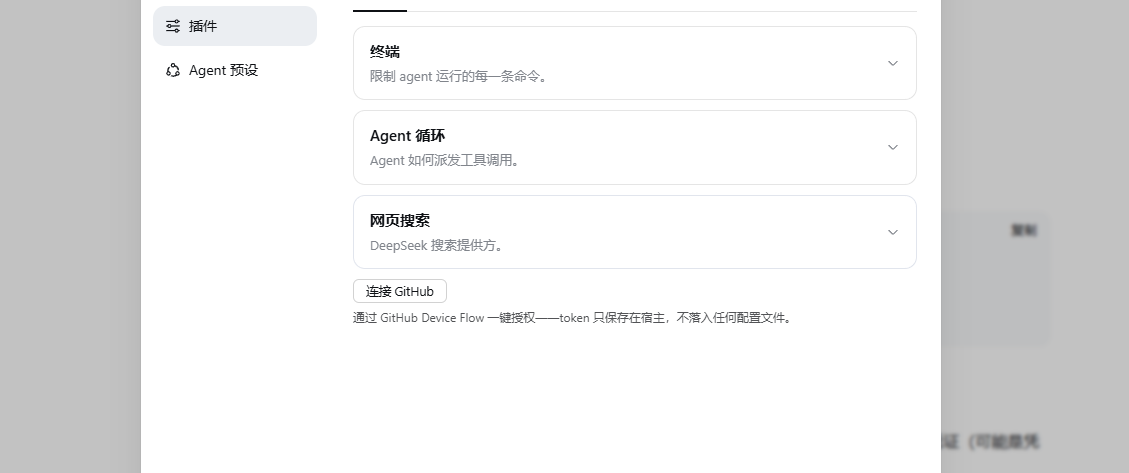
For CLI / headless use, set the GITHUB_TOKEN environment variable (a personal access token with repo scope) instead.
License
Links
More in this category
NanmiCoder/dsh-agent-teams★ 439
AgentTeams multi-agent teams.
icetomoyo/dsh_workflow★ 65
UltraCode-style multi-agent orchestration: a generatable, savable, governable, observable, resumable workflow layer.
btspoony/mstar-harness★ 47
Skill-driven harness/loop engineering workflow agent plugin.
titanwings/dsh-automation★ 46
Scheduled coding runs in fresh agent sessions with auditable history.
whyihaveyou/dsh-suite#plugin-team-board★ 38
Shared multi-agent task board (create/claim/transition/query) over a Cordis service key.
biociao/dsh-science★ 14
Claude Science-style research workbench: ReAct research-loop engine (research_* tools), versioned artifacts with provenance (artifact_* tools), and 10 science skills for genomics/pathogens/bioinformatics.