Scheduled coding runs in fresh agent sessions with auditable history.
Install
# from GitHub (first run asks for allowBuilds approval — follow the hint, retry)
dsh plugin --profile web add github:titanwings/dsh-automation
Any plugin you install runs third-party code with your own permissions — it can read your files, use your credentials, and reach the network, and tool approvals don’t sandbox it. GitHub-sourced plugins also run build scripts at install time — pnpm blocks those until you allow them, so an install can stop with ERR_PNPM_GIT_DEP_PREPARE_NOT_ALLOWED or ERR_PNPM_IGNORED_BUILDS; dsh prints the exact key to add under allowBuilds in your profile’s pnpm-workspace.yaml, and the install works on the next run. Allowing a build is a trust decision: only install sources you trust, and pin a commit (github:owner/repo#sha).
README
⏱️ dsh-automation
Run coding tasks on schedule. Manage them from Web or Agent.
🕒 Need recurring or one-shot coding work to run later without relying on an old chat? 🧭 Need each unattended run to stay inside an explicit workspace and permission boundary? 🧾 Need to inspect what ran, which revision it used, and how it ended?
✨ dsh-automation turns all three requirements into one workflow.
Create and manage schedules from DSH Web or any eligible root Agent. Every dispatched occurrence starts in a fresh root Agent and Session, then leaves an auditable record.
Self-contained task + schedule + permission boundary → fresh root Agent + fresh Session + durable run history
Why automation · Features · Install · Quick start · Safety · Technical details
English · 简体中文
🎯 Why automation
DSH Core Schedule is the right tool for reminders in the current conversation: “come back to this Session in ten minutes.” dsh-automation handles a different job: “run this complete task independently every weekday and leave me a result I can inspect.”
| DSH Core Schedule | dsh-automation | |
|---|---|---|
| Execution context | Returns to the same live Agent | Starts a fresh root Agent and Session |
| Input | A follow-up inside existing context | A saved, self-contained task |
| Scope | Current Session Log | One canonical DSH workspace |
| History | Conversation events | Definition revisions and durable run records |
| Best for | Reminders and same-chat follow-ups | Repeated or one-shot standalone coding work |
If a task depends on unstated chat history, needs an interactive approval halfway through, or should react to a file, HTTP, or process condition rather than time, it is not a good automation yet.
✨ Features
🕹️ One control plane, two ways in
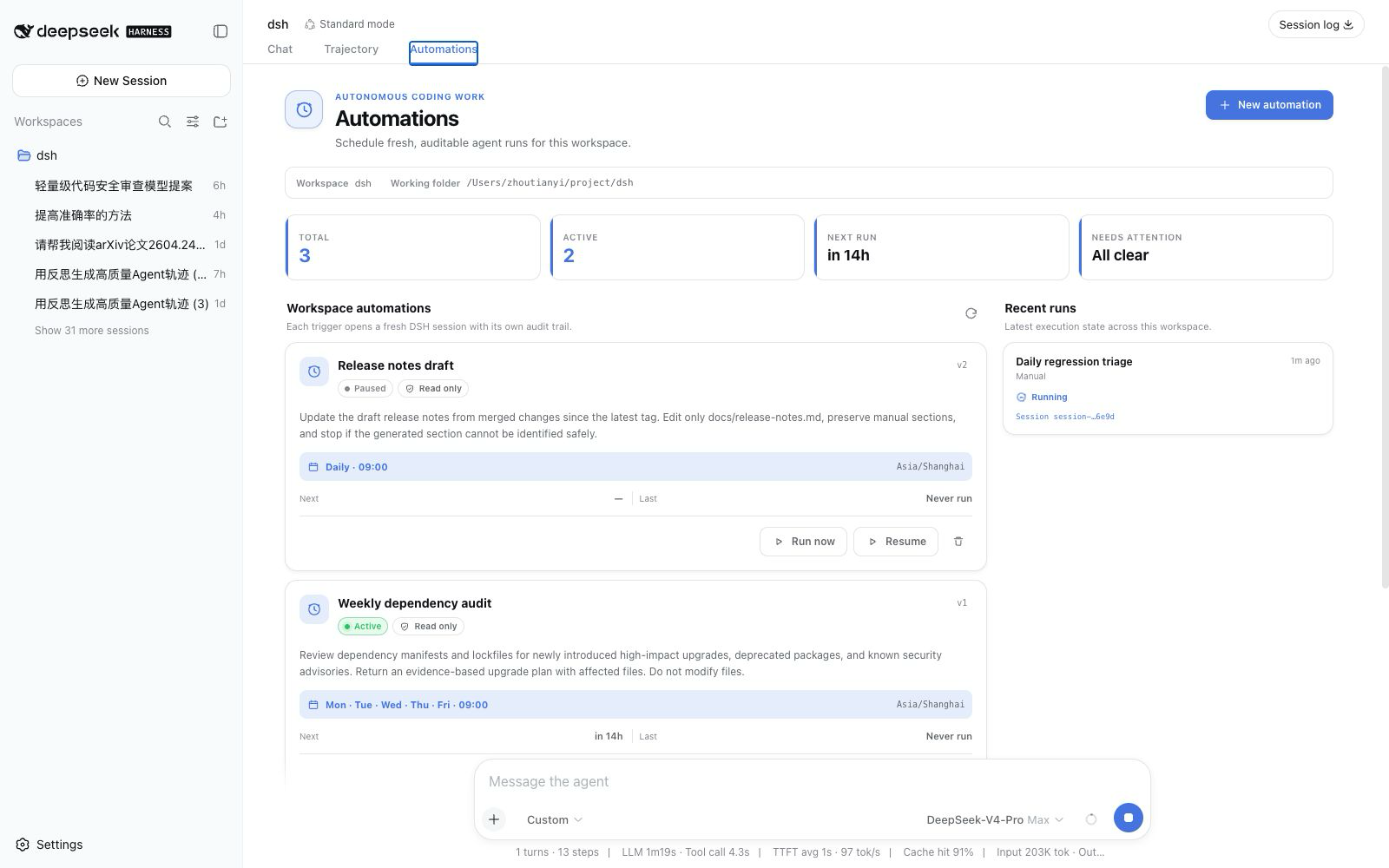
- DSH Web: open Automations from the sidebar or the conversation tab to create a rule, pause or resume it, run it now, delete it, and inspect recent runs. On the blank New Session screen, the sidebar shortcut tells you to start a conversation instead of failing silently.
- Any eligible root Agent: ask in natural language. Six scoped tools let the Agent manage automations only for its exact workspace.
There is no separate bot, daemon UI, or third-party scheduler to operate.
📅 Schedules people can read
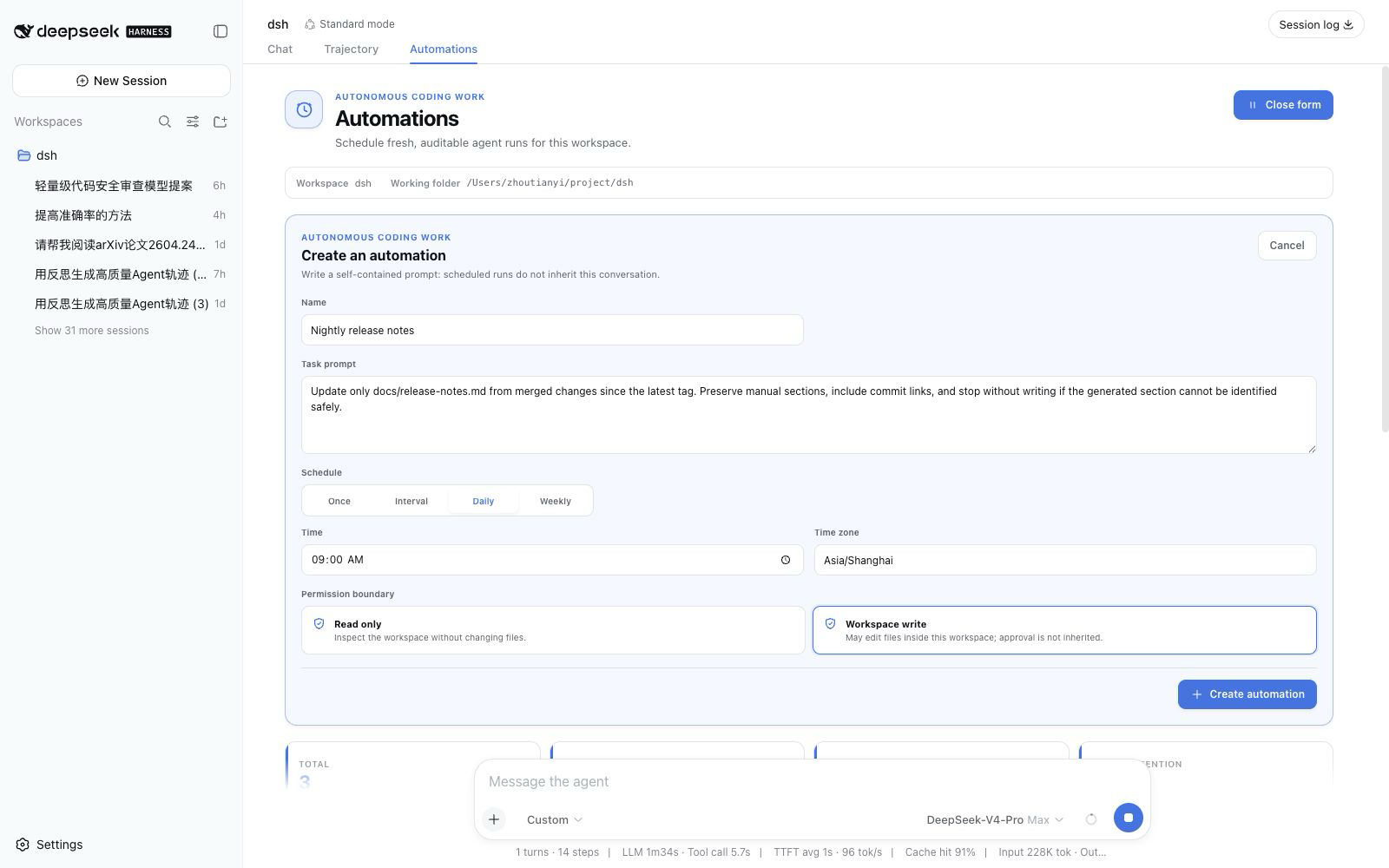
Create a one-shot, fixed-interval, daily, or weekly rule. Daily and weekly schedules use an IANA time zone; the friendly form is normalized into a validated RFC 5545 RRULE for persistence and inspection.
🧠 A model target for each automation
The Web form can follow the live global model or pin one provider/model pair. A pinned model can use its own default reasoning effort or one of the opaque effort values advertised by that exact model. The card shows the saved target, and each run keeps the same target in its immutable snapshot.
Agent tools expose the same fields. Omitting all model fields on create preserves the existing behavior of capturing the creating Session's complete selection; explicitly setting provider and model to null follows the live global selection at run time. On update, omitted fields stay unchanged, null clears a pin, and changing the route without an effort resets to the new model's default.
🧼 A clean execution boundary every time
Each dispatched occurrence receives:
- a new Session ID and fresh root Agent;
- the saved prompt, not the source conversation history;
- the captured workspace, cwd, Agent preset, permission preset, and a durable model target that either follows the live global selection or pins one model and optional reasoning effort;
- an explicit
automationmessage source containing the automation ID, run ID, and scheduled time; - a terminal result derived from the actual DSH turn end, not merely “message delivered.”
🧾 History that explains failure as well as success
Runs progress through queued, running, and a terminal state such as succeeded, failed, skipped, or cancelled. Each record keeps its definition revision, prompt and target snapshot, scheduled time, result Session ID, bounded summary, and structured error.
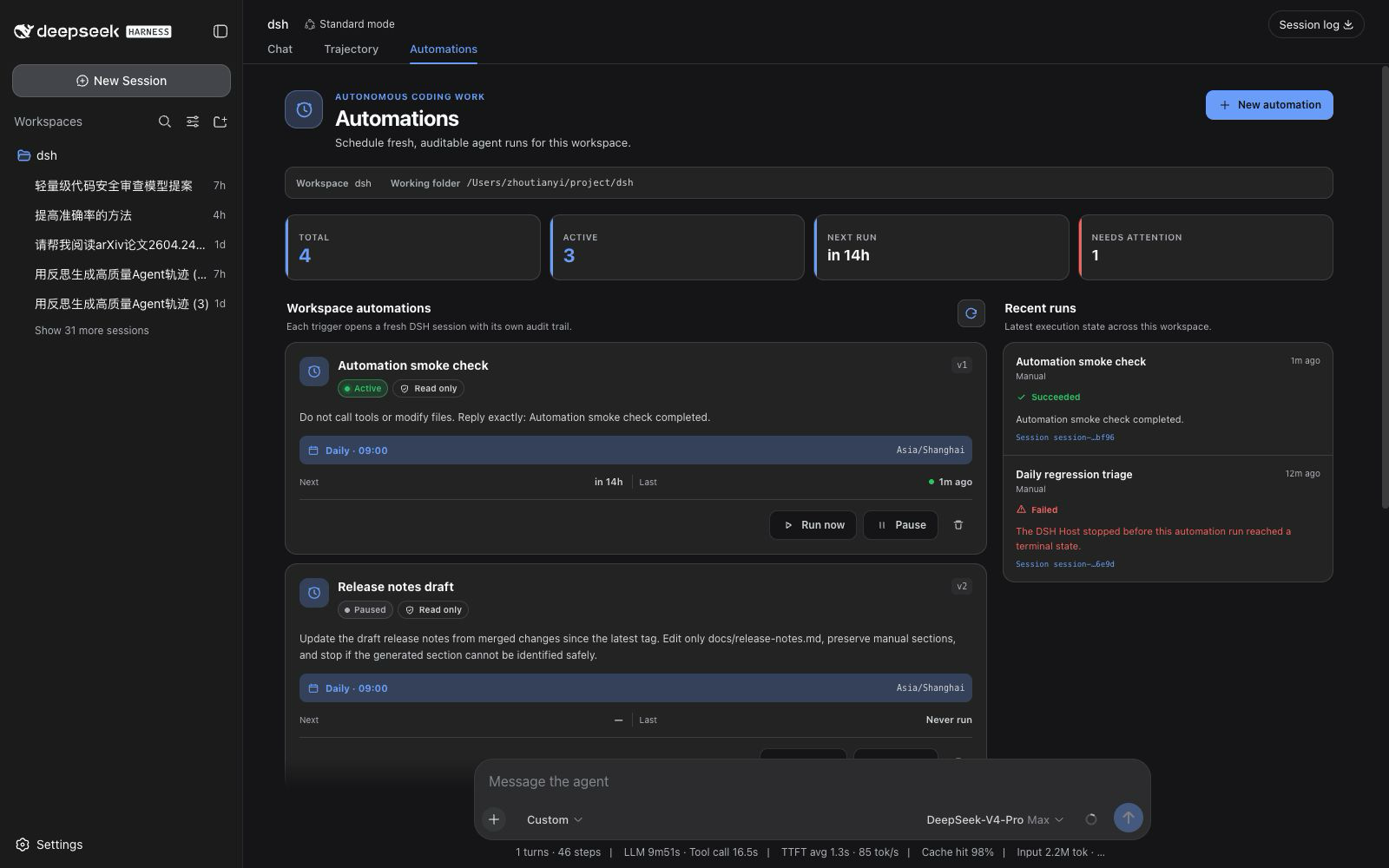
Updating a definition increments its revision, so each retained run still identifies what it executed. Deleting the definition does not immediately erase those run records. Retention removes only the oldest terminal records; queued and running records are never pruned.
Set archiveRunSessions: true in the Cordis plugin config to archive completed, failed, cancelled, and other terminal run Sessions from the ordinary DSH conversation list. Their logs are not deleted: the Automations run history keeps the Session ID, summary, and error as an auditable inbox. Current Harness releases do not expose an unarchive API, so an archived result is labeled instead of offering a broken Session-open action. The default is false and preserves ordinary Session navigation.
⚡ Install
Install the GitHub bundle into the DSH Web profile, then restart dsh web:
dsh plugin --profile web add github:titanwings/dsh-automation#v0.1.7
The version tag keeps the install reproducible; a reviewed commit SHA is equally valid. If you run DSH from its source checkout, use pnpm dsh in place of dsh.
Node.js 22.19 or newer is required.
git clone https://github.com/titanwings/dsh-automation.git
cd dsh-automation
pnpm install
pnpm check

cd /path/to/deepseek-harness
pnpm dsh plugin --profile web add /absolute/path/to/dsh-automation
The repository ships its built Host and Web bundles. Git installation runs no
package build script and needs no allowBuilds entry.
🚀 Quick start
🖥️ From DSH Web
- Open a Session attached to the workspace you want to automate.
- Open Automations from the sidebar, or select it next to Chat and Trajectory. If the New Session screen is still blank, start the conversation first.
- Enter a self-contained task, schedule, IANA time zone, model target, and permission boundary.
- Use Run now once before relying on the schedule; inspect the resulting Session and run record.
💬 Ask an Agent
Once installed, eligible root Agents receive the management tools. For example:
Create a read-only automation called "Weekday regression triage" for this workspace.
Run it Monday through Friday at 09:30 in Asia/Shanghai. Inspect the latest local test
evidence, identify regressions, and return a short report. Do not modify files.
| Tool | Purpose |
|---|---|
automation_create |
Create a workspace-bound standalone rule, optionally with a pinned model and reasoning effort. |
automation_list |
Read rules, next occurrences, and recent history. |
automation_update |
Change name, prompt, cadence, model target, permission, or active/paused state. |
automation_run_now |
Queue one manual occurrence with the same boundary. |
automation_runs |
Read bounded run history, errors, summaries, and Session IDs. |
automation_delete |
Delete the definition while retaining durable run records. |
Plugin-level approval asks for human confirmation when an Agent creates or expands unattended future work. Read operations and a pause-only update do not add that extra approval step.
🧰 Good automation candidates
The best automations are repeatable, bounded, and easy to verify.
| Automation | Suggested boundary | Why it is useful |
|---|---|---|
| Weekday regression triage | read-only |
Inspect local test evidence, group failures, and leave a concise diagnosis in a new Session. |
| Weekly repository health report | read-only |
Review stale TODOs, dependency manifests, ignored failures, and test gaps without changing the tree. |
| One-shot verification | read-only |
Recheck a flaky failure later and preserve evidence outside the current chat. |
| Generated-code refresh | workspace-write |
Rebuild a known generated artifact, run focused checks, and report the exact diff. |
| Maintenance fix window | workspace-write |
Reproduce one bounded issue, make the smallest verified fix, and stop when acceptance checks pass. |
A strong task states the goal, evidence to inspect, allowed changes, verification, and stopping condition. Avoid prompts such as “continue what we discussed” or “fix everything”: scheduled runs do not inherit the conversation that created them.
🛡️ A schedule is not permission
Unattended coding needs a smaller trust boundary than an interactive chat. dsh-automation makes these constraints explicit:
- No inherited authority. A run receives no source-chat history, inbox, grant, or past approval.
- Two permission modes only. Rules may use
read-onlyorworkspace-write; unattendeddanger-full-accessis not accepted. - Fail closed. Each fresh Session uses approval policy
never. A tool that still requires interactive approval fails instead of waiting forever or silently escalating. - Exact workspace scope. Agent tools bind to the caller's canonical registered workspace; callers cannot supply an arbitrary target path.
- Explicit capability allowlist. The fresh Agent admits a small coding-tool set. Interactive questions, plans, goals, nested Agents, runtime plugin mounting, terminal/background jobs, recursive automation management, and unknown third-party tools are denied by an Agent-scoped final guard.
- Loopback Web control. The management RPC channel accepts loopback authority only.
- Traceable origin. The task enters the Session with
source.kind = automation, plus the automation/run identity and scheduled time. It never impersonates a human message. - No blind retries. Once an Agent may have produced side effects, the plugin does not automatically retry it.
These boundaries do not turn every third-party DSH tool into a sandbox. Foreground shell and network behavior still depends on the selected Agent preset, tool set, and DSH guards. Review a task with Run now before enabling unattended writes.
🔧 Technical details
⏱️ Scheduling and recovery semantics
| Situation | Behavior |
|---|---|
| Interval | Minimum five minutes; the first run occurs after one full interval, not immediately. |
| Daily / weekly | Evaluated at local HH:mm in an explicit IANA zone; nonexistent DST wall times are skipped rather than shifted. |
| Overlap | One active run per automation. A due occurrence is recorded as skipped(overlap) if its previous run is queued or running. |
| Host restarts late | Within the grace window (15 minutes by default), only the latest due occurrence can catch up. Older work is not replayed as a write backlog. |
| Run timeout | The Agent is cancelled after 60 minutes by default and the run is recorded as failed. |
| Host crash | Persisted queued or running records become failed(host_interrupted) on recovery; they are not secretly re-executed. |
| Session list | With archiveRunSessions enabled, terminal run Sessions are durably archived after their run record is saved. Startup retries archival for an interrupted terminal record, and an archive failure never changes the run outcome. |
| Retry | Manual Run now only. There is no automatic side-effect retry. |
A deterministic occurrence key prevents the scheduler from dispatching the same recorded occurrence twice. This is an at-most-once dispatch policy, not a claim that external side effects are exactly once.
The DSH Host must be running for a task to start. Version 0.1 is not an operating-system daemon and does not coordinate multiple Hosts over one storage directory.
The product model is inspired by Codex Scheduled tasks, especially the distinction between returning to a chat and starting a standalone run. The implementation is native to DSH and Cordis; it does not copy Codex internals or patch DSH Core.
flowchart LR
  UI["Web control center"] --> Service["Automation service"]
  Tools["Agent-scoped tools"] --> Service
  Service --> Definitions["Durable definitions"]
  Clock["Cordis-owned clock"] --> Claim["Durable occurrence claim"]
  Definitions --> Clock
  Claim --> Executor["Run executor"]
  Executor --> Agent["Fresh root Agent + Session"]
  Agent --> Runs["Durable run history"]
  Runs --> Service
| Layer | Owns | Does not own |
|---|---|---|
| Definition/run store | Durable facts and revision snapshots | Timers or Agents |
| Clock | Finding the next due occurrence | Prompts, permissions, or execution |
| Executor | One already-claimed fresh Agent run | Schedule mutation |
| Agent tools / Web RPC | Validated service calls | Tables, timers, or direct Agent construction |
| Web client | Native conversation.view presentation |
Authoritative due state |
Cordis disposal stops the clock, cancels plugin-owned live handles, removes tools/RPC/UI, and closes storage without inventing a successful run. The full rationale and data model are in the design document.
⚙️ Configuration
The included cordis.patch.yml uses conservative defaults:
| Option | Default | Meaning |
|---|---|---|
maxConcurrentRuns |
2 |
Global execution capacity for this Host. Per-automation overlap is still disabled. |
runTimeoutMinutes |
60 |
Maximum wall-clock time for one fresh Agent run. |
misfireGraceMinutes |
15 |
How late the latest due occurrence may catch up after downtime. |
historyLimit |
200 |
Durable terminal-run retention per automation; active records are always kept. |
archiveRunSessions |
false |
Opt in to archiving terminal run Sessions from the ordinary conversation list while preserving their logs and durable Automation result metadata. Current Harness releases cannot directly reopen an archived Session. |
Edit the plugin row in the deployment profile if you need different values. Increasing concurrency or timeout expands the amount of unattended work; treat those changes as policy decisions.
🚧 Current limits
Version 0.1 deliberately does not provide:
- same-chat heartbeats — use DSH Core Schedule;
- raw cron or arbitrary shell actions;
- unattended full access;
- automatic retry of a run that may have side effects;
- Git worktree creation or cleanup;
- multi-workspace targets, DAGs, or hidden cross-run memory;
- external email, SMS, or push delivery;
- a guarantee of exactly-once external side effects.
Only local execution is implemented. A stable DSH worktree lifecycle service should exist before a UI toggle claims worktree isolation.
🧪 Development
pnpm typecheck
pnpm test
pnpm build
# or all three
pnpm check
The package builds a Host ESM bundle and a Web client bundle for DSH's window.__ModuleLoader__ contract. Tests cover recurrence and DST behavior, durable-domain invariants, Agent capability guards, scheduler overlap/recovery/retention, and client schedule/localization helpers.
📄 License
MIT. This is an independent community plugin for DeepSeek Harness. “Codex” is referenced only to describe the product pattern that informed the design.
Fork maintenance notes
The local reliability/performance branch and its data-compatibility, validation, and rollout notes are documented in the optimization handoff.
Links
More in this category
Q00/ouroboros#integrations/dsh-plugin★ 6118
Config-only bundle that mounts Ouroboros through the DSH MCP client, exposing 36 interview, Seed, execution, evaluation, and evolution workflow tools in DSH.
loopx-project/loopx#dsh-loopx-plugin★ 6072
LoopX, a provider-neutral, local-first state kernel and control plane for long-horizon agents: keeps Goal, Todo, gate, evidence, quota, recovery, and handoff state above DeepSeek Harness, while the plugin bootstraps the CLI and skills, admits bounded same-session continuation, and adds a loopback GoalBar for the exact bound loop.
chuspeeism/dashi-taskboard#deepseek-harness★ 3244
Embeds the active installed Codex Taskboard runtime in the DeepSeek Harness sidebar, using its launcher runtime descriptor instead of a fixed port.
NanmiCoder/dsh-agent-teams★ 1829
AgentTeams multi-agent teams.
EthanYoQ/AI-Novel-Writer#dsh-ai-novel-writer★ 1149
Installs a dedicated AI novel-writing preset and workbench: revisioned local project assets, a compact side drawer, and native approval-gated single-file changes.
tong-io/tongflow#dsh-tongflow★ 1033
TongFlow film-crew studio for image, voice, music and video production: the agent writes per-asset TongFlow workflow files (.tongflow.json) that run through TongFlow plugins, with an embedded workflow canvas, a shot/character/take project layout and a manga-drama template; sessions starting with @tongflow open the Studio view.
Community comments
Comments are public GitHub Discussions. Loading them connects to GitHub and Giscus; a GitHub account is required to post.