Feishu (Lark) IM bridge for DeepSeek Harness via `dsh plugin add`; one DM user to one persistent dsh session, with full debugging docs.
Install
# from GitHub (first run asks for allowBuilds approval — follow the hint, retry)
dsh plugin --profile web add github:itr-del/dsh-feishu
Any plugin you install runs third-party code with your own permissions — it can read your files, use your credentials, and reach the network, and tool approvals don’t sandbox it. GitHub-sourced plugins also run build scripts at install time — pnpm blocks those until you allow them, so an install can stop with ERR_PNPM_GIT_DEP_PREPARE_NOT_ALLOWED or ERR_PNPM_IGNORED_BUILDS; dsh prints the exact key to add under allowBuilds in your profile’s pnpm-workspace.yaml, and the install works on the next run. Allowing a build is a trust decision: only install sources you trust, and pin a commit (github:owner/repo#sha).
README
Pluggable cordis plugin wiring a Feishu self-built bot into a running DeepSeek Harness (dsh)
webprofile — installable viadsh plugin add.
┌────────┐   WS    ┌──────────────┐   cordis    ┌──────────┐    LLM    ┌──────────┐
│ Feishu │ ──────> │  this plugin │ ──────────> │ dsh agent │ ────────> │ DeepSeek │
│  IM    │ <────── │              │ <────────── │          │ <──────── │          │
└────────┘   API   └──────────────┘  events     └──────────┘  stream   └──────────┘
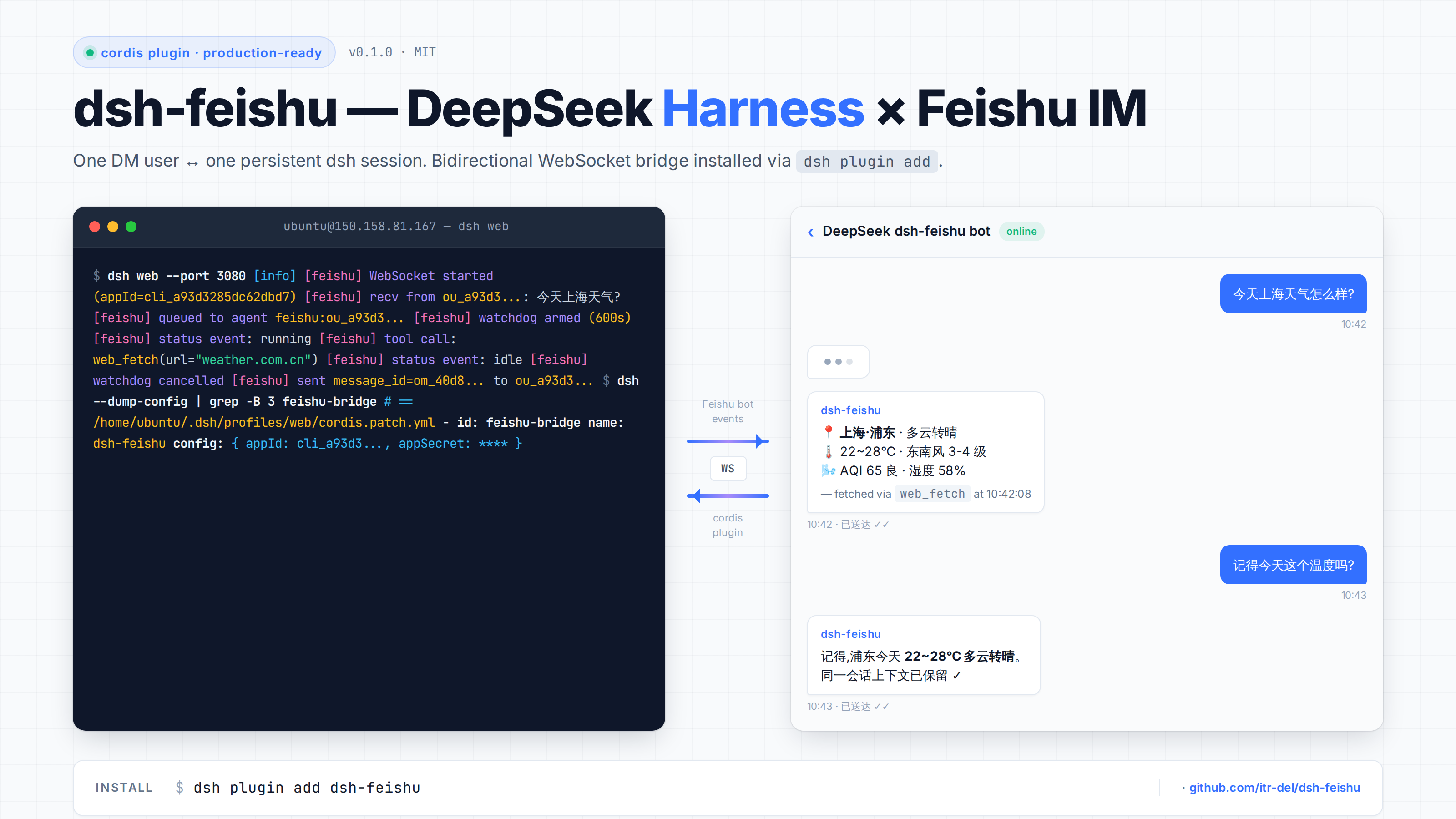
Features
- One Feishu DM user ↔ one persistent dsh session (
feishu:<open_id>). - Multi-turn conversations across reconnects.
- Streams assistant replies back into Feishu, chunked at 4000 chars.
- Filters DeepSeek
<|DSML|...>tool-call markers from outbound text. - Interactive-question bridging.
ask_user_questionpayloads (with their options) are rendered as plain chat text and the turn is unblocked immediately — otherwise the tool hangs until the watchdog fires, because it only accepts answers from the dsh web browser client. - Progress updates. Once a turn has run past 45s, newly produced assistant text is flushed to the chat every 30s, so long jobs are no longer silent.
- Watchdog. A stalled turn is force-cancelled with a notice to the user; the timeout is configurable (30 min default).
- Pure ESM, no TypeScript compile step.
- No telemetry, fully local.
Installation
1. Install dsh
npm install -g @deepseek-ai/dsh
dsh web --help
2. Install the plugin
dsh plugin add dsh-feishu
This installs the plugin into ~/.dsh/profiles/web/node_modules/dsh-feishu and
patches cordis.patch.yml automatically.
3. Configure your Feishu app
Create a Custom App at https://open.feishu.cn/app and copy appId + appSecret.
Under Event Subscriptions (事件与回调):
- Set mode to Receive events via persistent connection (使用长连接接收事件/回调).
- Add the event
im.message.receive_v1.
Under Permissions (权限), grant:
im:messageim:message.p2p_msg(required for DMs)
Publish a version (发布版本) — without this the bot cannot receive events. Wait ~2 minutes after publishing.
4. Export env vars and run
export DEEPSEEK_API_KEY="sk-..."
export FEISHU_APP_ID="cli_..."
export FEISHU_APP_SECRET="..."

dsh web
You should see in logs:
[feishu] WebSocket started (appId=cli_xxx)
[feishu] FeishuBridgeService initialized
DM the bot anything — the agent will reply in the same conversation.
Environment variables
| Variable | Required | Default | Notes |
|---|---|---|---|
DEEPSEEK_API_KEY |
yes (LLM) | — | https://platform.deepseek.com |
DEEPSEEK_BASE_URL |
no | https://api.deepseek.com |
For proxies |
FEISHU_APP_ID |
yes | — | cli_xxx from app console |
FEISHU_APP_SECRET |
yes | — | From app console — never commit |
DSH_FEISHU_WATCHDOG_TIMEOUT_MS |
no | 1800000 (30 min) |
Force-cancel threshold for a stalled turn |
DSH_FEISHU_PROGRESS_AFTER_MS |
no | 45000 |
How long a turn runs before progress updates start |
DSH_FEISHU_PROGRESS_INTERVAL_MS |
no | 30000 |
Minimum gap between two progress updates |
How a message flows
- User DMs the bot.
- Feishu SDK fires
im.message.receive_v1→ this plugin. - Plugin loads/creates the agent for
feishu:<open_id>. - Plugin calls
agent.followup(userMessage). - When agent returns to
idle, plugin readsagent.session.events, strips DSML noise, and posts the reply vialarkClient.im.message.create(...). - While the turn runs, a 2s polling watchdog does two jobs: an unsettled
ask_user_questioncall is bridged to the chat (question + options) and the turn is cancelled to unblock it; a turn running past the threshold gets its new assistant text flushed as a "progress" message. Both share one seq cursor with the final reply, so no text is ever sent twice.
Limitations
- Text only. Image / file / card / post messages are not handled.
- No token-level streaming. Replies are still sent as whole blocks; during a long turn you only get periodic progress updates (see above).
- No groups yet. DMs only.
- Interactive UI tools are degraded.
ask_user_question/exit_plan_modeonly accept answers from the dsh web client. Over IM the plugin renders the question as text and cancels the turn, and injects an environment notice so the model prefers asking in prose.
License
MIT.
Acknowledgments
- DeepSeek Harness (dsh) — the agent runtime this plugin extends.
- @larksuiteoapi/node-sdk — official Feishu (Lark) SDK, MIT licensed.
- DeepSeek API — LLM backend.
Author
itr-del — 13918029394@163.com
Built while integrating dsh with a self-hosted Feishu bot on Ubuntu 22.04.
📖 Open-sourcing story: PUBLISHING.md — how this repo got published and listed.
中文文档见 README.zh.md。
Links
More in this category
xmanrui/dsh-im★ 1518
Connect IM bots to DeepSeek Harness via QR codes or bot credentials (9 channels: Feishu, WeChat, DingTalk, WeCom, QQ, Slack, Telegram, Discord, and WhatsApp).
shaobeichen/dsh-pocket★ 1381
Remote phone access to the DSH Web UI: scan a QR code for LAN or public (cloudflared tunnel) access with real-time sync, a mobile-adaptive layout, and a settings tab.
inclusionAI/Avernet#deepseek-harness-channel-bcn★ 572
Connects DeepSeek Harness to Avernet's Bot Collaboration Network over WebSocket V2, with automatic onboarding, isolated agent sessions, tool-call events, and multi-bot routing tools.
omdsh-dev/dsh-notification★ 85
Desktop notifications for turn completions, with per-outcome controls and keyword rules.
whyihaveyou/dsh-suite#plugin-notify★ 57
IM webhook and local notifications on turn completion, errors, or approval (Feishu/WeCom/DingTalk/Slack/Discord/custom).
omdsh-dev/dsh-lark★ 55
Lark/Feishu bot channel for DeepSeek Harness: each chat drives its own agent, and tool approvals, model questions, and plan reviews return as cards answered by a button or a reply. Switch workspace and model from the chat (`/cd`, `/model`, `/new`), and run several bots that keep separate sessions and can hand turns to each other in one group.
Community comments
Comments are public GitHub Discussions. Loading them connects to GitHub and Giscus; a GitHub account is required to post.