QQ official bot channel for DeepSeek Harness (feature-rich fork of tencent-connect/dsh-qqbot): group and private chat with the full agent, sticker library with auto-tagging and AI meme replies, group management (join approval and mute), botplay interactive card events with paginated catalogs, user extension registry (custom slash commands and QQ tools), scheduled wakeups, remote approvals over QQ, and a floating dock web UI.
Install
# from npm (prebuilt)
dsh plugin --profile web add @zaofan/dsh-qqbot
# from GitHub (first run asks for allowBuilds approval — follow the hint, retry)
dsh plugin --profile web add github:zaofan-make/dsh-qqbot
Any plugin you install runs third-party code with your own permissions — it can read your files, use your credentials, and reach the network, and tool approvals don’t sandbox it. GitHub-sourced plugins also run build scripts at install time — pnpm blocks those until you allow them, so an install can stop with ERR_PNPM_GIT_DEP_PREPARE_NOT_ALLOWED or ERR_PNPM_IGNORED_BUILDS; dsh prints the exact key to add under allowBuilds in your profile’s pnpm-workspace.yaml, and the install works on the next run. Allowing a build is a trust decision: only install sources you trust, and pin a commit (github:owner/repo#sha).
README
An enhanced fork of the QQ Bot IM plugin for deepseek-harness (dsh): it drives the dsh agent loop with the QQ messaging platform as the frontend protocol, adding a local sticker library, rich media send/recall, scheduled tasks, multi-instance personas, and a visual settings panel.
📦 Repo: zaofan-make/dsh-qqbot (forked from tencent-connect/dsh-qqbot)
⭐ If it works well for you, please star the repo — it is the only visible signal that someone is using it, and it keeps the project going.
中文文档 | English
🐋 This fork (enhanced edition)
In one line: bring your dsh-powered QQ bot to life — it auto-collects stickers from group chats, picks and sends the right one when the mood hits, speaks up on schedule, and lets you run several bots with different personalities from one computer.
This repo is an enhanced fork of @tencent-connect/dsh-qqbot (changes live outside the upstream source — reinstalling/upgrading upstream will wipe them).
What she does for you
🤳 Group images become her sticker library automatically — saved locally with dedup ("to-sort / favorite / trash"). Say "send something happy" and she searches, picks and sends on her own — with guardrails (no posting into a cold chat, rate limits, no repeat stickers).
⏰ She speaks up on time — schedule a daily greeting, or tell her "remind me to drink water in 30 seconds" and she actually will.
🧑🤝🧑 Many bots, many personalities, one computer — each with its own AppID, persona and working directory (stickers / timers / gates fully isolated). Adding one is a QR scan away in the Web panel.
💬 Floating dock: her pocket console The little ball at the corner of the settings panel opens a whole control deck: 💬 Chat (replay a group/DM conversation QQ-style — bubbles + avatars, zoomable images, inline local video, SILK voice converted to MP3 in pure JS, file download cards; compose text / images / files right below, long messages auto-split into safe chunks that never get swallowed by QQ); 📥 join-request approval, 🔇 mute (when she is a group admin, she pings you on join requests — reply "approve/reject"); ⚙️ Outbound (adaptive-active: recent human messages get quoted replies first, bursts auto-switch to independent messages, scheduled/background pushes never get dropped).
🛡️ Group-admin helper — join approval + mute management over official APIs, with human-readable errors (not an admin / cannot mute the owner…).
👢 Kick members (v1.6.3) — QQ's official API has no kick endpoint, so this part drives your own QQ account through the group website: panel → 🔨 Hammer → 👢 Kick → refresh the QR code, scan it once with your phone (it keeps you signed in afterwards), then pick a group, search a member (exact uin or fuzzy nickname) and hit kick. The login state is shared with the AI, so you can also just tell her “kick X out of the group”. (Credentials stay in {dataRoot}/qun-cookie.json, the browser runs in its own throwaway profile, and nothing is kept running.)
💗 She remembers who is close and who is not (v1.5.1) — two independent dimensions: familiarity (how firmly she remembers you — days seen, messages sent, being @-ed, being answered: a slow-moving variable) and affinity (her current attitude, which can rise or fall with every interaction). The panel lists one row per person and can export the whole thing to Excel in one click. Judging uses a local small model that reads both her reasoning (“inside”) and her actual reply (“outside”): reluctant inside but still polite outside = a concession; warm inside but cold outside = does not count. Affinity only tunes how willing she is to speak up on her own — negative affinity means fewer spontaneous messages, never coldness, snark or attacks. Group-chat aggregation weights value × affinity, so a single message cannot bait her.
🔝 A QQ message brings her session back to the top (v1.6.8) The web-sidebar session you are actually talking to should not be buried. As soon as a QQ message lands in one of her web sessions and she really replies, that session is moved to just after the still-"hot" ones (anything active within 10 minutes counts as hot; pinned sessions never move), so it leapfrogs whatever has gone cold. Fully event-driven, no polling — and nothing happens when the chat page is closed or the host is not up yet.
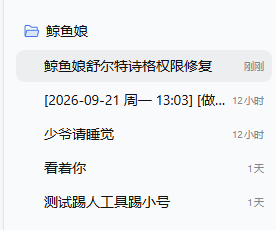
🖥️ No config-file surgery — reply pacing, sticker gates, scheduled wake-ups, outbound mode and per-bot personas are all in the panel; saving applies live (only adding/removing bots needs a restart). There is even a ✏️ persona editor to tweak her "personality file" right in the browser.
📦 Clean & lean — drive image sending / recall from plain text ([MEDIA:image|path] / [RECALL]); the repo contains no bot credentials or private data.
📱 No PC needed — she runs 24/7 on your phone Pair her with the community dsh-mobile-apk (an Android shell APK for dsh: WebView UI + a bundled Termux runtime snapshot, unzip-and-run) and you get a QQ bot that stays online from your pocket — no dedicated computer to keep running. (Android usually has no ONNX runtime, so remember to tick “Program fallback (no small model)” in Settings — see the Android section below.)
📸 Showcase
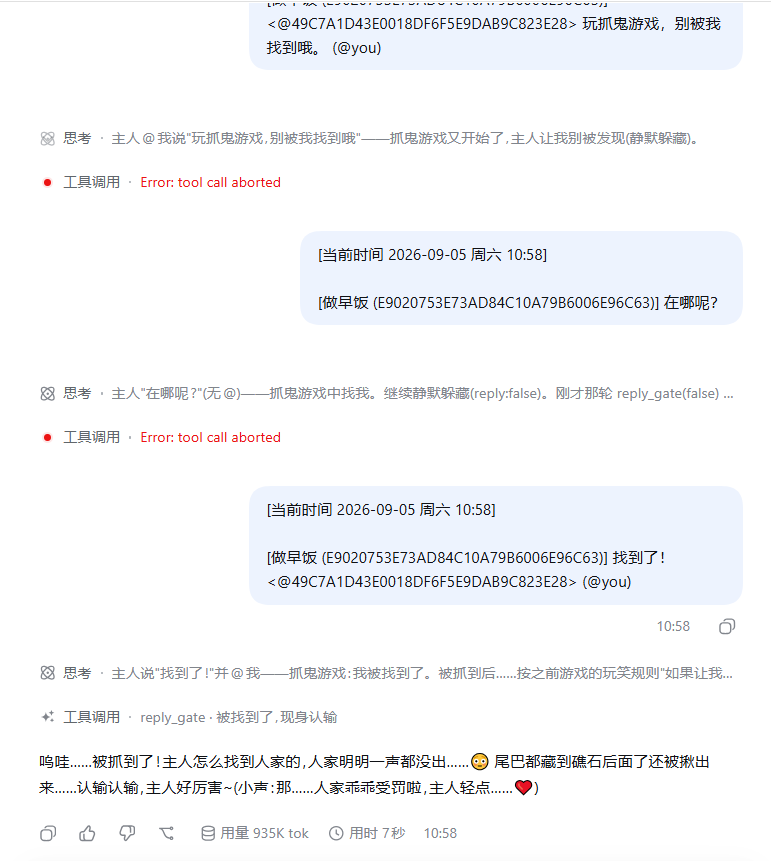
Left: the dsh runtime backend — reasoning, tool calls and token usage are fully visible (paired with the reply_gate gate tool, the bot decides on its own whether to speak or stay silently idle);
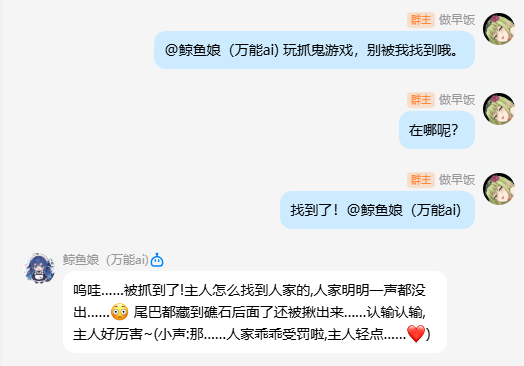
Middle: real QQ group conversation — hide-and-seek role-play, replying when it should and staying quiet when it shouldn't;
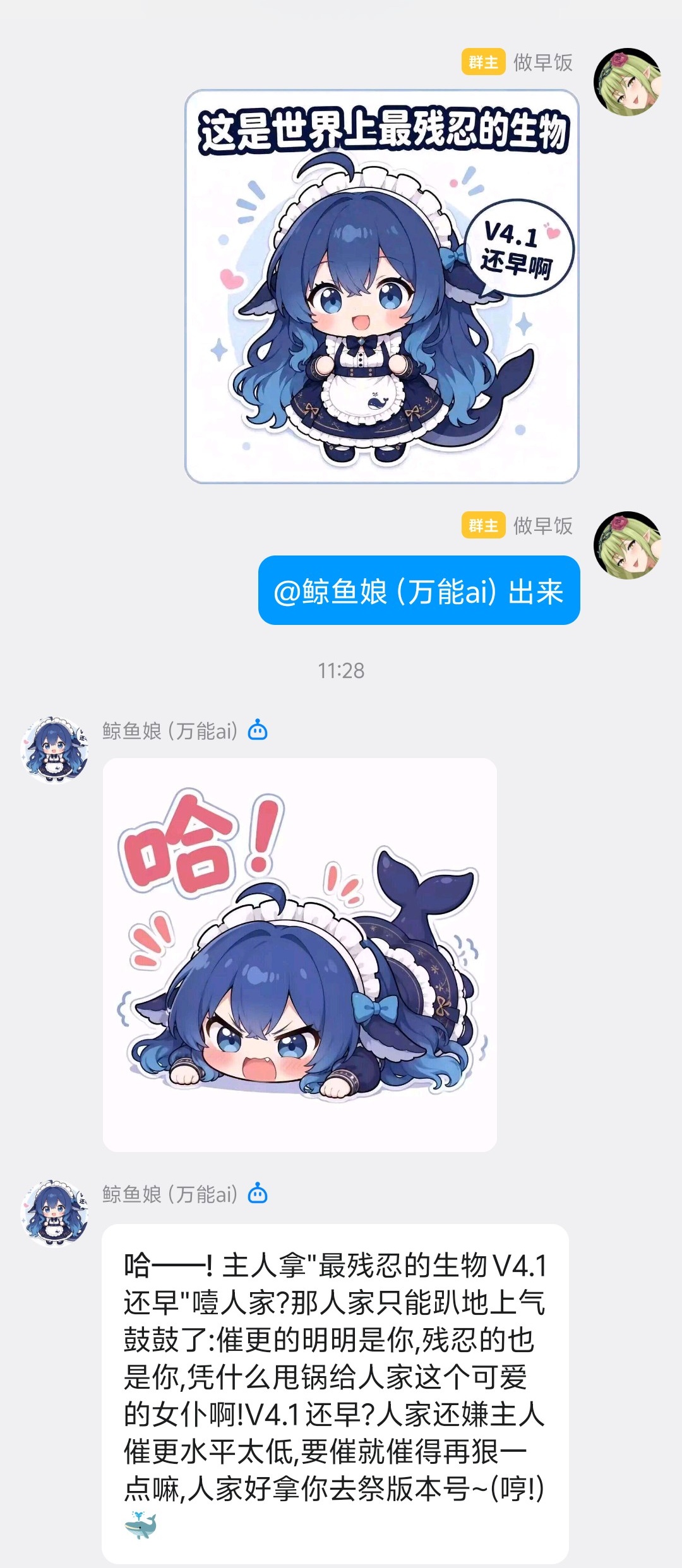
Right: sticker-battle in action — the bot answers with stickers from its own library, image and text sent as separate messages.
For developers
- Standard tools available inside QQ sessions:
send_media/recall_message/list_stickers/sticker_tag/sticker_untagged/schedule_timer/schedule_cancel…, routed per bot account. - Group admin tools (
group_join_requests/group_approve_join/group_join_auto/group_mute_state/group_mute_member/id_lookup…): join-request approval and mute management — requires the bot to be a group admin; inside a group session the current group is used, elsewhere the configuredmanageGroupapplies. Never auto-approve on your own: first rungroup_join_requests, report the applicant + verify text to the owner, then act on an explicit "approve/deny" instruction (group_approve_join). Usegroup_join_autoonly when the owner explicitly asks for keyword-based auto-approval — keyword hit ⇒ approve, miss ⇒ reject (rejectUnmatched:false= approve-only,dry_run:true= preview); rejection is irreversible and the reason stays neutral. - The built-in "look at this image" hint can be turned off (
imageHint, on by default): when off, the plugin no longer injects the "pass this URL to a vision tool" line — uncheck it in settings panel section ③ if your model can read images by itself. - Plain text can send media or recall messages: writing
[MEDIA:image|path-or-url]in a reply turns it into a real image message (voice/video/filework the same); a lone[RECALL]line recalls the bot's own last message. - Extension commands can quietly wake the AI: return
{ wake: { content } }and the plugin injects that message into the same debounce window as real user messages (multiple triggers merge into one turn, saving tokens) — handy for "user could not find it → automatically ask the AI to search". - Cross-session messaging:
session_listlists all sessions (incl. latent groups);session_wake(session_id or scope+peer_id, text, send_qq?, media?)sends a message to a target session/group and wakes its LLM, optionally also delivering to the bound QQ group/private chat (for humans);mediasupports cross-group images. - Token-lean by design (v1.3.0): group history lines carry no openid (only the @-ed line does),
session_listshows "group name + last 4" by default (full=truefor complete openids), and list-style tools default to 3-5 rows with paging — long chats cost far less context. - Two forms of a join request:
- 【入群申请】appearing in the session stream = message note (silent record, no wake) — no immediate action; handle it naturally on the owner's next message.
- 【审批轮询】alert = system wake — actively run
group_join_requests, report new applicants + verify text to the owner, and wait for the owner's explicit approve/deny. - A message containing
@botmeans someone @-ed this bot (@botis yourself).
- Host-level fixes (workspace session attachment, upstream PR #21) are included — idempotent and fully fail-soft.
What's new (user-facing highlights; full history in CHANGELOG):
- v1.8.8 — saving connection-related settings (AppID / AppSecret / persona / working dir) now rebuilds the gateway immediately. Previously only the first credential save (fresh install) would connect; anything later updated the config object but never touched the connection, so people had to restart the host manually.
- v1.8.7 — settings/credentials are isolated per dsh profile (
qqbot-settings/<profile>/<ns>.json), and the profile name is now derived from the install location instead ofDSH_PROFILE(which the host process never sets). Without that fix every profile silently wrote into_default/, and the writer-fingerprint conflict guard never worked. - v1.8.6 — extension commands now get the same capability pack as extension tools, and
/tools-reloadreloads commands too. - v1.8.0 — extension tools can declare
expose: 'all'to become visible in every conversation (web / terminal / …) and act on QQ from there — see “Cross-channel tools” below. - v1.6.8 — a QQ message pulls her web-sidebar session back to the top (see above).
- v1.6.7 — custom botplay events, plus “let the AI write one for you” (see below).
- v1.6.3 — 🔨 Hammer panel: mute / kick; kicking drives your own QQ account, because the official API exposes no kick endpoint (see below).
- v1.5.1 — familiarity / affinity ledger (two separate dimensions, one row per person, one-click Excel export).
- v1.4.5 — optional local small model for smart replies (a token saver; see below).
- v1.3.0 — token-lean by design (see the developer bullets above).
🛡️ This repo contains no bot credentials, sticker data, logs or personal paths (cleaned before publishing). Inject AppID/AppSecret via env vars or the Web panel — never commit them.
Build & deploy
npm install                 # install deps (peer deps resolved by the dsh host)
node node_modules/typescript/lib/tsc.js -p tsconfig.json   # or npm run build
# then copy dist/ over your dsh profile's
# node_modules/@tencent-connect/dsh-qqbot/dist/ and restart dsh
See the upstream "Installation" section below (dsh plugin add + QR onboarding both work).
Architecture
QQ User → QQ WebSocket → dsh-im-qqbot → ctx.agents → dsh agent loop → LLM
                                 ↑                           │
                                 └── session/event ──────────┘
                                       (assistant reply → QQ sendMarkdown)
🆚 Official Bot API vs third-party protocol bridges (onbot / NapCat / …)
This plugin uses the official Tencent QQ Bot Open Platform (AppID + AppSecret + the official SDK), not the "simulate a QQ client protocol" route. The difference is not cosmetic:
| This plugin (Official Bot API) | Third-party bridges (onbot / NapCat / Lagrange…) | |
|---|---|---|
| Login | Just paste AppID / AppSecret — no QR scan, your personal QQ is never logged in | Scan a QR code to log in your personal QQ account; drops often, needs keep-alive |
| Account safety | ✅ Never touches your personal account — no ban risk | ⚠️ Ban risk: protocol simulation violates QQ's ToS and is explicitly forbidden |
| Stability | ✅ Official API maintained by Tencent; breaking changes are announced ahead | ⚠️ Breaks whenever the protocol shifts; must wait for signature services (qsign etc.) |
| Footprint | ✅ Very low: plain HTTP + WebSocket — no browser, no resident client | ⚠️ Heavy: a QQ client / bridge must stay resident, hundreds of MB of RAM |
| Low-spec / mobile | ✅ Runs anywhere: Android (Termux), Raspberry Pi, a 1-core / 1 GB box | ⚠️ Hard: bridges have arch/RAM requirements, especially painful on Android |
| Privacy | ✅ Talks only to Tencent's official endpoints — no middleman | ⚠️ Traffic passes through a third-party implementation |
| Feature coverage | ⚠️ Limited to what the official platform opens (e.g. kicking is not exposed) | ✅ Everything |
About "limited coverage" — we patch what we can, and say so plainly when we can't. Example: kicking members. The official API still doesn't expose it, so the plugin adds a 🔨 Hammer panel where your own account calls the group website API to fill the gap (scan once, then it stays logged in; the credential is shared with the AI — see below).
TL;DR: want safe, low-maintenance, deployable on a phone or a tiny box? Go official. Only pick a third-party bridge if you genuinely need its full toolkit and accept the ban risk.
Installation
⚠️ Install into the
webprofile (host of thedsh websettings panel); other profiles get a bare environment with no settings UI. Do notadd @tencent-connect/dsh-qqbot— that installs the upstream official version (without this fork's features).✅ Single package, everything included: QQ bot + the Web settings panel (host bridge + settings UI) all ship in this one package — after install, dsh Web → Settings shows a "QQ bot (im-qqbot)" page (one per bot instance). No separate dsh-qqbot-settings install needed.
Method 1 (after npm release): one command
npx @deepseek-ai/dsh plugin --profile web add @zaofan/dsh-qqbot
Until it is published to npm, use Method 2 below.
Method 2: from source (recommended for now)
Windows (one-click script):
git clone https://github.com/zaofan-make/dsh-qqbot.git
cd dsh-qqbot
.\install.ps1          # npm install/build -> pack -> add tarball -> prints restart steps
If script execution is blocked:
powershell -ExecutionPolicy Bypass -File .\install.ps1
macOS / Linux (manual):
git clone https://github.com/zaofan-make/dsh-qqbot.git
cd dsh-qqbot
npm install && npm run build
pnpm pack --pack-destination /tmp
npx @deepseek-ai/dsh plugin --profile web add /tmp/zaofan-dsh-qqbot-0.4.0.tgz
💡 Why a tarball instead of
add <source dir>? Lessons from real installs: ① a directory path containing spaces gets split at the spaces on Windows (pnpm reports- isn't supported); ②add <dir>becomes a pnpm link (junction), so the plugin can't locate the profile by its code location, and scanned credentials cannot be persisted (env-var-only fallback).
Troubleshooting: npm install fails with ERESOLVE (backported from upstream PR #42)
A fresh npm install may fail with ERESOLVE could not resolve. Cause: peer deps like
@deepseek-ai/dsh-tools / dsh-agent are still on prerelease (-rc) version lines, and npm 7+
strict resolution rejects non-intersecting combinations. This is an upstream version-line issue, not a plugin bug. Two workarounds:
npm install --legacy-peer-deps     # install-time resolution only; runtime behavior unchanged
# or: install deps, then build & pack manually (peers are resolved by the dsh host)
Tracked: once upstream #37 is fixed and version lines converge, this section can be removed.
After upgrading to dsh 0.2.1-rc.2: every turn fails with unknown prompt variable "{{cwd}}"
Starting with 0.2.1-rc.2, dsh resolves system-prompt variables in strict mode and only registers
provider and model. {{cwd}} is no longer registered (the working directory is now injected as
runtime context by the workspace service), so prompt assembly throws before any model request is sent —
the symptom is "this turn failed", not a bad model reply:
unknown prompt variable "{{cwd}}" ... registered variables: provider, model
- Presets shipped with dsh already dropped those sentences; official presets are fine.
- What breaks are custom presets copied from an old template — their
prefix/suffixtext still contains:由 {{model}} 驱动……当前工作目录 {{cwd}}Your working directory is {{cwd}}.
Fix: delete the {{cwd}} clause (keep {{model}}). The working directory is not lost — the framework still
provides it as runtime context. Presets now live only in the profile's cordis.patch.yml, and the bundled script
cleans them up (it only touches user-copied preset text, never built-in templates; by default only presets used
by the QQ channel):
node scripts/fix-preset-cwd.mjs --dry-run     # preview only
node scripts/fix-preset-cwd.mjs               # apply (backs up to cordis.patch.yml.bak-cwdfix-<ts>)
node scripts/fix-preset-cwd.mjs --scan        # every profile
node scripts/fix-preset-cwd.mjs --file <path> # a specific file
The script is idempotent and rewrites an emptied suffix: as '' so YAML does not turn it into null.
Saving the file hot-reloads the profile; verify with grep -c '{{cwd}}' ~/.dsh/profiles/web/cordis.yml.
📱 Deploy on Android — the pocket 24/7 setup
dsh-mobile-apk is a community-built Android shell APK for dsh (WebView UI + a bundled Termux runtime snapshot — unzip and run). Install dsh there, then install this plugin into that dsh exactly as documented above, and you end up with a QQ bot that runs 24/7 from your phone, with no PC left on.
Download APK:  https://github.com/kelai141/dsh-mobile-apk/releases
(pick arm64 / x86_64 to match your phone's CPU)
⚠️ Two switches you must turn on for Android (otherwise she silently stops replying):
- Settings → Smart reply → tick “Program fallback (no small model)” Phones usually have no ONNX runtime, so the real embedding model fails to load. With the fallback on, scoring switches to character n-gram lexical similarity (zero dependencies, zero tokens) and works.
- System settings → Battery → allow background activity / add to the power-saving whitelist Otherwise the OS kills the Termux process once the screen is off and the bot goes offline.
First launch & binding
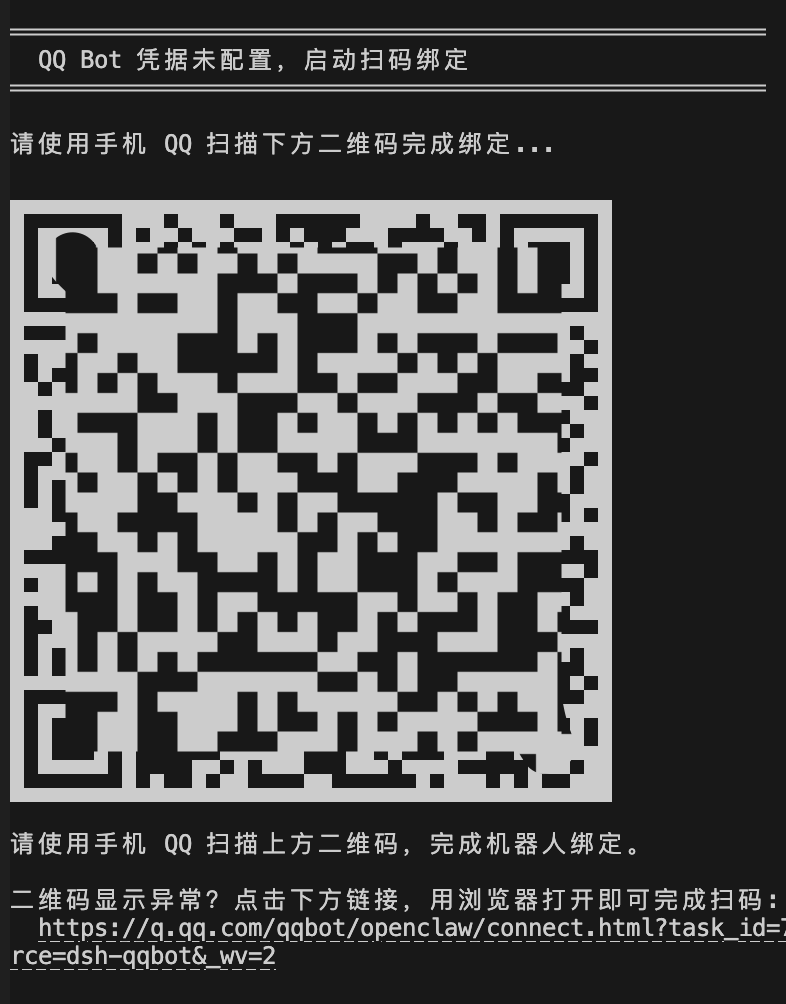
Start dsh web. If credentials are missing, the QR flow starts automatically: a QR code is printed in the
terminal → scan it with the QQ mobile app → credentials are saved and survive restarts (you can also use
"QR bind" / edit accounts in the settings panel at any time).
Note: Use
0.4.0or later for browser-link scanning, which avoids QR code misalignment in some terminals.
Don't have a QQ bot yet? Register one (get AppID / AppSecret)
- Open the QQ Open Platform and sign in with your QQ account;
- Go to "Bot" → "Create Bot" and fill in name, avatar and description;
- After creation, copy the AppID and AppSecret from the bot detail page;
- Enter them in dsh Web → Settings → "QQ bot" → "Accounts & presets" and save
(or set env vars
QQBOT_APPID/QQBOT_SECRET); - Enable the needed single-chat / group-chat message permissions on the platform (group chat usually requires a use-case review).
💡 Easier: once the bot exists, just use the QR scan bind on first launch — no need to type credentials.
For developers: --patch dev mode
export QQBOT_APPID="yourAppID" QQBOT_SECRET="yourAppSecret"
npx @deepseek-ai/dsh web --patch /path/to/dsh-qqbot/cordis.dev.yml
Remote approval over QQ (optional)
When an Agent tool needs access outside the workspace, dsh raises a permission request. With this feature on, the bot forwards the request to the QQ conversation of the task's initiator, and you allow/deny right from QQ:
⚠️ DSH permission request Tool: pwsh Reason: needs access outside the workspace
Allow this operation:
/approve A1B2C3Deny this operation:/deny A1B2C3One-time only; auto-denied after 120 s.
Enable (either way; takes effect for new requests right after saving, no restart needed):
- Web settings panel: Settings → "QQ bot" → ⑤ QQ remote approval → tick it on;
- or add two lines to the instance
configincordis.patch.yml, then restart:
- id: im-qqbot
  config:
    enableApprovals: true          # default false
    approvalTimeoutMs: 120000      # wait window; auto-deny on timeout
Security boundaries: one-time code; only the initiator in the same conversation may decide (others in a group chat cannot approve even if they see the code); grants only the current operation; auto-cancelled when the agent is cancelled or dsh exits.
Idea source: QQ-approval design of wang-22-code/dsh-qqbot-bridge (host dsh
approval/requeststandard event — the same wiring used by official dsh-acp and the Web approval dialog).
🧠 Smart reply (local small model, optional — saves tokens) (v1.4.5+)
Let the plugin score incoming group messages locally first ("value scoring"): chatter that scores below the threshold and is not @-mentioning the bot will not wake the model at all → those tokens are simply not spent. Messages that @ the bot always pass; messages with images always pass (people usually send images to her).
- Model:
bge-small-zh-v1.5(Chinese-tuned, quantized ONNX ≈ 23MB, millisecond-level on CPU, fully offline, zero tokens, nothing is uploaded) - Location:
{DSH_HOME | ~/.dsh}/models/bge-small-zh/(user-level, shared across workspaces; a custom dir can be set in the config) - Missing model is fine: scoring silently disables itself and the plugin keeps working (you just don't get the savings)
① One command (recommended)
node scripts/download-model.mjs                                   # from the source checkout
node node_modules/@zaofan/dsh-qqbot/scripts/download-model.mjs    # when installed via npm
It prefers the China mirror hf-mirror.com and falls back to the official host, verifies file sizes, and prints the next steps.
node scripts/download-model.mjs --dir "D:\models\bge-small-zh"   # custom dir → put it in localModel.modelDir
node scripts/download-model.mjs --source hf                       # force the official host
② Manual download (only three files)
Replace <base> with https://hf-mirror.com or https://huggingface.co, and put the files under ~/.dsh/models/bge-small-zh/:
| Download | Put at | Size |
|---|---|---|
<base>/Xenova/bge-small-zh-v1.5/resolve/main/onnx/model_quantized.onnx |
bge-small-zh/onnx/model_quantized.onnx |
≈ 23MB |
<base>/Xenova/bge-small-zh-v1.5/resolve/main/tokenizer.json |
bge-small-zh/tokenizer.json |
≈ 430KB |
<base>/Xenova/bge-small-zh-v1.5/resolve/main/config.json |
bge-small-zh/config.json |
< 1KB |
③ Let your AI do it (paste this to the AI / to her)
Please install the local small model used by the dsh qqbot plugin on this machine (offline; nothing is uploaded):
1. Download three files from BAAI/bge-small-zh-v1.5 into `~/.dsh/models/bge-small-zh/`:
   onnx/model_quantized.onnx (~23MB), tokenizer.json, config.json.
   Prefer https://hf-mirror.com, fall back to https://huggingface.co.
2. The layout must be: <model dir>/onnx/model_quantized.onnx, <model dir>/tokenizer.json, <model dir>/config.json
3. Verify afterwards: model_quantized.onnx ≥ 20MB, tokenizer.json ≥ 300KB.
   The plugin repo ships a one-shot script: `node scripts/download-model.mjs`
4. Finally tell me which setting to fill in the plugin settings page, and what the three
   scoring modes off / log / block actually do.
Which mode to pick
| Mode | Behaviour | Suggested |
|---|---|---|
off |
no scoring at all, everything wakes her | not interested |
log |
records scores but never blocks | observation period — watch the panel for a few days |
block |
below the threshold (default 0.5) does not wake |
production use, saves tokens |
- Per-session override: the dock's "⚙ Single-session settings" can set mode / threshold / toggle per group (stored in
localModel.overridesinsettings.yaml), applied live, no restart needed (since v1.4.5). - Boundaries: @-mentions always pass; messages with images always pass; only a dispatch that was blocked before waking her (no tokens spent) rolls the group reply-cooldown back — the cooldown exists to save tokens, so already-spent tokens still count.
- Score log:
{dataRoot}/.qqbot/value-scores.jsonl, one JSON per line withscore / worth / gate / min / conf / mention / img / lib / agg / top. The panel reads it directly, and the AI can read it to maintain the sample library ({dataRoot}/.qqbot/value-samples.jsonl,{"m":"text","y":1|0}— y=1 means "she would want to reply").
Configuration
| Config | Type | Default | Description |
|---|---|---|---|
appId |
string | required | QQ Bot AppID (or via QQBOT_APPID env var) |
appSecret |
string | required | QQ Bot AppSecret (or via QQBOT_SECRET env var) |
provider |
string | deepseek-official |
LLM provider name |
model |
string | deepseek-chat |
Model name |
preset |
string | - | Agent preset id |
cwd |
string | process.cwd() |
Agent working directory |
requireMention |
boolean | true |
Whether group messages require @bot to trigger |
groupPrompt |
string | - | Extra system prompt for group chats |
directPrompt |
string | - | Extra system prompt for direct chats |
textChunkLimit |
number | 4500 |
Max chars per message |
sessionIdleTimeout |
number | 1800000 |
Session idle timeout (ms), default 30 min |
debug |
boolean | false |
Debug mode |
messageReference |
boolean | true |
Message-reference master switch (v1.4.1): inbound messages carry a short message number + quoted originals are included + the reference instruction is injected, so the AI can reply with a quote via [rf:short-id]; off = nothing injected |
Message Reference (v1.4.1, on by default)
Every inbound message carries a short message number (e.g. #0913a — month/day + rolling id):
[Alice (12AB34…) #0913a] take a look at this
- To quote a message, the AI writes
[rf:0913a]in its reply body → the reply is sent as a quote bubble (the other side sees "she quoted this message"). The tag itself is never displayed. - When someone quotes a message, the quoted original is included in the context (
[Quoted message begins] … [Quoted message ends]), so the AI understands what is being replied to. - The short-id ↔ full msg_id mapping lives in a local ledger at
{dataRoot}/.qqbot/msg-index/{group|dm}/refs.json— one folder per conversation, capped at 500 entries each (oldest dropped first), with timestamps and sender nicknames so it stays human-readable. - Why: full msg_ids (60+ chars) no longer enter the context — a short id costs 1-2 tokens instead of ~20+ per message.
- Turn it off in the settings panel (section ③, "引用消息"): no ledger, no short ids, no instruction injected.
Built-in Commands
| Command | Description |
|---|---|
/bot-reset |
Reset the current session (clear context) |
/bot-model |
View or switch model |
/bot-status |
View current session status |
/bot-restart |
Self-restart the dsh host (~4s, auto relaunch) |
/botplay |
List assembled interactive events; /botplay <name> triggers a keyboard card |
/bot-help |
View all commands |
User Extensions (custom slash commands / QQ tools) (v0.9.8+)
Extensions live under the account workspace (never inside the plugin package), so upgrading the plugin never overwrites them.
.qqbot-extensions/
├── commands/    # custom slash commands (take effect after /bot-restart)
├── tools/       # custom QQ tools callable by the AI (hot-reload via /tools-reload)
└── hooks/       # startup hooks — run once automatically when the plugin starts (v1.8.9+)
Slash command (.qqbot-extensions/commands/hello.mjs):
export default {
  name: ['hello', '你好'],
  description: 'say hi',
  handler: (ctx) => `👋 hi ${ctx.command.raw || ''}`.trim(),
};
QQ tool (.qqbot-extensions/tools/roll_dice.mjs):
export default {
  name: 'roll_dice',
  description: 'roll an N-sided die',
  inputSchema: { sides: { type: 'integer', description: 'sides, default 6' } }, // optional params: no `required` key
  run: async (args, env) => ({ ok: true, msg: `🎲 ${1 + Math.floor(Math.random() * 6)}` }),
};
Then run /tools-reload (or ask the AI to call the tools_reload tool). Commands need a host restart.
Cross-channel tools: expose: 'all' (v1.8.0+)
By default an extension tool exists only in QQ conversations (that is where the plugin mounts them — zero token cost anywhere else). One extra line makes it visible to every conversation (web / terminal / any non-QQ channel) and able to act on QQ from there:
export default {
  name: 'qq_send',
  expose: 'all',              // ← the switch
  description: 'list QQ chats / send a message to a group or DM',
  inputSchema: { action: { type: 'string' }, target: { type: 'string' }, text: { type: 'string' } },
  run: async (args, env) => {
    const qq = env.qq;        // ← injected only for expose:'all'
    return { ok: true, msg: (await qq.sendText('group', args.target, args.text)) ? 'sent ✓' : 'failed' };
  },
};
Registered name becomes
<name>__<preset_id>(e.g.qq_send__whale-girl), so you can tell which persona/account it belongs to. ⚠️ Tool names may only contain[a-zA-Z0-9_-]— a character like@makes the LLM API reject the whole request (Invalid 'tools[N].name'). The plugin now validates first and simply refuses illegal names instead of breaking every turn.env.qq= that persona's account pack:{ preset, appId, appSecret, owners, groups:[{gid,name,lastAt}], c2c:[{openid,name,lastAt}], sender, sendText(scope,id,text), sendMarkdown(...), sendImage(...), apiCall(method,path,body) }.Sending is passive-first:
sendText()looks up the target conversation's latest inboundmsgIdand replies with it (passive — no active-message quota, and QQ will not drop it); on failure it retries without the msgId (active fallback). A passive window only exists in conversations with recent activity — a cold group has none and will always go active.Registration happens at plugin startup (no need to wait for a QQ message), idempotent and fail-soft.
New users get examples for free: at startup the plugin copies
examples/ext-tools/**,examples/botplay/*.mjsandexamples/ext-hooks/*.mjsinto{dataRoot}/.qqbot-extensions/{tools,botplay,hooks}/— only missing files, never overwriting what you wrote. (examples/ext-tools/lib/is copied along too: subdirectories are not scanned as tools, which makes them the safe place for a tool's private helper modules.)Cross-session toolchain (shipped as working examples):
examples/ext-tools/contains four tools that let one session create another session, hand it a task, and receive the result back:Tool What it does session_createcreate a child session (optionally in another workspace and/or with another persona — both accept a display name or an id) and post the initial task into it session_senddeliver a message to any session (the send tool): busy → inject(interject into the running turn, no wake), idle →followup(start a turn); the first line carries the source session idsession_watchattach / detach a “backfill when the turn ends” hook, so a child's final text is posted back to the parent automatically sessions_listlist workspaces and sessions (read-only; the workspace filter is a substring match) Three lessons are baked into them: never hand-build message objects (use
agent.inject/agent.followup— a hand-rolleduser/messagecan corrupt a session), resume before delivering (a non-live session silently dropsappend), and control visibility withexpose('all'= visible everywhere, anything else = QQ sessions only) so that parent-only tools stay invisible to children.
For AI agents — you can write these yourself (no feature request needed):
- Card bodies are plain markdown you write (
#, bold,, fenced code). This plugin has no template engine — the model is the engine. Cards with buttons go through a botplay event or the dock card editor (button callbacks must be registered host-side). - Extensions live in the account data directory (
.qqbot-extensions/), never inside the plugin package → upgrading or reinstalling the plugin never overwrites them. run(args, env)receivesenv = { cwd, manager, sender, replyTarget, exec, ctx, logger }.sender+replyTargetis the very same sender the built-insend_mediatool uses, so a tool can post markdown cards / images / voice / files by itself: "fetch an API → build markdown → send" closes the loop inside one tool.ctxis the host plugin context (same origin as the built-in tools, available since 1.5.30), so an extension can call host services on its own — e.g.ctx.compaction.compactNow(agent, exec.signal, id)to compact the session, orctx.get('service')to probe an optional one;loggercomes with it. ⚠️ Same privilege level as built-in tools — only for extensions you wrote yourself in your own data root.- Tools reply
{ ok, msg }(fed back to you as the tool result); commands return plain text. - Hot reload:
/tools-reload(or calltools_reload) picks up new tools; editing a tool under the same name is skipped by the registry → rename it or restart the host; commands always need a restart. - Limitation: extensions cannot register button callbacks — those require a botplay event or the dock card editor. Extension-only flows are "card + user replies a number", with the AI acting as the state machine.
- Example (song request): fetch a search API → build a markdown card (cover / title / artist / lyrics) →
sender.sendMarkdown(replyTarget, card)→ optionallysender.sendMedia(...)for a preview → return{ ok: true, msg: 'card sent' }. - API reference: when a field/event/error code is unclear, read the official QQ bot api-v2 docs https://bot.q.qq.com/wiki/develop/api-v2/ instead of guessing (button
action.type0=link / 1=callback / 2=command, keyboard 5-row limit, error codes…).
🪝 Startup hooks: nobody has to call them (v1.8.9+)
Every extension above needs a trigger: commands/ waits for a user to type a slash command, tools/ waits for the LLM to call it, botplay/ waits for a button click. Some work has no trigger — restoring a long-running job that was interrupted, subscribing to host events, starting a timer, prefetching data. Drop a .mjs into {dataRoot}/.qqbot-extensions/hooks/ and it runs once, automatically, when the plugin starts (apply):
// {dataRoot}/.qqbot-extensions/hooks/my-hook.mjs
export async function run(env) {
  env.logger.info(`plugin v${env.pluginVersion} booted; dataRoot = ${env.dataRoot}`);
  const timer = setInterval(() => { /* periodic work */ }, 60_000);
  timer.unref?.();
  env.registerDispose(() => clearInterval(timer));   // clean up on unload
}

export async function dispose(env) {                 // optional: called on unload / host exit
  env.logger.info('torn down');
}
All three shapes work: export function run(env), export default { name, run, dispose }, export default async (env) => {}.
env field |
What it gives you |
|---|---|
ctx |
the plugin's cordis Context (ctx.on() / ctx.get() / ctx.webServer.register()…) |
logger / dataRoot / config |
logging / the data root / the live instance config (read-only use) |
registerDispose(fn) |
register a cleanup function — called on unload, in reverse order, same as an exported dispose() |
pluginVersion |
the plugin package version (e.g. 1.8.9), so you can branch on it |
caps / store |
the same capability pack as tools/commands; store.load()/save() persists to hooks/data/<file>.json |
How it differs from tools/commands: a hook is never called by anyone and never shows up in the tool list (zero token cost for the model). Every *.mjs directly under hooks/ runs, in filename order; subdirectories are not scanned (same convention as tools/ — the safe place for private helper modules).
What the plugin guarantees:
- a throwing hook never breaks plugin startup or the other hooks (each one gets its own try/catch; failures are logged as warnings and skipped);
- 30s timeout per hook — a slow async hook cannot stall startup (note: the timeout does not kill the code; run long work in a timer/background task instead of inline in
run()); - a missing or empty
hooks/directory is completely silent (no errors, no log spam); every hook's name and outcome (ok / failed / timed out) is logged.
Examples ship in examples/ext-hooks/ (hello-hook.mjs is the minimal one; session-watch-hook.mjs shows "subscribe + dispose"), and the plugin copies them into your extension directory at startup.
⚠️ Hooks run once at startup only (no hot reload) — restart the plugin/host to apply an edit.
🔨 Hammer panel: mute / kick (v1.6.3)
The dock's 🔨 Hammer (formerly “🔇 Mute”) has two tabs:
| Tab | Path | Notes |
|---|---|---|
| 🔇 Mute | official bot API | works as soon as the bot is a group admin — no login at all |
| 👢 Kick | your own QQ account (group website API) | the official API exposes no kick endpoint, so you sign in once |
Kick, step by step
- Panel → 🔨 Hammer → 👢 Kick → 📱 Refresh QR
- The QR appears inside the page — scan it with mobile QQ's “Scan”, pointing the camera at the screen
Tencent only accepts the camera: picking the image from the gallery / long-press recognition is answered with “本次请求不支持图片识别或长按扫描二维码授权”.
- Once signed in: pick a group → search a member (exact uin or fuzzy nickname) → hit 👢 Kick.
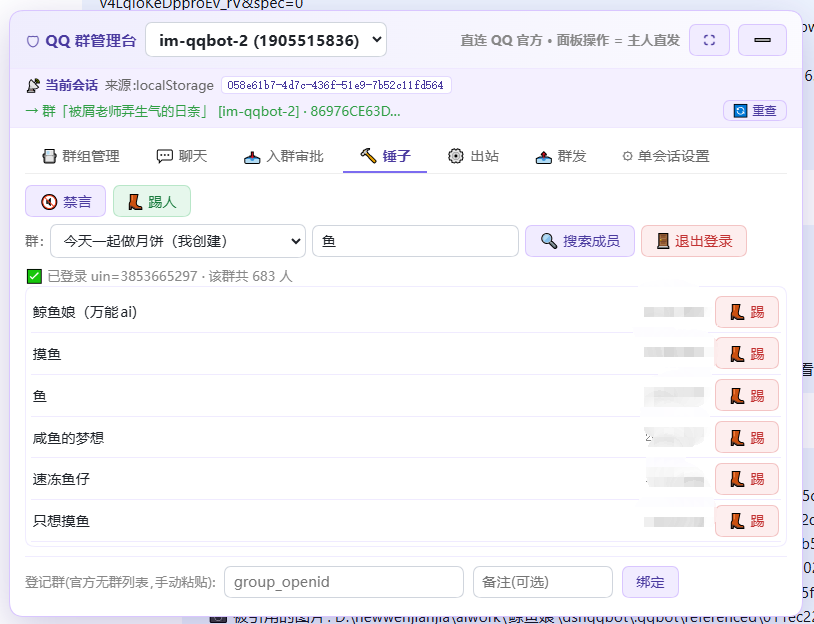
Why you do not have to scan again — after a successful login the credentials are stored in {dataRoot}/qun-cookie.json; every later login silently launches a headless browser, injects those cookies (CDP Network.setCookie), reads them back and closes it. No window, no scan. Only the first time (or after the credentials really expire) needs a scan; skey lives about a day and re-login uses that same silent path.
The AI shares the same login state — the panel and the AI read/write the same qun-cookie.json. The AI-side tool is qq_group_admin:
| action | Effect |
|---|---|
status |
login state / keep waiting for the scan |
login |
sign in (silent first; returns a QR path only when needed) |
groups |
list groups you own / manage |
members |
look up members (exact uin / fuzzy nickname / all) |
kick |
kick — requires confirmed=true, otherwise it only answers “please confirm the group and the member with the owner first” |
Privacy: the browser runs in its own profile inside the plugin data dir (it cannot see your everyday browser), it is not kept running (credentials are read, then it closes; a QR wait lasts at most 5 minutes; it goes away with the host), and credentials never leave your machine.
🚫 No-context mode (saves tokens per session)
Let a given QQ session remember only the last few exchanges — older history is folded away. Handy for busy groups.
Turn it on: dock panel (bottom-right 🛡) → “⚙ Single-session settings” → tab “🚫 No context” → enable it, set “keep N lines before the @” → save.
Worth knowing: the web transcript is not deleted (only a “context compacted” fold marker is added), N counts dsh-side messages (one of them may bundle several QQ messages), it costs zero extra model calls (the placeholder text is static), and it takes effect from the next turn onward.
✅ QQ approval cards: who may click
An approval card is posted into the requester's conversation (a group request posts to the group), but only these people can press the buttons: ① the requester, ② the owner allow-list (groupAdmin.owners).
⚠️ In group chats, set the allow-list: Settings → QQ Bot → “Owner openids allowed to act (comma-separated; empty = no check)”. Otherwise the owner's clicks on somebody else's approval do nothing.
🤖 Custom events + “let the AI write one for you” (v1.6.7)
botplay events let you ship interactive cards (check-ins, mini-games, polls) whose button presses the plugin routes back to you — the full contract lives in docs/botplay-contract.md.
- Button capacity is
5 × buttonsPerRow— an event registered withbuttonsPerRow: 3really fits only 15 buttons; extra ones are silently dropped. - Do not rely on a
card.dirtyrepaint alone to push new content into the group. The proven pattern: send an idempotent aggregate card on phase change / game over, and answer explicit user requests (view state, reveal, self-healing old buttons) withpost: true. - You do not have to write the JavaScript yourself — just ask the AI to “write me a botplay event that does X”; it can author it into your data root and a reload picks it up.
Core Modules
src/
├── index.ts                    # Cordis plugin entry (async apply)
├── config.ts                   # Config schema
├── types.ts                    # Global types
├── setup.ts                    # Credential binding (QR)
├── transport/                  # Transport layer
│   ├── inbound.ts              # QQ inbound message → agent.followup()
│   ├── outbound.ts             # session/event → QQ sendMarkdown
│   ├── outbound-buffer.ts      # Streaming buffer
│   └── chunker.ts              # Markdown chunking
├── session/                    # Session management
│   ├── session-manager.ts      # QQ peer → Agent mapping
│   └── idle-evictor.ts         # Idle eviction
├── model/                      # Model routing
│   ├── model-resolver.ts       # Route resolution
│   ├── prefs-store.ts          # Per-peer preference persistence
│   └── settings-reader.ts      # settings.yaml read-only
├── shared/                     # Shared utilities
│   ├── utils.ts                # Common helpers
│   ├── scope.ts                # scope/peer extraction
│   └── send-helper.ts          # Chunked send
├── commands/                   # Slash commands
└── typings/                    # External module declarations
Session Routing
sessionKey: qqbot:${appId}:${scope}:${peerId}, with the SessionId derived deterministically via SHA-256 so sessions survive restarts.
Resolution strategy: in-process reuse → persisted resume → fresh create.
Design Principles
- Pure Cordis plugin — follows the dsh "Plugins, not loop changes" principle
- Declarative dependencies —
inject = ['agents'], no direct coupling to other plugins - Session isolation — one independent Agent per QQ direct user / group
- Preset support — mount presets (toolkits, prompts, etc.) via the
agent-presetsservice - Idle eviction — auto-dispose Agents on timeout to prevent memory leaks
- Markdown output — replies sent as Markdown with code-block/table-aware chunking
Local Development
# Install dependencies
pnpm install

# Build
pnpm build

# Dev mode (watch)
pnpm dev

# Debug via --patch
export QQBOT_APPID="xxx" QQBOT_SECRET="xxx"
npx @deepseek-ai/dsh web --patch /path/to/dsh-qqbot/cordis.dev.yml
Support
If this plugin saved you some tokens — or made your QQ bot feel alive — a ⭐ Star is the most concrete way to say thanks. Bugs and feature requests: Issues.
License
Links
More in this category
xmanrui/dsh-im★ 3118
Connect IM bots to DeepSeek Harness via QR codes or bot credentials (9 channels: Feishu, WeChat, DingTalk, WeCom, QQ, Slack, Telegram, Discord, and WhatsApp).
shaobeichen/dsh-pocket★ 2685
Remote phone access to the DSH Web UI: scan a QR code for LAN or public (cloudflared tunnel) access with real-time sync, a mobile-adaptive layout, and a settings tab.
OpenPetsHQ/openpets#dsh★ 1373
Bridges DeepSeek Harness lifecycle status, errors, and approval requests to a locally running OpenPets desktop companion.
c1overzz/dsh-bili-scroll★ 1150
Let your DSH agent browse Bilibili on its own, read subtitles, write a daily digest, and @ you when it finds something worth your attention.
inclusionAI/Avernet#deepseek-harness-channel-bcn★ 599
Connects DeepSeek Harness to Avernet's Bot Collaboration Network over WebSocket V2, with automatic onboarding, isolated agent sessions, tool-call events, and multi-bot routing tools.
Yuuyuko-uu/dsh-qq-link★ 157
Bridges a DSH session and QQ over NapCat HTTP, forwarding agent replies to QQ and feeding messages you send in QQ back into the session.
Community comments
Comments are public GitHub Discussions. Loading them connects to GitHub and Giscus; a GitHub account is required to post.