DeepSeek Harness 的飞书/Lark 私聊桥接插件,支持 `dsh plugin add` 一键安装,配套完整调试文档。
安装
# GitHub 源码(首次需按提示配置 allowBuilds 构建授权后重试)
dsh plugin --profile web add github:itr-del/dsh-feishu
装任何插件都等于在你的机器上跑第三方代码,权限和你本人一样大——能读你的文件、用你的凭据、访问网络,工具审批管不到它。GitHub 来源的插件还会在安装时执行构建脚本——pnpm 默认拦截,所以安装可能停在 ERR_PNPM_GIT_DEP_PREPARE_NOT_ALLOWED 或 ERR_PNPM_IGNORED_BUILDS;dsh 会打印出需要添加的确切键名,把它加进该 profile 的 pnpm-workspace.yaml 的 allowBuilds 下,重跑一次即可装上。放行构建本身就是一次信任判断:请只安装可信来源,并尽量锁定 commit(github:owner/repo#sha)。
README
Pluggable cordis plugin wiring a Feishu self-built bot into a running DeepSeek Harness (dsh)
webprofile — installable viadsh plugin add.
┌────────┐   WS    ┌──────────────┐   cordis    ┌──────────┐    LLM    ┌──────────┐
│ Feishu │ ──────> │  this plugin │ ──────────> │ dsh agent │ ────────> │ DeepSeek │
│  IM    │ <────── │              │ <────────── │          │ <──────── │          │
└────────┘   API   └──────────────┘  events     └──────────┘  stream   └──────────┘
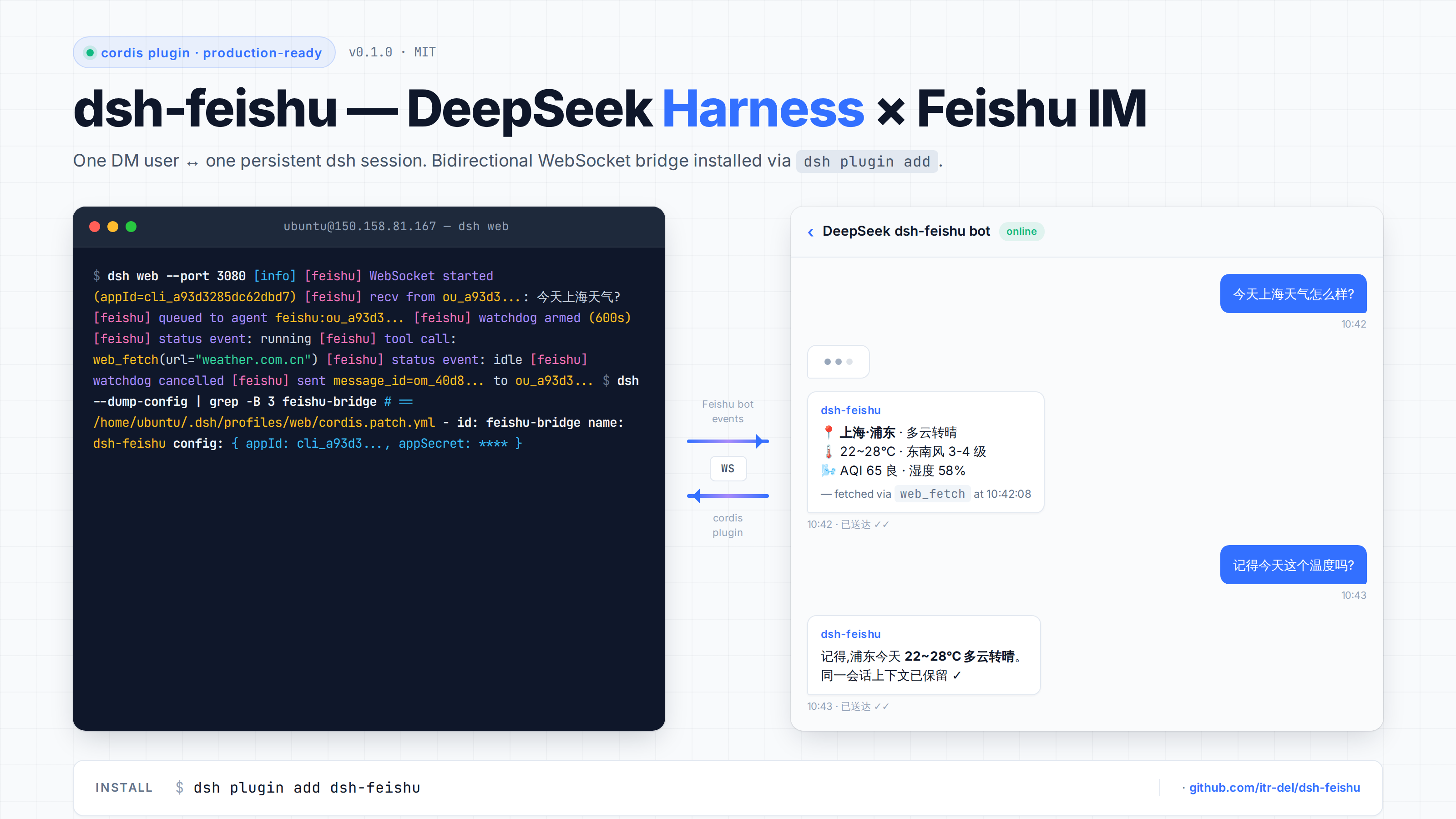
Features
- One Feishu DM user ↔ one persistent dsh session (
feishu:<open_id>). - Multi-turn conversations across reconnects.
- Streams assistant replies back into Feishu, chunked at 4000 chars.
- Filters DeepSeek
<|DSML|...>tool-call markers from outbound text. - Interactive-question bridging.
ask_user_questionpayloads (with their options) are rendered as plain chat text and the turn is unblocked immediately — otherwise the tool hangs until the watchdog fires, because it only accepts answers from the dsh web browser client. - Progress updates. Once a turn has run past 45s, newly produced assistant text is flushed to the chat every 30s, so long jobs are no longer silent.
- Watchdog. A stalled turn is force-cancelled with a notice to the user; the timeout is configurable (30 min default).
- Pure ESM, no TypeScript compile step.
- No telemetry, fully local.
Installation
1. Install dsh
npm install -g @deepseek-ai/dsh
dsh web --help
2. Install the plugin
dsh plugin add dsh-feishu
This installs the plugin into ~/.dsh/profiles/web/node_modules/dsh-feishu and
patches cordis.patch.yml automatically.
3. Configure your Feishu app
Create a Custom App at https://open.feishu.cn/app and copy appId + appSecret.
Under Event Subscriptions (事件与回调):
- Set mode to Receive events via persistent connection (使用长连接接收事件/回调).
- Add the event
im.message.receive_v1.
Under Permissions (权限), grant:
im:messageim:message.p2p_msg(required for DMs)
Publish a version (发布版本) — without this the bot cannot receive events. Wait ~2 minutes after publishing.
4. Export env vars and run
export DEEPSEEK_API_KEY="sk-..."
export FEISHU_APP_ID="cli_..."
export FEISHU_APP_SECRET="..."

dsh web
You should see in logs:
[feishu] WebSocket started (appId=cli_xxx)
[feishu] FeishuBridgeService initialized
DM the bot anything — the agent will reply in the same conversation.
Environment variables
| Variable | Required | Default | Notes |
|---|---|---|---|
DEEPSEEK_API_KEY |
yes (LLM) | — | https://platform.deepseek.com |
DEEPSEEK_BASE_URL |
no | https://api.deepseek.com |
For proxies |
FEISHU_APP_ID |
yes | — | cli_xxx from app console |
FEISHU_APP_SECRET |
yes | — | From app console — never commit |
DSH_FEISHU_WATCHDOG_TIMEOUT_MS |
no | 1800000 (30 min) |
Force-cancel threshold for a stalled turn |
DSH_FEISHU_PROGRESS_AFTER_MS |
no | 45000 |
How long a turn runs before progress updates start |
DSH_FEISHU_PROGRESS_INTERVAL_MS |
no | 30000 |
Minimum gap between two progress updates |
How a message flows
- User DMs the bot.
- Feishu SDK fires
im.message.receive_v1→ this plugin. - Plugin loads/creates the agent for
feishu:<open_id>. - Plugin calls
agent.followup(userMessage). - When agent returns to
idle, plugin readsagent.session.events, strips DSML noise, and posts the reply vialarkClient.im.message.create(...). - While the turn runs, a 2s polling watchdog does two jobs: an unsettled
ask_user_questioncall is bridged to the chat (question + options) and the turn is cancelled to unblock it; a turn running past the threshold gets its new assistant text flushed as a "progress" message. Both share one seq cursor with the final reply, so no text is ever sent twice.
Limitations
- Text only. Image / file / card / post messages are not handled.
- No token-level streaming. Replies are still sent as whole blocks; during a long turn you only get periodic progress updates (see above).
- No groups yet. DMs only.
- Interactive UI tools are degraded.
ask_user_question/exit_plan_modeonly accept answers from the dsh web client. Over IM the plugin renders the question as text and cancels the turn, and injects an environment notice so the model prefers asking in prose.
License
MIT.
Acknowledgments
- DeepSeek Harness (dsh) — the agent runtime this plugin extends.
- @larksuiteoapi/node-sdk — official Feishu (Lark) SDK, MIT licensed.
- DeepSeek API — LLM backend.
Author
王嘉楠 (itr-del) — 13918029394@163.com
Built while integrating dsh with a self-hosted Feishu bot on Ubuntu 22.04.
📖 Open-sourcing story: PUBLISHING.md — how this repo got published and listed.
中文文档见 README.zh.md。
👤 关于这个项目的我
我做这个的原因:DeepSeek Harness 的会话在浏览器里,用它做日常工作的门槛太高——我想让它直接出现在飞书对话里。
我负责的部分:整个插件——cordis 插件结构、飞书长连接、会话与 open_id 映射、流式回传与分片、工具调用标记过滤、交互式提问桥接、进度心跳、看门狗超时。
技术选择的关键取舍:交互式提问那个坑最典型——ask_user_question 只认浏览器端应答,所以在飞书里会直接把回合挂死。我的取舍是把它降级成纯文本问答并立即放行,牺牲一点结构化,换回合不卡死。
做完之后的收获:做"桥接"类工具时,目标端的异常行为比接口本身更决定成败。
🔗 相关项目:dsh-cue-bank · 全部项目
链接
同类插件
xmanrui/dsh-im★ 3118
通过二维码或机器人凭据将 IM 机器人接入 DeepSeek Harness(支持飞书、微信、钉钉、企业微信、QQ、Slack、Telegram、Discord 和 WhatsApp 共 9 种渠道)。
shaobeichen/dsh-pocket★ 2685
手机远程访问 DSH Web 界面:扫码即用局域网或公网(cloudflared 隧道)访问,实时同屏、移动端适配布局,带设置页管理。
OpenPetsHQ/openpets#dsh★ 1373
将 DeepSeek Harness 的生命周期状态、错误与审批请求,桥接到本地运行的 OpenPets 桌面伙伴。
c1overzz/dsh-bili-scroll★ 1150
让你的 DSH 自己刷 B站 —— 读字幕原文挑内容、写日报,遇到值得看的会发评论 @ 你。
inclusionAI/Avernet#deepseek-harness-channel-bcn★ 599
通过 WebSocket V2 将 DeepSeek Harness 接入 Avernet Bot 协作网络,支持自动注册、Agent 会话隔离、工具调用事件和多 Bot 路由工具。
zaofan-make/dsh-qqbot★ 213
QQ 官方机器人通道(tencent-connect/dsh-qqbot 的增强 fork):群/私聊ai陪聊、富媒体收发、表情包打标入库+检索发图、入群审批/禁言/群发、定时唤醒、QQ 远程审批与提问卡、互动按钮卡、多账号多实例、扩展接口、群友记忆注入、按消息价值唤醒省token、上下文自动压缩、悬浮球设置面板。
社区评论
评论公开保存在 GitHub Discussions。加载评论会连接 GitHub 和 Giscus;发表内容需要 GitHub 账号。