Hot-switchable brand skins for the DSH Web UI: an OpenBMC skin, a UEFI skin and an unofficial fan-made skin based on A Record of a Mortal's Journey to Immortality, each with light/dark schemes, plus a personal wallpaper gallery, per-skin tagline and transparency controls, and a one-click path back to the official look.
Install
# from npm (prebuilt)
dsh plugin --profile web add @iasiv5/dsh-skins
# from GitHub (first run asks for allowBuilds approval — follow the hint, retry)
dsh plugin --profile web add github:iasiv5/dsh-skins
Any plugin you install runs third-party code with your own permissions — it can read your files, use your credentials, and reach the network, and tool approvals don’t sandbox it. GitHub-sourced plugins also run build scripts at install time — pnpm blocks those until you allow them, so an install can stop with ERR_PNPM_GIT_DEP_PREPARE_NOT_ALLOWED or ERR_PNPM_IGNORED_BUILDS; dsh prints the exact key to add under allowBuilds in your profile’s pnpm-workspace.yaml, and the install works on the next run. Allowing a build is a trust decision: only install sources you trust, and pin a commit (github:owner/repo#sha).
README
English · 中文
Hot-swappable brand skins for DeepSeek Harness — installable on both the Web and Desktop profiles, with a one-click path back to the official interface.
Up and running in 30 seconds
This section answers: how to install, how to switch skins.
dsh plugin --profile web add @iasiv5/dsh-skins
- Run the install command above.
- Restart DSH Web (for example
systemctl restartthe matching service, depending on your deployment). - Refresh the page.
- Click Skin Switcher at the bottom of the sidebar and pick a skin.
On a fresh install with no saved choice, OpenBMC Studio (the openbmc skin) is the factory-default skin (since v1.0.6; meirenzhi before that). For reproducible installs, pin the exact version:
dsh plugin --profile web add @iasiv5/dsh-skins@1.0.0
Update and uninstall:
dsh plugin --profile web update @iasiv5/dsh-skins    # update
dsh plugin --profile web remove @iasiv5/dsh-skins    # uninstall
DSH Desktop app: install from the app's built-in plugin page, or run dsh plugin --profile desktop add @iasiv5/dsh-skins, then restart the app.
With the dsh-m plugin marketplace installed, you can also install / uninstall this plugin with one click inside the DSH Web UI.
Pick the plugin version for your DSH version:
| Your DSH version | Plugin version |
|---|---|
0.2.0-rc.1 and later (Web and Desktop alike) |
@latest (1.5.9+) |
0.1.x |
1.5.7 (last release supporting that line) |
Copy the whole block below to an Agent inside DSH Web:
Install the DSH skin plugin @iasiv5/dsh-skins for me:
1. Run: dsh plugin --profile web add @iasiv5/dsh-skins
2. Once it succeeds, restart DSH Web (if it runs under systemd, restart the service).
3. Remind me to refresh the page afterwards.
If the install fails, send me the command output verbatim and retry at most once.
Three skins and the official look
This section answers: which skins exist and what each feels like.
| Choice ID | Kind | Description |
|---|---|---|
official |
built-in option | Plain paper & dark ink · breathing white space · naturally itself |
openbmc |
full skin · factory default | Ice-silk waves · storm-wing backdrop · ice-blue palette |
uefi-harness |
full skin | Violet spark · sunset wash · indigo-blue palette |
meirenzhi |
full skin | Jade faces & flowered looks · moonlit silks by night · asking the Dao in mortal dust |
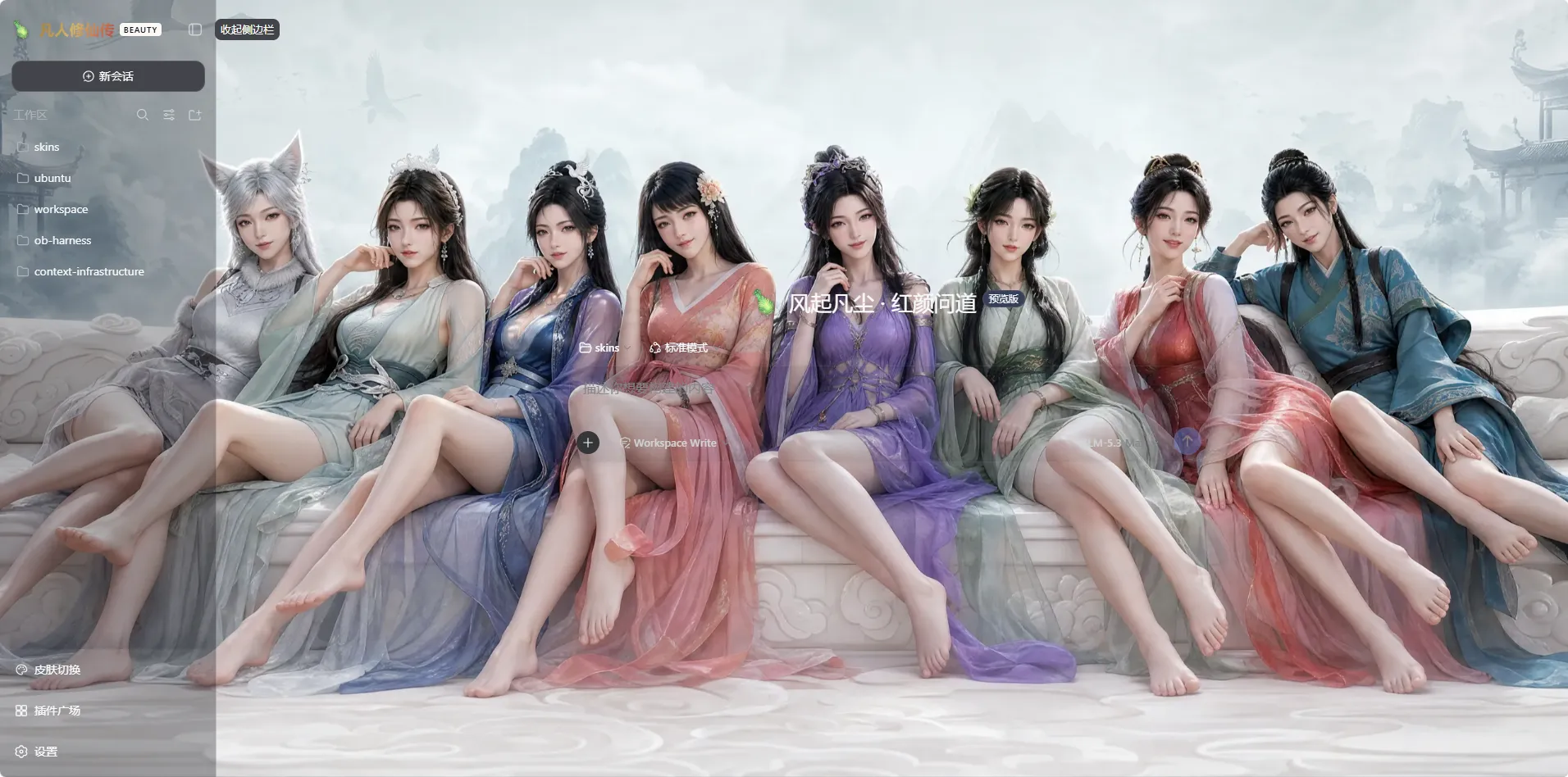
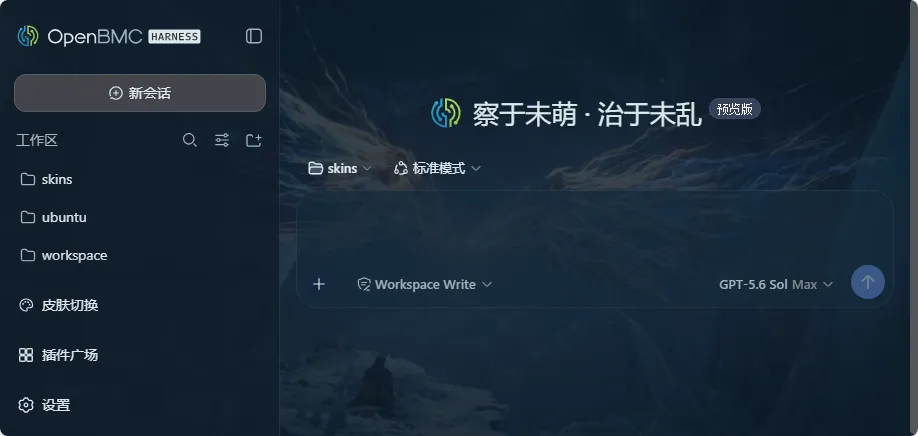
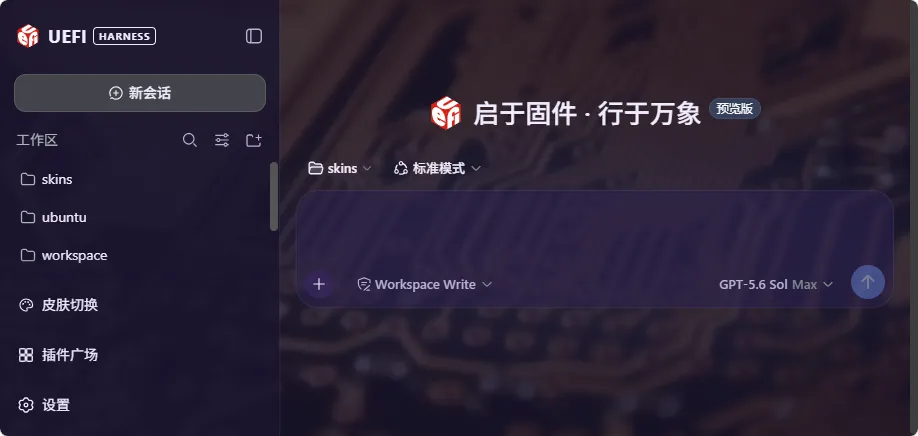
officialrestores the official DeepSeek Harness branding, backdrop and favicon, while keeping the skin switcher and the official light/dark palettes.openbmc(OpenBMC Studio): the brand slots reuse the OpenBMC project's official logo letterforms and blue-green brand gradient, used solely for identification; all rights remain with the OpenBMC project. The backdrop is the "Left Wind, Right Thunder" storm artwork, ice-blue in both light and dark, slogan "Govern before the storm" (察于未萌 · 治于未乱).uefi-harness(UEFI Studio): the brand slots carry the UEFI Forum's official logo (rights note under "Known limits"). The backdrop is the "Integrated Circuits" circuit-board artwork, violet-and-indigo in both light and dark, slogan "Boot before everything" (启于固件 · 行于万象).meirenzhi(凡人修仙传 · A Mortal's Journey: Beauty Chronicle) is an unofficial fan work with no affiliation with or authorization from the copyright holders; the 6 bundled wallpapers are AI-generated fan art, the Reach-for-the-Sky Vial site icon embeds the owner-provided emblem artwork, the BEAUTY badge is rendered with HTML/CSS, and the fireflies use CSS pseudo-elements and radial gradients — no official artwork is bundled. Vermilion-and-gold in both light and dark, slogan "From mortal dust, immortals bloom" (风起凡尘 · 红颜问道).- Every skin ships one palette per light/dark mode and follows the appearance setting automatically.
- The
tgcf(Heaven Official's Blessing) skin was removed in v1.4.0: browsers that had selected it fall back to the factory skin automatically, and its leftover personalization settings are cleaned up at load.
Screenshots
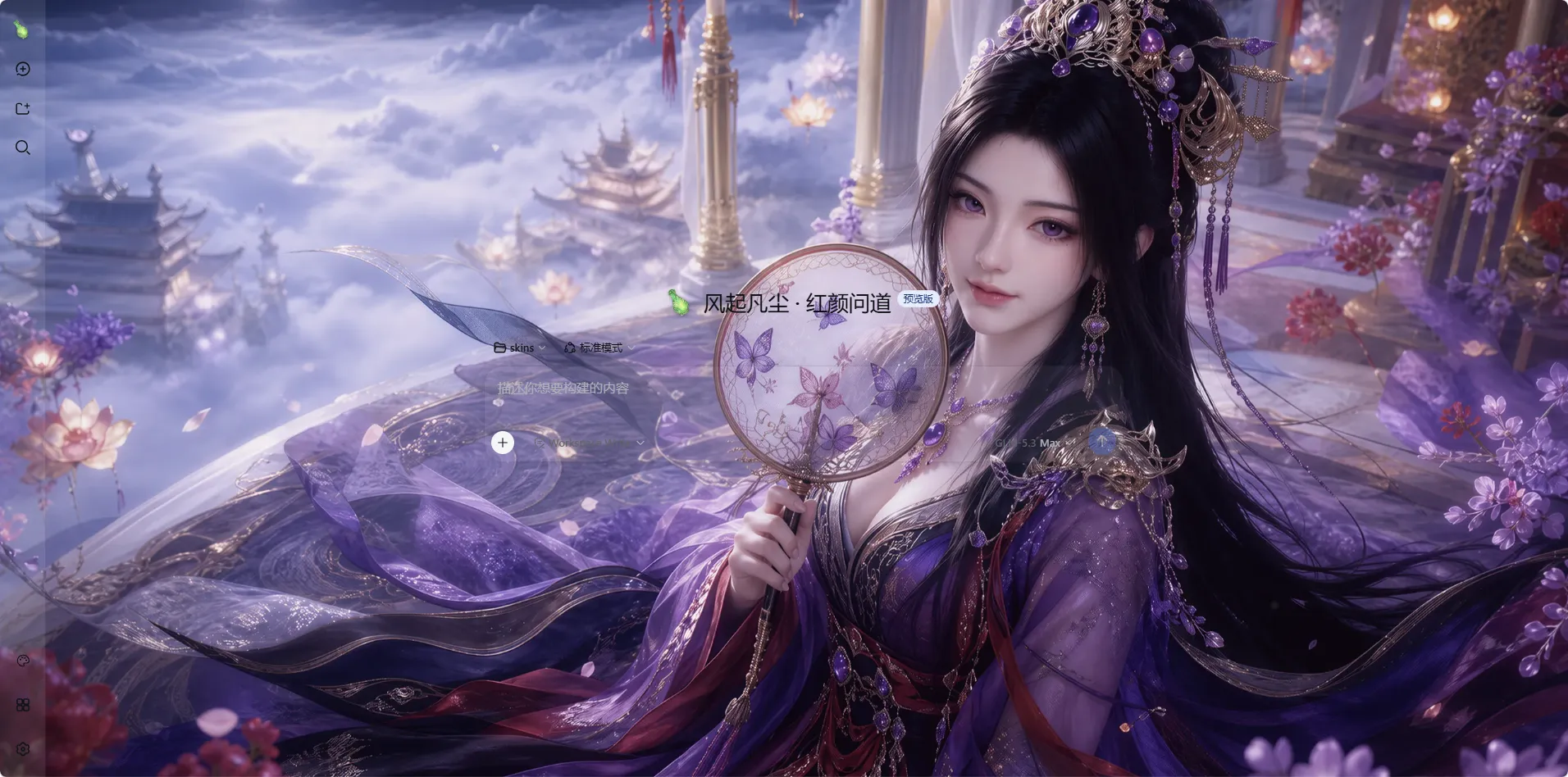
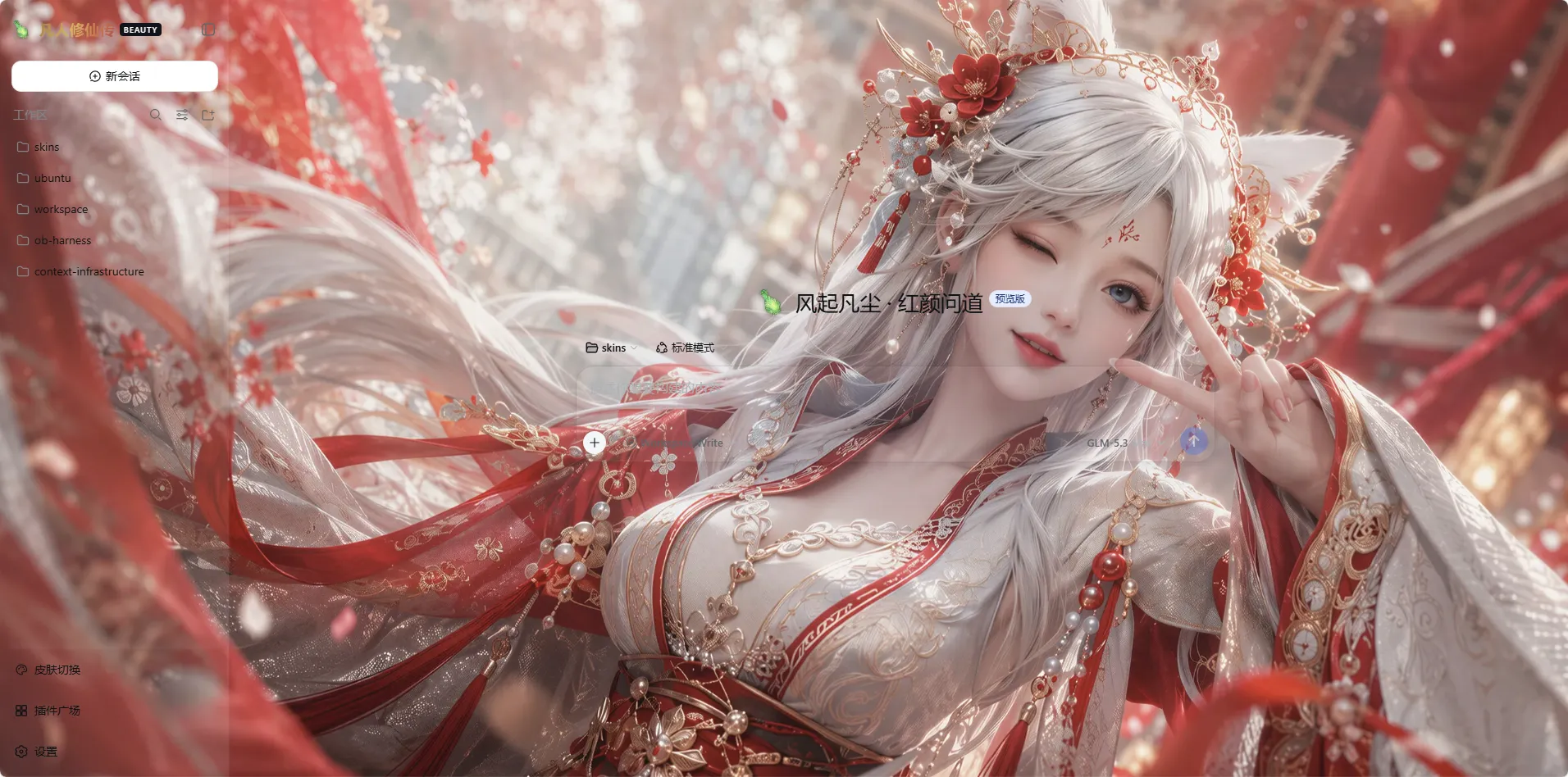
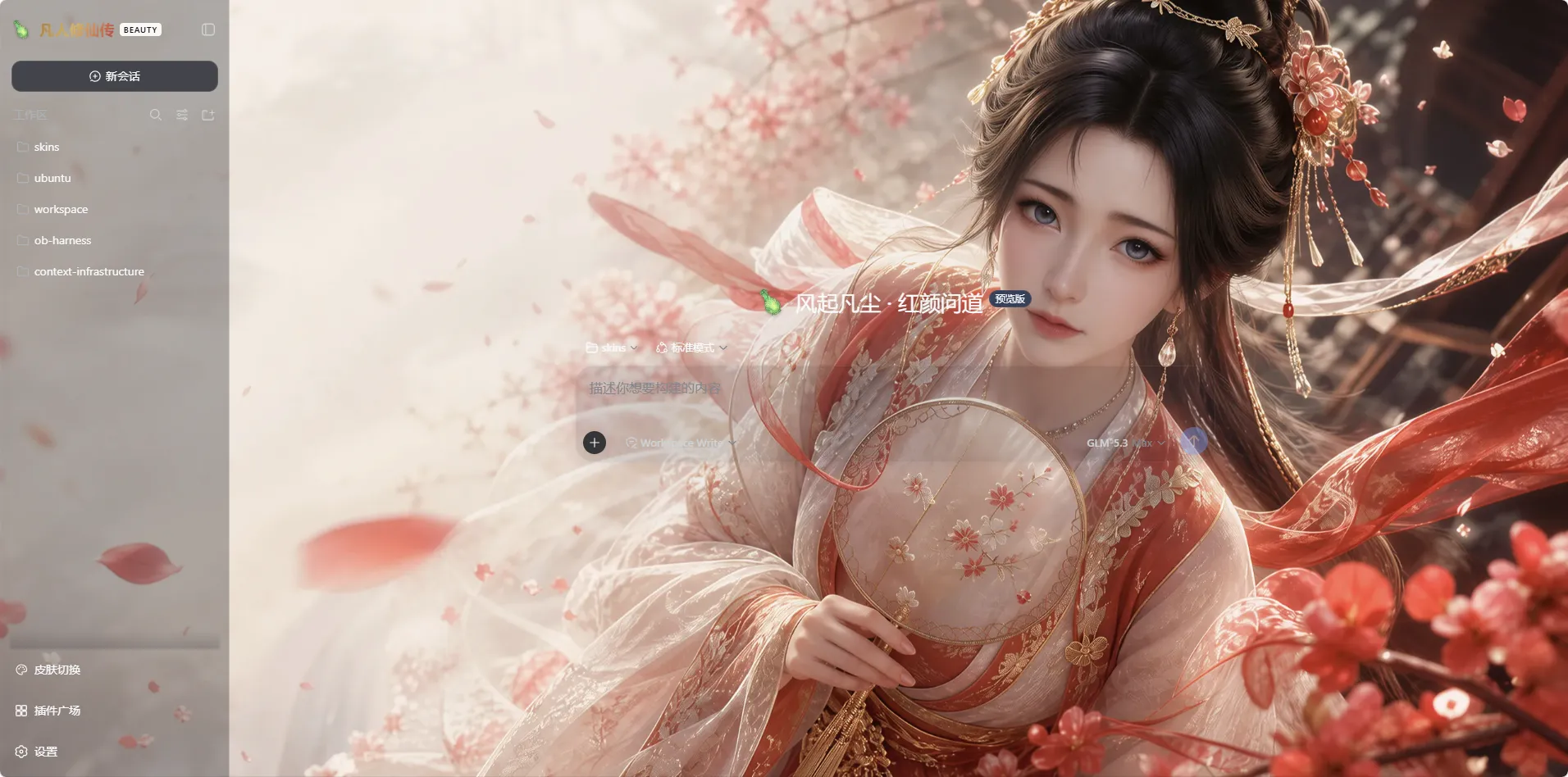
All captures below are real browser screenshots covering all three extension skins, new and old alike; every wallpaper can be swapped any time from the personalization panel (next section).
凡人修仙传 · 美人志
|
 |
 |
 |
 |
 |
Solo portraits in order: Ziling, Nangong Que (dark), Yinyue, Mu Peiling and Nangong Wan; the first shot is the factory wallpaper "Yuntai Gathering" (group).
OpenBMC Studio (factory default)
UEFI Studio
Personalization: wallpaper, slogan and translucency
This section answers: what you can tune, how, and where the settings live.
Every skin's key visuals are open to adjustment. Click the gear button on a skin card and that skin's personalization panel docks beside the switcher (stacked vertically on narrow windows). All three skins (openbmc / uefi-harness / meirenzhi) share the same field set:
| Field | What you can do | Factory value |
|---|---|---|
| Wallpaper | Pick from the skin's built-in artwork, or upload your own images into a personal library | Each skin's default artwork |
| Slogan | The new-session guidance line, one Chinese and one English copy | The skin's factory slogan |
| Translucency | 0–100%, one value driving three visual layers: panel tint, wallpaper scrim and blur. 0% is pure, fully visible wallpaper; 100% hides it completely | meirenzhi: Web 35%, Desktop 66%; openbmc / uefi-harness: Web 55%, Desktop 66% |
meirenzhi ships zero wallpaper blur and no global glass at or below its Web factory value (35%) (ADR-0010) — the wallpaper stays native-crisp; blur ramps smoothly above 35% up to 12px at 100%.
Desktop profile: the shell is the solid skin base color and the wallpaper shows only inside the conversation area — see "The Desktop profile" below.
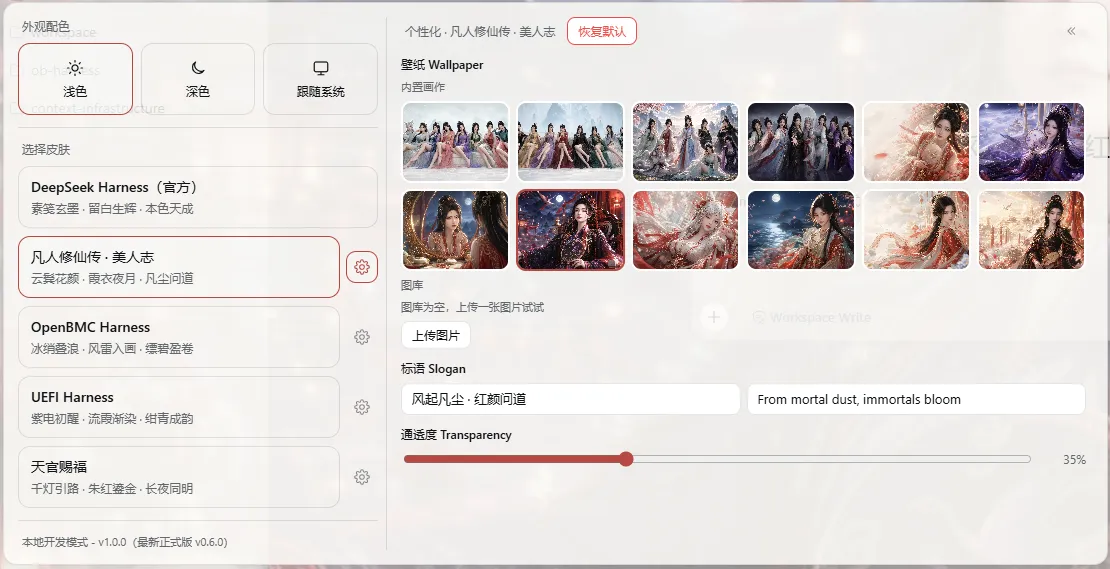
Upload your own wallpaper (personal library)
- PNG / JPEG / WebP / GIF are accepted: ≤ 20MB each, GIF ≤ 12MP; animated WebP and SVG are rejected.
- Multi-select is supported — files upload one by one, each announcing its progress and any failure reason.
- The library has no count cap and is shared by all skins.
- Deleting a referenced image, or clearing the library, lists every affected skin and field first and acts only after you confirm.
Every change applies and persists on its own
- Any change in the panel applies immediately and is written automatically after a brief (~0.5s) debounce.
- Two tabs sync within about a second; while offline, write controls disable themselves so edits are never lost silently.
- Reset-to-default lists the settings it will reset; after confirmation it returns to factory values and persists automatically. On Desktop, destructive actions use an in-page confirmation to avoid the Electron input-focus issue after native JavaScript dialogs; Web keeps the browser's native confirm.
- While the panel is open, clicking another skin's card moves the panel straight to that skin's settings.
Where settings live, and whether they survive
- Web stores configuration and the library under
$DSH_HOME/dsh-skins/; since v1.5.4 Desktop stores them under$DSH_HOME/dsh-skins-desktop/. On first launch Desktop copies existing settings and images from the legacy directory once, without removing or rewriting the old directory; the two stores then evolve independently. Both are separate from the plugin installation directory, which upgrades replace. - Only overrides are stored: untouched fields automatically follow the new version's defaults, and leftovers of retired skins or fields are cleaned up at load (the v1.4.0 tgcf removal rides this path).
- A damaged state file triggers recovery mode: indexes are rebuilt and bad files quarantined — your images are never wiped.
- Uploads pass magic-number validation and size caps; concurrent writes merge per field and never clobber each other.
The Desktop profile
In the DSH Desktop app, the shell chrome — sidebar, caption strip, right panel and window buttons — is the opaque skin base color and does not follow the translucency knob; the wallpaper is exposed inside the conversation area (center column), where the knob drives surface tint, scrim and blur. The Web profile keeps the original fully translucent form on every surface; the two environments are independent.
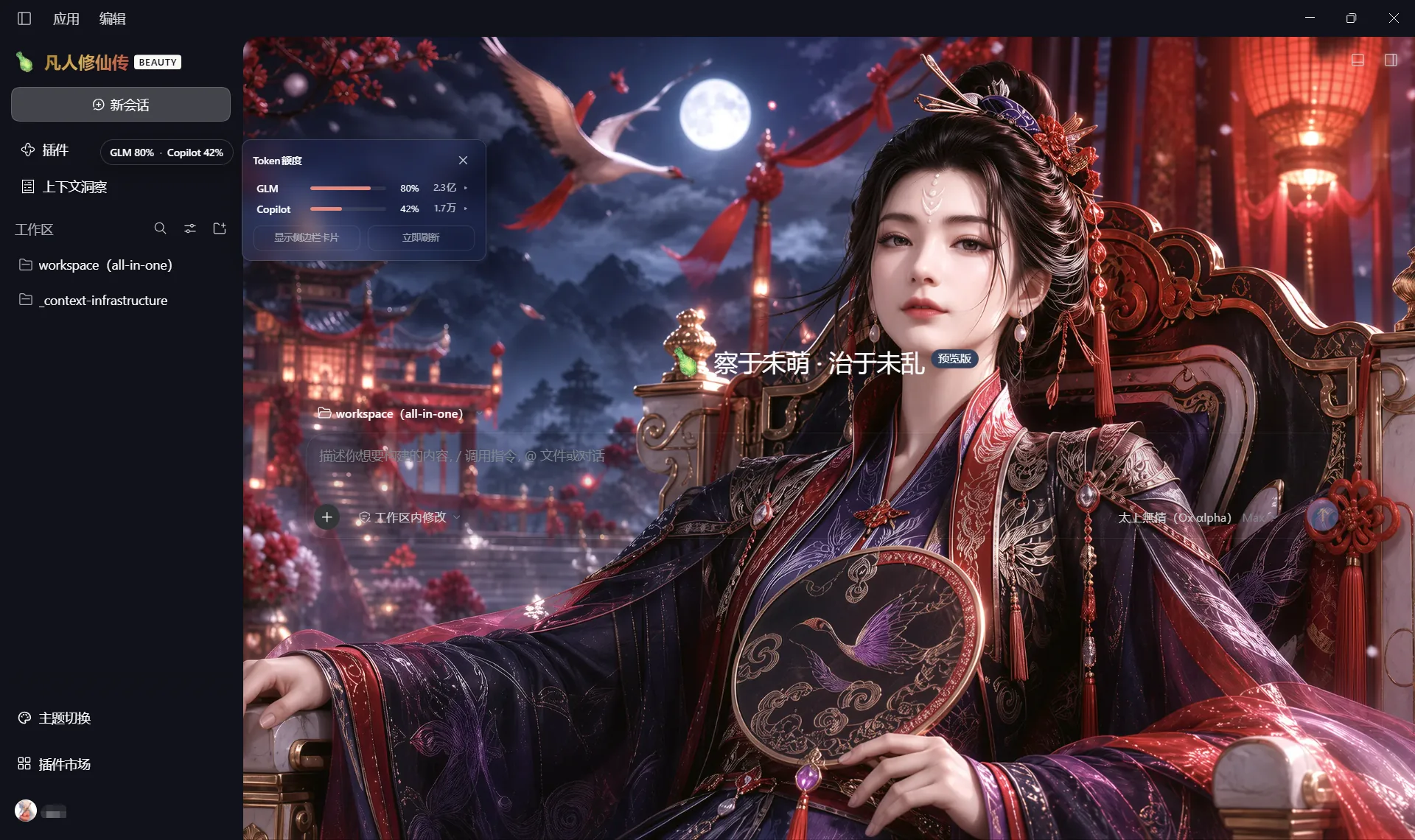
- Verified with dsh Desktop
0.2.1-rc.2(Windows); macOS / Linux Desktop currently follow the Web form and will be adapted in a later release. - The right panel in fullscreen is the solid skin base color; the wallpaper is not shown through it.
The skin switcher
This section answers: what lives in the switcher and how to use it.
The Skin Switcher popover at the bottom of the sidebar has two sections:
- Appearance: Light, Dark, System. It calls the official theme service and stays in sync with Settings → General → Appearance.
- Choose Skin: the first entry is DeepSeek Harness (Official), followed by the extension skins. Clicking switches instantly and persists the choice; the popover stays open for continuous preview.
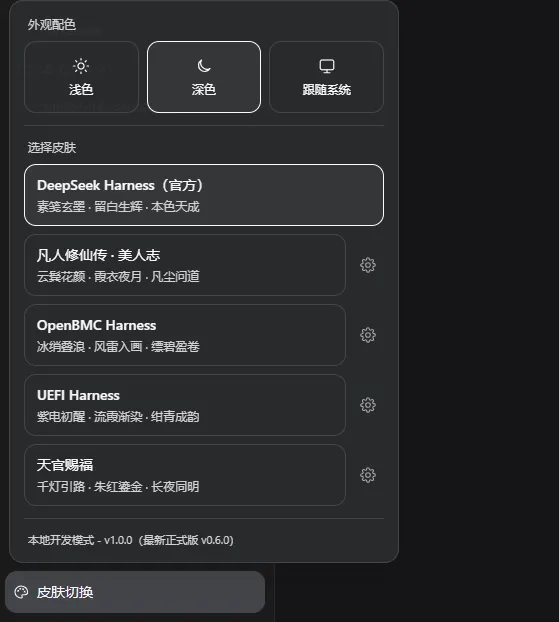
When the sidebar is collapsed, the entry folds into a round palette icon; multiple sidebar.footer.action entries stack vertically without overlapping. Choosing "Official" only undoes the extension skins — your light/dark/system preference is untouched.
The URL switches skins too: /?skin=official, /?skin=openbmc, /?skin=uefi-harness, /?skin=meirenzhi.
Updates
This section answers: how the plugin is updated.
The plugin ships no updater of its own (ADR-0008): update discovery and installation belong to the dsh-m marketplace, or to the DSH CLI — upgrade with dsh plugin --profile web update @iasiv5/dsh-skins; roll back by reinstalling an older exact version with dsh plugin add --profile web @iasiv5/dsh-skins@X.Y.Z. The latest exact version of @iasiv5/dsh-skins on npm remains the sole distribution form, and the version policy stays strict X.Y.Z.
FAQ
How do I get fully back to the official interface?
Pick "DeepSeek Harness (Official)" in the skin switcher, or open /?skin=official. It undoes the extension skin's branding, backdrop and favicon while keeping the switcher and the official light/dark palettes; your light/dark/system preference stays untouched.
Why is there no "check for updates" button? Update duty has moved to the dsh-m marketplace and the DSH CLI (ADR-0008); the skin switcher only handles skins and personalization.
Which DSH Web versions are supported?
Verified with DSH Web 0.2.0-rc.2, 0.2.1-rc.3 and 0.2.1-rc.4 (the 1.5.21 gate suite ran green on rc.4). 0.2.1-rc.5 is a contract-surface equivalent re-release of the same series (host web-app patch is zero-diff against rc.4), so the rc.4 conclusions carry over to rc.5. 0.2.2-rc.1, the first release of a new minor line, has been live-verified (2026-11-04: settings endpoint 200, client bundle delivered normally through the upgraded host static-asset path; the host webserver/frontend-static evolution was audited dimension-by-dimension as non-replacement-surface). Later rc builds of the same series are expected to work, but unverified versions carry no promise. Requires DSH 0.2.0-rc.1 or later; older DSH versions are blocked from upgrading to 1.5.8+ by the peer dependency floor.
Is the Desktop profile supported?
Yes. The DSH Desktop app and the Web profile are installed independently and do not affect each other; the desktop form (solid chrome + wallpaper in the conversation area) is described under "The Desktop profile". Verified with DSH Desktop 0.2.1-rc.5.
Does my appearance preference sync across browsers?
In the browser on the DSH host machine (loopback), the preference is persisted by the DSH Host and shared naturally. Other remote browsers keep the preference in their own localStorage — independent per browser, never overwritten.
Do personalization settings survive upgrades?
Yes. Configuration and the library live in the $DSH_HOME/dsh-skins/ data directory; upgrades only replace the plugin install directory (through any channel) and physically cannot touch it — rollbacks preserve it too. Only disk-level damage can lose configuration, and even then recovery mode keeps the library images.
Known limits
- Other skin plugins may also touch the body backdrop, brand slots or favicon; avoid enabling multiple visual skin plugins at the same time.
- The
openbmcbrand slots reuse the OpenBMC project's official logo letterforms and brand gradient, used solely for identification; all rights remain with the OpenBMC project. - The
uefi-harnessmark is the UEFI Forum's official trademark (the red cube, from uefi.org's published uefi_logo_red.gif, embedded as vector paths traced via Wikimedia Commons "Logo of the UEFI Forum.svg"); it is used solely to identify the skin, and all rights remain with the UEFI Forum. - Windows Desktop known limits: the fullscreen right panel is the solid skin base color; the wallpaper is not shown through it.
License
Want to read the source, build your own skin, or contribute? See docs/developers.md (how it works, skin authoring guide, local verification and the debug API).
Links
More in this category
elysia395/dsh-wallpaper-engine★ 6498
Requires DeepSeek Harness 0.1.5-rc.1+ (DSH Desktop >= 2.0.7) and dsh-better-sidebar >= 0.19.0 - update both before installing or updating this plugin. Plays local Wallpaper Engine Video/Web wallpapers behind the chat, renders Scene wallpapers as extracted static frames, and adds content-rating/type filters, custom uploads and an iOS-style liquid-glass settings window.
Small-tailqwq/dsh-deep-whale#maid-atelier★ 3093
Whale-girl skin series for the DSH Web UI (maid-atelier).
Nwflower/dsh-claude-style★ 570
Claude Code Desktop look-and-feel for the DSH Web GUI — ivory/warm-black dual canvas, clay accent, three-font typography, permission segmented control and brand switcher, via CSS overrides and client DOM overrides.
d-dev0101/open-sea-skin★ 391
Realtime WebGPU ocean skin with quick controls for waves, daylight, glass opacity, and an automatic day cycle.
kingOfSoySauce/dsh-liang-skin★ 384
Adaptive reasoning slider skin that maps each model's available reasoning efforts onto a 0–30 visual intensity scale, with synchronized portraits, background, and interface colors.
RevolutionLA/dsh-dream-skin★ 301
One-command skin plugin: 8 original themes, translucent wallpaper with opacity/blur, per-user accent, and shareable theme-pack import/export, favorites and surprise-me — purely native on DSH's token system.
Community comments
Comments are public GitHub Discussions. Loading them connects to GitHub and Giscus; a GitHub account is required to post.