Mineradio glassmorphism theme for the DSH web UI: champagne-gold glass panes, a fluid or wallpaper backdrop, and a one-switch toggle that restores the stock look exactly.
Install
# from npm (prebuilt)
dsh plugin --profile web add dsh-theme-mineradio
# from GitHub (first run asks for allowBuilds approval — follow the hint, retry)
dsh plugin --profile web add github:dhicoc/dsh-theme-mineradio
Any plugin you install runs third-party code with your own permissions — it can read your files, use your credentials, and reach the network, and tool approvals don’t sandbox it. GitHub-sourced plugins also run build scripts at install time — pnpm blocks those until you allow them, so an install can stop with ERR_PNPM_GIT_DEP_PREPARE_NOT_ALLOWED or ERR_PNPM_IGNORED_BUILDS; dsh prints the exact key to add under allowBuilds in your profile’s pnpm-workspace.yaml, and the install works on the next run. Allowing a build is a trust decision: only install sources you trust, and pin a commit (github:owner/repo#sha).
README
English | 中文
Mineradio is a cinematic glassmorphism theme for the DeepSeek Harness web UI — a faithful re-skin of the Mineradio "private visual radio" identity. The header, sidebar, composer, stats line, and trajectory view become panes of warm champagne glass over a near-black studio backdrop. You can put a video as wallpaper and switch it off and the stock UI comes back exactly, with no source changes to DSH itself.
Screenshots
Live captures of 2.2.x on DeepSeek Harness — hero, paper-white, and the Looks panel (scenes / performance / mica):
| Dark studio | Light paper |
|---|---|
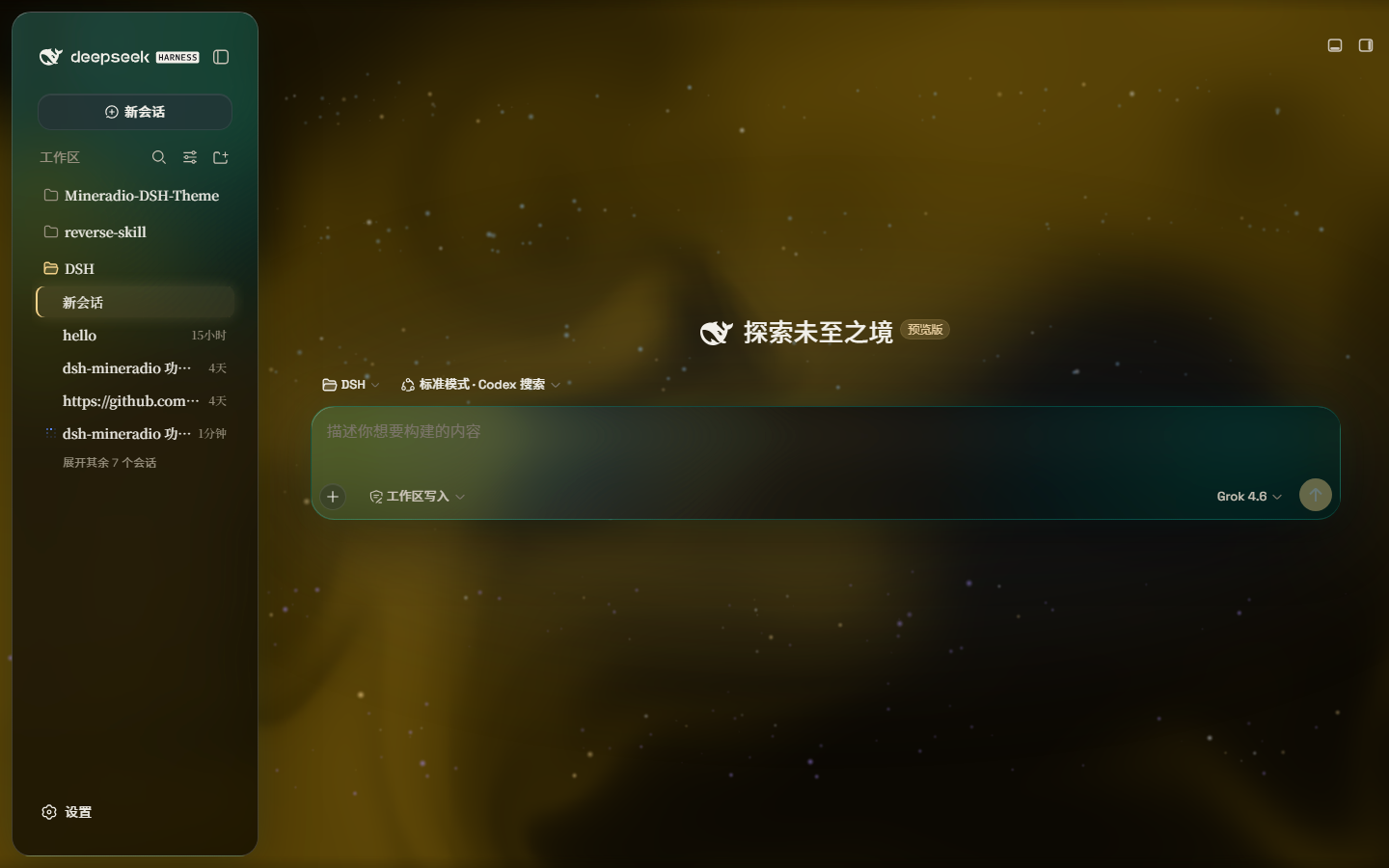 |
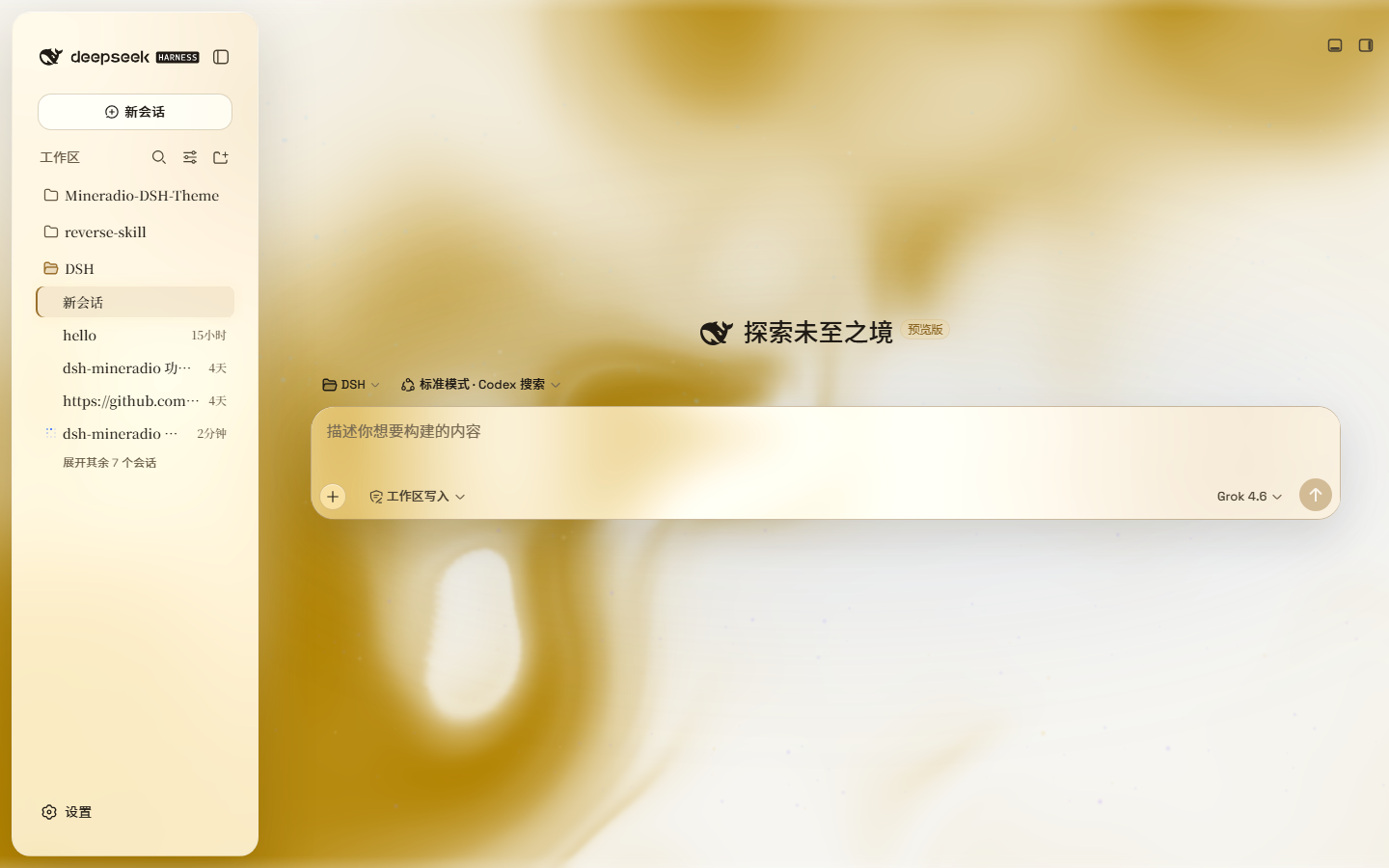 |
A full-size gallery is also hosted at https://dhicoc.github.io/dsh-theme-mineradio/.
What ports from Mineradio
- Champagne-gold identity — the signature palette (
#f4d28achampagne,#7ad7c2mint,#ff5367ember rose over a warm near-black#08090B) drives every alias token: surfaces, hairline strokes, text ink, buttons, scrollbars, and warm-tinted shadows with a gold bloom. - Typography — Inter + Noto Sans SC for the UI, self-hosted so there's no shell/fontsource dependency.
- Cinematic glow — a champagne-gold ambient bloom sits behind the glass; the spotlight hue knob sweeps it from warm amber to mint while keeping the brand warm.
- Fluid backdrop — a living fluid board (hue + depth adjustable, defaults to warm gold) or your own wallpaper (image or video) with its own blur and frost.
Features
- Two modes: Mica restyles the layout into floating glass cards (blur and frost adjustable), while Compatibility Mode keeps the stock layout byte-for-byte and only swaps the material to generic glass — other plugins' UI gets the same treatment automatically
- Free backdrop: a living fluid board (hue adjustable) or your own wallpaper (fills the page, aspect preserved, with its own blur and frost); light wallpapers look best in light mode, dark wallpapers in dark mode
- Background brightness: follows the resolved scheme — dark mode darkens (0–50), light mode brightens (50–100), 50 is unchanged
- Ambient decor: particle whale in the chat center, star particles, and an interactive dot-grid mesh — all toggleable
- Champagne glow: a pointer-tracking glow over the glass panes, plus a hover press-down for tactile depth
- One switch: off restores the stock UI exactly, and every effect is removed with the plugin
How coverage works (3.0)
Earlier versions decided what to style from class-name word roots, at a fixed specificity. Against the real 0.2.0-rc.2 shell that loses: the shell paints an opaque --dsw-alias-bg-base on its tab host, centre column and conversation column, and any host rule above that specificity wins outright — which is why patches kept missing areas. 3.0 covers surfaces three ways instead, in this order:
- Design tokens, through the official
ctx.theme.overrideTokens()seam. It writes inline custom properties onbody, so it wins without!importantand without a specificity contest. Measured against the rc.2 sources, 97% of painted backgrounds resolve to a token, so this one layer reaches nearly every surface — including into::before/::after, which inherit them. - A runtime role census for what tokens cannot express. It reads computed paint and geometry — never class names — and stamps
data-md-role(ground,structure,pane,overlay,control,chip). The stylesheet then dresses by role with!important, so priority decides rather than a specificity race. It re-runs for elements added after mount, which is most of a React UI, and finishes in ~25 ms over 600 elements. - Carve-outs that stay stock. Code, terminals, form fields and file previews keep their own fill and get no blur; containers that hold code (program source, diff bodies, consoles) are carved out too, so the text behind them is not greyed. The host's positional anchors are never touched, because a
backdrop-filteron them would re-anchor every in-place overlay. Faces that already wear the family rim are left alone, so hand-tuned panes keep their look.
A popover whose plate is drawn by a covering ::before is detected and dressed on the pseudo-element, so the box stays clean instead of stacking a second layer of glass.
You can inspect it live: __mineradioCensus() reports how many faces carry each role, __mineradioCensus(true) re-runs the pass, and __mineradioAudit() sweeps for opaque surfaces the theme did not reach.
Installation
Windows (one command)
powershell -ExecutionPolicy Bypass -Command "Invoke-WebRequest 'https://github.com/dhicoc/dsh-theme-mineradio/raw/main/install.ps1' -OutFile install.ps1; .\install.ps1"
Installs the latest release by default. No git needed — the installer falls back to a plain zip download. It links the plugin into the profile's node_modules and registers ui-mineradio in cordis.patch.yml (idempotent — safe to run again). Reload the web UI and it is on.
Pin a version or track the dev branch:
.\install.ps1 -Version 'v1.0.0'   # a specific release
.\install.ps1 -Version 'main'     # the development branch
Plugin market / npm (recommended)
dsh plugin --profile web add dsh-theme-mineradio
Or search dsh-theme-mineradio in Settings → Plugin market. That installs the prebuilt npm package (lib/ already bundled). There is no prepare / postinstall script.
From 2.3.6 the theme probes the host at load: it uses @deepseek-ai/dsh-client-runtime when present (DSH 0.1.1-rc.2+) and falls back to @deepseek-ai/dsh-client-store (DSH Desktop 0.7.x / 0.1.2-alpha.1). Do not pin 2.3.1 for old desktops and 2.3.5 for new ones — one latest build runs on both.
Do not install with github:dhicoc/dsh-theme-mineradio or dsh plugin add https://github.com/dhicoc/dsh-theme-mineradio. A git / tarball spec makes pnpm block "build scripts", and market updates then fail. If you already have the git spec, switch to npm:
dsh plugin --profile web add dsh-theme-mineradio@latest
The dsh.bundle manifest registers ui-mineradio automatically, so no manual patch is needed. (The installer adds this equivalent entry for source installs:)
- insert:
    - id: ui-mineradio
      name: 'dsh-theme-mineradio'
Restart the web UI. To turn it off: Settings → Plugins → Mineradio.
License
MIT. Mineradio visual identity (palette, typography, glow aesthetic) is a faithful re-skin of the Mineradio project by XxHuberrr, whose original is licensed GPL-3.0.
Links
More in this category
Small-tailqwq/dsh-deep-whale#maid-atelier★ 2379
Whale-girl skin series for the DSH Web UI (maid-atelier).
elysia395/dsh-wallpaper-engine★ 551
Requires DeepSeek Harness 0.1.5-rc.1+ (DSH Desktop >= 2.0.7) and dsh-better-sidebar >= 0.19.0 - update both before installing or updating this plugin. Plays local Wallpaper Engine Video/Web wallpapers behind the chat, renders Scene wallpapers as extracted static frames, and adds content-rating/type filters, custom uploads and an iOS-style liquid-glass settings window.
d-dev0101/open-sea-skin★ 386
Realtime WebGPU ocean skin with quick controls for waves, daylight, glass opacity, and an automatic day cycle.
kingOfSoySauce/dsh-liang-skin★ 233
Adaptive reasoning slider skin that maps each model's available reasoning efforts onto a 0–30 visual intensity scale, with synchronized portraits, background, and interface colors.
RevolutionLA/dsh-dream-skin★ 203
One-command skin plugin: 8 original themes, translucent wallpaper with opacity/blur, per-user accent, and shareable theme-pack import/export, favorites and surprise-me — purely native on DSH's token system.
ymh0000123/dsh-theme-endfield★ 120
Arknights: Endfield industrial-editorial theme for the DSH Web UI: cream paper, ink text, zero border radius, two switchable accent palettes (signal yellow / teal-cyan), plus optional marching-squares contour background, ENDFIELD watermark and boot progress plate.
Community comments
Comments are public GitHub Discussions. Loading them connects to GitHub and Giscus; a GitHub account is required to post.