Reads DSH session logs, lists every package the agent installed with its resolved location and version, and uninstalls it in one click.
Install
# from GitHub (first run asks for allowBuilds approval — follow the hint, retry)
dsh plugin --profile web add github:chenjie151/dsh-software-manager
Any plugin you install runs third-party code with your own permissions — it can read your files, use your credentials, and reach the network, and tool approvals don’t sandbox it. GitHub-sourced plugins also run build scripts at install time — pnpm blocks those until you allow them, so an install can stop with ERR_PNPM_GIT_DEP_PREPARE_NOT_ALLOWED or ERR_PNPM_IGNORED_BUILDS; dsh prints the exact key to add under allowBuilds in your profile’s pnpm-workspace.yaml, and the install works on the next run. Allowing a build is a trust decision: only install sources you trust, and pin a commit (github:owner/repo#sha).
README
This plugin publishes its README in Chinese only.
A plugin for DSH (DeepSeek Harness) that answers one question: what did the agent install on my machine, and where did it go? It reads your DSH session logs, finds every install command the agent ran, resolves each package to its real location, and uninstalls it in one click.
DSH (DeepSeek Harness) 插件:agent 在会话里到底往这台机器装了什么、装到哪去了? 它读你的 DSH 会话日志,找出 agent 执行过的每一条安装命令,定位到真实安装位置,并支持一键卸载。
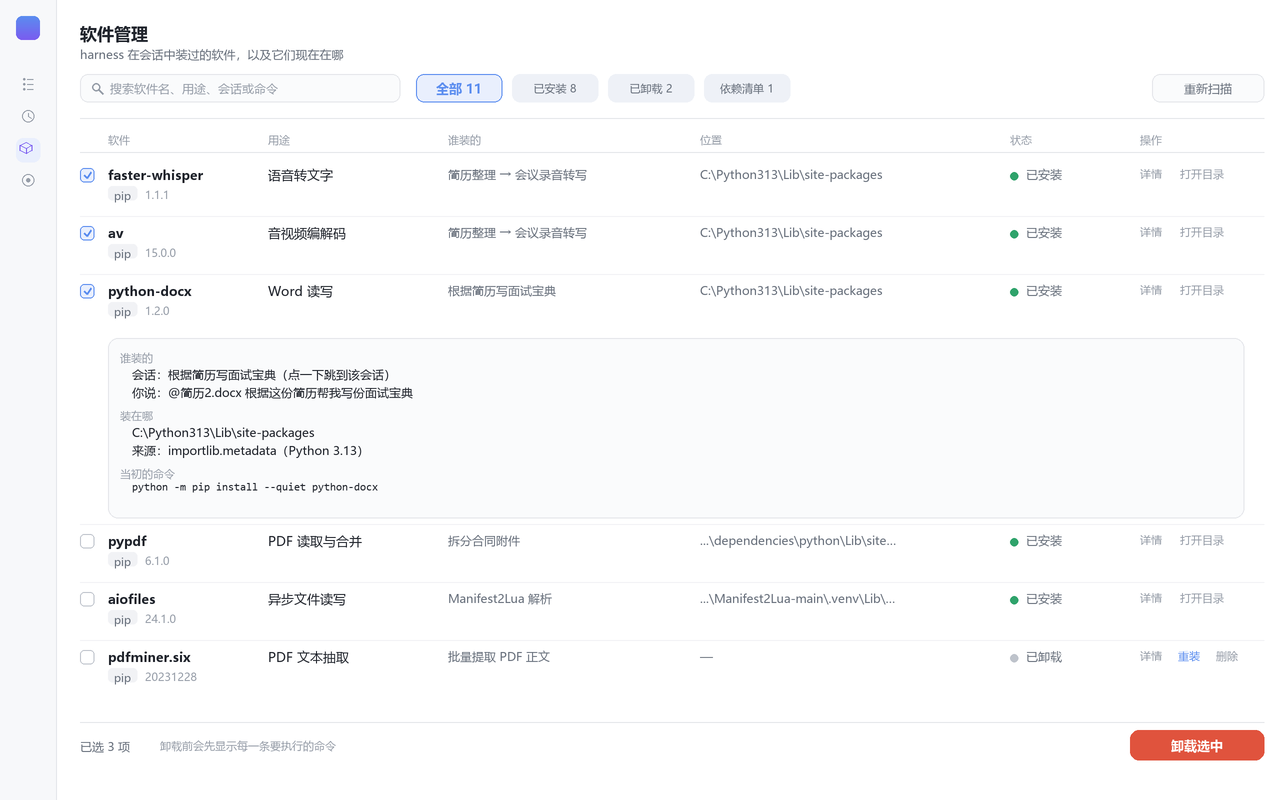
What it shows / 显示什么
- Package and version — parsed from the original command (
pip install faster-whisper,npm i -g pnpm@9,winget install --id Git.Git, …). - Purpose — a built-in Chinese dictionary of ~180 packages (
faster-whisper→ 语音转文字,pypdf→ PDF 读取与合并拆分), falling back to a per-installer generic description. - Who installed it — the session title, the session id, and the exact ask you gave the agent in that turn. Clicking it opens that session.
- Real location — resolved per installer: the Windows
Uninstallregistry keys for winget/MSI,importlib.metadata+sysconfigfor Python (using the interpreter from the command, so a venv stays a venv),npm root -gfor Node,where.exeand the default prefixes for the rest. - Status — installed / uninstalled / dependency list / install script, each with a one-line explanation of what it means.
- Original command — the exact shell line, its working directory, and how many times it ran.
Supported installers / 支持的安装器
winget · choco · scoop · pip · uv · npm · pnpm · yarn · bun · cargo · gem · dotnet · msiexec · archive extraction (Expand-Archive, tar -x, 7z x) · git clone · install scripts (install.bat)
Install / 安装
Straight from this repository / 直接从仓库安装:
dsh plugin add github:chenjie151/dsh-software-manager
Pin a commit so a later push cannot change what runs / 锁定提交,后续推送就无法悄悄换掉你运行的代码:
dsh plugin add github:chenjie151/dsh-software-manager#<commit-sha>
Or from a local checkout / 或从本地源码目录安装:
dsh plugin add ./path/to/dsh-software-manager
There is no build step — lib/ ships as plain ESM and package.json declares no scripts, so installing from git needs no allowBuilds build approval. / 没有构建步骤:lib/ 就是可运行的 ESM 源码,package.json 里没有任何 scripts,所以从 git 安装不需要 allowBuilds 构建授权。
In the desktop client, enable it under Settings → Plugins and press Ctrl+R to reload the window. The entry shows up in the left sidebar as 软件管理 / Software Manager.
桌面版:在 设置 → 插件 里启用后按 Ctrl+R 刷新窗口,左侧栏就会出现「软件管理」。上架插件目录后也可以在插件市场里一键安装。
Usage / 使用
- Click 软件管理 in the left sidebar. The panel scans every session on open and lists what it found.
- Filter by installer or status, or search across package, purpose, session title and the original command.
- Tick the rows you want and press 卸载选中 — the confirm dialog shows the exact command per item before anything runs.
- For a package that is no longer on disk, ↺ replays the original install command.
Safety / 安全
- Uninstall executes real commands with your permissions:
pip uninstall -y,winget uninstall,npm uninstall -g, and for portable folders aRemove-Itemof the install directory. Nothing runs until you confirm, and directory removal needs a second checkbox. - Uninstalling a dependency list (
requirements.txt) or an install script (install.bat) is refused: the plugin cannot know what those produced. - The bridge only accepts same-origin
POSTrequests from loopback, and the uninstall endpoint takes item ids — never a command from the browser. - State lives in your DSH home (
~/.dsh/software-manager/forgotten.json) and holds only the ids of records you deleted.
Limitations / 限制
- Only installs that went through a shell command in a DSH session are found. Anything you installed yourself in another terminal does not appear.
- Locations are resolved from the Windows registry,
where.exeand per-ecosystem metadata; other platforms are untested. - An "uninstalled" record is kept for 7 days and can be deleted permanently from the row.
- The UI strings are Chinese;
locale/en.jsoncarries the English title and description for the plugin list.
License / 许可
MIT
Links
More in this category
Tencent/WeKnora#dsh-weknora★ 38236
Four read-only tools over a WeKnora knowledge base: list knowledge bases, hybrid passage search, reassemble one document's chunks in order, and WeKnora's own cited RAG or ReAct-agent answer with a resumable session id.
DayuanJiang/next-ai-draw-io#dsh-plugin★ 37190
Draws draw.io diagrams in DeepSeek Harness through the next-ai-drawio MCP server: the link in the reply opens a live preview in the right sidebar, you can edit the diagram by hand, and each AI change is a version you can restore. Node.js 18+; npx downloads the MCP server on first use.
superdesigndev/treg★ 9111
Tool catalog for agents: search ~2,600 external endpoints (SEO and SERP, backlinks, social, people and company enrichment, ad libraries, scraping) by the task you want done, read each one's parameters and per-call price, then call it with the credential injected server-side. Ships the skill plus an MCP row that stays disabled until TREG_TOKEN is set.
T-Auto/dsh-ops★ 6016
Provides bash, PowerShell 7, and high-performance Rust tools for DSH on Windows to reduce token usage.
helloHub1212/dsh-windows-mcp★ 2563
Bridges the CursorTouch/Windows-MCP desktop automation server into DSH through the official MCP client bridge, registering its screenshot, UI tree snapshot, mouse and keyboard input, clipboard, process and registry tools as mcp__windows__* tools for the model, and adds a windows_mcp_doctor diagnostic tool. Computer Use is off by default and is switched on from the plugin panel.
sixtysevenlf/dsh-blender-plugin★ 2280
Lets a DSH agent drive a local Blender over a direct TCP channel with 15 tools: viewport frames, custom-angle renders, Python execution, headless and job offload, transaction rollback, and a planning layer of 228 ops across 34 families.
Community comments
Comments are public GitHub Discussions. Loading them connects to GitHub and Giscus; a GitHub account is required to post.