读取 DSH 会话日志,列出 agent 装过的每个软件及其真实安装位置与版本,并支持一键卸载。
安装
# GitHub 源码(首次需按提示配置 allowBuilds 构建授权后重试)
dsh plugin --profile web add github:chenjie151/dsh-software-manager
装任何插件都等于在你的机器上跑第三方代码,权限和你本人一样大——能读你的文件、用你的凭据、访问网络,工具审批管不到它。GitHub 来源的插件还会在安装时执行构建脚本——pnpm 默认拦截,所以安装可能停在 ERR_PNPM_GIT_DEP_PREPARE_NOT_ALLOWED 或 ERR_PNPM_IGNORED_BUILDS;dsh 会打印出需要添加的确切键名,把它加进该 profile 的 pnpm-workspace.yaml 的 allowBuilds 下,重跑一次即可装上。放行构建本身就是一次信任判断:请只安装可信来源,并尽量锁定 commit(github:owner/repo#sha)。
README
A plugin for DSH (DeepSeek Harness) that answers one question: what did the agent install on my machine, and where did it go? It reads your DSH session logs, finds every install command the agent ran, resolves each package to its real location, and uninstalls it in one click.
DSH (DeepSeek Harness) 插件:agent 在会话里到底往这台机器装了什么、装到哪去了? 它读你的 DSH 会话日志,找出 agent 执行过的每一条安装命令,定位到真实安装位置,并支持一键卸载。
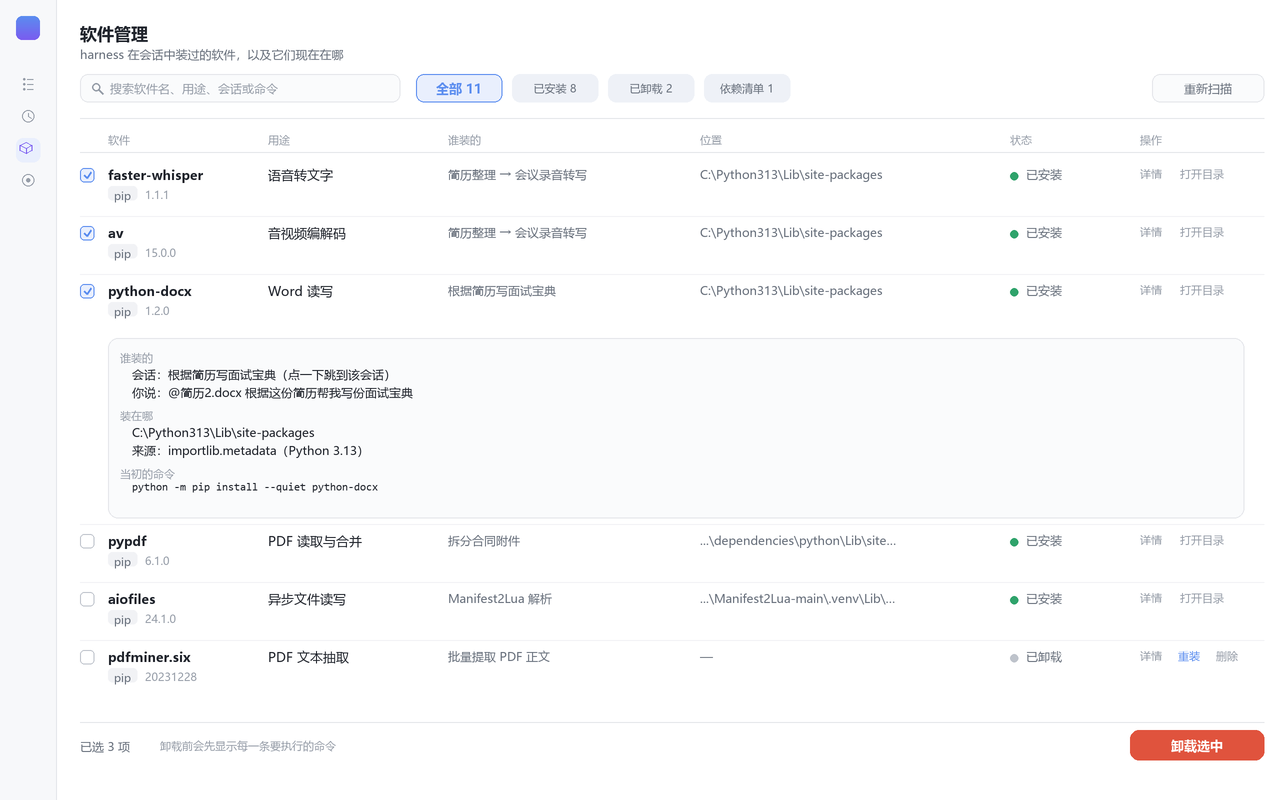
What it shows / 显示什么
- Package and version — parsed from the original command (
pip install faster-whisper,npm i -g pnpm@9,winget install --id Git.Git, …). - Purpose — a built-in Chinese dictionary of ~180 packages (
faster-whisper→ 语音转文字,pypdf→ PDF 读取与合并拆分), falling back to a per-installer generic description. - Who installed it — the session title, the session id, and the exact ask you gave the agent in that turn. Clicking it opens that session.
- Real location — resolved per installer: the Windows
Uninstallregistry keys for winget/MSI,importlib.metadata+sysconfigfor Python (using the interpreter from the command, so a venv stays a venv),npm root -gfor Node,where.exeand the default prefixes for the rest. - Status — installed / uninstalled / dependency list / install script, each with a one-line explanation of what it means.
- Original command — the exact shell line, its working directory, and how many times it ran.
Supported installers / 支持的安装器
winget · choco · scoop · pip · uv · npm · pnpm · yarn · bun · cargo · gem · dotnet · msiexec · archive extraction (Expand-Archive, tar -x, 7z x) · git clone · install scripts (install.bat)
Install / 安装
Straight from this repository / 直接从仓库安装:
dsh plugin add github:chenjie151/dsh-software-manager
Pin a commit so a later push cannot change what runs / 锁定提交,后续推送就无法悄悄换掉你运行的代码:
dsh plugin add github:chenjie151/dsh-software-manager#<commit-sha>
Or from a local checkout / 或从本地源码目录安装:
dsh plugin add ./path/to/dsh-software-manager
There is no build step — lib/ ships as plain ESM and package.json declares no scripts, so installing from git needs no allowBuilds build approval. / 没有构建步骤:lib/ 就是可运行的 ESM 源码,package.json 里没有任何 scripts,所以从 git 安装不需要 allowBuilds 构建授权。
In the desktop client, enable it under Settings → Plugins and press Ctrl+R to reload the window. The entry shows up in the left sidebar as 软件管理 / Software Manager.
桌面版:在 设置 → 插件 里启用后按 Ctrl+R 刷新窗口,左侧栏就会出现「软件管理」。上架插件目录后也可以在插件市场里一键安装。
Usage / 使用
- Click 软件管理 in the left sidebar. The panel scans every session on open and lists what it found.
- Filter by installer or status, or search across package, purpose, session title and the original command.
- Tick the rows you want and press 卸载选中 — the confirm dialog shows the exact command per item before anything runs.
- For a package that is no longer on disk, ↺ replays the original install command.
Safety / 安全
- Uninstall executes real commands with your permissions:
pip uninstall -y,winget uninstall,npm uninstall -g, and for portable folders aRemove-Itemof the install directory. Nothing runs until you confirm, and directory removal needs a second checkbox. - Uninstalling a dependency list (
requirements.txt) or an install script (install.bat) is refused: the plugin cannot know what those produced. - The bridge only accepts same-origin
POSTrequests from loopback, and the uninstall endpoint takes item ids — never a command from the browser. - State lives in your DSH home (
~/.dsh/software-manager/forgotten.json) and holds only the ids of records you deleted.
Limitations / 限制
- Only installs that went through a shell command in a DSH session are found. Anything you installed yourself in another terminal does not appear.
- Locations are resolved from the Windows registry,
where.exeand per-ecosystem metadata; other platforms are untested. - An "uninstalled" record is kept for 7 days and can be deleted permanently from the row.
- The UI strings are Chinese;
locale/en.jsoncarries the English title and description for the plugin list.
License / 许可
MIT
链接
同类插件
Tencent/WeKnora#dsh-weknora★ 38236
把 WeKnora 知识库接入 dsh 的四个只读工具:列出知识库、混合检索原文片段、按顺序还原单篇文档,以及直接取用 WeKnora 自己带引用的 RAG 或 ReAct agent 回答(含可续聊的 session id)。
DayuanJiang/next-ai-draw-io#dsh-plugin★ 37190
dsh 的 draw.io 绘图插件:通过 next-ai-drawio MCP 服务器作图,点回复里的链接在右侧栏打开实时预览,可以手动修改图,AI 的每次修改都是可以恢复的版本。需 Node.js 18+,首次使用由 npx 下载 MCP 服务器。
superdesigndev/treg★ 9111
给 Agent 的工具目录:按「要做的事」检索约 2,600 个外部接口(SEO 与 SERP、外链、社交、人物与公司信息补全、广告库、抓取),查看参数与单次调用价格后直接调用,凭据由服务端注入。附带技能,MCP 行在未设置 TREG_TOKEN 前保持禁用。
T-Auto/dsh-ops★ 6016
为 Windows 的 DSH 提供 bash、PowerShell 7 及 Rust 高性能工具,减少 token 消耗。
helloHub1212/dsh-windows-mcp★ 2563
通过官方 MCP 客户端桥接层把 CursorTouch/Windows-MCP 桌面自动化服务器接入 DSH,把截屏、UI 树快照、鼠标键盘输入、剪贴板、进程与注册表等工具注册成 mcp__windows__* 供模型调用,并附带 windows_mcp_doctor 诊断工具;Computer Use 默认关闭,需在插件面板里打开。
sixtysevenlf/dsh-blender-plugin★ 2280
让 DSH agent 通过直连 TCP 通道驱动本地 Blender,提供 15 个工具:视口帧、自定义视角渲染、Python 执行、无头与作业卸载、事务回滚,以及 34 个 family / 228 个 op 的规划层。
社区评论
评论公开保存在 GitHub Discussions。加载评论会连接 GitHub 和 Giscus;发表内容需要 GitHub 账号。