Serve any local file in DSH web sessions - /ws/<absolute-path> maps disk files to same-origin http URLs that session markdown can render. Any drive, no staging directory.
Install
# from GitHub (first run asks for allowBuilds approval — follow the hint, retry)
dsh plugin --profile web add github:carlclouder/dsh-image-serve
Any plugin you install runs third-party code with your own permissions — it can read your files, use your credentials, and reach the network, and tool approvals don’t sandbox it. GitHub-sourced plugins also run build scripts at install time — pnpm blocks those until you allow them, so an install can stop with ERR_PNPM_GIT_DEP_PREPARE_NOT_ALLOWED or ERR_PNPM_IGNORED_BUILDS; dsh prints the exact key to add under allowBuilds in your profile’s pnpm-workspace.yaml, and the install works on the next run. Allowing a build is a trust decision: only install sources you trust, and pin a commit (github:owner/repo#sha).
README
This plugin publishes its README in Chinese only.
你一定遇到过这个场景:你让 AI "给我看看刚那张截图" / "把生成的封面图展示一下",
它一本正经地回复"图片已保存到 D:\shots\fig1.png"——然后呢?什么都不会出现。
那只是一行打不开的死文本。
原因:DeepSeek Harness 的 web 会话里,markdown 渲染器只认 http/https 图片源。
你的截图、AI 生成图、本地文档全在硬盘上,file: 和 data: 引用一律被过滤,
而 DSH 官方没有提供任何本地文件路由。这不是配置问题,是这个能力缺口从第一天
就在——直到装上这个插件。
装完之后:同样一句"给我看看 fig1.png",AI 回复的是
——图片直接渲染在对话里。
任意盘、任意目录、中文路径、NAS 共享,全都直接显示,不需要复制到任何特定文件夹。
dsh-image-serve
DeepSeek Harness 的本地文件展示插件:安装一次,会话 markdown 即可通过
/ws/<本地绝对路径> 直接渲染磁盘上任何位置的图片与文件。
English: register a /ws route in dsh web that maps /ws/<absolute local path>
to any file on disk, so session markdown can render local images via same-origin
http URLs (the renderer accepts http/https only). No root, no whitelist, no staging
directory — any drive, any folder.
效果预览 / Demo
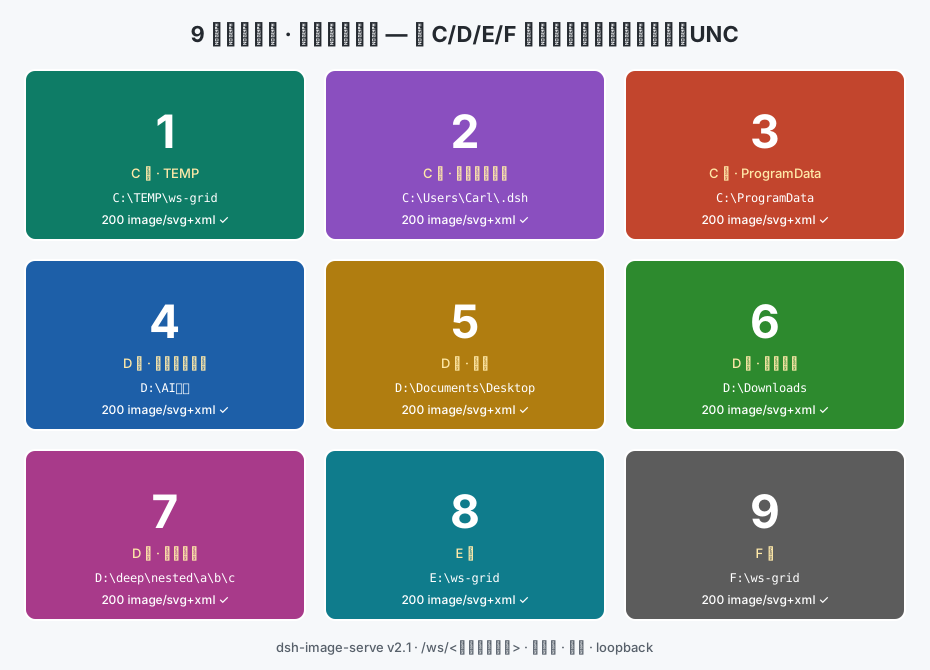
九个不同位置的文件(跨 C/D/E/F 盘、中文路径、深层嵌套、UNC),全部经 /ws 路由直接渲染:
前后对比:
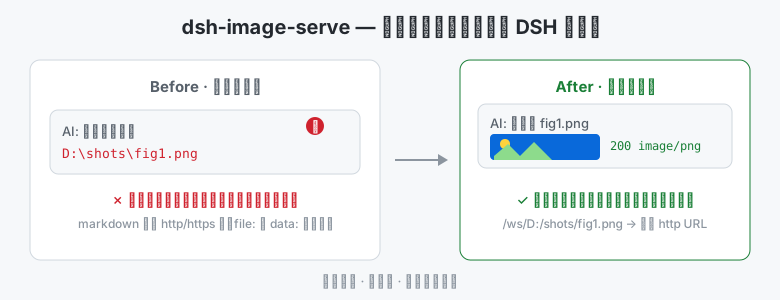
它解决什么问题 / What it solves
| 没装本插件 | 装了本插件 |
|---|---|
AI:图片已保存 D:\shots\fig1.png(一行死路径,什么也看不到) |
AI: ← 图片直接显示在对话里 |
| 出图后要自己切到文件夹打开看 | 出图即看,零切换 |
| 想展示别的目录的图?先手动复制到约定目录 | 任何位置直接引用,包括 C:\、E:\、NAS |
典型场景:让 AI 展示它刚处理的截图、AI 出图后当场验收、多张图表并排对比、 导出的文档/网页快照直接预览。
快速上手(30 秒)
dsh plugin --profile web add dsh-image-serve   # 在线安装
# 或离线:dsh plugin --profile web add <本包 .tgz 路径>(零依赖,自包含)
重启 dsh web。之后 markdown 里写(/ws/ 后跟本地绝对路径):
http://127.0.0.1:3080/ws/D:/AI任务/Generated/cover.png
http://127.0.0.1:3080/ws/D:/AI任务/                 (指向目录 → 返回可浏览的文件列表页)
http://127.0.0.1:3080/ws/D:\截图\对比图.png        (反斜杠写法等价)
http://127.0.0.1:3080/ws//NAS/share/方案.png       (UNC 网络路径)
相对路径会返回 400 并附提示;只支持 GET/HEAD;MIME 自动识别 (png/jpg/webp/svg/md/json…)。
安全须知(装前必读)
/ws 是本地任意文件的读取通道,没有白名单(v2.1 起应用户明确决策移除白名单设计):
- 路由的可达范围 = dsh web 的可达范围:默认仅本机回环
127.0.0.1; - 但如果你通过 Tailscale 等反把 web 暴露到远程,远程设备同样能读取本地任意文件;
- 只读,无写入/删除/列目录。
从 v2.0 / 文件式旧版迁移
旧短链接 …/ws/<文件名>(隐含 D:\AI任务 根目录)已失效,请改写为完整
…/ws/D:/AI任务/<文件名> 形式。root 配置已不存在,profile patch 里的覆盖行
(如 - id: web-workspace-files, config: {root: ...})可删除。
特性一览 / Features
- 目录浏览:/ws 指向目录时返回可点击的 HTML 文件列表(子目录优先、大小/修改时间、上一级导航,文件名已做 HTML 转义)
- 零运行时依赖的标准 npm bundle;可在 dsh-market 中热启停/更新/卸载
- 跨盘符(C:/D:/E:/…)、中文路径、深层嵌套目录、UNC 均实测可用
- 明确报错:相对路径 400 + 提示、文件不存在 404、非 GET/HEAD 405
License
MIT
Links
More in this category
tt-a1i/archify#integrations/deepseek-harness★ 85456
Generate validated, self-contained interactive architecture, workflow, sequence, data-flow, and lifecycle diagrams from repositories or system descriptions.
dream-num/dsh-univer-office★ 564
Give DeepSeek Harness a real office environment. Univer Office Plugin brings spreadsheets, docs, slides, canvases, relational tables, and more into one runtime — with connected data, validation, versioned changes, and isolated worktrees for multi-agent collaboration.
PerryLink/dsh-industry-research★ 214
Deterministic industry research reports for DeepSeek Harness — company and industry research flows produce structured, verifiable reports from staged evidence.
PolinniZhong/dsh-knit★ 54
Puts the Markdown documents, source files, images and video that already exist anywhere in the session workspace into the DSH sidebar, ranked by relevance to the current conversation. The default lexical mode matches your recent messages against title, summary and body locally with IDF weighting (BM25) — no model calls, no network, nothing leaves the machine. The list comes from scanning the workspace rather than from a recent-files list, so restarting DSH or opening a new session does not empty it. Results are organised into a three-tier reading order (primary / supporting / related) with a verifiable reason on every row — which field matched, which document cites this one — and one click opens an in-place preview: Markdown as rendered text, relative-path images actually drawn, source code with the host's own syntax highlighting, video streamed over HTTP Range. The same Context Pack is exposed to the agent as a knit_docs tool. Later versions added read evidence and lifecycle tracking (attribution is frozen at the moment of reading), pin / exclude (exclusion applies before retrieval, and is undoable), relation evidence (references / imports / tests, with line numbers) and an incremental index reused across restarts. Since v0.23 there is also an optional hybrid mode: it is off by default and only runs once you configure an Ollama or OpenAI-compatible embedding provider yourself. When it runs, what leaves the machine is your query text plus each candidate file's title and summary — a Markdown summary is an excerpt of the body's first paragraph (at most 60 characters), a code file's summary is its workspace-relative directory, and an image or video contributes its file name; full bodies and absolute paths are not sent, and a loopback provider keeps everything on this machine. Since v0.24 it also associates uncommitted changes: a read-only git status (fixed argv, no shell, whitelisted child-process environment) combined with the same reference / import / test / mention evidence shows which files a change is likely to drag along, and it is off by default. The benefit of semantic retrieval still awaits a real-provider run, so no recall improvement is claimed.
HuanLinOTO/dsh-plugin-mineru★ 47
Expose MineRU document parsing tools to the model.
kw78/dsh-office-tools★ 32
Workspace-safe Office tools for agents: create/read Word, create/read/update Excel, and create/read PowerPoint decks with PNG/JPG/GIF image placement.
Community comments
Comments are public GitHub Discussions. Loading them connects to GitHub and Giscus; a GitHub account is required to post.