Preview Mermaid diagrams as images via local rendering in DSH Web when the chat message contains a Mermaid fenced code block, and also allow integration with external rendering servers.
Install
# from GitHub (first run asks for allowBuilds approval — follow the hint, retry)
dsh plugin --profile web add github:baconbao/dsh-mermaid-image-preview
Any plugin you install runs third-party code with your own permissions — it can read your files, use your credentials, and reach the network, and tool approvals don’t sandbox it. GitHub-sourced plugins also run build scripts at install time — pnpm blocks those until you allow them, so an install can stop with ERR_PNPM_GIT_DEP_PREPARE_NOT_ALLOWED or ERR_PNPM_IGNORED_BUILDS; dsh prints the exact key to add under allowBuilds in your profile’s pnpm-workspace.yaml, and the install works on the next run. Allowing a build is a trust decision: only install sources you trust, and pin a commit (github:owner/repo#sha).
README
A DeepSeek Harness Plugin for Previewing Mermaid Diagram Images
Preview mermaid syntax as images via local rendering in DSH Web when the chat message contains a mermaid fenced code block (```mermaid or ```mmd ).
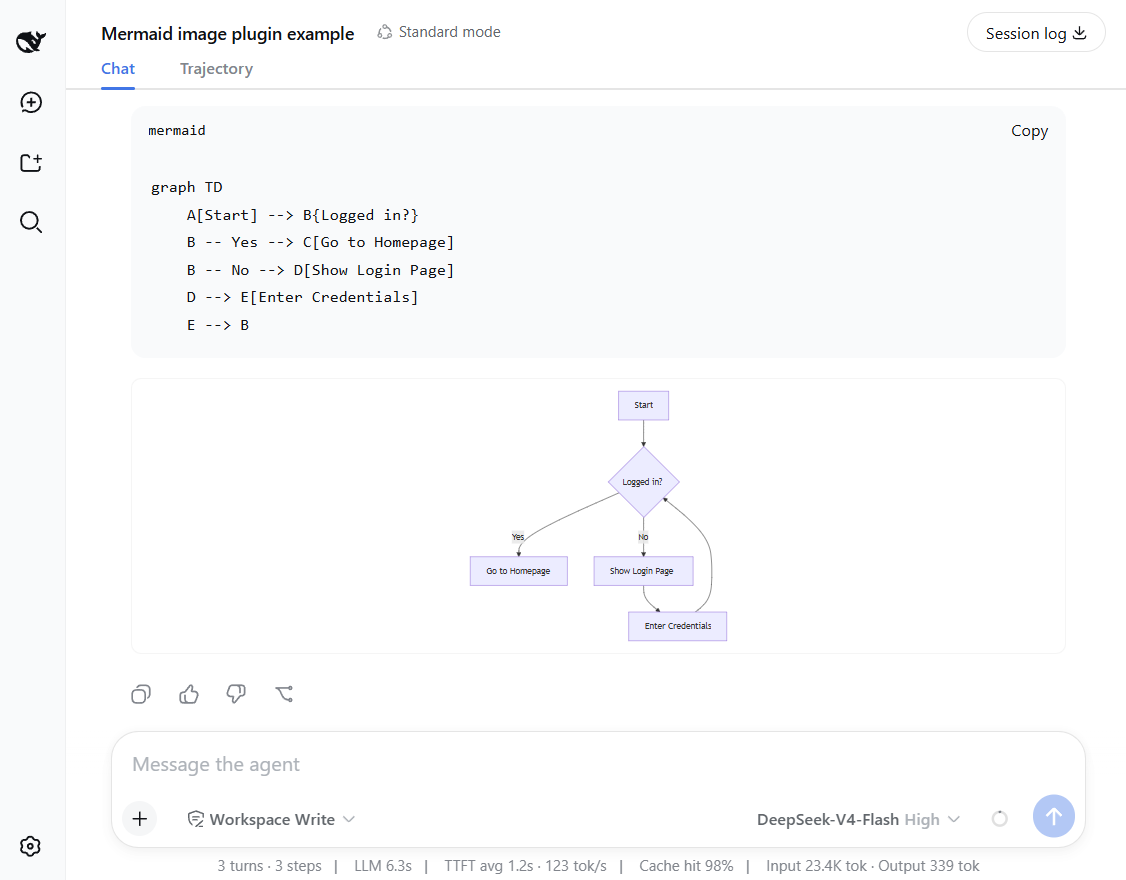
Features and how it works
- Preview mermaid diagrams by rendering images directly!
- Local renderer first! If it fails, it can fall back to an external or self-hosted rendering engine by configuring a fallback server.
- Setting card: you can adjust runtime settings in the UI - no restart needed.
- Mount point:
conversation.chat.turnTail(chain slot, additive - never shadows shipped UI). - Thumbnail display: the diagram renders as a thumbnail; click to enlarge in place, click again to shrink back (same element toggles, no popup).
- Light/dark themes follow the UI automatically.
Support diagram types
The plugin renders diagrams locally with a built-in renderer. It supports 14 diagram types out of the box.
Rendered locally: flowchart, sequenceDiagram, classDiagram, stateDiagram, erDiagram, pie, journey, gitGraph, requirementDiagram, timeline, quadrantChart, packet-beta, xychart-beta
Expand: gantt, mindmap, block-beta, sankey-beta, architecture-beta, zenuml, C4Context
[!NOTE] You can enable the fallback to render expanded types — see Configuration below.
Installation
Installation from github
### latest release version
$ npx @deepseek-ai/dsh plugin --profile web add github:baconbao/dsh-mermaid-image-preview#latest

### specific version
$ npx @deepseek-ai/dsh plugin --profile web add github:baconbao/dsh-mermaid-image-preview#<VERSION_TAG|GIT_TAG>

### dev version
$ npx @deepseek-ai/dsh plugin --profile web add github:baconbao/dsh-mermaid-image-preview#dev
Installation from source code
$ git clone https://github.com/baconbao/dsh-mermaid-image-preview
$ cd dsh-mermaid-image-preview
$ pnpm install
$ dsh plugin --profile web add .
[!IMPORTANT] Restart dsh web after installing.
Configuration
Change runtime settings on setting card
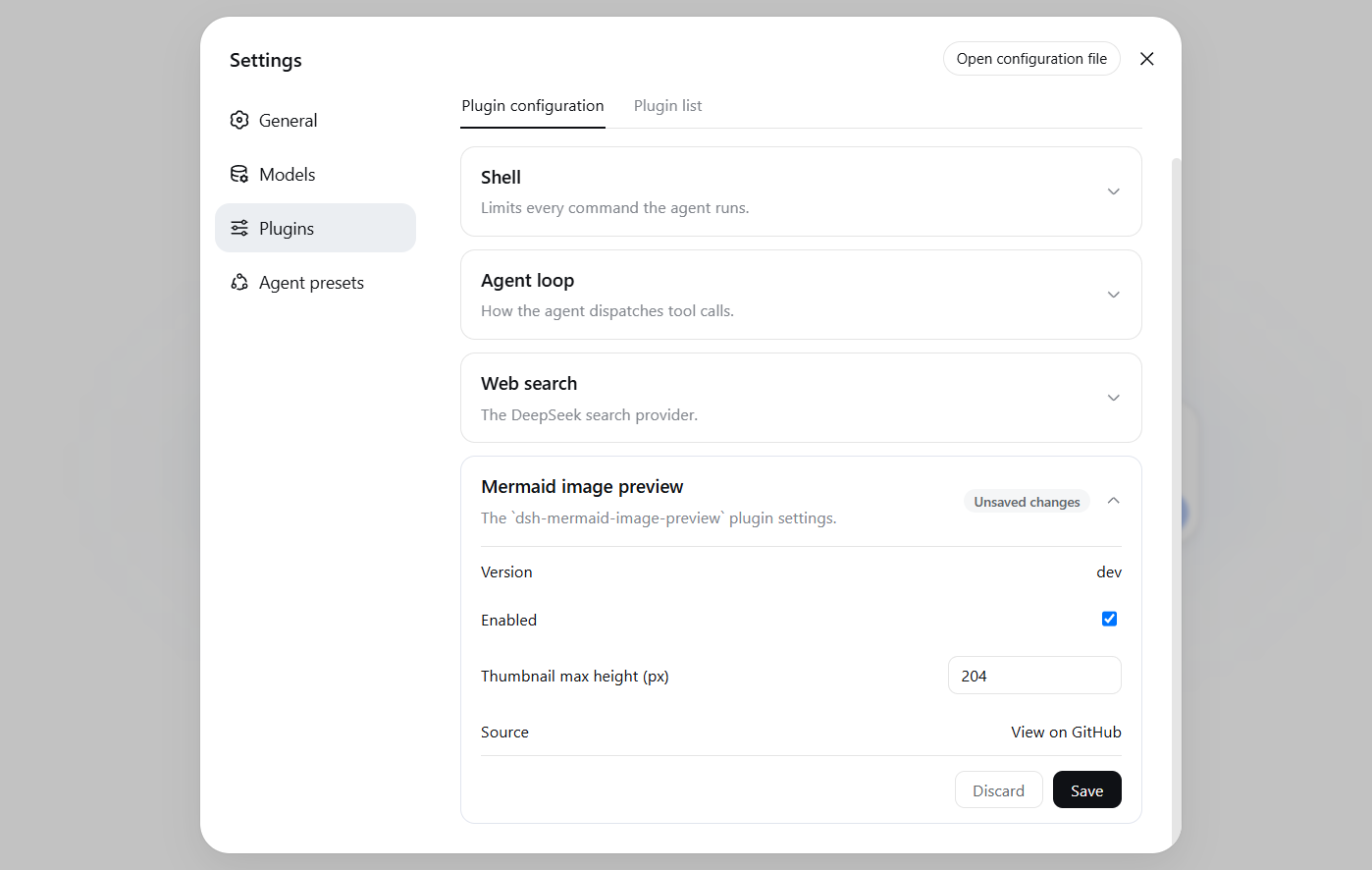
The Plugins settings page (Settings > Plugins) shows a Mermaid image preview card where
you can adjust plugin's runtime settings directly - no restart needed.
Values are stored in localStorage and applied immediately across all sessions.
Change render server by profile patch
Diagrams are rendered locally by default. To use your own render server or
enable the external fallback, edit the profile's cordis.patch.yml (e.g.
~/.dsh/profiles/web/cordis.patch.yml):
- id: ui-dsh-mermaid-image-preview
  config:
    enableLocalRender: true
    fallbackRenderUrl: https://mermaid.ink
    enableFallback: false
enableLocalRender: render locally (defaulttrue). Setfalseto always use the fallback server (enableFallbackis ignored).fallbackRenderUrl: fallback render server (defaulthttps://mermaid.ink).enableFallback: use the fallback server when local rendering fails (defaultfalse).- Restart dsh web after changing these settings.
- To host your own fallback render server, see https://github.com/jihchi/mermaid.ink for the details.
Uninstallation
$ dsh plugin --profile web remove @baconbao/dsh-mermaid-image-preview
[!NOTE] Since v0.2.0 the plugin/package id is changed from
dsh-mermaid-image-previewto@baconbao/dsh-mermaid-image-preview.
Test
Ask the agent to produce:
```mermaid
graph TD
  A[Start] --> B{Success?}
  B -->|Yes| C[Done]
  B -->|No| D[Retry]
```
Author
baconbao, vibe coding with deepseek ai
License
Links
More in this category
tt-a1i/archify#integrations/deepseek-harness★ 74360
Generate validated, self-contained interactive architecture, workflow, sequence, data-flow, and lifecycle diagrams from repositories or system descriptions.
dream-num/dsh-univer-office★ 442
Give DeepSeek Harness a real office environment. Univer Office Plugin brings spreadsheets, docs, slides, canvases, relational tables, and more into one runtime — with connected data, validation, versioned changes, and isolated worktrees for multi-agent collaboration.
PerryLink/dsh-industry-research★ 186
Deterministic industry research reports for DeepSeek Harness — company and industry research flows produce structured, verifiable reports from staged evidence.
HuanLinOTO/dsh-plugin-mineru★ 47
Expose MineRU document parsing tools to the model.
kw78/dsh-office-tools★ 26
Workspace-safe Office tools for agents: create/read Word, create/read/update Excel, and create/read PowerPoint decks with PNG/JPG/GIF image placement.
PolinniZhong/dsh-knit★ 18
Lists the Markdown documents, images and video that already exist anywhere in the session workspace in the DSH sidebar, ranked by relevance to the current conversation: recent messages are matched locally against document title, summary and body with IDF weighting, with no model calls and no network. Because the list is scanned from the workspace instead of remembered, restarting DSH or starting a new session does not empty it. Images and video preview in place, with relative-path images resolved and video streamed over HTTP Range. A references bar under the preview header shows which documents cite the one being previewed and which it cites, with one click to jump between them. The same ranking is exposed to the agent as a knit_docs tool, which returns the most relevant documents along with the passage that matched in each, where one is found.
Community comments
Comments are public GitHub Discussions. Loading them connects to GitHub and Giscus; a GitHub account is required to post.