当 DSH Web 中的消息包含 Mermaid 语法时,通过本地渲染以图像形式预览 Mermaid Diagrams,并允许接入外部渲染服务器。
安装
# GitHub 源码(首次需按提示配置 allowBuilds 构建授权后重试)
dsh plugin --profile web add github:baconbao/dsh-mermaid-image-preview
装任何插件都等于在你的机器上跑第三方代码,权限和你本人一样大——能读你的文件、用你的凭据、访问网络,工具审批管不到它。GitHub 来源的插件还会在安装时执行构建脚本——pnpm 默认拦截,所以安装可能停在 ERR_PNPM_GIT_DEP_PREPARE_NOT_ALLOWED 或 ERR_PNPM_IGNORED_BUILDS;dsh 会打印出需要添加的确切键名,把它加进该 profile 的 pnpm-workspace.yaml 的 allowBuilds 下,重跑一次即可装上。放行构建本身就是一次信任判断:请只安装可信来源,并尽量锁定 commit(github:owner/repo#sha)。
README
该插件的 README 只有英文版本。
A DeepSeek Harness Plugin for Previewing Mermaid Diagram Images
Preview mermaid syntax as images via local rendering in DSH Web when the chat message contains a mermaid fenced code block (```mermaid or ```mmd ).
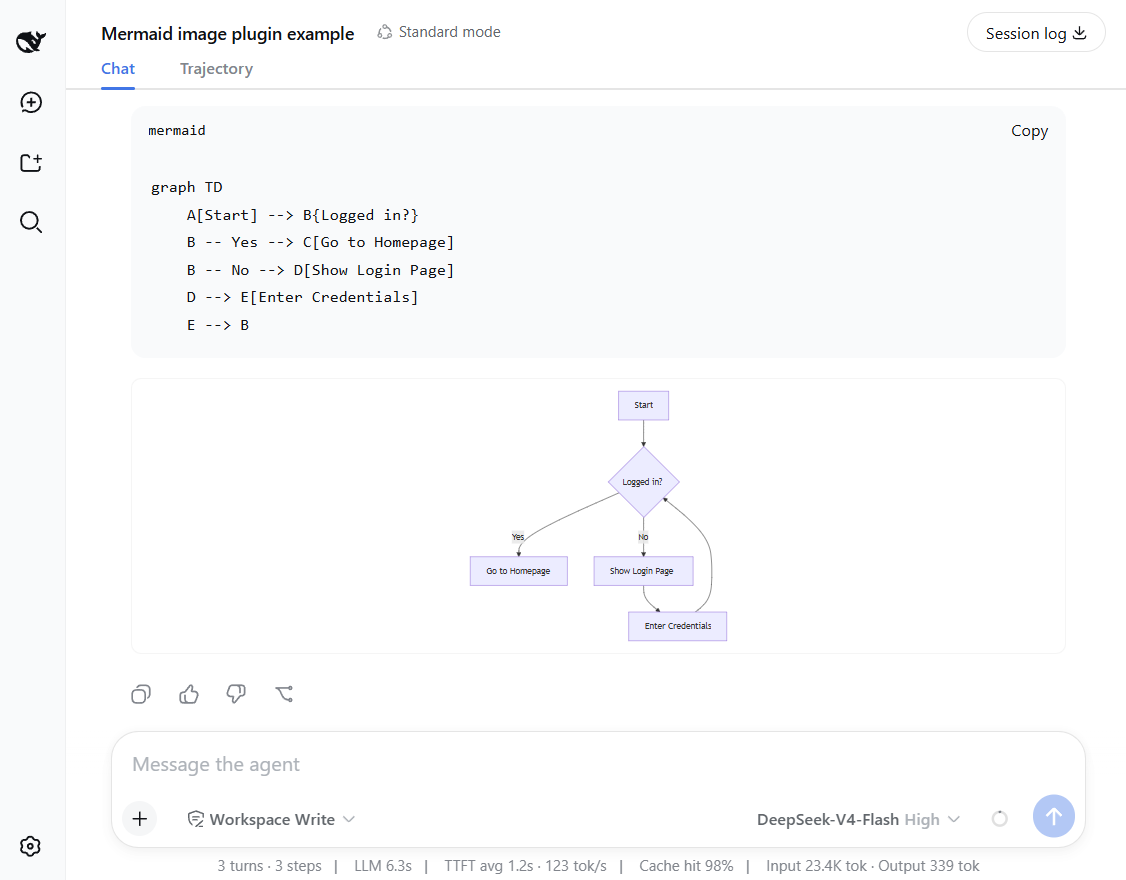
Features and how it works
- Preview mermaid diagrams by rendering images directly!
- Local renderer first! If it fails, it can fall back to an external or self-hosted rendering engine by configuring a fallback server.
- Setting card: you can adjust runtime settings in the UI - no restart needed.
- Mount point:
conversation.chat.turnTail(chain slot, additive - never shadows shipped UI). - Thumbnail display: the diagram renders as a thumbnail; click to enlarge in place, click again to shrink back (same element toggles, no popup).
- Light/dark themes follow the UI automatically.
Support diagram types
The plugin renders diagrams locally with a built-in renderer. It supports 14 diagram types out of the box.
Rendered locally: flowchart, sequenceDiagram, classDiagram, stateDiagram, erDiagram, pie, journey, gitGraph, requirementDiagram, timeline, quadrantChart, packet-beta, xychart-beta
Expand: gantt, mindmap, block-beta, sankey-beta, architecture-beta, zenuml, C4Context
[!NOTE] You can enable the fallback to render expanded types — see Configuration below.
Installation
Installation from github
### latest release version
$ npx @deepseek-ai/dsh plugin --profile web add github:baconbao/dsh-mermaid-image-preview#latest

### specific version
$ npx @deepseek-ai/dsh plugin --profile web add github:baconbao/dsh-mermaid-image-preview#<VERSION_TAG|GIT_TAG>

### dev version
$ npx @deepseek-ai/dsh plugin --profile web add github:baconbao/dsh-mermaid-image-preview#dev
Installation from source code
$ git clone https://github.com/baconbao/dsh-mermaid-image-preview
$ cd dsh-mermaid-image-preview
$ pnpm install
$ dsh plugin --profile web add .
[!IMPORTANT] Restart dsh web after installing.
Configuration
Change runtime settings on setting card
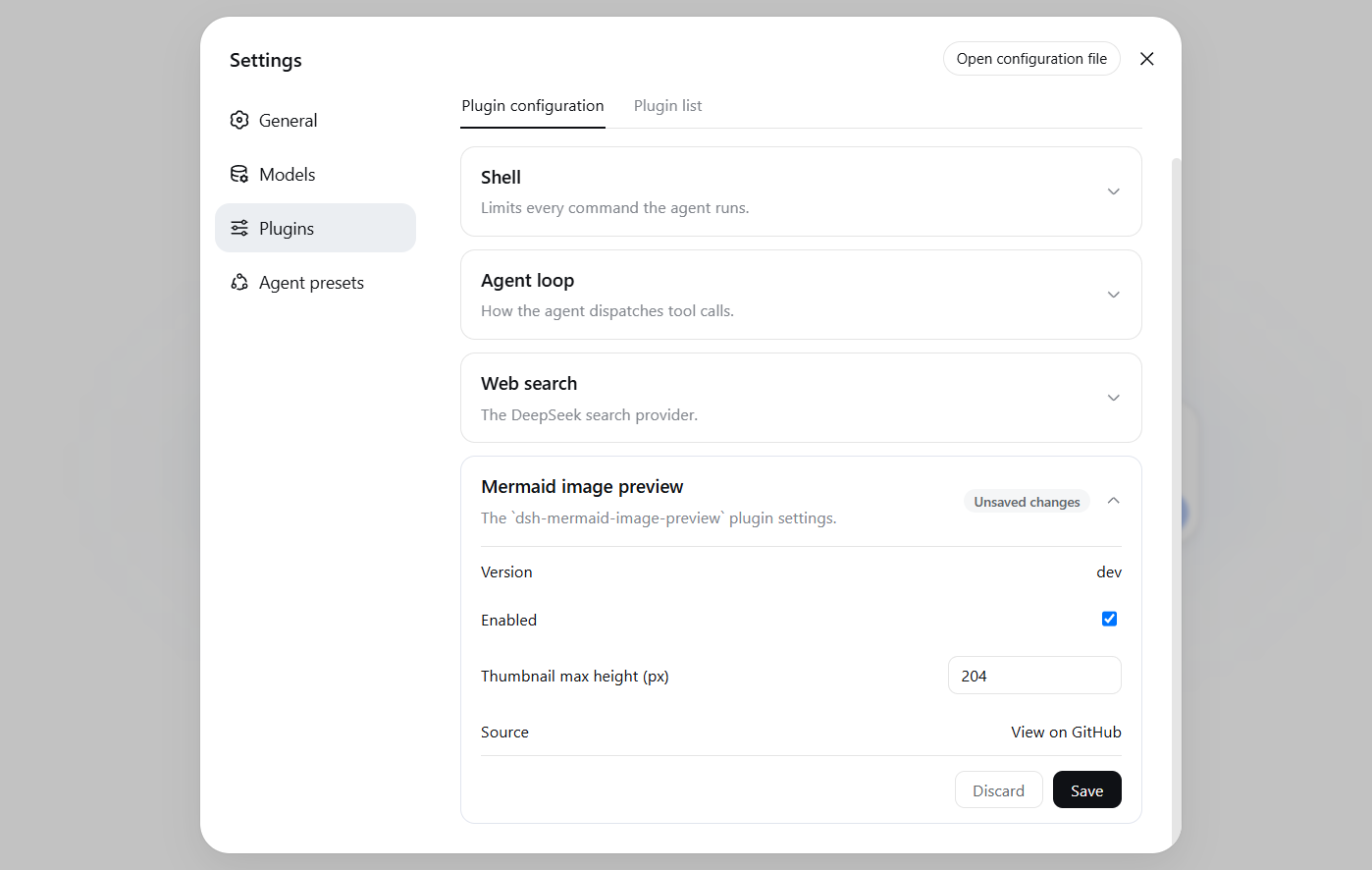
The Plugins settings page (Settings > Plugins) shows a Mermaid image preview card where
you can adjust plugin's runtime settings directly - no restart needed.
Values are stored in localStorage and applied immediately across all sessions.
Change render server by profile patch
Diagrams are rendered locally by default. To use your own render server or
enable the external fallback, edit the profile's cordis.patch.yml (e.g.
~/.dsh/profiles/web/cordis.patch.yml):
- id: ui-dsh-mermaid-image-preview
  config:
    enableLocalRender: true
    fallbackRenderUrl: https://mermaid.ink
    enableFallback: false
enableLocalRender: render locally (defaulttrue). Setfalseto always use the fallback server (enableFallbackis ignored).fallbackRenderUrl: fallback render server (defaulthttps://mermaid.ink).enableFallback: use the fallback server when local rendering fails (defaultfalse).- Restart dsh web after changing these settings.
- To host your own fallback render server, see https://github.com/jihchi/mermaid.ink for the details.
Uninstallation
$ dsh plugin --profile web remove @baconbao/dsh-mermaid-image-preview
[!NOTE] Since v0.2.0 the plugin/package id is changed from
dsh-mermaid-image-previewto@baconbao/dsh-mermaid-image-preview.
Test
Ask the agent to produce:
```mermaid
graph TD
  A[Start] --> B{Success?}
  B -->|Yes| C[Done]
  B -->|No| D[Retry]
```
Author
baconbao, vibe coding with deepseek ai
License
链接
同类插件
tt-a1i/archify#integrations/deepseek-harness★ 74360
从仓库或系统描述生成经过校验的自包含交互式架构图、流程图、时序图、数据流图和生命周期图。
dream-num/dsh-univer-office★ 442
为 DeepSeek Harness 打造一个真正的办公环境。Univer Office 插件将电子表格、文档、幻灯片、画布、多维表格等汇聚到同一个运行时——数据互联、修改经过校验、变更按版本管理,并以隔离工作树支持多 Agent 协作。
PerryLink/dsh-industry-research★ 186
面向 DeepSeek Harness 的确定性行业研究报告:公司与行业研究流程基于分阶段证据产出结构化、可核验的报告。
HuanLinOTO/dsh-plugin-mineru★ 47
向模型暴露 MineRU 文档解析工具。
kw78/dsh-office-tools★ 26
面向 agent 的工作区安全 Office 工具集:创建/读取 Word、创建/读取/更新 Excel、创建/读取 PowerPoint,并支持 PNG/JPG/GIF 图片排版。
PolinniZhong/dsh-knit★ 18
把会话工作区里已有的 Markdown 文档、图片与视频列进 DSH 侧边栏,按与当前对话的相关性排序:用最近几条消息在本地与文档标题、摘要、正文做带 IDF 权重的匹配,不调用模型,也没有网络出口。列表来自工作区扫描,而不是「最近打开记录」,所以重启 DSH 或新开会话都不会变空。图片与视频可就地预览,相对路径图片真实渲染,视频走 HTTP Range 流式播放。预览头下方的引用条显示当前这篇被哪些文档引用、又引用了哪些,点一项即可跳过去。同一份排序也作为 knit_docs 工具交给 agent:它返回最相关的若干篇,并附上每篇里命中的那段原文(有命中时才附)。
社区评论
评论公开保存在 GitHub Discussions。加载评论会连接 GitHub 和 Giscus;发表内容需要 GitHub 账号。