Browser Web Speech API voice input: zero server, zero keys, zero model downloads (Edge=Azure, Chrome=Google speech).
Install
# from npm (prebuilt)
dsh plugin --profile web add dsh-voice-webspeech
# from GitHub (first run asks for allowBuilds approval — follow the hint, retry)
dsh plugin --profile web add github:anweat/dsh-voice-webspeech
Any plugin you install runs third-party code with your own permissions — it can read your files, use your credentials, and reach the network, and tool approvals don’t sandbox it. GitHub-sourced plugins also run build scripts at install time — pnpm blocks those until you allow them, so an install can stop with ERR_PNPM_GIT_DEP_PREPARE_NOT_ALLOWED or ERR_PNPM_IGNORED_BUILDS; dsh prints the exact key to add under allowBuilds in your profile’s pnpm-workspace.yaml, and the install works on the next run. Allowing a build is a trust decision: only install sources you trust, and pin a commit (github:owner/repo#sha).
README
This plugin publishes its README in Chinese only.
DSH Web GUI 的浏览器语音输入插件:默认零服务端、零 API Key、零模型下载、零 Python, 也可在设置中按需下载本地模型用于离线识别。 按住输入框旁的麦克风按钮说话,松手即把语音转成文字——转写完全由浏览器内置语音识别 (Web Speech API)完成:
| 浏览器 | 实际语音服务 |
|---|---|
| Microsoft Edge | 微软 Azure 语音 |
| Google Chrome | Google/Chrome 语音 |
与社区里
dsh-voice-funasr的差异:后者以本地 FunASR 引擎为主(需安装 Python + 下载 ~520MB 模型),浏览器识别只是回退路径。本插件只做"浏览器内置识别"这一件事, 安装即用,适合不想要本地引擎开销的用户。
特性
- 按住说话 / 松手转文字:按住麦克风按钮开始聆听,松手停止;期间连续短句自动累积。
- 实时反馈:聆听时按钮上方悬浮显示"正在聆听… + 实时识别文字"(可关闭)。
- 两种落字方式(设置里切换):
- 默认"转进输入框":识别结果写入 composer,可编辑后再发送;支持追加到已有文字。
- "松手自动发送":识别完成直接发送(免提)。
- 多语言:中文普通话/粤语/繁体、英/日/韩/法/德/西/俄等(BCP-47)。
- 隐私:音频直接交给浏览器语音服务,不经过任何 DSH 服务端、不落盘。
兼容性
- DSH:
>=0.1.0-rc.3 <0.2.0(Profile Bundle + 嵌套dsh.client契约) - Node.js:
^22.19.0 || >=24.0.0 - 浏览器:需 Edge 或 Chrome(Web Speech API);Firefox/Safari 不支持
- 麦克风:浏览器需获得麦克风权限(首次使用会在地址栏请求授权)
安装
插件为 out-of-tree client bundle(dsh.client + dsh.bundle.patch)。
仓库已提交构建产物 lib/,git 安装无需再 build。
方式 A:从 GitHub 安装(推荐)
pnpm dsh plugin --profile web add github:anweat/dsh-voice-webspeech
若 pnpm ≥10 提示需要 allowBuilds(因
prepare),把打印的包键写进 profile 的pnpm-workspace.yaml后重跑;本仓库已提交lib/,通常不会触发。建议固定到提交:github:anweat/dsh-voice-webspeech#<sha>。
方式 B:本地 checkout 开发链接
cd D:/codeproject/dsh-voice-webspeech
pnpm dsh plugin --profile web add .
方式 C:打包 tgz 安装
cd D:/codeproject/dsh-voice-webspeech
pnpm run build
pnpm pack    # 产出 dsh-voice-webspeech-0.1.0.tgz
pnpm dsh plugin --profile web add ./dsh-voice-webspeech-0.1.0.tgz
激活:重启 dsh web(pnpm dsh web)。插件的 dsh.bundle.patch 会把它自动挂进
插件树,客户端 bundle 由 dsh.client 声明 + exports["./client"] 自动加载。
不要手工把本插件插进 profile 的 cordis.patch.yml,否则同一 loader id 会重复。
使用
- 输入框工具行左侧出现麦克风按钮:按住说话,松手转文字。
- 默认把文字写进输入框(追加到已有文字后);可在 设置 → 语音输入(Web Speech) 改为 "松手自动发送"。
- 聆听时按钮变红并脉动;识别中的文字实时显示在按钮上方。
设置(设置 → 语音输入(Web Speech))
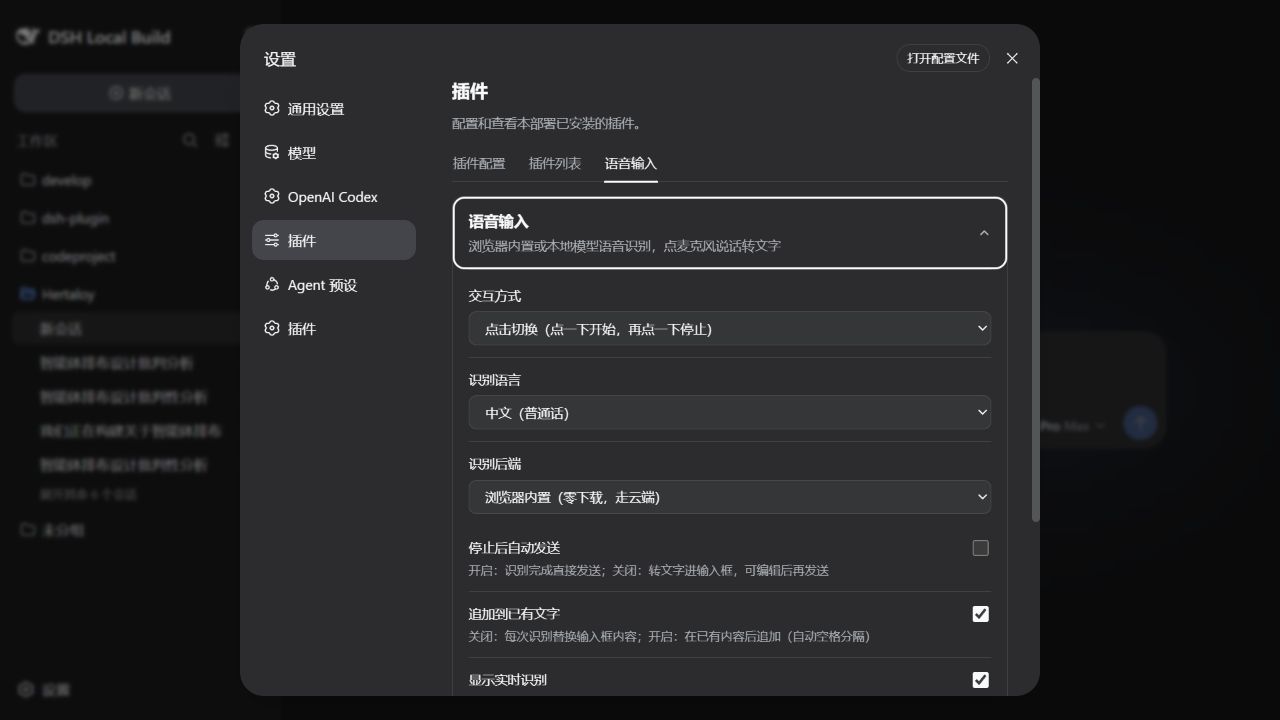
设置页以独立的“语音输入”标签挂载,不依赖 host settings namespace;偏好保存在浏览器本地。
| 项 | 默认 | 说明 |
|---|---|---|
| 识别语言 | zh-CN | 普通话/粤语/繁体/英/日/韩/法/德/西/俄 |
| 松手自动发送 | 关 | 开启后按住说话、松手直接发送 |
| 追加到已有文字 | 开 | 关闭则每次识别替换输入框内容 |
| 显示实时识别 | 开 | 聆听时实时显示识别中的文字 |
隐私与卸载
- 音频只交给浏览器语音服务(Edge=Azure、Chrome=Google),不经过 DSH 服务端、不落盘、无遥测。
- 卸载:
pnpm dsh plugin --profile web remove dsh-voice-webspeech(或从 profile 依赖里删掉再pnpm install)。
开发
pnpm install
pnpm run dev:link-dsh -- --source D:/codeproject/deepseek-harness   # 可选:从源码链接 @deepseek-ai 类型
pnpm run build
pnpm run typecheck
- host 半:
src/index.ts(空apply,仅让插件出现在宿主插件树) - 客户端:
src/client/(tsdown →lib/client.js,__ModuleLoader__注册) - 识别:
src/client/webspeech.ts(Web Speech API 封装:continuous + interim + abort) @deepseek-ai/*是 peer 依赖(optional),构建时外部化,运行时由 DSH 提供。
路线图
- v0.1:按住说话 + 连续听写 + 追加/自动发送 + 多语言 + 实时反馈 ✅
- 后续:本地 ASR 可选后端(SenseVoice/Whisper);TTS 语音朗读回复;快捷键按住
Links
More in this category
PolinniZhong/dsh-omi-voice★ 74
In-chat read-aloud for DeepSeek Harness: tap to read, pause and resume AI replies with natural Doubao TTS voices (BYOK), reading only the final answer with code, tables and diagrams filtered; local engine, plugin keeps no API key.
PensiveFei/dsh-voice-scribe★ 34
Voice input for the web UI: tap Alt (or Alt+Space) to start/stop dictation, browser Web Speech (zero-config) or OpenAI-compatible cloud ASR, optional polish through DSH-configured LLM, settings UI.
WizisCool/dsh-ears★ 22
Voice input plugin for DeepSeek Harness (dsh): a microphone button in the composer turns speech into a draft transcript, with a choice of speech-recognition backends, optional polish through dsh own LLM routes, and a native settings page.
1624318455/dsh-plugin-tts★ 21
Reads assistant replies aloud via free Edge TTS or your own RVC voice models: read-aloud buttons + auto-read, adaptive chunked progressive playback (gapless long reads), one-click voice-pack installs from a registry, and a portable RVC runtime.
qishuilalala/dsh-voice-mode#dsh-voice-mode★ 15
Full-duplex voice mode for the DeepSeek Harness Web UI: toggle (2s-pause auto-send) or hold-to-talk dictation into an editable draft with zipformer2 streaming ASR, optional wake word; sentence-by-sentence Edge TTS read-aloud with live captions, and speaking interrupts playback and the running turn (true barge-in). On-device ASR, no API key.
PerryLink/dsh-talk★ 13
Voice I/O for DeepSeek Harness — speech-to-text and text-to-speech over the microphone and audio output.
Community comments
Comments are public GitHub Discussions. Loading them connects to GitHub and Giscus; a GitHub account is required to post.