Adds tools for executing agent tasks in CubeSandbox through an Adapter.
Install
# from a prebuilt release tarball
dsh plugin --profile web add "https://github.com/aik8s/cubesandbox-agent-adapter/releases/download/dsh-plugin-v0.7.0/cubesandbox-agent-adapter-dsh-plugin-0.7.0.tgz"
# from GitHub (first run asks for allowBuilds approval — follow the hint, retry)
dsh plugin --profile web add github:aik8s/cubesandbox-agent-adapter#path:/plugins/dsh
Any plugin you install runs third-party code with your own permissions — it can read your files, use your credentials, and reach the network, and tool approvals don’t sandbox it. GitHub-sourced plugins also run build scripts at install time — pnpm blocks those until you allow them, so an install can stop with ERR_PNPM_GIT_DEP_PREPARE_NOT_ALLOWED or ERR_PNPM_IGNORED_BUILDS; dsh prints the exact key to add under allowBuilds in your profile’s pnpm-workspace.yaml, and the install works on the next run. Allowing a build is a trust decision: only install sources you trust, and pin a commit (github:owner/repo#sha).
README
This DSH plugin connects an agent to CubeSandbox Agent Adapter, which manages isolated CubeSandbox execution environments. It provides cube_* tools for commands, files, asynchronous jobs, checkpoints, and approved tasks. The Adapter enforces its configured profiles and policies.
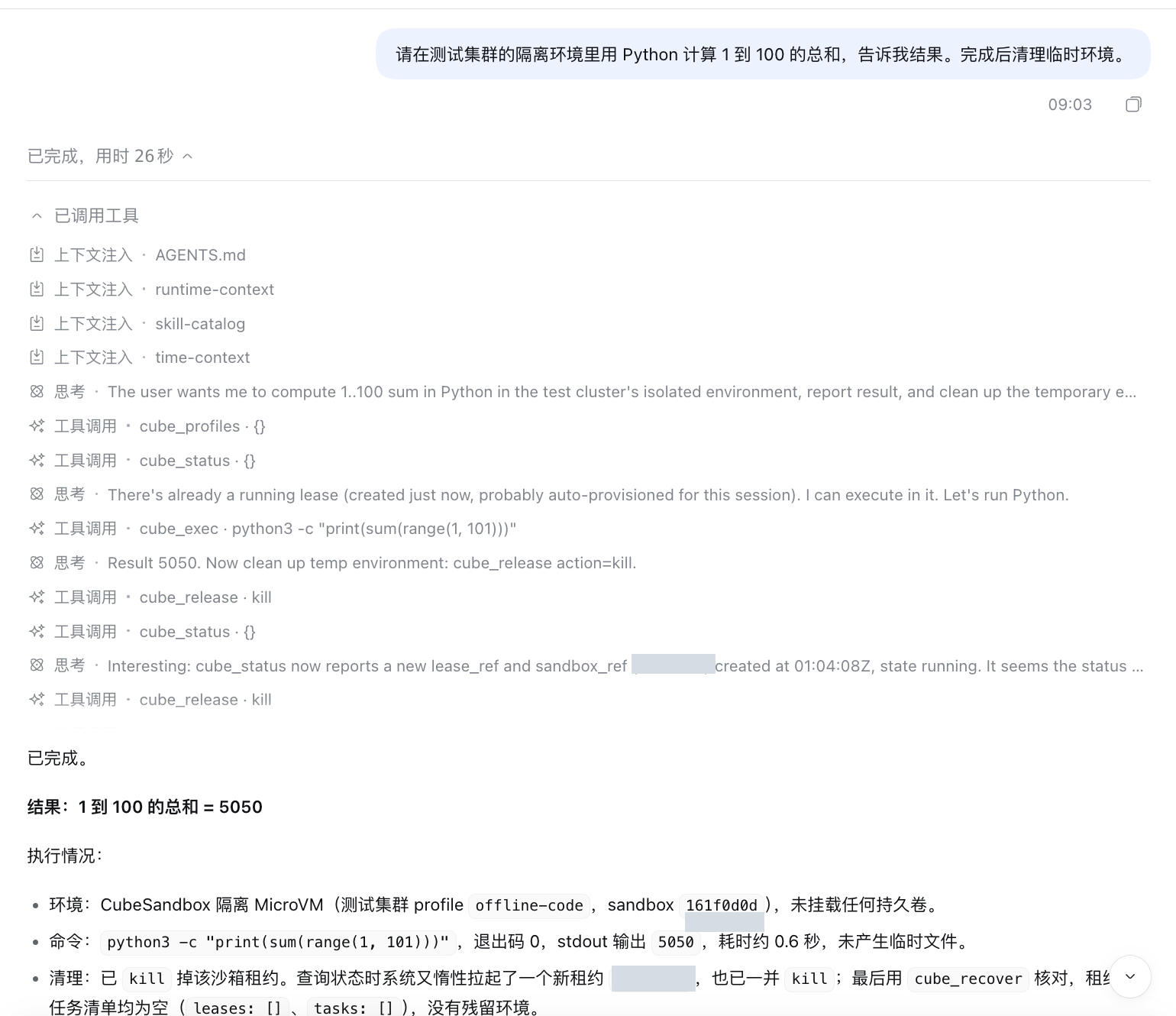
The screenshot shows a DSH Web session executing a Python calculation in a CubeSandbox environment and cleaning up its leases.
Requirements
- DeepSeek Harness with plugin-bundle support.
- A running CubeSandbox Agent Adapter connected to CubeSandbox, an Adapter access token, and an authorized profile. See the deployment guide.
- Network access from the DSH process to the Adapter. Installing this plugin does not deploy the Adapter or CubeSandbox.
Install
Install the release package into the DSH profile you use, for example web:
dsh plugin --profile web add https://github.com/aik8s/cubesandbox-agent-adapter/releases/download/dsh-plugin-v0.7.0/cubesandbox-agent-adapter-dsh-plugin-0.7.0.tgz
Set the Adapter URL and token in the environment that starts DSH. Supply the token securely; do not paste it into prompts or commit it to a repository.
export CUBE_ADAPTER_URL='https://adapter.example.com'
read -rs 'CUBE_ADAPTER_TOKEN?Adapter token: ' && export CUBE_ADAPTER_TOKEN
dsh web
The token input example uses zsh; use your shell's equivalent if needed. In containers, inject the token as a secret into the DSH process rather than setting it in a Dockerfile or image. The default Adapter URL is http://127.0.0.1:18080 and the default profile is offline-code. The Adapter must authorize that profile for the token.
Alternatively, configure adapterUrl, tokenFile, and profile in a DSH patch overlay. The integration guide covers deployment and the repository installer.
Try it
In DSH, ask: “In the test cluster's isolated environment, use Python to calculate the sum from 1 to 100, then clean up the environment.” Check the tool calls and the returned result. Availability depends on model tool use, Adapter policy, and the selected CubeSandbox profile.
The bundle adds CubeSandbox tools; it does not disable DSH's existing host tools. For an explicitly sandbox-only configuration, use the repository's DSH installer and its generated patch, then review which host tools are disabled. Follow your organization's access, network, and audit policies.
For long commands use cube_job_start and inspect or cancel the job rather than waiting synchronously. cube_status can acquire a lease; after cleanup use cube_recover to inspect remaining leases without creating another one.
Links
More in this category
Tencent/WeKnora#dsh-weknora★ 37546
Four read-only tools over a WeKnora knowledge base: list knowledge bases, hybrid passage search, reassemble one document's chunks in order, and WeKnora's own cited RAG or ReAct-agent answer with a resumable session id.
DayuanJiang/next-ai-draw-io#dsh-plugin★ 36997
Draws draw.io diagrams in DeepSeek Harness through the next-ai-drawio MCP server: the link in the reply opens a live preview in the right sidebar, you can edit the diagram by hand, and each AI change is a version you can restore. Node.js 18+; npx downloads the MCP server on first use.
superdesigndev/treg★ 8164
Tool catalog for agents: search ~2,600 external endpoints (SEO and SERP, backlinks, social, people and company enrichment, ad libraries, scraping) by the task you want done, read each one's parameters and per-call price, then call it with the credential injected server-side. Ships the skill plus an MCP row that stays disabled until TREG_TOKEN is set.
T-Auto/dsh-ops★ 5864
Provides bash, PowerShell 7, and high-performance Rust tools for DSH on Windows to reduce token usage.
sixtysevenlf/dsh-blender-plugin★ 2147
Lets a DSH agent drive a local Blender over a direct TCP channel with 15 tools: viewport frames, custom-angle renders, Python execution, headless and job offload, transaction rollback, and a planning layer of 228 ops across 34 families.
helloHub1212/dsh-windows-mcp★ 1456
Bridges the CursorTouch/Windows-MCP desktop automation server into DSH through the official MCP client bridge, registering its screenshot, UI tree snapshot, mouse and keyboard input, clipboard, process and registry tools as mcp__windows__* tools for the model, and adds a windows_mcp_doctor diagnostic tool. Computer Use is off by default and is switched on from the plugin panel.
Community comments
Comments are public GitHub Discussions. Loading them connects to GitHub and Giscus; a GitHub account is required to post.