通过 Adapter 添加在 CubeSandbox 中执行 Agent 任务的工具。
安装
# Release 预构建包
dsh plugin --profile web add "https://github.com/aik8s/cubesandbox-agent-adapter/releases/download/dsh-plugin-v0.7.0/cubesandbox-agent-adapter-dsh-plugin-0.7.0.tgz"
# GitHub 源码(首次需按提示配置 allowBuilds 构建授权后重试)
dsh plugin --profile web add github:aik8s/cubesandbox-agent-adapter#path:/plugins/dsh
装任何插件都等于在你的机器上跑第三方代码,权限和你本人一样大——能读你的文件、用你的凭据、访问网络,工具审批管不到它。GitHub 来源的插件还会在安装时执行构建脚本——pnpm 默认拦截,所以安装可能停在 ERR_PNPM_GIT_DEP_PREPARE_NOT_ALLOWED 或 ERR_PNPM_IGNORED_BUILDS;dsh 会打印出需要添加的确切键名,把它加进该 profile 的 pnpm-workspace.yaml 的 allowBuilds 下,重跑一次即可装上。放行构建本身就是一次信任判断:请只安装可信来源,并尽量锁定 commit(github:owner/repo#sha)。
README
该插件的 README 只有英文版本。
This DSH plugin connects an agent to CubeSandbox Agent Adapter, which manages isolated CubeSandbox execution environments. It provides cube_* tools for commands, files, asynchronous jobs, checkpoints, and approved tasks. The Adapter enforces its configured profiles and policies.
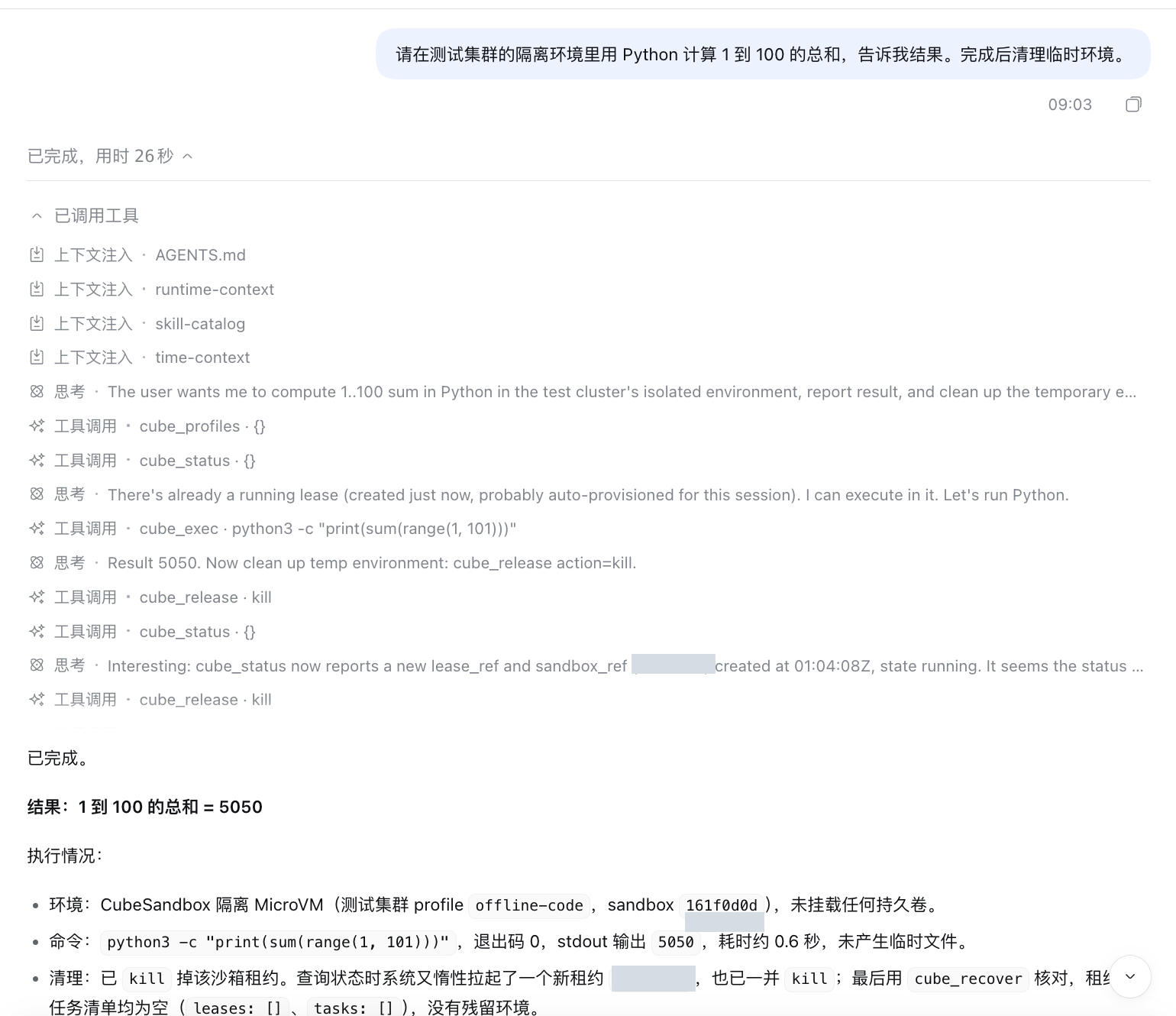
The screenshot shows a DSH Web session executing a Python calculation in a CubeSandbox environment and cleaning up its leases.
Requirements
- DeepSeek Harness with plugin-bundle support.
- A running CubeSandbox Agent Adapter connected to CubeSandbox, an Adapter access token, and an authorized profile. See the deployment guide.
- Network access from the DSH process to the Adapter. Installing this plugin does not deploy the Adapter or CubeSandbox.
Install
Install the release package into the DSH profile you use, for example web:
dsh plugin --profile web add https://github.com/aik8s/cubesandbox-agent-adapter/releases/download/dsh-plugin-v0.7.0/cubesandbox-agent-adapter-dsh-plugin-0.7.0.tgz
Set the Adapter URL and token in the environment that starts DSH. Supply the token securely; do not paste it into prompts or commit it to a repository.
export CUBE_ADAPTER_URL='https://adapter.example.com'
read -rs 'CUBE_ADAPTER_TOKEN?Adapter token: ' && export CUBE_ADAPTER_TOKEN
dsh web
The token input example uses zsh; use your shell's equivalent if needed. In containers, inject the token as a secret into the DSH process rather than setting it in a Dockerfile or image. The default Adapter URL is http://127.0.0.1:18080 and the default profile is offline-code. The Adapter must authorize that profile for the token.
Alternatively, configure adapterUrl, tokenFile, and profile in a DSH patch overlay. The integration guide covers deployment and the repository installer.
Try it
In DSH, ask: “In the test cluster's isolated environment, use Python to calculate the sum from 1 to 100, then clean up the environment.” Check the tool calls and the returned result. Availability depends on model tool use, Adapter policy, and the selected CubeSandbox profile.
The bundle adds CubeSandbox tools; it does not disable DSH's existing host tools. For an explicitly sandbox-only configuration, use the repository's DSH installer and its generated patch, then review which host tools are disabled. Follow your organization's access, network, and audit policies.
For long commands use cube_job_start and inspect or cancel the job rather than waiting synchronously. cube_status can acquire a lease; after cleanup use cube_recover to inspect remaining leases without creating another one.
链接
同类插件
Tencent/WeKnora#dsh-weknora★ 37546
把 WeKnora 知识库接入 dsh 的四个只读工具:列出知识库、混合检索原文片段、按顺序还原单篇文档,以及直接取用 WeKnora 自己带引用的 RAG 或 ReAct agent 回答(含可续聊的 session id)。
DayuanJiang/next-ai-draw-io#dsh-plugin★ 36997
dsh 的 draw.io 绘图插件:通过 next-ai-drawio MCP 服务器作图,点回复里的链接在右侧栏打开实时预览,可以手动修改图,AI 的每次修改都是可以恢复的版本。需 Node.js 18+,首次使用由 npx 下载 MCP 服务器。
superdesigndev/treg★ 8164
给 Agent 的工具目录:按「要做的事」检索约 2,600 个外部接口(SEO 与 SERP、外链、社交、人物与公司信息补全、广告库、抓取),查看参数与单次调用价格后直接调用,凭据由服务端注入。附带技能,MCP 行在未设置 TREG_TOKEN 前保持禁用。
T-Auto/dsh-ops★ 5864
为 Windows 的 DSH 提供 bash、PowerShell 7 及 Rust 高性能工具,减少 token 消耗。
sixtysevenlf/dsh-blender-plugin★ 2147
让 DSH agent 通过直连 TCP 通道驱动本地 Blender,提供 15 个工具:视口帧、自定义视角渲染、Python 执行、无头与作业卸载、事务回滚,以及 34 个 family / 228 个 op 的规划层。
helloHub1212/dsh-windows-mcp★ 1456
通过官方 MCP 客户端桥接层把 CursorTouch/Windows-MCP 桌面自动化服务器接入 DSH,把截屏、UI 树快照、鼠标键盘输入、剪贴板、进程与注册表等工具注册成 mcp__windows__* 供模型调用,并附带 windows_mcp_doctor 诊断工具;Computer Use 默认关闭,需在插件面板里打开。
社区评论
评论公开保存在 GitHub Discussions。加载评论会连接 GitHub 和 Giscus;发表内容需要 GitHub 账号。