macOS computer-use tools backed by a plugin-owned Cua Driver runtime.
Install
# from npm (prebuilt)
dsh plugin --profile web add dsh-cua-drive
# from a prebuilt release tarball
dsh plugin --profile web add -w "https://github.com/aa2246740/dsh-cuadrive-mac/releases/download/v0.2.1/dsh-cua-drive-0.2.1.tgz"
# from GitHub (first run asks for allowBuilds approval — follow the hint, retry)
dsh plugin --profile web add github:aa2246740/dsh-cuadrive-mac
Any plugin you install runs third-party code with your own permissions — it can read your files, use your credentials, and reach the network, and tool approvals don’t sandbox it. GitHub-sourced plugins also run build scripts at install time — pnpm blocks those until you allow them, so an install can stop with ERR_PNPM_GIT_DEP_PREPARE_NOT_ALLOWED or ERR_PNPM_IGNORED_BUILDS; dsh prints the exact key to add under allowBuilds in your profile’s pnpm-workspace.yaml, and the install works on the next run. Allowing a build is a trust decision: only install sources you trust, and pin a commit (github:owner/repo#sha).
README
中文 · English
dsh-cua-drive
dsh plugin --profile web add github:aa2246740/dsh-cuadrive-mac
pnpm must be on PATH. Then restart that Host and reload the page.
If dsh is not on PATH:
npx @deepseek-ai/dsh plugin --profile web add github:aa2246740/dsh-cuadrive-mac
Official dsh plugin add runs pnpm in $DSH_HOME/profiles/web. This package declares dsh.bundle.patch, so it joins dsh.profile.bundles. The repo ships built lib/; a GitHub install does not run prepare. dsh plugin add writes the profile only. It does not hot-load a running Host.
macOS only. After install, the in-host agent uses a private, lock-pinned cua-driver 0.20.0 (runtime-lock.json) to click windows, read the screen, and drive apps. It runs on this plugin's own socket and does not stop, change, or hijack a Cua install already on the machine.
First launch asks the process that started dsh for Accessibility and Screen Recording. DSH.app: grant DSH. CLI dsh web: grant Terminal / iTerm / Cursor / VS Code. Windows and Linux only load cua_status and say this is macOS-only. They do not download a driver or start computer-use.
The package name is dsh-cua-drive. The repo is still dsh-cuadrive-mac, so existing downloads, permissions, sockets, and sessions do not move.
A local clone uses the same official CLI:
git clone https://github.com/aa2246740/dsh-cuadrive-mac.git
dsh plugin --profile web add ./dsh-cuadrive-mac
Then restart that Host and reload the page.
dsh plugin --profile web remove dsh-cua-drive
DSH.app's Plugin Manager accepts npm package specs only, not github:. Desktop users should install into the web profile with dsh web.
If an older profile cordis.patch.yml already has a dsh-cuadrive-mac row, delete that row first. The bundle now owns the Loader. Two copies fail boot with a duplicate id.
First launch on a Mac
| How you run dsh | Grant in System Settings |
|---|---|
| DSH.app | DSH |
CLI dsh web with no app pack |
Terminal / iTerm / Cursor / VS Code, the parent app |
Do not run cua-driver permissions grant. That pulls /Applications/CuaDriver.app. Grant the name in cua_status.hostPermissions.hostLabel.
The first Mac start needs network once, to pull the pinned darwin-universal tarball into $DSH_HOME/dsh-cuadrive-mac/vendor/. If that fails, set HTTPS_PROXY / ALL_PROXY / plugin config proxy, or drop the same tarball at runtime.manualCachePath. Do not run cua-driver update.
Progress is the cua_status card title, or $DSH_HOME/dsh-cuadrive-mac/status.json and download.log.
Windows / Linux only load the status tool:
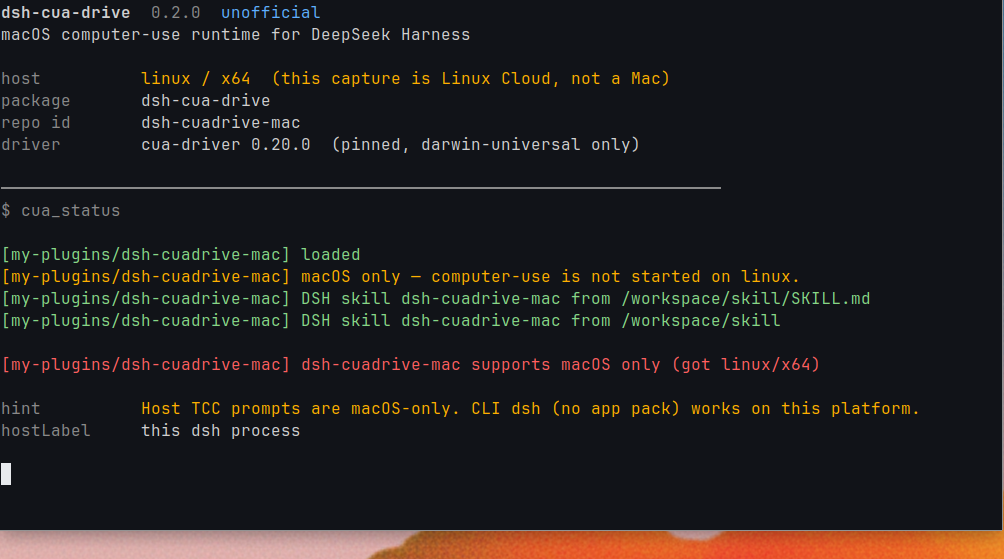
Private runtime lives under $DSH_HOME/dsh-cuadrive-mac/. Closing DSH stops only run/driver.sock. Tools exposed to the model stay named cua_*.
Config
| key | default | meaning |
|---|---|---|
binary |
empty | Absolute override. Empty uses the plugin vendor dir |
ownDaemon |
true |
Private DSH socket |
socketPath |
$DSH_HOME/dsh-cuadrive-mac/run/driver.sock |
Serve for DSH only |
autoStart |
true |
Download and serve --embedded if the socket is down |
proxy |
empty | HTTP(S) proxy for GitHub downloads |
promptPermissions |
true |
Ask the host that launched dsh on first use |
timeoutMs |
90000 |
Per-call timeout |
sessionId |
dsh |
Hosted session on the private daemon |
Local development
Clone this repo on its own, then mount it with official dsh plugin add:
npm ci
npm test
npm run typecheck
npm run build
dsh plugin --profile web add .
Restart that Host and reload the page after a rebuild.
MIT.
Links
More in this category
Tencent/WeKnora#dsh-weknora★ 38318
Four read-only tools over a WeKnora knowledge base: list knowledge bases, hybrid passage search, reassemble one document's chunks in order, and WeKnora's own cited RAG or ReAct-agent answer with a resumable session id.
DayuanJiang/next-ai-draw-io#dsh-plugin★ 37203
Draws draw.io diagrams in DeepSeek Harness through the next-ai-drawio MCP server: the link in the reply opens a live preview in the right sidebar, you can edit the diagram by hand, and each AI change is a version you can restore. Node.js 18+; npx downloads the MCP server on first use.
yikart/AiToEarn#dsh-plugin-aitoearn★ 28763
Generate copy, images and short videos, and publish with one click to Douyin, Kuaishou, Xiaohongshu, WeChat Official, Bilibili, Facebook, TikTok and more, covering the full content lifecycle from creation to publishing and monetization.
superdesigndev/treg★ 9619
Tool catalog for agents: search ~2,600 external endpoints (SEO and SERP, backlinks, social, people and company enrichment, ad libraries, scraping) by the task you want done, read each one's parameters and per-call price, then call it with the credential injected server-side. Ships the skill plus an MCP row that stays disabled until TREG_TOKEN is set.
T-Auto/dsh-ops★ 6028
Provides bash, PowerShell 7, and high-performance Rust tools for DSH on Windows to reduce token usage.
Hithink-Tech-Org/Financial-API#hithink-finance★ 4641
Query Hithink Finance data in DeepSeek Harness, view charts in chat, and save refreshable dashboards.
Community comments
Comments are public GitHub Discussions. Loading them connects to GitHub and Giscus; a GitHub account is required to post.